
Quick Summary
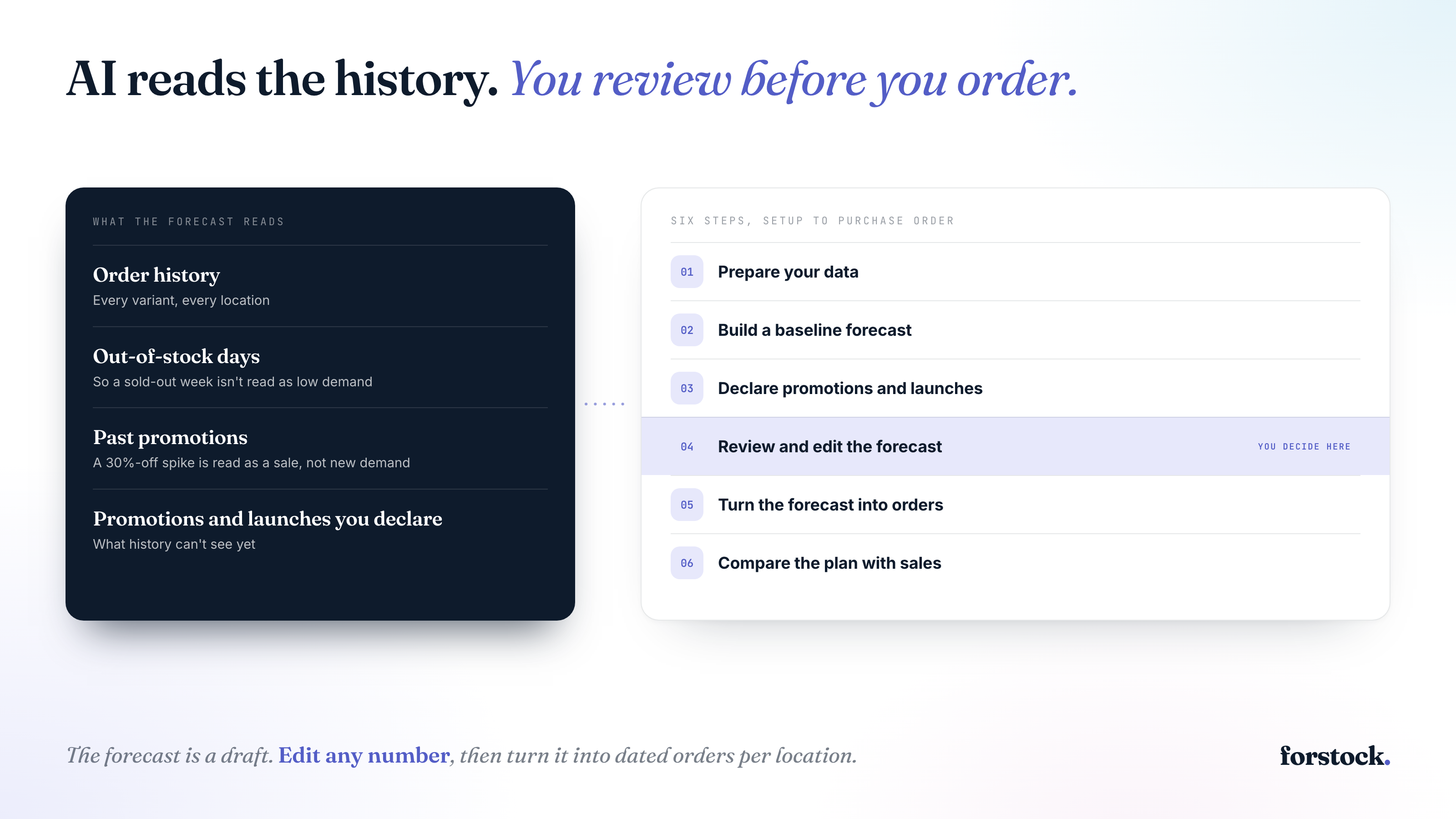
AI inventory forecasting predicts how many units of each variant you’ll sell at each location. Tools like Forstock build the forecast from your Shopify order history, then adjust for past promotions and out-of-stock days. To use one of these tools, connect your store and add upcoming promotions or launches. Check the forecast and edit any number you know better. Then turn the reorder recommendations into purchase orders. The forecast is decision support. Your team reviews it and approves every order.
What Is AI Inventory Forecasting?
AI inventory forecasting predicts future demand for each product from your order history. The forecast accounts for seasonality and unusual demand spikes. Each variant gets its own forecast at each location. You can also view the forecast by sales channel. For a wider definition, read our guide to AI demand planning.
AI Forecast vs. Spreadsheet
The biggest difference is how each one forecasts. A spreadsheet forecast runs on manual calculations. An AI forecast reads your order history and adjusts for days when sales didn’t reflect demand.
| Spreadsheet forecast | AI forecast | |
|---|---|---|
| Method | Manual min/max and weeks-of-cover columns | Forecast built from each product’s order history |
| Seasonality and new products | Applies a flat growth percentage to last year’s sales and misses seasonality and new products | Reads seasonality and takes launches as inputs |
| Out-of-stock days | Show as zero in the sales report | Read as dates, then rebuilt as demand |
| Data | Weekly exports from your store and warehouse, reconciled by hand | Orders and stock sync from your store and warehouse |
Why Out-of-Stock Days Matter
The out-of-stock row in the table changes how a forecast handles your sales. A sold-out week shows zero in your sales report. A forecast that doesn’t know the product sold out reads those days as no demand. Forstock, for example, gets the dates each product sat out of stock at each location. Forstock then rebuilds demand for those days.
What Data an AI Forecast Reads
An AI forecast reads three kinds of data.
- Order history shows what sold at each location.
- Out-of-stock dates mark the days a product couldn’t sell.
- Discount history shows which past spikes were promotions.
Lead times apply after the forecast. Each supplier’s lead time sets the order date.
Two things sit outside your data. One is the promotions you plan to run. The other is context, like a wholesale order or a store opening. You add both, and your team reviews the forecast before ordering.
How to Use AI Inventory Forecasting
1. Prepare Your Data
An AI forecast only works with the data it’s given. Clean that data up before your first sync.
Start with your catalog. Archive products you’ll never restock. Then map each bundle to the products inside it, because a bundle sale is demand for its components.
Next, check your stock by location. If a 3PL (a third-party warehouse that ships orders for you) holds your stock, its counts need to reach the forecast.
Then collect each supplier’s ordering rules. Lead time is the days between placing an order and having stock you can sell. The minimum order quantity (MOQ) is the smallest order a supplier accepts, and pack size is the multiple they ship in, like cases of 12.
Plan around the lead times suppliers actually deliver, which can differ from what they quote. Pull your last few deliveries from each supplier and plan around the slower end. Forstock’s guide to lead time variability walks through the math.
Then decide how many days of safety stock to hold. Safety stock is the buffer that covers late deliveries and demand above the forecast. Also decide how many days of sales each order should cover.
In Forstock, you set these rules per product, and lead time can differ by location. A product held in two warehouses can carry two lead times. A connected warehouse or 3PL’s counts take over from Shopify’s. You can also exclude any product from planning. An excluded product stays in Shopify and leaves the reorder list.
You’re done when every active product has a supplier and its ordering rules.
2. Build a Baseline Forecast
Before you build a baseline, decide which products to plan and how often. Forstock’s inventory demand planning guide covers that groundwork.
Then connect your store to your inventory forecasting software and choose a forecast horizon. The horizon is how far ahead the plan looks. Pick one that covers your longest lead time with room to spare. Say your main supplier takes 90 days. A three-month horizon only gets you to the day the stock arrives, so a six-month view is safer.
In Forstock, you connect Shopify or Amazon, and your order history and discounts sync in. You can plan 3, 6 or 12 months out. Forstock needs six months of orders to run its AI forecast. With less history, Forstock uses a simple average over a window you choose. You get the first plan and reorder list the same day.
Read the first forecast before you act on it. Pick five or ten best sellers you know well and compare the forecast with last year’s sales for the same months. You’re looking for numbers that would surprise you. A sudden jump on a steady product can mean a past promotion is still inflating its history.
Give the most attention to products that sold out last year. Take a product that sold 30 units in a month but was out of stock for 11 of those days. Divide by all 30 days and you get 1 sale a day. Divide by the 19 days customers could buy it and you get about 1.6 a day. A good AI forecast makes that correction for you, so check that yours does.
You’re done when you’ve compared the baseline with last year’s sales for your best sellers.
3. Declare Promotions and Launches
Your order history can’t know about next month’s sale or a product you haven’t launched. If nobody tells the forecast, it plans for a normal month, and you could sell out halfway through your busiest week.
Forstock rebuilds every promotion you’ve run from your discount history. From that history, Forstock lifts the plan by what a similar discount did to each product before. A 20% discount may lift one product far more than another, and the plan reflects that difference.
To declare a promotion, give Forstock the dates and discount, then pick the products and channel. You can fill in the form or tell Alfred, Forstock’s AI assistant, in a sentence.
A new product has no order history yet, so you give the forecast something to go on. Pick one to five comparable products with a year of history on that channel. Choose products that sell to a similar customer at a similar price. Then set how hard you’ll push the new product.
You’re done when every promotion and launch for the next few months is in the plan.
4. Review and Edit the Forecast
Review every forecast before you order from it. The model handles the arithmetic across every variant and location. Your team adds context it can’t see, like a large wholesale order or a store opening.
Use this review routine.
- Give one person ownership of the plan, with input from whoever runs marketing.
- Start with best sellers, since an error there costs the most.
- Open the number behind any big change to see what went into it.
- Type your own number where you know something the data doesn’t.
- Write down why, so the next review can show whether your edits helped.
In Forstock, you can open any number to see its inputs, like the months of orders behind it and the out-of-stock days it adjusted for. You can type your own number for any month of any product or location. Nothing moves until you save, and Discard takes you back. Every reorder date and quantity then follows your number.
Avoid two opposite mistakes. If you override almost everything, you’re back to ordering on gut feel. If you override nothing, you’re trusting a model that knows nothing about next month’s warehouse move.
You’re done when every edit has a note and the plan reflects what your team knows.
5. Turn the Forecast Into Orders
Work back from the day each product runs out to the day you have to order.
- Find the day each product runs out. Run your stock, including open orders, through the forecast.
- Count back by the supplier’s lead time and your safety stock days. That’s your order-by date.
- Order enough to cover your days of sales. Round up to the MOQ and pack size.
Say a hoodie has 60 units on hand, nothing on order and a forecast of 2 sales a day, so it runs out in 30 days. Your supplier needs 21 days and you hold 7 days of safety stock, so you need to order within 2 days. To cover 60 days of sales, you need 120 units. With an MOQ of 50 and packs of 25, you order 125.
The Reorder screen in Forstock runs this math for every product at every location. Every morning, Forstock projects each SKU forward day by day through the forecast and finds the day the product runs out. Forstock then works back through your lead time to an order-by date. Open purchase orders and transfers between your locations count as incoming stock on the day they arrive.
Each row shows a status, from Out of stock to Overstock. Forstock shows its system quantity next to your override, so you can compare the two before you order.
When the list looks right, select the rows and Forstock drafts one purchase order per supplier. You can email each PO from Forstock and track it until it’s received. Received stock only updates your Shopify counts if you switch that sync on for that order.
You’re done when each order-by date has a purchase order or a decision to wait.
6. Compare the Plan With Sales
Compare the plan with actual sales every week, along with last year’s numbers for your top products. A forecast that was right in June can be wrong by August, because demand keeps changing. Sort your top products by the gap between plan and actual sales, then review the widest gaps first. For each one, decide whether to edit the number or leave it.
In Forstock, the plan refreshes weekly on its own, and every synced order updates the actuals. When a number doesn’t make sense, ask Alfred in plain language. You might type “Which purchase orders are late?” or “How much cash is sitting in overstock?” Alfred answers from your Forstock data and shows Sources chips naming the screens it read, so you can check them yourself.
Alfred can also prepare changes for you, like moving a promotion or updating a supplier’s lead time. Alfred stages each change as a card, and the plan recalculates once you confirm. Alfred never invents a number, and the forecast itself comes from the forecasting engine.
You’re done when this review has a set slot each week and every flagged product gets a decision. Leaving a number alone counts as a decision.
Try AI Inventory Forecasting on Your Store
Start a 14-day free trial of Forstock. No credit card up front. Connect your store, then compare the first forecast for your best sellers with last year’s sales. If you’d rather have someone walk you through it, book a 20-minute demo. Forstock connects your store on the call and goes through your first plan with you.
FAQs
Which AI is best for demand forecasting?
The best AI for demand forecasting is the one that tells you what to order and when. For a Shopify brand, that means a forecast for each variant at each location, corrected for out-of-stock days and promotions. The tool also has to turn its recommendations into purchase orders. Forstock meets these criteria, and its roundup of demand forecasting tools for Shopify compares the options.
Will demand planning be replaced by AI?
Demand planning still needs people. AI takes over the repetitive math across every variant and location. Planners keep the judgment calls, like how hard to push a launch. So your team reviews the AI forecast before ordering.
Can you use AI to do your forecasting?
Yes, and you don’t need to build a model yourself. A forecasting tool like Forstock connects to your store and reads your order history and discounts directly. Its plan refreshes weekly, and every synced order updates actual sales. A general chatbot like ChatGPT can analyze a sales export as a one-off. For ordering, that analysis is fragile, because it isn’t auditable or connected to your supplier workflows.
What is the 80/20 rule in inventory?
The 80/20 rule in inventory says that about 20% of your products account for 80% of annual usage value. ABC analysis puts this into practice by sorting products into A, B and C groups by that value, calculated as units sold times unit cost. Review the A products most closely. Forstock’s ABC analysis calculator runs it on your own catalog.