
TL;DR
- Inventory forecasting software predicts future product demand and turns those estimates into replenishment decisions.
- Stock tracking records what you have now. Forecasting estimates what customers will buy and when you should reorder.
- Forecasting engines use sales history, seasonal patterns, supplier lead times, and sales channel behavior to estimate demand.
- A 12-month forecast supports seasonal purchasing and long lead-time orders that a 30-day view may miss. Regular updates improve those plans as new sales data arrives.
- Better forecasts help you reduce stockouts while avoiding excess inventory that ties up cash.
What inventory forecasting software actually is
Inventory forecasting software predicts future product demand and helps you decide when to reorder and how much to buy. It analyzes sales patterns and operational inputs to estimate unit demand, likely stockout dates, and future inventory needs. Demand forecasting software is a near-synonym when the forecast supports inventory planning.
Stock tracking records what you currently have. For example, Shopify might show 200 units of a product across two locations. That count cannot tell you whether those units will last ten days or ten weeks. A forecasting engine estimates how quickly customers will buy them and whether replacement stock can arrive before they run out.
Forecasting software turns those estimates into planning decisions. You can use projected demand to prepare purchases before inventory reaches a critical level, rather than reacting after sales deplete available stock. The software may also recommend different quantities by SKU, location, or sales channel because each combination can follow a different demand pattern.
Forecasts describe probable demand rather than guaranteed sales. New orders, seasonal changes, promotions, and supplier delays can alter the expected outcome. Useful software updates its projections as fresh data arrives, which gives you a current basis for replenishment decisions while stock tracking continues to provide the underlying inventory counts.
The signals a forecasting engine reads
A forecasting engine starts with sales history because past orders reveal baseline demand, growth trends, and recent changes. Clean history also needs stockout context. A product that sold zero units while unavailable had constrained sales, not necessarily zero demand.
Seasonality helps the engine distinguish recurring demand patterns from random variation. Holiday peaks, weekday patterns, and promotional periods can change expected sales. The engine should treat a recurring December increase differently from a temporary spike caused by a one-time discount.
Channel mix matters because one SKU can behave differently across Shopify, Amazon, and other marketplaces. Each channel can attract different customers and run separate promotions. A forecast based only on blended sales may miss a channel-specific increase or assign demand to the wrong inventory location.
Supplier lead times determine how far ahead the forecast must support a purchasing decision. A SKU that takes 90 days to replenish requires an earlier reorder than one that arrives in two weeks. Forecasting software should use actual supplier performance when available because quoted lead times often differ from delivery history.
Finer-grained inputs usually produce more useful forecasts because aggregation can hide meaningful differences. SKU-level forecasts preserve product variation, while location-level and channel-level forecasts show where demand occurs. For example, the Forstock platform uses more than 40 signals per SKU. That figure illustrates the possible depth of a forecasting model, but signal count alone does not establish forecast quality.
Relevant signals must also be accurate, timely, and recorded at the level where you make inventory decisions. Before choosing software, check whether it forecasts each SKU by location and channel rather than distributing one company-wide estimate across the catalog.
From forecast to purchase order: reorder points and order quantities
Inventory forecasting software turns predicted demand into a purchasing decision by calculating when to reorder and how much to buy. The software adds expected demand during the supplier lead time to a safety stock allowance. That total becomes the reorder point.
For example, a SKU expected to sell 10 units per day with a 20-day lead time needs 200 units to cover demand before the next delivery. If you keep 50 units as safety stock, the reorder point becomes 250 units. The software recommends a purchase order when the SKU’s inventory position reaches that threshold.
Inventory position includes usable stock on hand and confirmed inbound stock. The calculation then subtracts units already committed to customer orders. Using inventory position instead of the warehouse count prevents you from ordering stock that is already on its way or treating reserved units as available.
The purchase quantity depends on the coverage period you choose. Software forecasts demand through that period, adds the required safety stock, and subtracts the inventory position. It can then adjust the recommendation for supplier minimums or case-pack sizes before creating a purchase order.
Forecasting software should recalculate both values as demand and supplier performance change. If recent deliveries took 25 days instead of 20, the reorder point must rise to cover the extra five days. If sales slow, the recommended purchase quantity should fall rather than preserve an outdated order plan.
Accurate reorder points reduce late, expedited purchases because you order before available stock runs out. Appropriate order quantities also limit excess stock, which leaves more cash available for other products and operating costs.
Why forecast accuracy compounds over a 12-month horizon
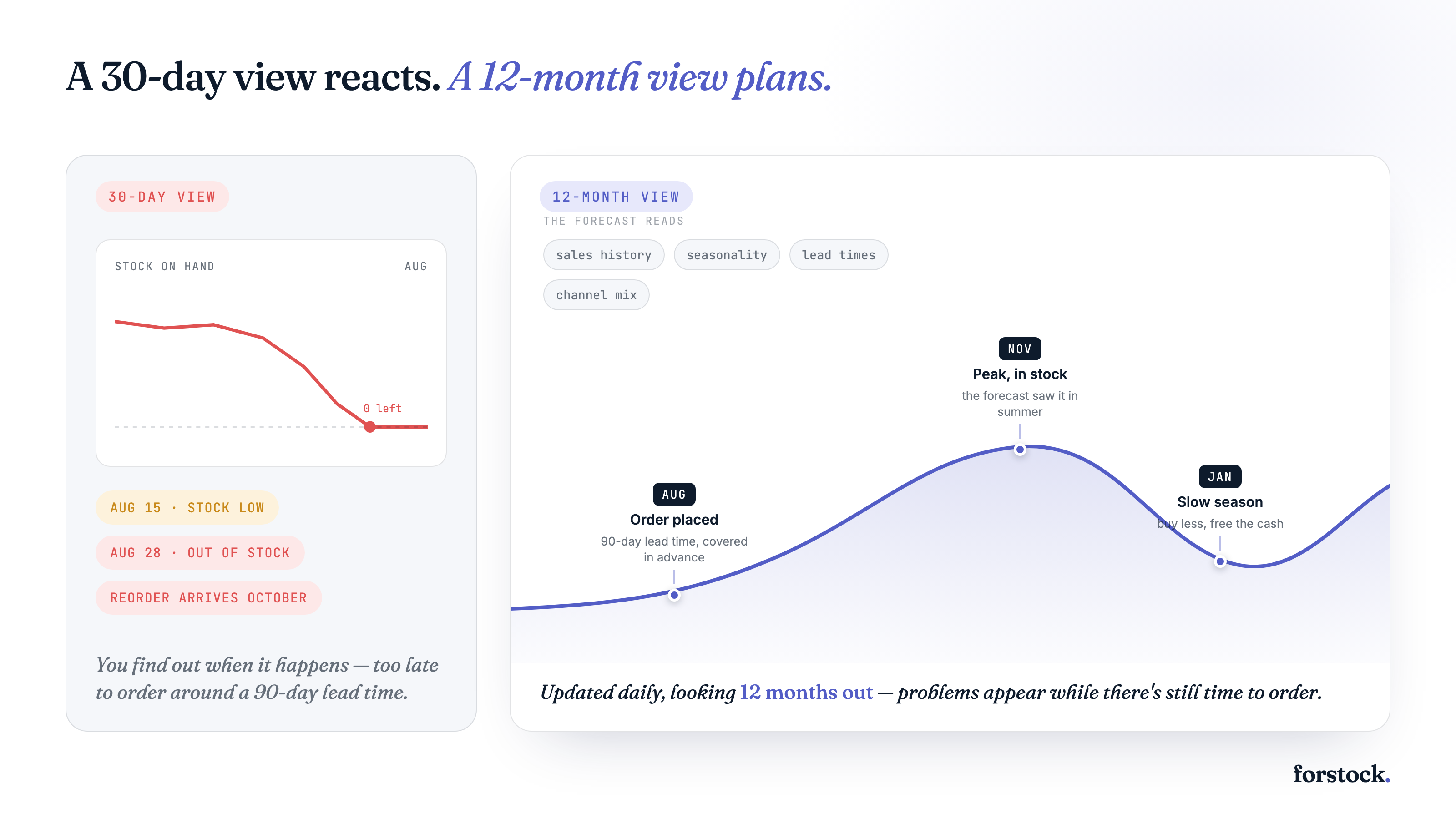
A 12-month forecast gives you enough time to act on seasonal demand and long supplier lead times. For example, a product that peaks in November may require a purchase order in August if production and shipping take 90 days. A 30-day forecast will detect the increase too late to prevent a stockout.
Short forecasting windows can also repeat small errors across multiple purchasing cycles. If a forecast consistently understates demand, each reorder leaves less inventory available for the next cycle. Persistent overestimation creates the opposite problem, since every oversized order ties up more cash and raises storage costs.
A longer horizon does not make distant predictions inherently more accurate. Its advantage comes from showing upcoming demand early enough to plan purchase timing, inventory budgets, and supplier capacity. You can place provisional orders for later periods while reserving firmer commitments for near-term demand.
Frequent updates keep a long-range forecast useful as actual sales replace earlier assumptions. A daily forecasting engine can adjust future demand after a promotion performs above expectations or a channel slows down. Periodic forecasts preserve stale assumptions until the next scheduled update, which can spread one missed change across several planned orders.
The strongest approach uses a rolling 12-month horizon with daily updates. Each update improves the near-term forecast with current data while preserving visibility into seasonal peaks and long-lead-time purchases.
The evaluation checklist for choosing forecasting software
Use these five questions during vendor demos and trials. Ask vendors to show each capability with your data rather than confirm it with a yes or no.
- Can the software forecast separately by SKU, location, and sales channel? A blended forecast can hide meaningful differences between stores or channels. Ask the vendor to show how the same SKU receives different forecasts for Shopify and a marketplace, or for two fulfillment locations.
- Which demand signals does the forecast use for each SKU? Signal count provides a starting point, but signal relevance matters more. Ask whether the engine accounts for sales history, seasonality, promotions, stockout periods, and channel-specific demand. Check how it handles new products and SKUs with sparse data.
- How often does the software recalculate forecasts? A frequent data sync does not guarantee a fresh forecast. Ask whether the engine updates predictions automatically after new sales, returns, or inventory receipts. Daily recalculation can respond faster than weekly or monthly planning cycles when demand changes.
- How does the software account for supplier lead times? A useful engine should calculate when you need to order based on when stock will arrive, not simply when stock will run out. Ask whether lead times can vary by supplier and SKU. Check whether the software learns from actual delivery history or relies on one manually entered value.
- Does the software connect directly to Shopify as its source of inventory data? Ask which Shopify records the connection imports and how quickly changes appear in the forecast. The vendor should demonstrate support for your catalog structure and Shopify locations. You should also check how the connection reports sync failures, since missing orders or inventory adjustments can distort purchasing recommendations.
Test the shortlist with several difficult SKUs before buying. Seasonal products, recent launches, and items sold through multiple channels reveal limitations that a simple high-volume SKU may conceal.
Forstock as a working example against the checklist
Forstock provides a practical example of how the checklist applies to a Shopify forecasting tool. Its Platform capability reads more than 40 signals for each SKU through a live Shopify catalog. Demand Planning then produces forecasts by SKU, location, and sales channel, which gives operators more detail than a single storewide estimate.
Forstock updates its forecasts daily and projects demand up to 12 months ahead. Daily recalculation incorporates recent sales and inventory changes, while the longer horizon supports seasonal buying and orders with extended supplier lead times.
Its Reorder capability connects those forecasts to predicted stockout dates, supplier lead times, and recommended order quantities. Operators can then use its purchase order tools to draft, send, track, and receive orders without transferring forecast data into a spreadsheet.
Readers who want to assess Forstock alongside specific alternatives can use the fuller Shopify inventory management app comparison page.
Getting forecasting right without the spreadsheets
Forecasting software earns its keep when it turns sales and inventory signals into timely buying decisions. A spreadsheet can record assumptions and current quantities, but you must refresh formulas, reconcile channels, and judge whether recent sales changes warrant a new order. As your catalog grows, those manual judgments become harder to apply consistently.
Stock tracking still supplies the facts. Forecasting software uses those facts to help you decide what deserves attention and when. You can spend less time maintaining models and more time reviewing exceptions, such as an item selling faster than expected or a supplier delivering late. You remain responsible for promotions and supplier constraints, while the software keeps routine planning current. This division replaces gut-feel purchasing with a repeatable decision process without treating every recommendation as automatic.
Frequently asked questions
How does forecasting software differ from an inventory management system?
An inventory management system records stock levels and transactions, while forecasting software estimates future demand. Forstock combines forecasting with replenishment and purchase order management. You can use those predictions to plan purchases before inventory runs low.
What level of forecast accuracy should I expect?
Forecast accuracy measures how closely predicted demand matches actual sales, and no fixed percentage applies across every product. Forstock updates forecasts daily as new sales and inventory data arrive. You should compare accuracy against your current planning method and review errors by SKU.
Does inventory forecasting software work across multiple sales channels?
Multi-channel forecasting combines demand from each sales channel while preserving channel-level patterns. Forstock unifies data across Shopify, Amazon, Walmart, and other connected channels. You can plan shared inventory without treating one channel’s sales pattern as representative of every channel.