
Stocky Is Shutting Down on August 31, 2026: The Complete Migration Checklist
An imminent app shutdown will erase critical inventory and supplier records unless you export and rebuild them now.
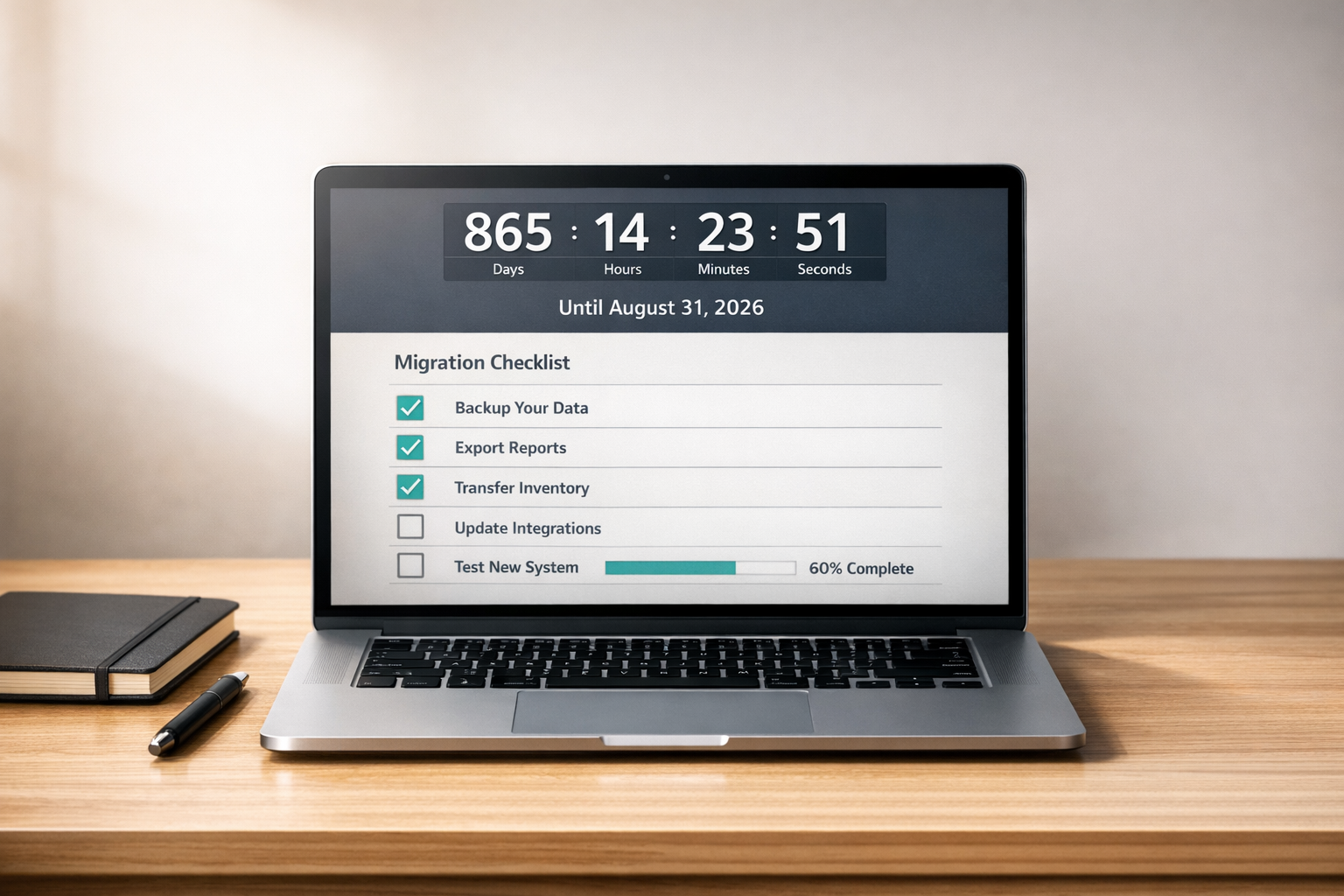
Stocky Is Shutting Down on August 31, 2026: The Complete Migration Checklist
If you’re using Stocky to manage purchase orders, inventory, and forecasting, you need to act now. Shopify is shutting down Stocky on August 31, 2026, and all data will become permanently inaccessible after this date. Key features will disappear even earlier, starting July 7, 2025. To avoid losing your data and disrupting your operations, follow these steps:
- Export critical data: Purchase orders, stocktake records, and product cost data can be saved as CSV files. Do this early to prevent issues.
- Manually document non-exportable data: Supplier details, lead times, and reorder rules must be recreated in another system.
- Switch to a new tool like Forstock: Start running it alongside Stocky to test workflows and ensure a smooth transition.
- Set a hard stop: Stop entering new data into Stocky by August 15, 2026, and monitor your new system closely after the shutdown.
This guide provides a step-by-step plan to help you secure your data, transition workflows, and prepare for Stocky’s shutdown without disruptions.
Stocky Shutdown Risks: What Data Is at Stake
Data Types at Risk After the Shutdown
Key Stocky data, including supplier details and forecasting rules, will be permanently lost after August 31, 2026. For instance, supplier data - like contact information, lead times, and vendor-product assignments - cannot be exported and will disappear entirely. Similarly, Stocky's settings, which store forecasting rules (e.g., min/max thresholds and custom reorder configurations), lack an export option.
Other data, such as purchase orders, stocktake records, ABC analysis, transfer history, and product costs, can be saved - but only through manual CSV exports before the deadline.
Understanding these risks is essential, as losing this data could significantly impact your business operations. The next section explains how these losses might disrupt your workflow.
How Losing Stocky Data Affects Your Business
The loss of Stocky data poses risks to both historical analysis and day-to-day operations. Here's what you need to know:
Without Stocky's historical records, your ability to analyze long-term trends will be severely limited. For example, Shopify Admin only retains 180 days of inventory adjustment history. If your business relies on year-over-year trends - like using past Q4 data to plan holiday stocking - you'll lose the ability to make informed decisions once Stocky's data is gone.
Operationally, the risks extend to purchase order management. Shopify's built-in workflow for receiving inventory only adjusts quantities; it doesn't update unit costs automatically. This means you'll have to manually update costs, which increases the risk of "margin drift" that could skew your profitability.
Data Risks Mapped to Migration Actions
The table below outlines the risks associated with specific Stocky data types and the actions needed to mitigate them:
| Data Type | Stored In | Risk After August 31, 2026 | Migration Action Needed |
|---|---|---|---|
| Supplier Details | Stocky Supplier Registry | Permanent loss; no export option | Manually copy contact info, lead times, and minimum order quantities (MOQs) into a spreadsheet |
| Purchase Orders | Stocky Purchase History | Loss of audit trail | Export all purchase orders as CSV files |
| Stocktake Records | Stocky Inventory Module | Inaccessible historical records | Export historical stocktake records as CSV |
| Forecasting Rules | Stocky Settings | Permanent loss; no export option | Document min/max levels and reorder logic manually |
| ABC Analysis | Stocky Reports | Loss of SKU prioritization data | Download the latest ABC Analysis report |
| Product Cost Data | Stocky Variant Records | Potential margin drift | Export and verify cost data against Shopify Admin records |
| Transfer History | Stocky Transfers | Loss of inventory movement logs | Export historical transfer reports |
It's worth noting that Stocky's reliability has been declining as Shopify shifts focus away from the app. Waiting until late August to export your data could result in access issues. To avoid complications, it's best to start exporting your data as soon as possible.
sbb-itb-f0fc809
Stocky Alternatives for Shopify: What to Choose Next

Phased Migration Timeline and Checklist
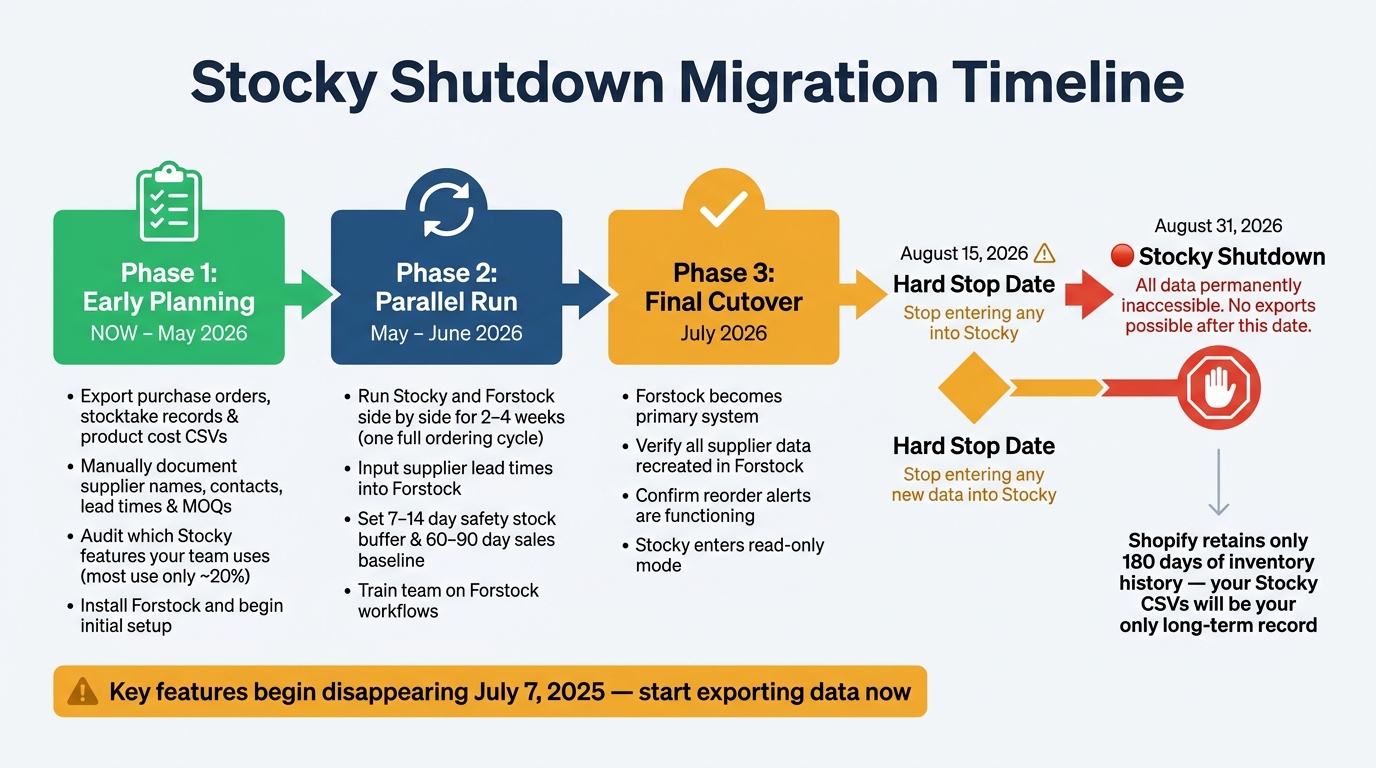
Stocky Shutdown Migration Timeline: Key Dates & Action Steps
Breaking the migration into three phases helps keep the process organized and minimizes the risk of missing critical details. With data preservation already in motion, these steps will guide you through completing the migration smoothly.
Phase 1: Early Planning and System Decisions
The first phase focuses on organizing your current system before any functionality is removed. This is your chance to fully understand how you’re using Stocky and ensure no important details are overlooked. Protecting your inventory data during Stocky’s shutdown starts here.
Begin by auditing how your team currently uses Stocky. Interestingly, most merchants only rely on about 20% of Stocky’s features, mainly for reorder suggestions and basic purchase order creation. Identifying the features you depend on will help you avoid overcomplicating the transition to a new system.
Next, prioritize data preservation. Export all purchase orders, stocktake records, and product cost data as CSV files. Since Stocky doesn’t allow supplier details to be exported, you’ll need to manually document key information like supplier names, contact details, lead times, and minimum order quantities (MOQs). If you skip this step, you risk losing critical supplier data permanently.
Phase 1 checklist:
- Export purchase orders, stocktake records, and product cost data as CSV files.
- Manually record supplier details, including names, contacts, lead times, and MOQs.
- Identify which Stocky features your team uses regularly.
- Document your current reorder workflow step by step.
- Install Forstock and start initial setup.
Phase 2: Parallel Run and Workflow Testing
Once your data is organized, the next step is to validate its accuracy through a parallel run. This means running Stocky and Forstock side by side for at least 2–4 weeks - or one full ordering cycle - to identify any issues before fully transitioning.
"Run both tools in parallel for at least 2-4 weeks... your new tool needs time to analyze your sales data and generate accurate forecasts." - Sensible Tools Blog
During this phase, input accurate supplier lead times into Forstock. This adjustment can significantly improve the accuracy of its forecasts. Start with a 7–14 day safety stock buffer and a 60–90 day sales period as your baseline, then adjust as needed.
Use the parallel run to compare Forstock’s reorder suggestions with Stocky’s outputs. Resolve any discrepancies and ensure your team is fully trained to complete restock workflows in Forstock without relying on Stocky before moving on to the final phase.
Phase 3: Final Cutover and Post-Shutdown Readiness
By July 2026, Forstock should be your primary system. While Stocky may still be accessible in read-only mode, all active purchasing decisions should now be handled through Forstock. This phase ensures that earlier risks have been addressed and the transition is complete.
Here’s a quick look at the timeline:
| Phase | Timeframe | Primary Focus |
|---|---|---|
| Phase 1: Early Planning | Now – May 2026 | Export data, document suppliers, and audit feature usage. |
| Phase 2: Parallel Run | May – June 2026 | Set up Forstock, validate workflows, and train your team. |
| Phase 3: Final Cutover | July 2026 | Fully transition to Forstock and monitor for any gaps. |
| Shutdown | Aug. 31, 2026 | Stocky access ends permanently. |
During the final cutover, double-check that all supplier data has been accurately recreated in Forstock. Confirm that reorder alerts are functioning as expected, and establish a process to handle any inventory discrepancies that may arise in the weeks following the shutdown. Close monitoring during this time will help catch and correct any remaining issues.
How to Export and Document Your Stocky Data
If you're following a phased migration plan, one of the most critical steps is exporting and documenting your Stocky data before it's too late. Once August 31, 2026 passes, you won't be able to access anything stored in Stocky.
"After August 31, you can't export anything. Whatever data you haven't pulled out of Stocky by then is gone." - Sensible Tools Blog
Exporting Purchase Orders and Inventory History
Stocky allows you to export several types of data, including purchase orders, stocktake records, product cost details, and inventory reports, all in CSV format. However, keep in mind these key points:
- For stocktake records, download the CSV during or immediately after adjustments. Stocky does not save historical stocktake data automatically.
- Stocktake CSV files include product details like names, SKUs, barcodes, and discrepancies between expected and actual stock levels.
- Export cost-per-item data separately and cross-check it against your Shopify Admin records to ensure accurate margin calculations.
Some data, like transfer history and custom forecasting settings (e.g., min/max thresholds), cannot be exported. These will need to be manually recreated. After exporting any CSV, double-check that essential columns, such as Shopify ID and cost price, are included. If an export is incomplete or corrupt, it cannot be fixed after the shutdown.
Additionally, take the time to document supplier and product configurations that Stocky doesn't allow you to export.
Documenting Supplier and Product Configurations
Supplier details, including names, contact emails, lead times, and minimum order quantities (MOQs), are stored exclusively in Stocky and must be manually recorded before the shutdown.
"Supplier information - this has to be manually recreated in whatever tool you move to. There's no shortcut here." - Bahadır Efeoglu
To do this, create a spreadsheet and manually copy over each supplier's details. Make sure to note which products are linked to which vendors. Your historical purchase orders can also serve as a reference, as they often include supplier names, past pricing, and inferred lead times.
Another useful export is the ABC Analysis report (available in CSV or PDF format). This report categorizes SKUs by sales grade, helping you prioritize which products to set up first in your new system.
Lastly, don't forget to document your reordering workflows to ensure a smooth transition.
Documenting Reordering Workflows and Policies
Data alone isn't enough. You also need to record how your team currently handles reordering. Write down the specific steps your team follows, from identifying low stock to acting on Stocky's suggestions and communicating with suppliers. This documentation will be invaluable for training your team on the new system.
Before Stocky shuts down, export the Low Stock Variants report. This report provides a snapshot of stock levels, days of stock remaining, and suggested reorder dates. Additionally, manually note the min/max thresholds and safety stock levels for your key SKUs. While Forstock uses velocity-based forecasting instead of static rules, having these figures will help you fine-tune the new system quickly.
| Data Type | Exportable? | Action Required |
|---|---|---|
| Purchase Orders | Yes (CSV) | Export from PO list in Stocky |
| Stocktake Records | Yes (CSV) | Download during/after each adjustment |
| Product Cost Data | Yes (CSV) | Export and cross-check with Shopify Admin |
| Inventory Reports | Yes (CSV) | Export from each report screen |
| Supplier Contact Info | No | Copy manually into a spreadsheet |
| Lead Times & MOQs | No | Document manually per supplier |
| Min/Max Thresholds | No | Record manually for key SKUs |
| Transfer History | No | Cannot be recovered after shutdown |
Pre-Shutdown Verification and Risk Reduction
Once you've tackled phased migration planning and data exports, it's time to lock in your transition with these final pre-shutdown checks. This step ensures that all your data exports and workflows are ready to go.
Verifying Data Exports and Access
Open each CSV file and carefully review it for issues like missing SKUs, blank cost fields, or duplicate rows. If you catch a problem now, you can still fix it. But if you find errors after the shutdown, it’ll be too late to recover.
"On August 31, your data disappears and your workflow breaks simultaneously. Merchants who wait will be setting up a new tool under pressure, with no historical reference to configure it properly." - Sensible Tools Blog
Once each file is verified, archive them in a shared drive. Use clear labels for report type and date to ensure easy access. Keep in mind that Shopify Admin only retains 180 days of inventory adjustments. Older records exported from Stocky will be your only long-term reference point.
Double-check your Stocky supplier list against your manually built spreadsheet. Make sure lead times, contact emails, and minimum order quantities (MOQs) are correctly entered into Forstock. These details are critical for accurate reorder forecasting.
Once you're confident in your exports, shift your focus to ensuring your team and workflows are fully prepared for the transition.
Confirming Team and Workflow Readiness
By now, your team should have completed at least one full ordering cycle in Forstock. Confirm that no one is still relying on Stocky for reorder suggestions or purchase orders. Set a firm internal "hard stop" date - preferably no later than August 15, 2026 - to prevent any new data from being entered into Stocky, ensuring all critical information transitions to the new system.
Check your Shopify POS setup, especially if your retail staff used Stocky's Smart Grid tile for inventory transfers. Remove the tile and train your team on the updated workflow. Also, verify that role-based permissions in Forstock are correctly set so only authorized team members can approve purchase orders or adjust inventory.
With team roles and workflows updated, you’re ready to closely monitor operations after the shutdown.
Monitoring for Issues After the Shutdown
The first two to four weeks after August 31 will be the most critical. Conduct daily checks of stock movements, open purchase orders, and inventory transfers. Keep an eye out for stockouts on fast-moving SKUs, mismatched lead times delaying reorders, and discrepancies between Forstock's inventory levels and physical counts.
"After August 31, 2026, you'll no longer be able to use the Stocky app for managing inventory, but you'll have read-only access for a period of time." - Shopify
While this read-only period offers a safety net, don’t rely on it as an excuse to delay your migration. Use it only to retrieve any reports you might have missed. If you're using a forecasting tool for the first time, give it two to four weeks to calibrate its demand predictions based on your sales history before fully trusting its reorder suggestions.
| Verification Task | Action | Owner |
|---|---|---|
| CSV files reviewed | Check for missing SKUs, blank costs, duplicate rows | Operations Manager |
| Files archived | Store in shared drive, labeled by date and type | Admin |
| Supplier data confirmed | Verify lead times and MOQs in new system | Procurement Team |
| Team Hard Stop Set | Ensure no new data is entered into Stocky | Store Owner |
| Post-shutdown monitoring | Daily stock and PO checks for first 2–4 weeks | Warehouse Manager |
Conclusion: Steps to a Smooth Transition
With the phased migration steps complete, it's time to wrap up your transition. Keep in mind that after August 31, 2026, all Stocky data will become permanently inaccessible. To avoid a last-minute rush, make sure to export your data, document supplier details by integrating multi-supplier data, and clean up duplicate SKUs as soon as possible. Starting early, testing in parallel, and executing a timely cutover are key to ensuring everything goes smoothly.
"The biggest risk isn't the shutdown itself - it's procrastination." - Bahadır Efeoglu, Fabrikatör
Maintaining accurate records will be your safety net throughout this process. Since Shopify Admin retains only 180 days of inventory adjustment history, the CSVs exported from Stocky today will be your sole long-term reference for audits, tax preparation, and year-over-year forecasting. Once the app is discontinued, that historical data will no longer be recoverable.
FAQs
What should I export first from Stocky?
Exporting your purchase order history from Stocky should be a top priority. This data is crucial for maintaining accurate records of your past orders and will help ensure a seamless transition in managing your inventory after the shutdown. Acting early to secure this information can save you from unexpected challenges later.
How do I save supplier data if it can’t be exported?
If exporting supplier data from Stocky isn’t an option, make sure to manually save the details before the shutdown on August 31, 2026. Document essential information such as supplier names, contact information, lead times, and product assignments. To keep things organized, consider taking screenshots or compiling the data into a document. This way, you’ll have access to the critical supplier details you need moving forward.
How long should I run Stocky and Forstock in parallel?
Running Stocky and Forstock side by side for about four months is a smart way to ensure a smooth transition. Since Stocky will no longer be available after August 31, 2026, and its data will become inaccessible, it’s best to start migrating as soon as possible. Using both systems at the same time lets you double-check data accuracy, fine-tune workflows, and keep your inventory operations running smoothly until Stocky is completely phased out.
Keep reading
Try Forstock free for 14 days.
AI-powered demand forecasting and reorder automation for Shopify brands. No credit card required.