
Dead Stock Recovery: Steps To Clear Unsold Inventory
Identify slow SKUs, run targeted promos or bundles, liquidate or donate excess, and use AI forecasting to prevent dead inventory and free cash flow.

Dead Stock Recovery: Steps To Clear Unsold Inventory
Dead stock, or unsold inventory sitting idle for over a year, drains your finances and clogs up valuable storage space. But you can fix this. Here’s how:
- Identify Dead Stock: Use Shopify reports like Inventory Aging, Sell-Through Rate, and Daily Sales by Product to pinpoint slow-moving items.
- Run Promotions: Clear stock with flash sales, discounts, or product bundles. Offer free gifts with purchase to move stagnant inventory.
- Liquidate or Donate: Sell to liquidation companies or donate for tax benefits and warehouse space relief.
- Prevent Future Dead Stock: Use tools like Forstock for demand forecasting to forecast inventory costs, automated inventory management, and real-time tracking.
Key stat: Dead stock and inventory mismanagement cost the retail industry $1.77 trillion globally. Don’t let it cost you too. Act now to free up cash flow and streamline operations.
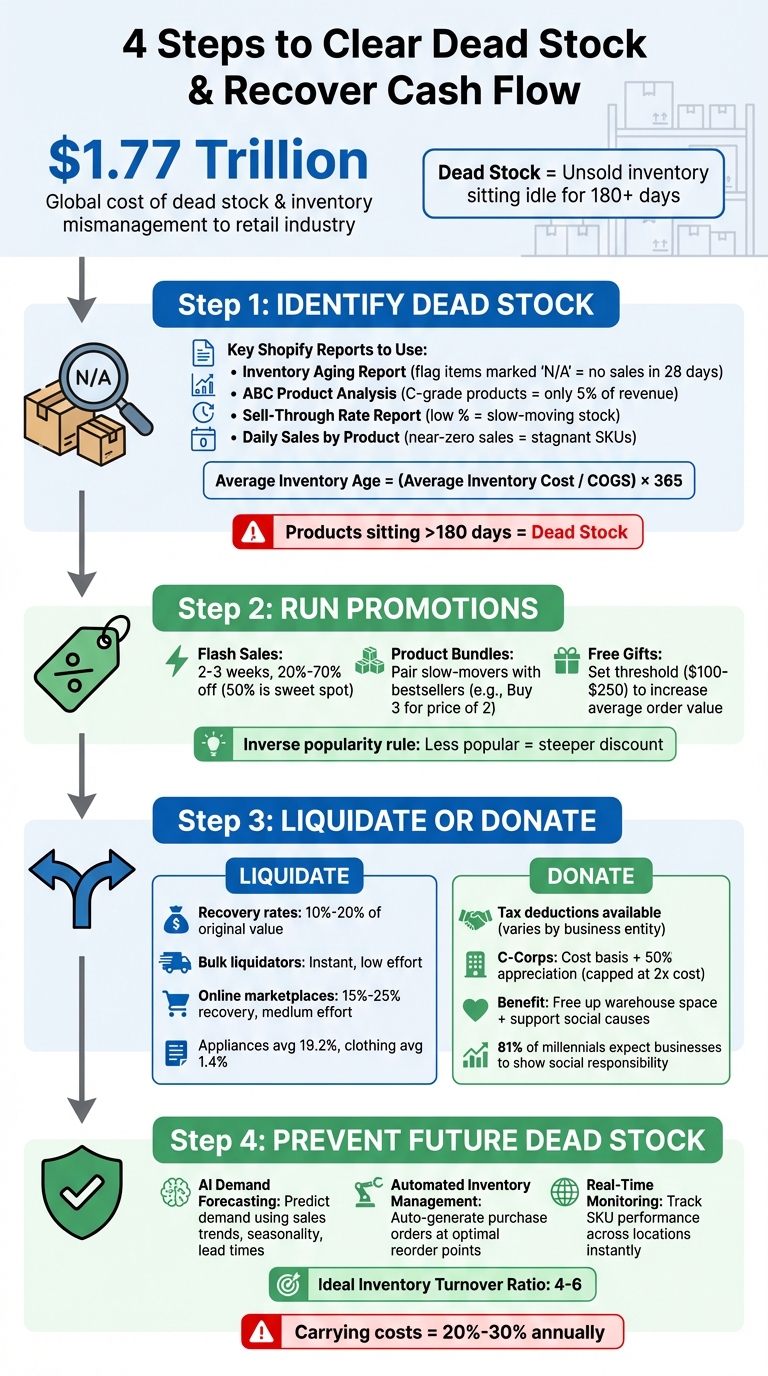
4-Step Dead Stock Recovery Process for E-commerce Businesses
How do I get rid of old inventory in my boutique? | Dead stock, old stock, too much inventory
sbb-itb-f0fc809
Step 1: Find Dead Stock in Your Shopify Reports

Before tackling dead stock, you need to identify which products are sitting idle. Shopify's built-in analytics tools make this process straightforward by highlighting underperforming items.
How to Access Inventory Aging Reports
Start by navigating to Analytics > Reports in your Shopify admin dashboard. From there, filter by Category and select Inventory to access stock-related reports. One key report to check is Inventory remaining per product, which estimates how many days of stock are left for each SKU based on sales from the last 28 days. If you see products marked "N/A", it means they haven’t sold at all during that time - these are likely dead stock candidates.
Another helpful tool is the ABC product analysis report. This ranks your SKUs based on their revenue contribution, making it easy to spot consistently poor performers. A-grade products typically generate 80% of your revenue, B-grade products contribute 15%, and C-grade products bring in the remaining 5%. Since this report updates daily, you can quickly identify which items are falling short. Keep in mind that Shopify's inventory metrics only go back to October 1, 2023, so earlier historical data won't be available.
Once you've flagged potential dead stock, take a closer look at specific SKU performance to confirm your findings.
Analyze SKU Performance Data
After identifying potential problem items, dig deeper into their performance metrics. Use the Products by sell-through rate report, which shows what percentage of your inventory has sold over a given period. Low sell-through rates are a clear signal that products aren't moving. Just note that Shopify's data for this report has a 2- to 3-day processing delay.
Another report to check is Inventory sold daily by product, which reveals the average daily sales for each SKU. If certain items show near-zero daily sales, they’re likely stagnant. To further assess inventory health, calculate the average inventory age to see how it impacts cash flow using the formula:
(Average Inventory Cost / COGS) × 365.
Products sitting in inventory for more than 180 days are generally considered dead stock.
Here’s a quick breakdown of the key reports to focus on:
| Report Name | Key Metric | What It Tells You |
|---|---|---|
| Inventory remaining per product | Days of inventory remaining | "N/A" indicates no sales in the last 28 days |
| ABC product analysis | Product grade (A, B, or C) | C-grade items contribute just 5% of revenue |
| Products by sell-through rate | Sell-through percentage | Low percentages show slow-moving stock |
| Inventory sold daily by product | Quantity sold per day | Near-zero sales suggest stagnant SKUs |
Step 2: Run Promotions to Clear Dead Stock
Once you've pinpointed your dead stock, the next move is to shift those stagnant items through targeted promotions. These strategies not only recover cash tied up in unsold inventory but also help maintain your brand's reputation.
Set Up Clearance Sales with Discounts
Flash sales lasting 2–3 weeks can create a sense of urgency without conditioning customers to expect constant discounts. Use the inverse popularity rule: the less popular the item, the steeper the discount. Start with smaller markdowns - like 20% off - and gradually increase to 50% or even 70% if needed. A 50% discount is often the sweet spot for generating enough interest to clear inventory within a short timeframe.
Keep your promotional messaging straightforward. Instead of using complex discount structures, go for clear, bold statements like "50% Off Everything" or "Winter Coats from $25". Red signage is particularly effective for drawing attention to sales. You can also offer threshold discounts, such as "Save $20 on purchases of $100 or more", to encourage larger cart sizes while clearing out dead stock. Be aware of regional regulations - some areas require products to be sold at full price for at least 28 days before advertising discounts.
If discounts alone don’t do the trick, consider discounting strategies to move unsold inventory, such as bundling slow-moving items with popular products, to make the offer more appealing.
Bundle Dead Stock with Popular Products
Bundling slow-selling items with bestsellers is a smart way to move inventory while optimizing warehouse space. For example, in 2025, Canvas Co-Founder Stuart Jones streamlined fulfillment by bundling related products, treating them as single primary items for processing. Similarly, Swarovski in Illinois saw an 8% profit boost within four weeks by using advanced merchandising strategies, including bundling.
Look for complementary product pairs. For instance, bundle slow-moving phone accessories with popular smartphone cases. For items often purchased in multiples - like home goods or clothing basics - offer bulk discounts such as "Buy 3 for the price of 2" to clear excess inventory quickly. Configure your inventory system to display bundles as single items for customers while ensuring warehouse staff can pick the components efficiently. This approach frees up capital and reduces storage costs. For long-term prevention, many brands are turning to dead stock reduction with AI analytics to optimize future ordering.
Give Dead Stock as Free Gifts
Offering dead stock as a free gift with purchase is another effective way to clear inventory while increasing your average order value. Set spending thresholds - commonly $100 or $250 - to activate the promotion. This encourages customers to add more full-priced items to their carts. As Lauren Ufford from Shopify explains:
"Offering a 'free' product with purchases over a certain amount... encourages shoppers to stock up on regularly priced items and spend a little more than usual to receive an exclusive gift".
You can automate this process on platforms like Shopify, where the free gift is added to the cart once the threshold is met. Highlight the offer as "exclusive" or "limited-time" to drive urgency. Dead stock can also be used as prizes in social media contests, helping you grow your audience while clearing inventory. While giving items away doesn’t directly generate revenue for the specific SKU, it reduces storage, labor, and insurance costs, freeing up capital and building customer loyalty.
Step 3: Liquidate or Donate Unsold Inventory
When promotions fall short of clearing out inventory, you can either liquidate or donate the excess stock. Both options help free up warehouse space and reduce annual carrying costs, which typically range from 20% to 30%. The choice between these paths depends on your financial objectives and how you want to position your brand.
Sell to Liquidation Companies or Marketplaces
Liquidation is a quick way to convert slow-moving inventory into cash, which can then be reinvested into products that sell better. You have two main options: selling to bulk liquidators or listing items on online platforms like Amazon, eBay, or B2B sites such as Liquidation.com and Overstock Trader.
Selling directly to liquidators is faster since you can offload entire pallets or truckloads at once. However, the recovery rates are lower, typically ranging from 10% to 20% of the original value. These rates vary by product type - appliances average 19.2%, while clothing and accessories might fetch as little as 1.4%. Amazon's liquidation program, for example, usually returns just 5% to 10% of an item's average selling price.
Before liquidating, make sure to remove labels and prepare a detailed manifest that includes SKUs, quantities, condition, and photos to maintain transparency and control. Also, vet liquidators carefully by checking their credentials and ensuring they have experience with your product category.
Here’s a quick comparison of liquidation methods:
| Liquidation Method | Recovery Rate | Speed | Brand Risk | Operational Effort |
|---|---|---|---|---|
| Internal Flash Sale | 40%–60% | Slow (weeks) | High (price erosion) | High (pick/pack/ship) |
| Online Liquidation Auctions | 15%–25% | Fast (days) | Medium (market leakage) | Medium (palletizing) |
| Bulk Inventory Liquidators | 10%–20% | Instant | Low (contractual restrictions) | Low (truckload pickup) |
Source:
When deciding on liquidation, compare the per-unit recovery rate to the cost of fulfilling individual orders. For instance, if an item sells for $15 but fulfillment costs $6 per unit (typical labor costs range from $4 to $6 per order), a bulk sale at $2 to $3 per unit might actually be more profitable. As Gregg Schwartz, Founder and VP of Overstock Trader, explains:
"Cash is king. Even a 10% recovery from pallet liquidations puts actual liquidity back into your bank account. You can use that cash to buy new inventory that actually sells."
If you use LIFO (Last In, First Out) accounting, consult your finance team to avoid triggering costly LIFO liquidations.
When liquidation doesn’t meet your financial goals, donation is another effective way to clear inventory while gaining tax advantages.
Donate for Tax Deductions
If your inventory won’t sell, even at steep discounts, donating it can be a smart alternative. Donations not only clear warehouse space and eliminate storage costs but also allow you to claim tax deductions. Plus, it’s an opportunity to support a good cause. By donating to a qualified 501(c)(3) organization, you can deduct the inventory’s cost basis - or, for C corporations, claim enhanced deductions under Section 170(e)(3). For claims exceeding $250 or $5,000, you’ll need written acknowledgments and appraisal records, respectively.
The IRS caps corporate charitable contributions at 10% of taxable income, but any excess can be carried forward for up to five years. Beyond financial benefits, donations can also improve your company’s reputation. According to a survey, 81% of millennials expect businesses to make a visible commitment to social responsibility.
Here’s how deductions vary by business type:
| Business Entity | Deduction Amount |
|---|---|
| Sole Proprietorship / Partnership / S-Corp | Straight cost basis only |
| C Corporation (Standard) | Lesser of cost basis or fair market value |
| C Corporation (Section 170(e)(3)) | Cost basis + 50% of appreciation (capped at 2x cost) |
For C corporations to claim the enhanced deduction, the donated goods must be used exclusively for the care of the ill, needy, or infants, and cannot be resold or bartered by the receiving charity. This makes donations particularly effective for items like baby supplies, food, or hygiene products. It’s a practical way to reduce dead stock costs while contributing to a meaningful cause.
Step 4: Prevent Dead Stock with Forstock
Avoid the headache of dead stock by managing your inventory smartly. While strategies like liquidation and donations can clear out unsold products, the real solution lies in preventing the problem before it affects your cash flow. Enter Forstock - a SaaS platform designed specifically for Shopify brands. It uses data-driven insights to help you make smarter inventory decisions.
Forstock connects seamlessly with your Shopify store, offering tools like AI-powered demand forecasting, automated purchase orders, and real-time stock tracking. It takes the guesswork out of inventory management, aligning your purchasing decisions with actual market demand. By factoring in sales trends, supplier lead times, and seasonal changes, Forstock ensures you order the right amount of stock at the right time. Here’s how its features work together to keep your inventory lean and dead stock at bay.
Use AI Demand Forecasting
With Forstock's AI, you can predict demand based on real data - like historical sales, seasonal trends, and promotions - instead of relying on gut feelings. This helps you make informed purchasing decisions and spot underperforming SKUs early, so you can adjust orders or avoid stocking items that may not sell.
The platform also calculates the best reorder points by considering factors like supplier lead times and sales velocity. For example, if a product sells 10 units per day and your supplier takes 15 days to deliver, Forstock will prompt you to reorder at just the right time. This prevents over-ordering, a common mistake that often leads to dead stock piling up.
Automate Inventory Management Tasks
Managing inventory manually can lead to costly errors - like double ordering or miscalculating quantities. Forstock eliminates these risks by automating key tasks, such as purchase order creation and supplier communication. It handles routine processes for you, ensuring accuracy and saving time.
The platform also centralizes supplier coordination, so you’re not stuck juggling spreadsheets or email threads. Automated workflows kick in when stock reaches predefined levels, triggering purchase orders based on real-time calculations of daily usage and lead times. This streamlined approach keeps your inventory lean and responsive to changing consumer demand, reducing the risk of overstocking items that don’t sell.
Monitor Stock with Real-Time Dashboards
Forstock’s dashboard gives you a bird’s-eye view of your inventory, offering real-time updates on stock levels and SKU performance across multiple locations. This lets you quickly identify slow-moving items and take action - whether it’s bundling them with popular products or running targeted promotions - before they turn into dead stock.
The dashboard also flags SKUs that haven’t been reordered in months, marking them as candidates for clearance. By keeping an eye on these trends, you can maintain a healthy inventory turnover ratio, ideally between 4 and 6. This proactive monitoring ensures your products don’t sit idle for more than a year, the point at which they’re typically classified as dead stock.
Conclusion
Dead stock doesn’t have to drain your finances or overwhelm your warehouse. The solution lies in acting quickly and planning strategically. Start by identifying problematic inventory using tools like aging reports and the Inventory Turnover Ratio - items sitting unsold for a year are considered dead stock. Once identified, take immediate action. Clearance sales, product bundles, or even offering items as free gifts with purchase can help you recover part of your initial investment.
If these tactics fall short, consider liquidation companies or online marketplaces to offload inventory in bulk. Donations are another option, potentially offering tax benefits. Keep in mind, every month dead stock sits in your warehouse, it costs you money - expenses like rent, utilities, insurance, and labor add up, cutting into your profit margins without generating any return.
While recovery strategies are helpful, the real focus should be on prevention. Avoiding dead stock in the first place saves time and money. Tools like Forstock leverage AI to provide demand forecasting and real-time dashboards, helping you order the right quantities at the right time. Keeping your Inventory Turnover Ratio between 4 and 6 is ideal. Automated reorder alerts can also help you maintain lean inventory, ensuring capital is available for products that drive revenue.
Don’t let unsold inventory weigh your business down. Regularly audit your stock, clear out unproductive items, and adopt smarter inventory practices to keep your cash flow healthy. Acting now frees up resources and positions your business for growth.
FAQs
When should I stop discounting and liquidate instead?
When inventory refuses to move despite your best efforts - whether through targeted discounts, flash sales, or bundling - it might be time to consider liquidation. If the stock has become outdated, overstocked, or too costly to keep discounting, liquidation can be a smarter move. It helps you cut further losses and free up cash flow, allowing you to focus on more strategic opportunities.
How do I calculate if bundling dead stock will still be profitable?
To determine if bundling dead stock makes financial sense, start by calculating the total cost of the items in the bundle. Next, assess the perceived value to customers - what price are they willing to pay for the grouped products? Then, set a sales price that not only covers costs but also preserves your profit margins.
Bundling can be a smart way to clear out inventory faster. It reduces storage costs, frees up valuable space, and helps improve cash flow. Think of it as turning unsold stock into an opportunity to attract buyers while managing operational expenses more effectively.
What’s the fastest way to prevent dead stock from building up again in Shopify?
Avoiding dead stock starts with proactive inventory management. This means staying ahead of the curve with tools like demand forecasting and conducting regular stock reviews. By analyzing past sales trends and SKU performance, you can predict what items will sell and adjust your stock accordingly.
Using Just-in-Time (JIT) practices can also make a big difference. This approach ensures you only order inventory when it's needed, reducing the risk of overstocking. Pairing JIT with real-time analytics platforms, such as Forstock, allows you to make smarter, data-driven purchasing decisions. These platforms help you fine-tune stock levels and keep your inventory in sync with actual demand.
Lastly, regular inventory audits and tweaking your purchasing strategies are crucial. These steps ensure your stock aligns with current market trends, keeping you nimble and responsive to changes.
Keep reading
Try Forstock free for 14 days.
AI-powered demand forecasting and reorder automation for Shopify brands. No credit card required.