
Stocky Forecasting Replacement: How to Predict Demand After August 2026
By Forstock Team · Last updated June 11, 2026
Shopify ends Stocky on Aug 31, 2026 — save supplier data, pick a forecasting replacement, and migrate before stock issues occur.

If you’re using Stocky for inventory management on Shopify, here’s the deal: Shopify is discontinuing Stocky on August 31, 2026. After that, all Stocky features and data will be gone - permanently. This means no more demand forecasts, automated reorder points, or purchase order management. Worse, you can’t export your data, so you’ll need to act fast to avoid disruptions.
What You Need to Know:
- Stocky’s shutdown is abrupt: No gradual phase-out - features stop entirely after August 31, 2026.
- Shopify Admin isn’t a full replacement: It lacks key tools like demand forecasting, automated reorder points, and purchase order creation.
- Manual methods are risky: Spreadsheets are error-prone and fail to account for trends like seasonality or lead times.
What to Do Next:
- Backup your Stocky data: Record supplier info, lead times, and purchase order history before it’s erased.
- Find a replacement tool: Look for features like sales velocity forecasting, automated reorder points, and supplier management.
- Test the new system early: Run it alongside Stocky for 4–8 weeks to ensure accuracy and smooth operations.
Tools like Forstock can step in to fill the gap, offering AI-powered demand forecasting, automated POs, and real-time Shopify sync. Setup takes just minutes, and many tools offer free trials to help you transition before the deadline.
Don’t wait until the last minute - switching systems typically takes 60–90 days. Start now to avoid stockouts, overstocking, and unnecessary headaches.
Stocky Alternatives for Shopify: What to Choose Next
sbb-itb-f0fc809
What Stocky's Shutdown Means for Shopify Users
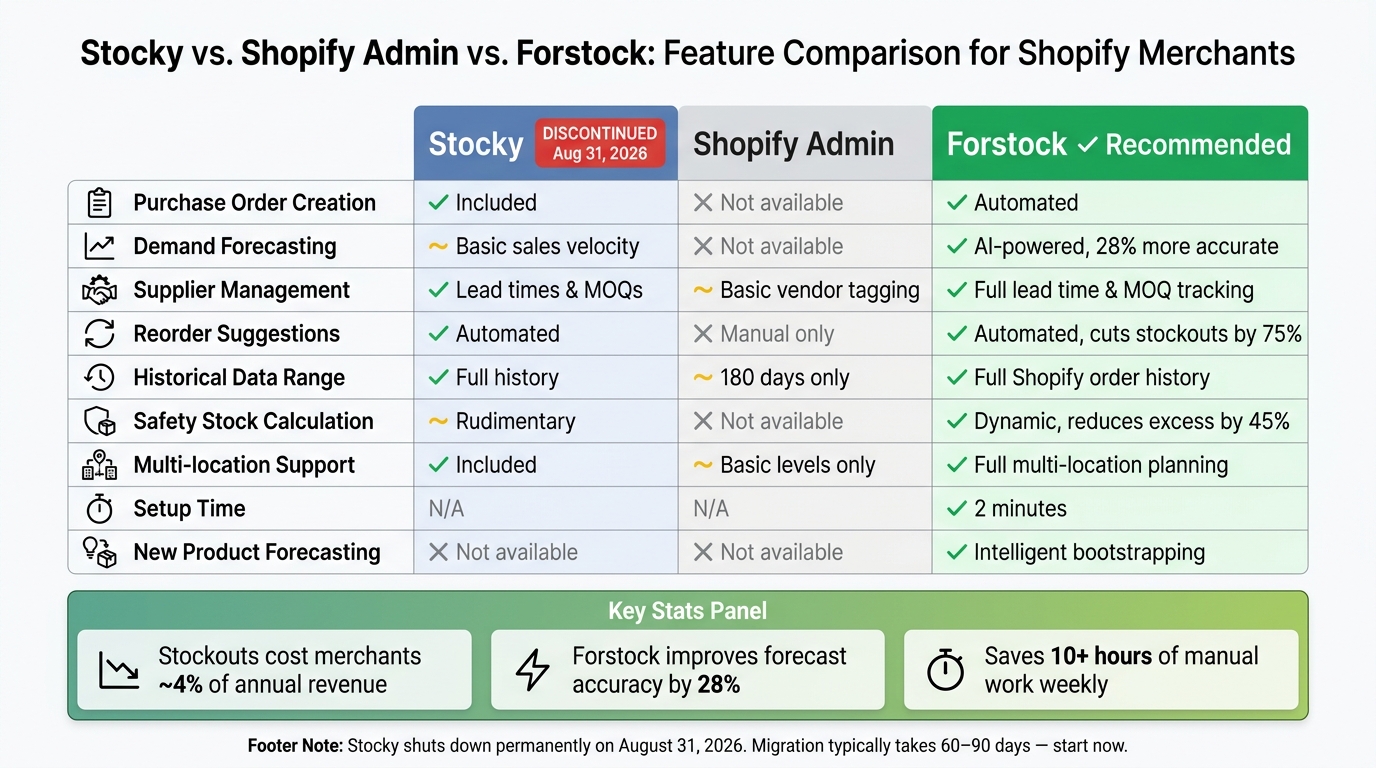
Stocky vs. Shopify Admin vs. Forstock: Feature Comparison for Shopify Merchants
Stocky's Shutdown Timeline
Stocky will no longer be available on Shopify stores after August 31, 2026. Unlike gradual phase-outs, this will be an abrupt removal, with all functionalities ceasing on that date.
What makes this particularly urgent is the complete loss of all associated data. Everything stored in Stocky - purchase orders, supplier records, lead times, minimum order quantities (MOQs), and demand forecasting history - will be permanently erased. None of this data can be exported, meaning merchants must manually record it before the deadline. Waiting until the last minute could lead to serious disruptions, as migrating to a new system typically requires 60–90 days for evaluation and full implementation. This highlights a major challenge: Shopify Admin, the platform's built-in solution, lacks the specialized features needed to replace Stocky effectively. Without those tools, merchants could face critical gaps in forecasting and supplier management.
Why Shopify Admin Cannot Replace Stocky
At first glance, it might seem like Shopify Admin could take over Stocky's role. Unfortunately, that's not the case.
"Shopify is not preserving the planning layer. Reorder suggestions, demand signals, and purchase order visibility from Stocky are not being carried into Shopify's core admin."
- Synplex
While Shopify Admin does handle basic inventory tracking - like stock levels and vendor tagging - it lacks advanced features. There's no built-in forecasting engine, no automated reorder suggestions, and no system for creating purchase orders. Even more limiting, Shopify Admin's historical data is typically capped at just 180 days, making it nearly impossible to analyze year-over-year trends or plan for seasonal demand spikes.
Here's a side-by-side comparison to show the difference:
| Feature | Stocky (Pre-Shutdown) | Shopify Admin (After Shutdown) |
|---|---|---|
| Purchase Order Creation | Included | Not available natively |
| Demand Forecasting | Basic sales velocity | Not available |
| Supplier Management | Lead times & MOQs | Basic vendor tagging only |
| Reorder Suggestions | Automated based on stock | Manual calculation required |
| Weeks Cover Metric | Rudimentary | Not available |
| Multi-location Intelligence | Included | Basic inventory levels only |
The stakes are high. Stockouts alone cost Shopify merchants an average of 4% of their annual revenue. Without Stocky's advanced tools, merchants will need to find alternative solutions to avoid these costly gaps.
What to Look for in a Forecasting Replacement
If you're looking to replace Stocky, you need more than just a basic inventory tracker. A solid replacement should offer advanced forecasting features that go beyond the essentials. Here’s what to prioritize:
Use Velocity-Based Forecasting
The best forecasting tools calculate sales velocity for each SKU by factoring in seasonality, growth trends, and promotional activity. This approach improves demand projections, boosting accuracy by 28% compared to manual methods.
### Automate Reorder Points
Automated reorder points are a game-changer. They track stock levels and supplier lead times, sending alerts before inventory runs dangerously low. This feature alone can slash stockouts by 75%. That kind of reduction isn’t just helpful - it’s essential.
Automate Safety Stock Calculations
Safety stock acts as a cushion, protecting you from unexpected demand surges or supplier delays. Advanced tools automatically adjust safety stock levels based on demand fluctuations and supplier reliability. Brands using these tools have reported reducing excess inventory by 45% while still maintaining enough buffer stock. This not only prevents shortages but also frees up working capital.
Build In Lead Time Awareness
Lead time - the period between placing an order and receiving it - is critical to managing inventory effectively. A good forecasting tool should account for supplier-specific lead times and send proactive reorder alerts. One operations lead shared their experience:
"It predicted demand 6 weeks ahead with 95% accuracy and prevented a stockout before Black Friday." - Operations Lead, Home Goods Brand
Integrate Purchase Order Planning
Forecasting tools are most effective when they connect directly to actionable steps. Look for a system that integrates purchase order (PO) creation and management right into the platform. This eliminates the need for external spreadsheets and streamlines operations. As Alexander, Supply Chain Manager at FashionCo, explained:
"The automated PO creation saves us 10+ hours weekly. Setup was seamless - just 2 minutes!"
This kind of efficiency is invaluable, especially for businesses juggling multiple suppliers, lead times, and minimum order quantities (MOQs). In the next sections, we’ll explore how to evaluate and transition to a forecasting tool that meets these critical needs.
How to Evaluate a Forecasting Replacement
With the key forecasting features outlined earlier, the next step is making sure any potential tool lives up to these expectations.
Checklist of Must-Have Features
Put every candidate tool to the test with these four essential checks:
- Real-time Shopify sync: Does it automatically pull orders, SKUs, and inventory levels without requiring manual CSV uploads?
- SKU-level forecasting: Can it predict demand for individual variants instead of just providing store-wide averages?
- Lead time and reorder automation: Does it account for your specific supplier lead times and send alerts before critical stock levels are reached?
- No-code setup: Is it user-friendly enough for your operations team to manage without needing a data scientist or developer?
If a tool falls short on any of these points, it won’t be a sufficient replacement for Stocky’s functionality.
Another critical factor is forecast transparency. A reliable tool should explain its recommendations clearly. If a tool simply tells you to "order 200 units" without showing the calculations behind that decision, it’s hard to trust. The best tools lay out the reasoning behind every suggestion.
"The forecasting transparency is unmatched. I can see exactly why Forstock recommends reordering now vs. later. No more black-box guessing." - Founder & CEO, DTC Beauty Brand ($8M ARR)
Must-Have vs. Nice-to-Have Features
Once you’ve confirmed the basics, it’s time to distinguish between features that are essential and those that are just added perks. Here’s a breakdown:
| Feature Category | Must-Have | Nice-to-Have |
|---|---|---|
| Forecasting | AI-based seasonality & trend detection, SKU-level granularity, lead time awareness | Adjustments for promotions or marketing events, explainable AI reasoning |
| Operations | Automated PO generation, real-time Shopify sync, low stock alerts | ABC analysis, multi-location stock transfers, supplier performance tracking |
| Usability | No-code setup, mobile-responsive dashboard, unlimited SKU support | Custom reporting API, multi-currency support, advanced scenario planning |
While the nice-to-have features can enhance your operations as your business grows, the priority should always be on mastering the essentials. Tools that deliver demand predictions up to six weeks in advance with 95% accuracy and help reduce stockouts by 75% prove their worth by excelling at the fundamentals, not by relying on flashy extras.
How to Switch to a New Forecasting Tool
Switching to a new forecasting tool can be quick and hassle-free. With the right option, transitioning from Stocky can take as little as 2 minutes - no spreadsheet cleanup or tedious manual data entry required.
Exporting and Preparing Your Historical Data
Start by transferring your historical data effortlessly. Forget about dealing with CSV exports. Modern forecasting tools connect directly to the Shopify API, automatically pulling in your complete order history, SKUs, and inventory levels. The system's AI then analyzes this data to identify seasonality, growth trends, and demand patterns - no manual prep work needed. For new product launches without sales history, choose a tool that intelligently estimates forecasts based on similar products.
Mapping SKUs and Setting Reorder Rules
Once your data is migrated, automating SKU mapping simplifies inventory management. With a direct connection, SKUs sync automatically at the variant level. The only details you'll need to input manually are supplier-specific rules, such as lead times, minimum order quantities (MOQs), and unit costs. These inputs ensure reorder calculations are accurate and tailored to your needs.
After setting these rules, the system creates a dynamic reorder table based on actual sales velocity, replacing Stocky's static thresholds with a much more responsive approach.
Checking Forecast Accuracy
Before automating purchase orders, it's essential to test the tool's forecasts against the past 6–8 weeks of sales data. This helps establish a reliable baseline and ensures the recommendations align with both your sales trends and your business instincts. A trustworthy tool should provide clear explanations for its suggestions, including the factors driving reorder decisions.
"It predicted demand 6 weeks ahead with 95% accuracy and prevented a stockout before Black Friday." - Operations Lead, Home Goods Brand ($5M ARR)
Once you've verified the forecasts, set up Shopify stockout alerts to ensure the system notifies you of replenishment needs before hitting critical inventory levels. This step not only strengthens your confidence in the tool but also prepares your system for proactive inventory management.
How Forstock Handles Post-Stocky Forecasting
Forstock steps in to fill the forecasting void left by Stocky, offering a sophisticated approach to predicting inventory needs. While Shopify Admin provides a snapshot of current stock levels, Forstock goes further by delivering precise demand forecasts. This capability is essential for merchants who relied on Stocky, especially with its shutdown slated for August 2026. Forstock ensures businesses can stay ahead of inventory challenges, maintaining smooth operations and avoiding costly stockouts or overstocking.
Forstock's Key Features and What They Do
At its core, Forstock uses AI-powered demand forecasting to analyze inventory needs at both the SKU and location levels. By syncing directly with Shopify's order history, it evaluates factors like seasonality, growth trends, and sales velocity to offer actionable insights. Unlike Stocky’s static thresholds, Forstock continuously updates its forecasts with new data, ensuring accuracy and relevance.
One standout feature is automated purchase order (PO) creation. For example, if a product’s inventory is projected to dip below its safety stock - like a SKU that sells 30 units weekly with a 3-week supplier lead time - Forstock flags the issue and generates a draft PO automatically. This feature can save merchants over 10 hours of manual work each week, freeing up time for other priorities.
Forstock also simplifies supplier management by storing essential details like lead times, minimum order quantities (MOQs), and vendor information. Additionally, its intelligent bootstrapping feature predicts demand for new product launches by analyzing trends from similar items - a game-changer for brands that frequently roll out new SKUs.
Forstock Features Mapped to User Benefits
| Forstock Feature | Benefit for Shopify Merchants |
|---|---|
| AI-driven demand forecasting | Improves forecast accuracy by 28%, reducing stockouts and overstock issues |
| Automated purchase order creation | Saves over 10 hours of manual work weekly and minimizes procurement errors |
| SKU-level predictions | Enables precise planning for individual variants and locations |
| Safety stock configuration | Protects against unexpected demand spikes and supplier delays without excessive overstocking |
| Lead time–aware planning | Ensures timely stock replenishment, even with variable or extended lead times |
| Real-time Shopify sync | Keeps forecasts aligned with current inventory, speeding up decision-making by 40% |
| Multi-location planning | Optimizes stock distribution across warehouses and stores to prevent localized shortages |
| Intelligent bootstrapping | Accurately forecasts demand for new products, even without prior sales data |
These features directly address the challenges merchants face in the absence of Stocky, offering a streamlined and efficient way to manage inventory forecasting and procurement. Forstock ensures a smooth transition while enhancing operational efficiency for Shopify merchants.
Next Steps for Shopify Merchants After Stocky
With Stocky shutting down in August 2026, now is the time to take action to ensure your inventory management stays on track. The goal? Preserve your historical data, identify essential Stocky features your team relies on, and find a replacement tool that handles demand forecasting, reorder automation, and manual vs. automated purchase order management. Start by focusing on your bestsellers and products with long lead times - this will help you avoid costly inventory mistakes.
Once you’ve chosen a new tool, run it alongside Stocky for four to eight weeks. During this period, compare the new system's purchase order recommendations with your actual sales. Fine-tune settings like safety stock levels and lead times to ensure the forecasts align with your sales patterns. This testing phase is critical for a seamless transition.
"The forecasting transparency is unmatched. I can see exactly why Forstock recommends reordering now vs. later. No more black-box guessing." - Founder & CEO, DTC Beauty Brand ($8M ARR)
For merchants looking for a smooth transition, Forstock is designed specifically with this change in mind. Setup takes just 2 minutes, syncing directly with your Shopify store to pull in order history, SKU data, and inventory levels. Forget about juggling spreadsheets or manually uploading CSV files. Forstock enables you to set reorder rules for each SKU, configure supplier lead times, and generate draft purchase orders automatically. It’s a one-stop solution that mirrors Stocky’s functionality while offering enhanced automation features. Plus, with a 14-day free trial, you’ll have plenty of time to test the system with your real sales data before the August deadline.
FAQs
What data should I save from Stocky before August 31, 2026?
With Stocky set to shut down on August 31, 2026, it's crucial to secure your important data ahead of time. Here's how to ensure you're ready:
- Export key data as CSV files, including:
- Purchase order history
- Stocktake records
- Product cost data
- ABC analysis reports
- Inventory transfer history
For details that can't be exported - such as supplier contacts, lead times, minimum order quantities (MOQs), and forecasting settings - you'll need to manually document this information.
Timeline to follow:
- Aim to complete all exports by mid-April 2026.
- Stop entering new data into Stocky by August 15, 2026, to ensure a smooth transition.
Taking these steps will help you avoid disruptions and keep your operations running smoothly as Stocky phases out.
How can I forecast demand without Stocky inside Shopify?
Starting in August 2026, Shopify Admin will discontinue support for Stocky's demand forecasting and automated reorder suggestions. While Shopify will still allow manual purchase orders and basic stock tracking, it won’t include advanced tools like sales velocity analysis, supplier lead time tracking, or automatic calculations for reorder points.
Forstock steps in to fill this gap. It offers a streamlined solution by analyzing sales trends, accounting for seasonality, and factoring in growth rates. The platform generates precise SKU-level forecasts, automates reorder suggestions, and simplifies the entire purchase order process.
How do I validate a new forecast tool before auto-creating POs?
Before implementing auto-created purchase orders, take some time to test the new forecasting tool alongside your existing processes for a few weeks. Keep an eye on critical metrics such as fill rates and stockout frequency to gauge how accurate the tool is. For the first 60 days, compare the AI-generated forecasts with historical sales data to see how well they align. Additionally, review safety stock levels and cross-check them with your team's input. To measure how accurate the tool's predictions are at the SKU level, use the Mean Absolute Percentage Error (MAPE) metric.
Keep reading
Try Forstock free for 14 days.
AI-powered demand forecasting and reorder automation for Shopify brands. No credit card required.