
Best Practices for Real-Time Inventory Alerts
Treat alerts as a decision system: set SKU-level reorder points, assign one owner per alert, back-test 90d, track stockouts & days on hand.
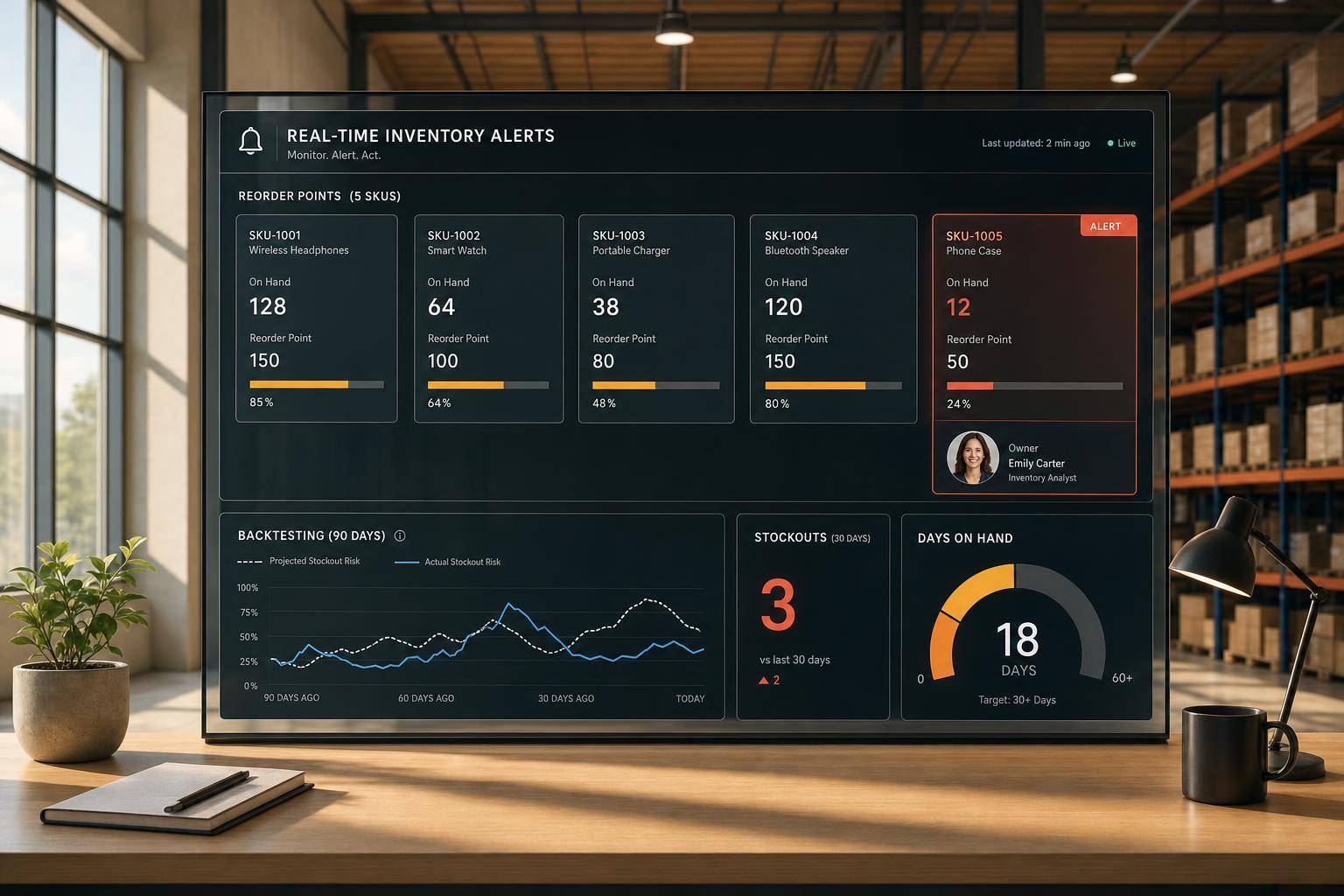
Best Practices for Real-Time Inventory Alerts
If your inventory alerts don’t lead to one clear action, they’ll get ignored. The fix is simple: set SKU-level reorder points from sales, lead time, and safety stock; send each alert to one owner; test it against past sales; then review stockouts, false alarms, and days on hand every month.
For Shopify stores, this matters because stockouts can cost about 4% of annual revenue, and 43% of shoppers may buy somewhere else instead of waiting. At the same time, too much stock ties up cash and can lead to markdowns. I’d treat alerts as a decision system, not just a warning system.
Here’s the article in plain English:
- Start with the highest-cost problems: low stock, zero stock, overstock, sales spikes, location gaps, and phantom stock
- Set thresholds by SKU or variant: not one flat rule for the whole catalog
- Use available stock: not just on-hand stock, because committed units can hide risk
- Calculate reorder points with a simple formula:
ROP = (Average Daily Sales × Lead Time) + Safety Stock - Group products by sales pattern: A-items, seasonal SKUs, fast movers, slow movers, and long lead-time items should not use the same buffer
- Match each alert to one next step: create a PO, rush a supplier, pause ads, move stock, or review a slow mover
- Route alerts by role and urgency: Slack for urgent issues, email for digests and records
- Test before launch: back-test the last 90 days of sales and confirm alerts would have fired in time
- Watch a small set of metrics after launch: stockout rate, alert accuracy, days of stock on hand, supplier lead time accuracy, and overstock rate
- Keep tuning: fixed thresholds go stale when demand or lead times shift
A small setup detail makes a big difference: fewer alerts usually means better alerts - as long as each one tells your team exactly what to do next.
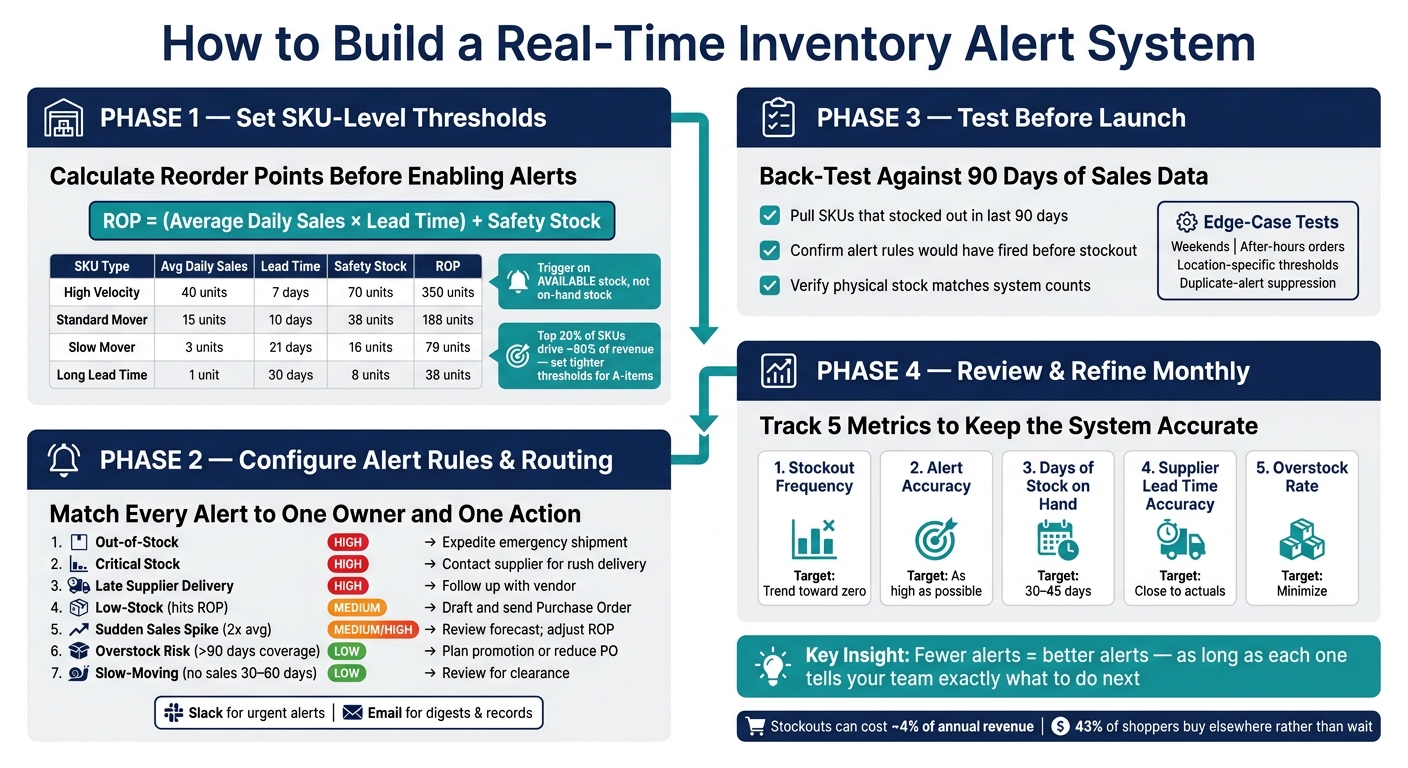
Real-Time Inventory Alert System: Setup to Optimization
Set SKU-Level Thresholds Before Turning Alerts On
If you switch on alerts before setting the right thresholds, you’ll usually get one of two problems: too many alerts or alerts that show up too late. A single default rule - say, alert every SKU at 10 units - looks clean on paper, but it falls apart fast. A high-volume SKU that sells 40 units a day needs far more stock to cover a 7-day lead time than a slow mover that sells only a few units. The goal is simple: each alert should point to an actual reorder need, not just a fixed stock number.
How to Calculate Reorder Points Using Demand and Lead Time
The standard formula is simple:
Reorder Point (ROP) = (Average Daily Sales × Lead Time in Days) + Safety Stock
Here’s what goes into it:
- Average daily sales: units sold over the last 30 to 90 days divided by the number of days in that period
- Lead time: the full time from placing a purchase order to inventory arriving at your warehouse, including manufacturing, shipping, and customs. Use your supplier’s worst-case estimate, not the best-case one
- Safety stock: (Maximum Daily Sales − Average Daily Sales) × Lead Time
One more thing matters a lot: trigger alerts based on available stock, not on-hand stock. If units are already committed, on-hand inventory can make things look safer than they are.
Use the formula as your starting point, then tune it by SKU type.
Example reorder points by product type:
| Type | Avg Daily Sales | Lead Time | Safety Stock | ROP |
|---|---|---|---|---|
| High Velocity | 40 units | 7 days | 70 units | 350 units |
| Standard Mover | 15 units | 10 days | 38 units | 188 units |
| Slow Mover | 3 units | 21 days | 16 units | 79 units |
| Long Lead Time | 1 unit | 30 days | 8 units | 38 units |
Based on the standard ROP formula: (Sales × Lead Time) + Safety Stock.
Group SKUs by Sales Pattern to Set Better Thresholds
Once you have the base number, sort SKUs by how they sell. A solid place to start is ABC analysis. In many catalogs, the top 20% of SKUs drive about 80% of revenue. Those A-items need tighter thresholds and larger safety stock buffers because a miss there hurts more.
Coverage windows can also vary by sales speed. Fast sellers may need alerts 25 to 30 days before projected depletion. Medium movers can often work with 18 to 20 days of coverage, while slow movers may need only 10 to 14 days.
Seasonal products are a different beast. Don’t lean on last month’s sales if you’re heading into a peak period. Set thresholds based on expected demand for that season, then review them at least quarterly.
It also pays to set thresholds at the variant level, not only at the product level. Total stock might look fine, but if the top-selling size or color is close to zero, you’re out of stock where it counts.
Forstock can surface reorder points and safety stock from current demand patterns.
sbb-itb-f0fc809
Set Up Alert Rules, Recipients, and Channels
Once your thresholds are in place, turn them into alert rules that send the right signal to the right person. Each alert should make two things clear: what changed and what needs to happen next. The easiest way to do that is to define the trigger, urgency, and owner for every alert.
Choose Alert Types That Lead to Action
Not every alert should feel like a fire drill. An out-of-stock alert needs immediate attention. A slow-mover alert for a product with no sales in 30 to 60 days can wait until the next review cycle. The goal is simple: keep alerts specific and tied to action so people don’t start ignoring them.
Each alert should connect to a clear response.
| Alert Type | Trigger Logic | Urgency | Expected Next Action |
|---|---|---|---|
| Low-Stock | Stock hits calculated Reorder Point (ROP) | Medium | Purchasing Manager drafts and sends Purchase Order |
| Out-of-Stock | Inventory reaches zero | High | Expedite emergency shipment; update site listing |
| Critical Stock | Stock falls below safety stock level | High | Contact supplier for rush delivery |
| Sudden Sales Spike | Velocity exceeds 2x historical average | Medium/High | Review forecast; adjust ROP and safety stock |
| Overstock Risk | Inventory exceeds 90 days of coverage | Low | Plan promotion or reduce next PO quantity |
| Slow-Moving | No sales in 30–60 days | Low | Review SKU for clearance or discontinuation |
| Late Supplier Delivery | PO not received by the expected date | High | Follow up with vendor; update customer ETAs |
Use the SKU or variant threshold you already set. Also track open POs and suppress repeat alerts until the order closes.
Next, route each alert to the person who can do something about it fastest.
Route Alerts by Role and Urgency Level
Send each alert only to the person who can act on it.
For example:
- Purchasing managers handle reorder alerts.
- Warehouse managers handle receiving issues and late delivery notices.
- Operations leads update forecasts.
Use Slack for urgent alerts. Use email for digests and recordkeeping.
A single dashboard helps keep open POs and unresolved alerts tied to the right owner.
Once roles and channels are mapped, test the rules against recent inventory data before rollout.
Test Alerts Before Full Rollout
Testing alerts before rollout helps you catch timing problems, routing mistakes, and duplicate notifications before go-live. That short validation window gives you room to fix issues while they’re still easy to sort out. Once your rules and recipients are in place, check them against actual orders before launch.
Run Test Scenarios Using Recent Inventory Data
One solid way to check your thresholds is to back-test them against the last 90 days of sales data. Pull SKUs that stocked out or moved faster than expected during that period, then see whether your proposed alert rules would have fired early enough to place a reorder before inventory hit zero. If an alert would have gone out only after the stockout had already happened, your threshold is too low.
Use the same reorder point formula from the threshold section to confirm whether each alert would fire on time.
Before you test, make sure system stock matches physical counts. Returns, damage, and receiving errors can throw off alert timing.
Check Alert Delivery, Timing, and Duplicate Notifications
After back-testing, trigger one test alert per SKU and confirm it reaches the right owner through the right channel.
Then pressure-test the setup with a few edge cases:
- Weekends
- After-hours orders
- Location-specific thresholds
- Duplicate-alert suppression
After launch, track alert results and adjust thresholds as needed.
Review Alert Performance and Refine the System
Once the system is live, look at the data and tune it. That’s how you catch late triggers, false alarms, and thresholds that no longer match how the business is moving.
Track the Metrics That Show Whether Alerts Work
Stick to a small group of metrics and review them the same way each time. Stockout frequency shows whether alerts are firing early enough. If items are still hitting zero, your thresholds may be too low or your lead time data may be out of date. Alert accuracy shows how many alerts lead to actual reorders instead of false alarms. If false alarms pile up, people stop paying attention. And that’s when the alerts that matter get missed.
You should also watch days of stock on hand - with a target of 30–45 days for most SKUs - along with supplier lead time accuracy, which compares estimated delivery dates with what happened, and overstock rate, which shows when inventory keeps sitting above target. Put together, these metrics show whether the system is helping the team act at the right time or just making more noise.
| Metric | What It Tells You | Target |
|---|---|---|
| Stockout Frequency | Alerts firing too late or thresholds too low | Trend toward zero |
| Alert Accuracy | Ratio of actionable alerts vs. false alarms | As high as possible |
| Days of Stock on Hand | Whether too much cash is tied up in safety stock | 30–45 days for most SKUs |
| Supplier Lead Time Accuracy | How reliable your supplier estimates are | Close alignment with actuals |
| Overstock Rate | Inventory consistently above target | Minimize to free up cash flow |
Review stockouts and false alerts every month. Recalculate seasonal reorder points after each major demand shift. Fixed thresholds can go stale fast, especially when sales velocity changes.
If the same SKUs keep setting off bad alerts, fixed rules may be the problem. For growing catalogs, switch to dynamic reorder points based on sales velocity and lead time.
Use the monthly review to cut noise before the team starts tuning alerts out.
A good alert system stays quiet until it matters. Then, when it fires, the team should move right away.
FAQs
How often should I recalculate reorder points?
Reorder points shouldn’t be treated as set-and-forget thresholds. If you review them by hand, a 90-day cadence is often recommended so you can account for shifts in seasonality, supplier lead times, and product lifecycles.
That said, static quarterly updates can still leave you behind. With Forstock, AI-driven forecasting adjusts reorder points in real time based on sales history, market dynamics, and seasonal trends.
What’s the difference between available and on-hand stock?
On-hand stock is the total number of items physically sitting in your warehouse or store locations. Available stock is the share you can sell right now.
You calculate it by subtracting units already committed to current orders from your on-hand stock. That helps prevent overselling and fulfillment mistakes.
Which alerts should I set up first?
Start with reorder point alerts. They tell you when it’s time to place a new order based on supplier lead times, so you can restock before inventory runs out.
Then add low-stock alerts as a backup for sudden spikes in demand. For growing businesses, Forstock can automate these alerts using real-time sales velocity, lead times, and AI-powered demand forecasts.
Keep reading
Try Forstock free for 14 days.
AI-powered demand forecasting and reorder automation for Shopify brands. No credit card required.