
How to Track Purchase Orders in Real-Time
Real-time PO tracking transforms inventory from a cash sink into a growth lever by cutting stockouts and excess inventory.
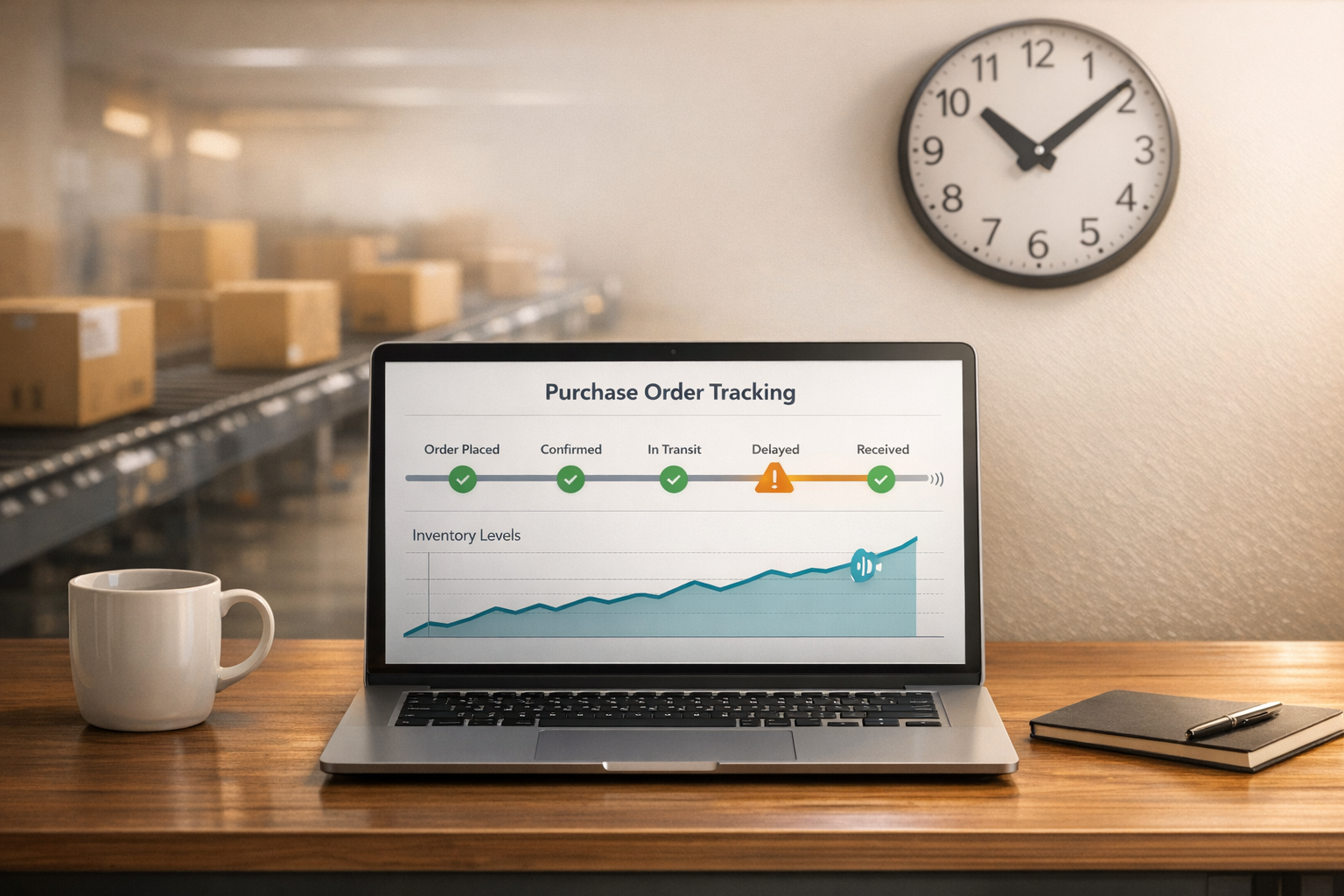
How to Track Purchase Orders in Real-Time
Managing purchase orders in real-time can help you avoid stockouts and overstock, and save time. Shopify businesses often face challenges like delayed updates, manual processes, and inventory inaccuracies. Real-time tracking tools simplify this by providing instant updates on orders and streamlining workflows.
Key Takeaways:
- 58% of brands have less than 80% inventory accuracy, leading to over $1.40 in stock for every $1 in sales.
- Manual purchase order processes take 2–3 days, while top businesses complete them in under 5 hours.
- Tools like Forstock automate purchase order creation, sync inventory, and provide AI-driven demand forecasting.
Steps to Set Up Real-Time Tracking:
- Review Your Current Workflow: Identify inefficiencies in your purchase order process.
- Choose a Tracking Tool: Look for features like Shopify integration, automated updates, and supplier communication.
- Connect Your Shopify Store: Sync inventory and supplier data for real-time updates.
- Enable Alerts: Get notifications for delays or low stock levels.
- Test and Refine: Run test orders and adjust settings for accuracy.
Real-time tracking improves inventory decisions, reduces errors, and frees up working capital. For example, businesses have reduced excess inventory by 45% and saved up to $150,000. Start by assessing your current process and integrating a tool that fits your needs.
Purchase Order Tracker: Real Example (From PO to Payment)
To implement this workflow, you'll need to compare Shopify purchase order apps that support these real-time tracking features.
sbb-itb-f0fc809
Why Real-Time Purchase Order Tracking Matters for Shopify Stores

When it comes to managing inventory for a Shopify store, timing is critical. Real-time purchase order tracking provides instant insights into SKU counts, spending, and delivery schedules, helping you plan sales more accurately. This isn't just a convenience - it directly impacts your profitability.
The numbers highlight the challenge: businesses hold $1.40 in inventory for every $1 in sales. That’s a lot of capital tied up in stock that might not even sell. Without clear visibility into incoming inventory, you may fall into the trap of "just in case" ordering. This approach increases storage costs and locks up cash that could be better spent on growing your business. Let’s dive into the risks posed by delayed purchase order updates and how they can disrupt operations.
What Happens When Purchase Order Updates Are Delayed
When updates are delayed, warehouse managers often discover stockouts too late. This delay can lead to overselling and backorders, which damages customer trust. While top-performing businesses process orders in under 5 hours, others take as long as 48 hours.
Matt, Operations Lead at TechGear, shared: "We're preventing stockouts that were costing us $50K monthly. The AI predictions are incredibly accurate."
During peak seasons, the stakes are even higher. 58% of companies miss delivery or accuracy targets when they lack real-time supplier metrics. These delays emphasize the importance of real-time tracking, which can help mitigate these risks.
How Real-Time Visibility Improves Inventory Decisions
Real-time tracking fundamentally changes how you manage purchasing decisions. Instead of relying on outdated spreadsheets, you gain live updates on transit milestones, allowing you to anticipate supplier delays and adjust customer expectations or marketing strategies.
Better visibility also strengthens cash flow.
Jason, Co-founder at HomeGoods, explained: "We reduced excess inventory by 45% and freed up $150K in working capital".
Knowing exactly what’s been paid for and what’s still pending helps you avoid over-ordering and allocate resources toward growth opportunities.
With real-time data, you can automate reorders based on current inventory levels, reducing errors and enabling more proactive decision-making. Automated syncing eliminates the mistakes that often come with manual tracking. This improved visibility is a key step toward the fully integrated systems discussed in our Shopify inventory management guide.
For Shopify merchants, tools like Forstock simplify this process further. They offer a unified dashboard that provides real-time inventory tracking, automated purchase order creation, and advanced demand forecasting - all in one place.
How to Set Up Real-Time Purchase Order Tracking
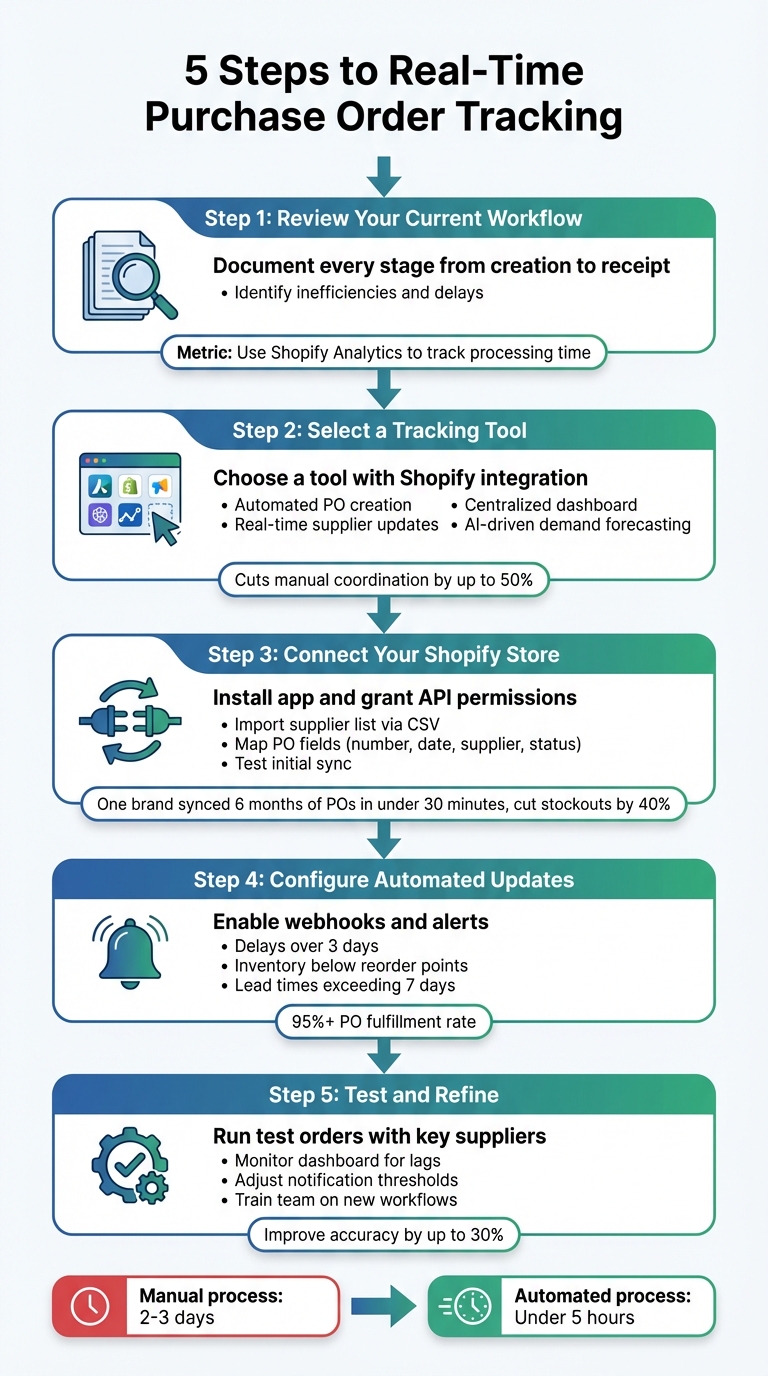
5-Step Guide to Setting Up Real-Time Purchase Order Tracking for Shopify
Switching from clunky spreadsheets and endless email chains to a real-time tracking system can transform how you manage purchase orders. Here’s a step-by-step guide to help you get started.
Step 1: Review Your Current Purchase Order Process
The first step is understanding your existing workflow. Document every stage of your purchase order process, from creation to final receipt. Identify touchpoints like supplier communication and inventory updates in Shopify. Are you chasing updates through email or juggling fragmented spreadsheets? These inefficiencies can lead to delays in detecting stockouts. Use tools like Shopify Analytics to track how long it takes for purchase orders to move through each stage. This will give you a baseline to measure improvements once you implement real-time tracking.
Once you’ve mapped out your process, you’ll be ready to choose the right tracking tool.
Step 2: Select a Real-Time Tracking Tool
A good tracking tool should integrate seamlessly with Shopify and support API connectivity. Look for features like automated purchase order creation, real-time supplier updates, and a centralized dashboard for managing inventory across multiple locations. Forstock is a great example - it combines AI-driven demand forecasting with automated PO generation, cutting manual coordination by up to 50% for Shopify brands. Prioritize tools that sync inventory levels automatically and include landed cost tracking (freight and duties) to offer a clear picture of your margins.
Once you’ve chosen your tool, it’s time to connect it to your Shopify store.
Step 3: Connect Your Shopify Store to the Tracking Software
Install your selected app from the Shopify App Store and grant the necessary API permissions to access inventory and order data. To save time, import your supplier list via a CSV upload. For example, one Shopify apparel brand was able to sync six months’ worth of purchase orders from 20 suppliers in under 30 minutes, cutting stockouts by 40%. Map essential fields like PO number, date (MM/DD/YYYY format), supplier name, and current status. Then, test the initial sync to ensure your dashboard reflects real-time stock updates accurately.
With your store connected, you can set up automated updates and alerts.
Step 4: Configure Automated Updates and Alerts
Enable webhooks to receive instant updates on supplier status changes like "shipped", "delayed", or "received." Set up email or SMS alerts for critical thresholds, such as delays over three days or inventory dropping below reorder points. Tailor notifications to include key metrics like PO fulfillment rates (aim for over 95%) and average lead times (10–14 days for most suppliers). For instance, you might configure an alert if a shipment’s lead time exceeds seven days based on AI predictions. These proactive measures help you stay ahead of potential delays instead of scrambling to react.
Now, it’s time to test and fine-tune your system.
Step 5: Test and Refine Your Tracking System
Run test purchase orders with key suppliers to ensure status updates and inventory levels sync correctly in Shopify. Watch for any lags in the dashboard and tweak notification thresholds as needed. AI tools can analyze test data to identify potential bottlenecks - like seasonal delays - and suggest adjustments, such as auto-reordering when stock drops to 20% of normal levels. This approach can improve accuracy by up to 30%. Finally, train your team on the new workflows and gather their feedback to make the system as efficient as possible.
What to Look for in a Real-Time Tracking Solution
With your tracking system in place, it's time to evaluate its effectiveness. The right solution should eliminate the need for spreadsheets and email chains, offering centralized, real-time control over your purchase orders.
Centralized Dashboard for Order Status
A centralized dashboard is a must-have feature for any real-time tracking tool. It provides a comprehensive view of open orders, supplier performance, and payment statuses - all in one place. This allows you to monitor the exact status of each purchase order, whether it's in draft, sent, or received, and even track payment progress. Some dashboards go a step further by including landed costs - factoring in freight and duties - so you can calculate true product costs and margins more accurately. Another time-saving feature is the ability to mark items as received with a single click, which instantly updates inventory levels on Shopify and reduces manual data entry.
Automated Purchase Order Creation and Updates
Automation is a game-changer for purchase order (PO) management. The best tools simplify PO creation using templates, filters, and CSV imports that pull real-time SKU and supplier data directly from Shopify. This approach minimizes manual errors and significantly reduces administrative workload. Look for tools offering three-way matching - a process that ensures the purchase order, goods receipt, and supplier invoice align. This feature helps prevent overpayments or incorrect shipments, which can lead to inventory imbalances like having $1.40 worth of stock for every $1.00 in sales.
Integrated Supplier Communication
Efficient supplier communication is crucial for reducing delays and miscommunication. Tools with integrated communication features or supplier portals allow vendors to acknowledge orders, update statuses, and manage delivery timelines directly within the system. This shared, real-time view of order progress eliminates the need for constant back-and-forth emails, saving time and reducing errors.
When paired with streamlined communication, advanced forecasting capabilities can elevate your tracking solution even further.
Demand Forecasting and Inventory Planning
AI-powered demand forecasting sets exceptional tracking tools apart. These systems analyze sales trends, lead times, and seasonal factors to recommend precise reorder points. This ensures your purchase orders align with future demand rather than simply reflecting past sales.
Matt, Operations Lead at TechGear, shared that AI-driven predictions helped prevent stockouts that previously cost his business $50,000 per month.
Jason, Co-founder at HomeGoods, highlighted how AI forecasting reduced excess inventory by 45%, freeing up $150,000 in working capital.
For Shopify brands managing complex catalogs with multiple variants, this precision can improve cash flow and cut down operational hours. For example, Forstock combines real-time tracking with AI forecasting to help brands automate routine inventory tasks and create detailed 12-month demand plans.
| Feature | Benefit for Real-Time Tracking |
|---|---|
| Centralized Dashboard | Offers a clear view of order progress and supplier performance |
| Automated PO Creation | Reduces errors with real-time data integration |
| Supplier Portals | Eliminates email chains by providing live PO updates |
| AI Demand Forecasting | Aligns reordering with future sales trends and seasonality |
| Inventory Sync | Automatically updates Shopify stock levels upon receipt |
Best Practices for Managing Purchase Orders in Real-Time
Once your tracking system is up and running, keeping it accurate requires consistent effort and smart automation. These protocols can elevate your real-time tracking system to the next level. The key to success often lies in managing supplier relationships effectively, keeping a close eye on performance metrics, and using AI to stay ahead of demand.
Maintain Clear Communication with Suppliers
Supplier portals are game-changers compared to email threads and scattered spreadsheets. When vendors can access live updates on purchase orders and make changes themselves, lead times shrink, and everyone stays on the same page about delivery schedules. To streamline the process, require suppliers to confirm or reject orders within 24 hours. This creates a clear audit trail and ensures any pricing or quantity issues are addressed quickly. Additionally, automated milestone alerts can notify your team when shipments reach critical checkpoints. This allows you to plan ahead, such as booking receiving staff and organizing warehouse space in advance.
Track and Analyze Purchase Order Metrics
Your data holds the truth about how well your purchasing process is working. Monitor supplier performance metrics like on-time delivery rates, order accuracy (quantities received vs. ordered), and lead times from order creation to receipt. For context, top organizations process purchase orders in under 5 hours, while slower ones can take more than 48 hours. Create a monthly scorecard to evaluate vendors on factors like defect rates, reliability of lead times, and delivery accuracy. This helps you spot problems before they disrupt your supply chain.
It’s also critical to track financial metrics, such as landed costs (including freight and duties) and payment progress. This provides a clearer picture of your working capital and the actual margins on your products. With this data in hand, you’re better positioned to let AI fine-tune your purchase order timing.
Use AI to Optimize Purchase Order Timing
AI takes ordering to a whole new level by eliminating guesswork. Instead of relying on fixed reorder points, AI algorithms analyze factors like sales trends, seasonal demand, and supplier lead times to calculate exactly what to order, when to order it, and how much to buy. These systems also account for specific minimum order quantities (MOQs) to ensure orders are placed early enough to avoid stockouts. This often involves calculating safety stock to handle unexpected spikes in demand.
"The AI forecast actually makes sense for my business. It feels like having a supply chain manager on my team." – Sophie, E-commerce Manager
Forstock’s AI-powered reorder tables make this process even easier. They automatically trigger low-stock alerts and generate purchase orders that are ready to send with just one click. This cuts down on manual errors and reduces what used to take 2–3 days to just a few hours. The system also groups multiple SKUs by vendor into a single purchase order, simplifying tracking and helping you meet MOQs efficiently. To keep everything running smoothly, set SKU-specific thresholds and regularly audit supplier lead times and MOQs to ensure they stay accurate.
Conclusion
Keeping tabs on purchase orders in real time is a game-changer for Shopify brands aiming to grow efficiently while avoiding costly inventory mishaps. When you have visibility over every order - from creation to delivery - you can make smarter inventory choices by forecasting inventory costs, free up working capital, and sidestep expensive errors. The stats speak for themselves: real-time tracking can help brands cut excess inventory by 45% and prevent stockouts that could cost as much as $50,000 per month.
The right solution can be the difference between constantly struggling with inventory and confidently scaling your business. Forstock makes this process seamless, combining forecasting with actionable insights to eliminate manual tasks and save time. With a setup that takes just two minutes, supply chain managers have reported reclaiming over 10 hours of work weekly.
Take a moment to assess your current purchase order process. Identify any delays and consider integrating a real-time tracking system into your Shopify store. With the right tools, you’ll spend less time chasing updates and more time focusing on growth.
Whether your business generates $250,000 or $40 million annually, the approach remains consistent: automate, monitor, and use AI to stay ahead. Real-time tracking paired with AI insights ensures better cash flow, improved inventory accuracy, and operational efficiency - key ingredients for scaling successfully. Brands that adopt these strategies today will be better positioned to thrive tomorrow.
FAQs
What counts as 'real-time' PO tracking in Shopify?
In Shopify, 'real-time' purchase order tracking allows merchants to monitor and update the status of their purchase orders instantly. This includes every step - from creation and supplier updates to delivery timelines and inventory synchronization.
With this feature, merchants gain access to up-to-date details like order status, delivery dates, costs, and payments. The result? Less manual effort, fewer stockouts, and more accurate inventory management.
Which Shopify data should I sync for accurate PO updates?
To keep purchase order (PO) updates accurate in Shopify, it's important to sync essential data such as inventory levels, supplier details, product SKUs, costs, and order statuses. Having real-time inventory data and tracking supplier performance ensures smoother operations and better oversight of POs. Including details like product lead times and costs can further streamline the process, helping to automate and double-check PO accuracy. This approach minimizes manual errors and avoids unnecessary delays.
How do I set reorder alerts without causing over-ordering?
To keep your inventory in check and avoid over-ordering, it's crucial to establish precise reorder points. These should be based on factors like safety stock, lead time, and how quickly your products sell. Make sure to update these parameters regularly to account for changing sales patterns, supplier timelines, and seasonal demand.
Using automated tools such as Forstock can make this process smoother. These tools leverage AI forecasting to adjust reorder points dynamically, helping you steer clear of overstocking or running out of stock. Additionally, take time to review low-stock alerts and safety stock levels periodically. This ensures your reorders are both timely and accurate.
Keep reading
Try Forstock free for 14 days.
AI-powered demand forecasting and reorder automation for Shopify brands. No credit card required.