
Open-to-Buy Planning for DTC and Omnichannel Brands
A monthly open-to-buy set at cost is the single stopgap that prevents stockouts and frees cash for DTC and omnichannel brands.

Open-to-Buy Planning for DTC and Omnichannel Brands
If you don’t know how much inventory you can buy this month, you’re guessing with cash.
I see open-to-buy as a simple monthly limit: it shows how much inventory I can still purchase after I factor in forecasted sales, markdowns, target ending stock, inventory on hand, and goods already on the way. For a DTC or omnichannel brand, that helps me avoid two expensive problems at once: stockouts and too much cash tied up in slow sellers.
Here’s the whole idea in plain English:
- I forecast demand by SKU, category, and channel
- I check on-hand inventory and open POs
- I account for lead times, returns, markdowns, and vendor terms
- I set a monthly buy cap based on inventory need and cash limits
- I turn that number into PO timing, units, and channel allocation
The core formula is simple:
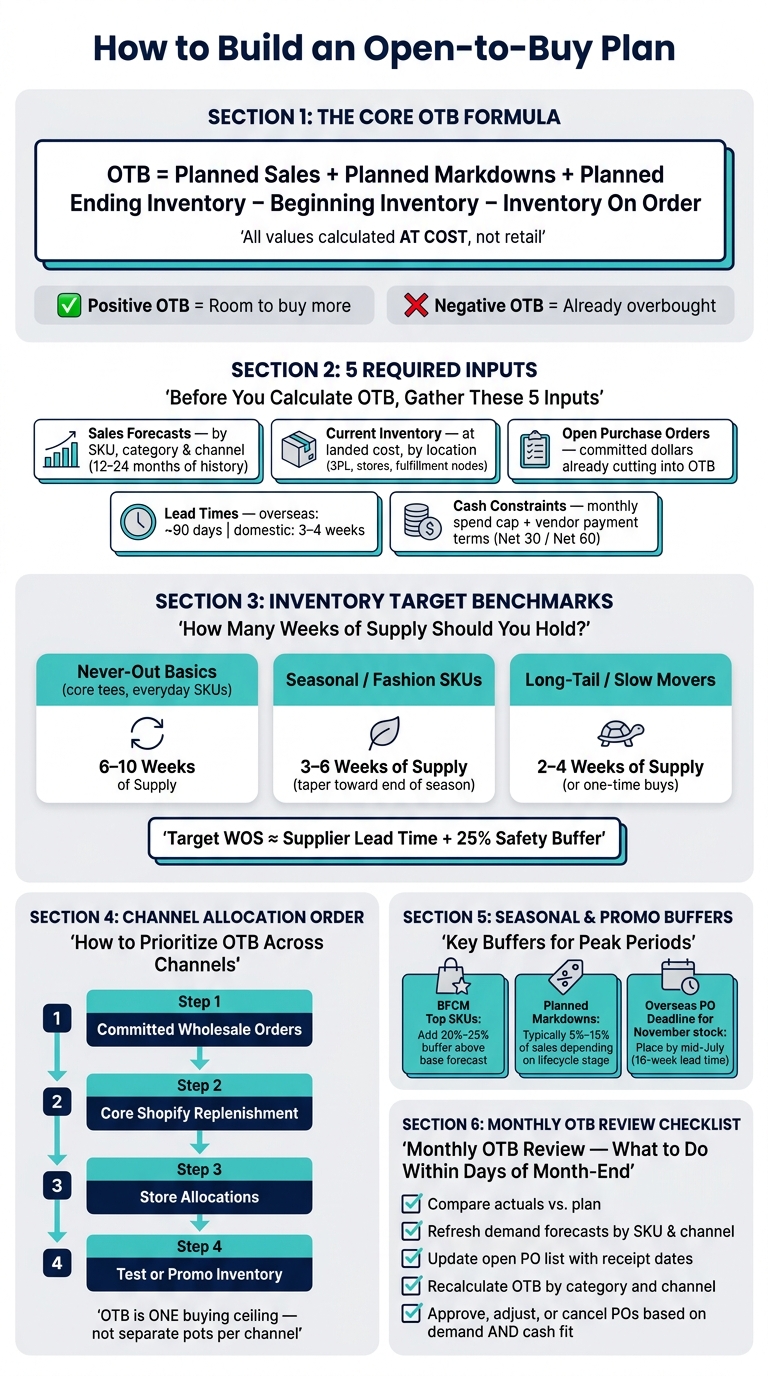
OTB = Planned Sales + Planned Markdowns + Planned Ending Inventory − Beginning Inventory − Inventory On Order
A few points matter most:
- OTB is done at cost, not retail
- A positive OTB means I still have room to buy
- A negative OTB means I’m already overbought
- For core items, I may hold 6–10 weeks of supply
- For seasonal goods, I may aim for 3–6 weeks
- Around big promo periods like BFCM, top SKUs may need a 20%–25% buffer
I also need to remember that inventory need and cash timing are not the same thing. A PO can fit the sales plan and still miss the cash plan if deposits, balances, and receipt dates pile up in the same month.
So this article comes down to one clear point: I should review OTB every month, use one shared number across Shopify, wholesale, and retail, and approve POs only when both demand and cash line up.
How to Make an Open-to-Buy Retail Inventory Planning Spreadsheet
sbb-itb-f0fc809
The inputs you need before building an open-to-buy plan
Before you calculate OTB, pull together five inputs: sales forecasts, current inventory, open purchase orders, lead times, and cash limits. If these inputs are off, your OTB will be off too. That can mean stockouts on one side or too much stock on the other. Build this data pack every month.
Sales forecasts by SKU, category, and channel
Start with 12 to 24 months of past sales from Shopify and any wholesale or retail systems. Break the data out by SKU, month, and channel. That gives you a clean baseline for seasonality and run rates.
From there, build the forecast using historical units and net sales. Then layer in growth assumptions, product launches, assortment changes, and planned promotions so the monthly plan lines up with how the business is expected to sell.
Add known events to the forecast, like a July 4th sale, a new wholesale account, or Black Friday/Cyber Monday volume.
Before you place any buys, reconcile finance targets with the SKU-level forecast. If the rolled-up forecast misses the target, either change the assumptions or reset the target. No point forcing purchases off numbers no one believes.
Once demand is set, compare it against inventory on hand and inventory already on order.
Current inventory, open purchase orders, and lead times
Pull beginning inventory at landed cost by SKU, location, and channel. Split inventory by location, such as 3PL, stores, and fulfillment nodes. Only include units that are actually available to sell. Leave out damaged stock, units reserved for bundles, and items set aside for photo shoots.
Next, export all open purchase orders with supplier name, SKU, cost per unit in USD, quantities, and expected receipt dates by month or week. These dollars are already committed, so they cut into the OTB you still have for that period. Group open POs by expected arrival month so you can see what inventory is already on the way before placing anything new.
Lead time affects timing just as much as volume. If a vendor has a 90-day lead time, August orders support November demand. If a domestic supplier can ship in 3 to 4 weeks, you have more room to adjust month by month. MOQs can also push you into larger buys than the forecast calls for.
These supply inputs feed the monthly OTB calculation in the next step.
Markdowns, returns, and cash constraints
Planned promotions and markdowns affect OTB in two ways. They can increase unit velocity, which may mean you need more stock. But they also lower your average selling price, which means each unit brings in less cash for future buys. For each key SKU or category, note the planned promo price, the weeks it will run, and the expected unit lift. Planned markdowns usually run 5% to 15% of sales depending on where a product is in its lifecycle.
Returns and damages matter just as much, and teams often underestimate them. If your DTC apparel category has a high return rate, forecast gross demand above net sales. In-store shrink and damages also cut into what you can actually sell. Add return and damage rates by channel and category when building demand inputs so you don't underbuy against your net sales plan.
Finally, put a ceiling on all of this with a monthly inventory spend cap set with finance. Then layer in vendor payment terms, like Net 30 or Net 60, because those terms decide when cash actually leaves your account. A sales-only OTB view can make buying power look bigger than it is. Together, these inputs shape how much inventory you can afford to buy.
These inputs become the monthly OTB plan in the next section.
How to build an open-to-buy plan step by step
Open-to-Buy Planning: Step-by-Step Formula & Key Inputs
Set the planning horizon and inventory targets
Build your OTB on a rolling 6–12 month horizon, split into monthly buckets. A 12-month view gives you enough runway for long lead-time suppliers and big retail moments like back-to-school and holiday. Six months can work well if lead times are short and your assortment doesn't change much by season. Set monthly receipt targets, then review your fastest movers weekly during peak periods.
Inventory targets should match what each product actually needs.
For never-out basics - core tees, standard skincare refills, everyday denim - plan for 6–10 weeks of supply (WOS). These SKUs need more coverage because running out hurts. For seasonal or fashion SKUs, keep coverage tighter at 3–6 WOS, then let targets taper down as end of season gets closer so you don't get stuck with markdown risk. Long-tail SKUs with slow, uneven demand can sit at 2–4 WOS or even work as one-time buys.
A simple rule of thumb: target WOS ≈ supplier lead time plus a 25% safety buffer. If your overseas vendor needs 8 weeks, start with a 10-week WOS target for that category.
Use those targets to set monthly OTB by channel and category.
Calculate OTB dollars and convert them into units
Use the same at-cost formula for each channel-category pair:
OTB at cost = (Planned EOM inventory + Planned sales at cost + Planned markdowns at cost) − (BOM inventory at cost + On-order at cost)
Here’s what that looks like in practice for BrightThreads, a hypothetical U.S. apparel brand planning September 2026 receipts for its Core Fleece category across Shopify, wholesale, and one flagship retail store.
| Channel | Planned EOM | Sales at Cost | Markdowns at Cost | BOM Inventory | On-Order | OTB at Cost | Avg Unit Cost | OTB Units |
|---|---|---|---|---|---|---|---|---|
| Shopify | $80,000 | $60,000 | $6,000 | $70,000 | $40,000 | $36,000 | $18 | ~2,000 |
| Wholesale | $30,000 | $80,000 | $0 | $50,000 | $40,000 | $20,000 | $16 | 1,250 |
| Retail Store | $40,000 | $24,000 | $2,400 | $35,000 | $20,000 | $11,400 | $20 | 570 |
| Total | $67,400 | ~3,820 |
Note: Wholesale markdowns are $0 because the wholesale customer manages its own promotions. Retail markdowns reflect end-of-summer clearance. All figures are at cost.
Positive OTB means you still have room for new POs. In this case, BrightThreads has $36,000 left for Shopify Core Fleece receipts. Negative OTB means you're already overcommitted. When that happens, slow down, trim, or cancel POs.
To turn dollars into units, divide OTB at cost by the weighted average unit cost for that buy group. Say a buy group is 60% of units at $8 and 40% at $18. The blended cost is $12, so a $60,000 OTB works out to about 5,000 units. Update your average cost inputs any time supplier pricing or product mix changes. If you don't, the unit math starts drifting.
Next comes the part that matters on the ground: turning that unit plan into purchase orders and receipt timing.
Turn the OTB result into purchase orders and timing decisions
Once you have OTB by channel and category, rank SKUs by velocity, margin, and strategic role before you assign units. High-velocity, never-out basics should go first. After that, fund steady sellers, assortment builders, and then fashion or test SKUs. For BrightThreads' Shopify Core Fleece OTB, split the 2,000 units 60/30/10: 60% to the top three hoodies, 30% to joggers, and 10% to new colorways.
Check supplier MOQs before you lock any PO. If a vendor needs 300 units per color and your OTB only supports 200, you may need to combine colorways or push the buy to next month. Timing matters too. If an overseas supplier works on a 90-day window, September receipts mean POs must be placed by early June. A faster domestic vendor gives you more room to adjust month by month.
Use the same plan to balance demand across Shopify, wholesale, and retail.
How to apply OTB across channels, seasons, and cash limits
Balancing Shopify, wholesale, and retail demand

Once OTB is set, the next step is to split it by channel and by receipt timing. The big idea is simple: OTB is one buying ceiling, not three separate pots for Shopify, wholesale, and retail. Start by forecasting demand for each channel on its own, because each one sells at a different pace and follows a different sell-through pattern. Then roll those forecasts into one number that limits what the business can buy in total. That number tells you both how much to buy and where it should go.
Where things get tricky is order sequence. In practice, the line usually goes like this:
- committed wholesale orders
- core Shopify replenishment
- store allocations
- test or promo inventory
That order protects the demand with the highest payoff first. It also helps prevent a quiet problem that hits a lot of teams: one channel eating up stock without anyone noticing until another channel runs dry—a common risk when managing inventory across multiple warehouses.
Say a slow seller is sitting in stores while the distribution center is short on that same SKU. Move it. If a top SKU is already heavily tied up in wholesale orders, cut Shopify replenishment quantities or lower that style’s priority until the next shipment lands. The point is to keep one channel from starving another.
Adjusting for seasonal buys and promotion periods
Seasonal demand needs to live inside the same monthly buy plan. Build lifts for Q4, back-to-school, and BFCM into your monthly sales assumptions before you set OTB. Timing matters here, maybe more than anywhere else. If an overseas vendor needs 16 weeks and the inventory must be in stock by early November, POs need to be placed by mid-July. Miss that window, and the season can slip away before the goods even arrive.
For BFCM, add a 20%–25% buffer to the base forecast for top SKUs, using last year’s results and this year’s marketing calendar as the guide. That extra room helps absorb the spike without forcing a last-minute reorder that has no chance of landing in time.
Promotions also change the margin picture. A BFCM event can pull demand forward and push realized price down at the same time. So OTB has to cover more units while accepting lower gross margin dollars. A good way to handle this is to model two versions:
- a base case
- a planned promo case
Then set a purchase ceiling that supports the planned case without leaving you stuck with too much inventory if the event comes in soft. And once the promo ends, reset the forecast back to baseline right away. If you don’t, that temporary lift can spill into the next buy and make demand look bigger than it is.
Using OTB to stay within cash limits
A positive inventory need does not mean the business can pay for the order today. That’s the hard part. Cash often goes out weeks or months before sales dollars come back in, especially when vendors ask for 30–50% deposits at PO placement with the balance due around shipment or arrival.
Map every PO against three dates: deposit date, balance date, and receipt date. That gives you a cleaner view of when cash leaves the business, not just when inventory shows up.
If September and October receipts stacked together would push projected cash below the minimum buffer, change the timing. Split the holiday buy so part lands in September and the rest in October instead of loading it all up front. The inventory need may be fixed, but the timing often is not.
That’s why a PO should only be approved when both pieces work:
- the receipt date fits the plan
- the cash outflow fits the month’s budget
Use cash timing to decide when to place the order, not just whether demand is there.
Conclusion: A monthly rhythm for cleaner inventory decisions
Once the plan is in place, OTB becomes the monthly checkpoint for buying, timing, and allocation.
At cost, OTB turns demand and current inventory position into a monthly buying cap. How close it is depends on a few moving parts: current forecasts, on-hand stock, open POs, lead times, markdowns, and cash limits. Those inputs don't have to be perfect. The big thing is updating them every month based on what actually sold. A forecast you correct monthly is far more useful than a seasonal plan that gets built once and then sits there.
For Shopify-based DTC and omnichannel teams, that shows up in practical ways:
- Core SKUs stay in stock during key selling periods
- Slow-moving inventory stops tying up cash
- Cash needs get easier to plan for
Within days of month-end, compare actuals to plan, refresh forecasts, update open POs, and recalculate OTB by category and channel. That monthly review is where the model turns into purchase-order decisions. It's also where the team decides which purchase orders to approve, adjust, or cancel.
OTB works best when everyone buys from one shared number instead of gut feel. Put the review on a fixed monthly cadence and keep it on the calendar. A set monthly OTB review date helps keep the plan current.
FAQs
How often should I update my open-to-buy plan?
Update your open-to-buy plan weekly so your purchasing decisions line up with what’s happening in the business right now. A Monday morning review works well because it lets you compare actual sales against your forecast, spot sales spikes or stockouts, and adjust reorders before the week gets rolling.
For more volatile products, review the plan daily or weekly. Slower-moving items may only need a monthly check, plus a broader quarterly review to fine-tune forecasts and safety stock.
What should I do if my OTB is negative?
A negative OTB means your planned inventory buys are higher than the budget or cash you have on hand. Put simply, you’ve committed more capital than you can comfortably support.
Start by checking sales velocity. If demand has slowed, you may be able to cut back purchase orders or push them out to a later date.
It can also help to negotiate longer payment terms, such as Net 60 or Net 90. Another option is to delay incoming shipments, which can push back costs like customs duties and final invoice payments.
How do I adjust OTB for long lead times and seasonal demand?
Use a data-driven approach. Build lead times from your actual history, not supplier promises. That means looking at the full timeline: production, transit, customs, and receiving.
Set your reorder point with this formula:
(Average Daily Sales × Actual Lead Time) + Safety Stock
Seasonality matters too. Apply a seasonal index to your baseline forecast, then increase safety stock by 25% to 50% during peak periods.
A 13-week rolling forecast works well here. Review it every week for seasonal items and fast movers.
Keep reading
Try Forstock free for 14 days.
AI-powered demand forecasting and reorder automation for Shopify brands. No credit card required.