
Inventory Planning for Coffee Roasters and Tea Brands on Shopify
Forecast SKU demand, reserve subscription orders, and convert forecasts into beans, tea, and packaging for Shopify brands.
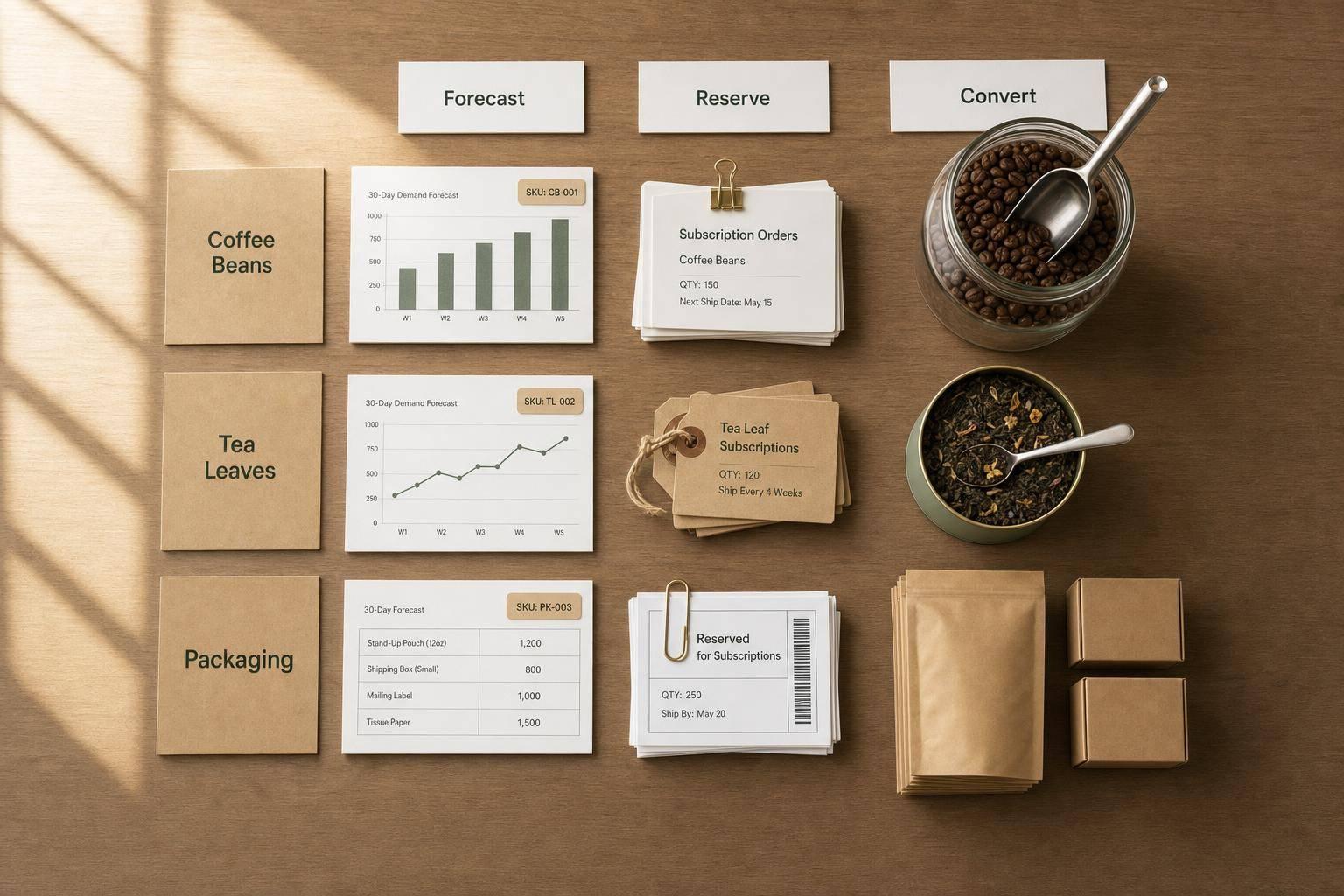
Inventory Planning for Coffee Roasters and Tea Brands on Shopify
If I had to sum this up in one line: plan inventory in two layers - what you sell in Shopify, and what those sales consume in beans, tea, and packaging.
That’s the big issue. Shopify tracks each variant, but coffee and tea brands buy and make stock at the component level. So if I only look at finished SKU counts, I can still run out of bags, labels, tins, or green coffee. And for roasted coffee, time matters: quality often drops after 2–4 weeks, while roast yield can shrink by 12%–20%.
Here’s the simple playbook:
- Forecast each SKU first using Shopify sales history
- Reserve subscription demand before open stock
- Convert SKU forecasts into ingredient and packaging needs
- Set reorder points with daily sales, lead time, and safety stock
- Track available, committed, incoming, and on-hand inventory
- Review weekly to catch stockouts, old stock, and cash tied up in slow items
A few numbers matter most:
- Roasted coffee quality often declines after 2–4 weeks
- Green coffee roast loss is often 12%–20%
- Core SKU forecast error should stay near 10%–15%
- A common reorder formula is: (average daily sales × lead time) + safety stock
- Core SKUs may sit around 15–45 days on hand, while roasted coffee is often tighter at 7–14 days
In other words: if I want fewer stockouts and less dead cash on the shelf, I need to forecast demand by variant, then roll that demand into beans, teas, and packaging before I buy or roast anything.
This article walks through that process in plain English, from forecasting and subscriptions to reorder points, Shopify tracking, and weekly inventory reviews.
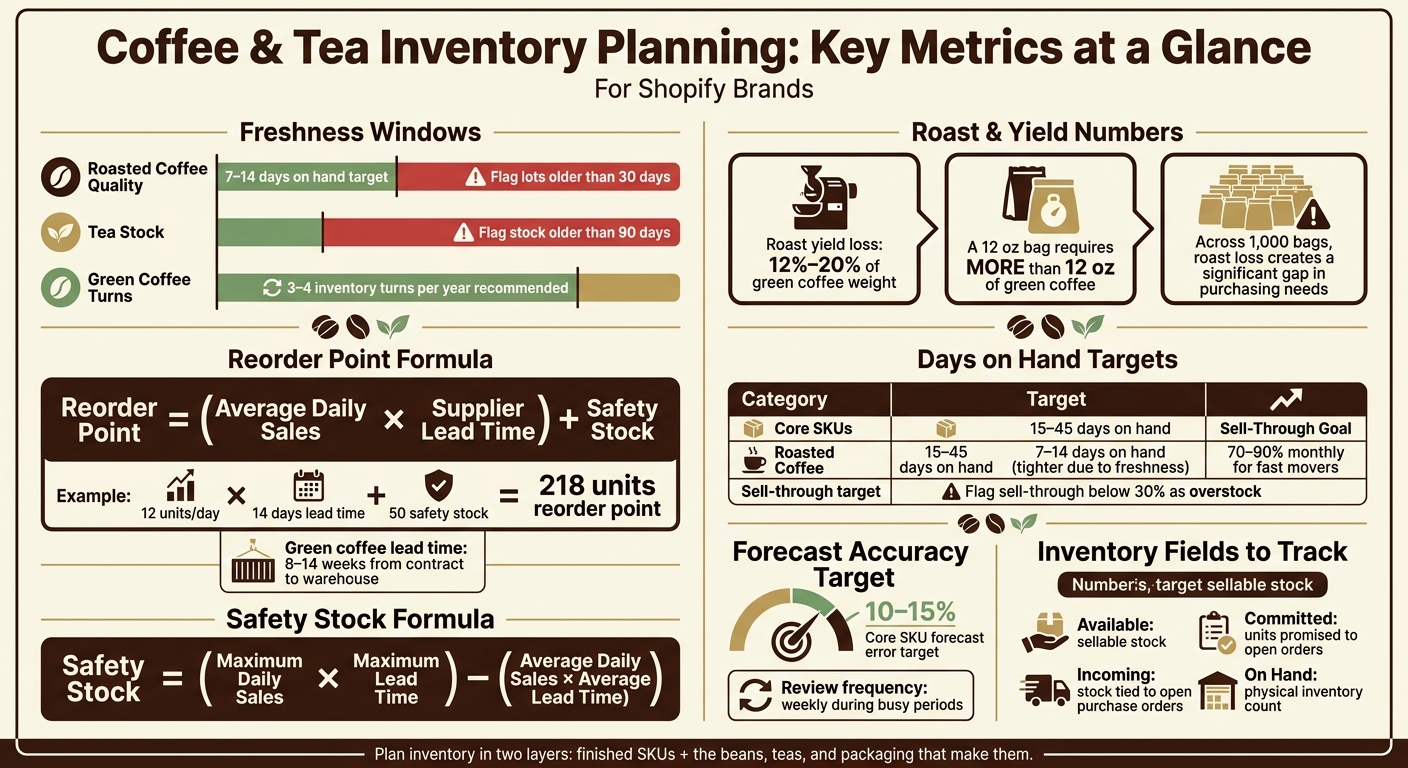
Coffee & Tea Inventory Metrics: Key Numbers Every Shopify Brand Needs
Forecast demand from Shopify sales, subscriptions, and seasonality

Use SKU history to forecast core products and demand spikes
Once your SKU-level plan is set, the next step is simple: use Shopify sales data to decide what to roast, pack, and reorder next.
Your best starting point is your own Shopify history. Pull at least 12 months of data from reports like Sales over time and Inventory sold daily by product. Then work out average weekly sales for each variant.
For a core espresso blend, a rolling 8–12 week average usually gives you a solid baseline. For a seasonal oolong or a holiday gift tin, last year's same-period trend is often more useful than a recent rolling average. Seasonality matters, and short windows can miss it.
For purchasing and production, start from the bottom up. Build the forecast at the SKU level first, then roll those numbers into total production and purchasing needs. In plain English: use bottom-up forecasting for SKU purchasing and roast scheduling. Save top-down forecasting for budgeting.
After you set a base forecast for each SKU, add known events that can change demand in the short term. A limited single-origin launch, a Black Friday email campaign, or a cold-brew tea push in late spring can all drive spikes that a rolling average won't catch by itself.
For new SKUs with no sales history, use a close substitute. That could be a past limited release in the same price range or with a similar roast profile. Then update the forecast after the first sales cycle, once you have actual demand data.
A good target is forecast error within 10–15%. Review your numbers every week or two, especially during busy periods.
Account for subscription demand before planning open stock
Subscription shipments are committed demand. Treat them that way.
Before you plan for one-time orders, reserve stock for subscriptions first. If the next subscription run will ship 400 bags of a medium roast blend on the 15th of the month, those 400 units need to be locked in before you decide how much open stock to keep on hand.
That plan should also account for a few moving parts:
- expected churn
- skipped shipments
- projected new signups
It helps to look at subscription cohorts instead of lumping every subscriber into one group. That gives you a clearer view of what to roast, pack, and order before the run date. It also helps line up green coffee purchasing and bag inventory with that specific shipment, instead of scrambling right before it goes out.
Convert finished-goods forecasts into beans, teas, and packaging requirements
Once you know finished-goods demand, turn it into green coffee, tea, and packaging needs.
For coffee, multiply the forecasted bag count by the net roasted weight per bag, then account for roast yield loss. A 12 oz bag needs more than 12 oz of green coffee because roast loss is usually about 12–20%. Across 1,000 bags, that gap gets big fast.
Tea brands work through the same math. Start with the ounces of loose tea per pouch or tin, multiply by expected unit sales, and add a realistic overage for blend variance and packaging spoilage.
Then add every packaging component tied to the sale, such as:
- bags
- labels
- cartons
- inserts
- tissue paper for gift sets
Add a small buffer for misprints or damaged stock too. This is a key part of calculating safety stock to prevent unexpected shortages. One of the most common planning mistakes isn't running out of coffee or tea. It's having product ready with no bags or labels to pack it in.
Packaging limits need to be forecast alongside product demand, not handled at the end. Use those totals to set reorder points and production timing.
sbb-itb-f0fc809
Set reorder points, safety stock, and production timing
Calculate reorder points using daily sales and lead time
Use your forecast to decide when to reorder each SKU. The basic idea is simple: turn sales pace and lead time into a clear trigger.
Reorder point = (average daily sales × supplier lead time) + safety stock
Here’s a plain example. If a bagged green tea SKU sells 12 units per day and your supplier needs 14 days to deliver, with 50 units of safety stock, the reorder point is 218 units. Once on-hand inventory drops to that level, place the order.
It also helps to set separate reorder points for green coffee, roasted coffee, tea, and packaging. These categories don’t move on the same timeline. Green coffee can take 8–14 weeks from contract to warehouse, while packaging can come with long lead times, minimum order quantities, and custom print delays. If you use one reorder threshold across the whole catalog, you usually end up with too much stock in one area and shortages in another.
Choose a safety stock level that fits freshness and supplier risk
Safety stock should match the item.
For roasted coffee, it usually makes sense to keep the buffer tight. That cuts down on staleness and keeps less cash tied up in finished goods. Smaller, more frequent roast batches help protect both freshness and cash flow.
For imported teas and custom-printed packaging, a bigger buffer often makes more sense. Long lead times, minimum order quantities, and custom print cycles can create a bottleneck fast. You might have product ready to go, but if you run short on a label or tin, fulfillment can stop cold.
Your buffer should be driven by lead time and demand swings.
| Method | Best for | Strengths | Limitations |
|---|---|---|---|
| Fixed buffer | Stable demand, low SKU count | Simple to set and maintain | Too high for slow sellers, too low during spikes |
| Formula-based | Seasonal products, subscriptions, multiple variants | Adjusts to actual demand and lead time variability | Needs cleaner data and regular recalculation |
| Lean coffee buffer | Fresh products with short shelf life | Cuts staleness and waste | Higher stockout risk if demand jumps without warning |
Safety stock = (maximum daily sales × maximum lead time) – (average daily sales × average lead time)
Use that formula when demand or lead time shifts often. It takes more upkeep, but it gives you a buffer that matches what’s happening on the ground.
Align purchasing with roast schedules, holiday peaks, and launch windows
Once your thresholds are set, line them up with roast and pack schedules. In practice, that means planning production backward from the next replenishment date. If a SKU reaches its reorder point on a Tuesday but your roast day is Friday, you may need to roast earlier instead of waiting for the usual cycle.
Holiday periods need extra room. Reorder points should go up before those peaks because pack-out labor gets tight and supplier lead times often stretch first. Gift sets and seasonal tins can also take more labor to pack than standard SKUs. Use prior-year Shopify sales data, traffic spikes, and subscription add-ons to estimate the seasonal lift. Following a Shopify inventory management guide can help streamline this process. Then order early enough to get past supplier cutoffs and inbound transit time.
For limited single-origin launches, treat packaging as a dependency item. Order that first. Custom-printed bags or tins often take longer to produce than the coffee itself, and running out of labels can hurt just as much as selling out of the SKU. Set the packaging timeline first, then work backward to schedule roast and pack dates from the packaging arrival date.
Use Shopify inventory data to prevent stockouts and guide purchasing
Track on-hand, incoming, and committed inventory by variant
Once your forecast and reorder points are set, the next step is simple: watch the inventory numbers that tell you when it’s time to buy or roast more.
Shopify tracks inventory at the variant level, which means each bag size, grind type, and tea format gets its own count. The two views that help most are Inventory by location and the Variants view under Products, especially if you sell from more than one location.
That detail matters more than it may seem at first. A 12 oz whole-bean Colombia and a 12 oz ground Colombia may look like the same product to a customer, but in Shopify they’re separate variants with separate inventory. And that’s the right way to think about them, because they often sell at different rates.
Pay close attention to these inventory fields:
- Available: sellable stock
- Committed: units already promised to orders
- Incoming: stock tied to open purchase orders or transfers
- On hand: physical inventory count
For purchasing and roasting decisions, start with Available. Then look at Committed to see how much of that stock is already spoken for. If a Holiday Blend shows 120 bags available, but 80 are committed to next week’s subscription renewals, you don’t have 120 bags free to sell. You have 40.
This kind of variant-level tracking also helps when several finished SKUs depend on the same upstream input. If one green coffee lot or one packaging component feeds multiple products, a shortage there can ripple across several variants at once.
Set low-stock thresholds for finished goods and packaging
After you’ve set thresholds, turn them into low-stock alerts so your team has time to react before a product goes out of stock. Set those alerts at the reorder point for both finished goods and shared packaging.
Packaging needs its own tracking. One missing bag or label can hold up several SKUs at the same time. That’s why shared components deserve the same attention as the finished product.
It also helps to move those thresholds up before holiday gift periods or launch windows. During those times, packaging lead times and pack-out labor can become the bottleneck, even if your coffee or tea supply looks fine on paper.
Use Forstock to turn Shopify signals into replenishment plans
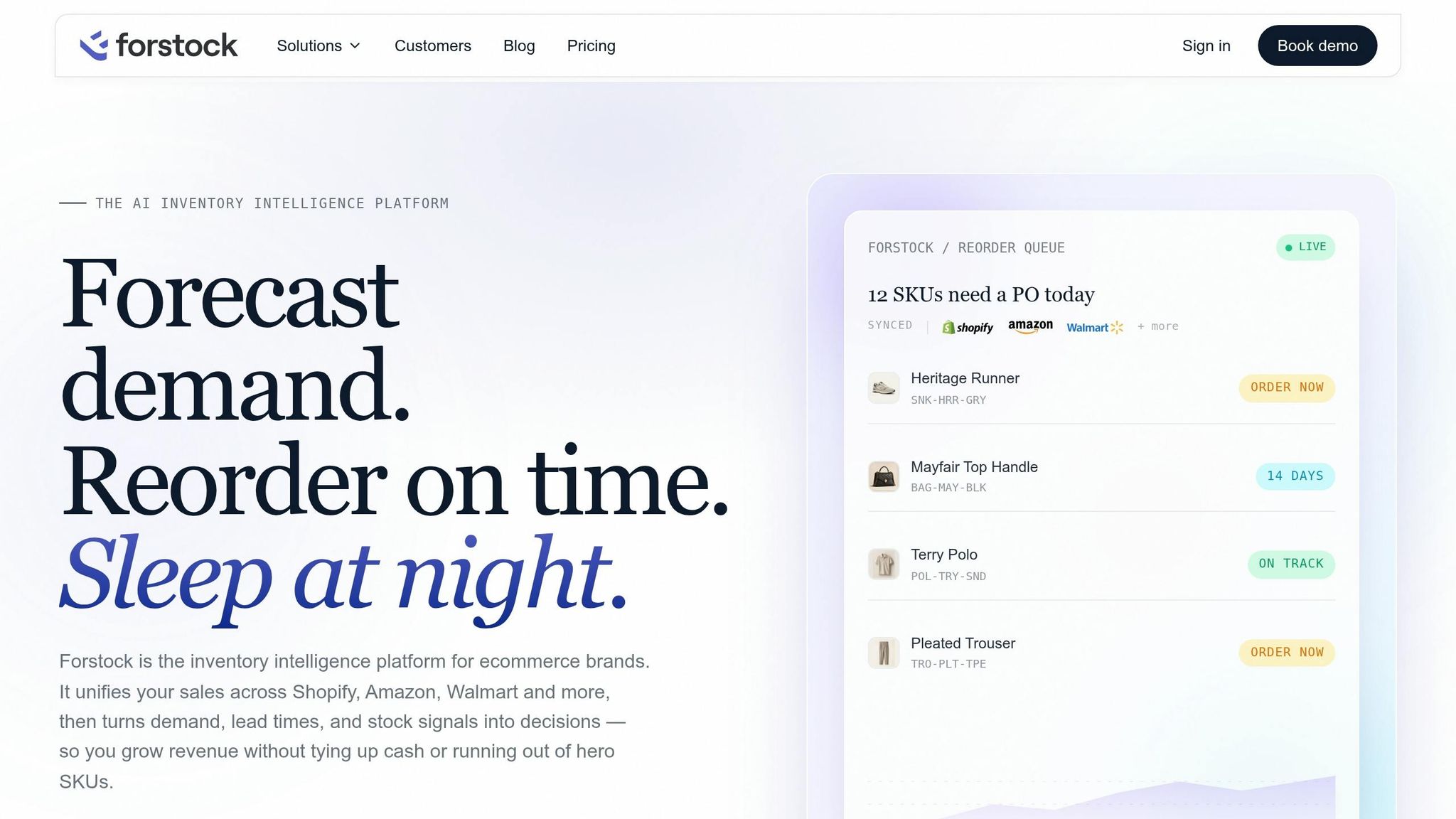
As your SKU count grows, it gets harder to manage inventory with manual checks alone. That’s where a single planning view starts to matter.
Forstock pulls Shopify sales, variant-level inventory, open purchase orders, and subscription data into one place. Then it uses that history to forecast demand by SKU over a set time window.
From there, it shows projected stockout dates, days of supply, and suggested reorder quantities based on current stock, incoming inventory, and forecasted sales. For coffee and tea brands, it can also roll up demand across variants that share a common component, such as a specific green coffee lot or a 12 oz bag. That way, upstream constraints show up before finished goods run out.
When it’s time to replenish, operators can group items by supplier - like a green coffee importer, tea blender, or packaging printer - and turn those recommendations into purchase orders directly inside Forstock. As shipments arrive, receiving is logged against the open order, which updates on-hand quantities for beans, teas, and packaging components. That keeps purchasing tied to current stock, open orders, and receipts.
Monitor inventory health, cash exposure, and next steps
Review days on hand, sell-through, aging stock, and inventory value
Once reorder points are live, move from planning into a weekly review rhythm. After replenishment starts, check the numbers every week so you can spot drift before it turns into a stockout or old inventory.
| Metric | What it measures | Target | Action if out of range |
|---|---|---|---|
| Days on hand (DOH) | How long current stock will last at the current sales pace | 15–45 days for core SKUs; 7–14 days for roasted coffee | Below minimum: move up the next roast or PO. Above maximum: slow purchasing or run a promotion. |
| Sell-through rate | % of available inventory sold in a period | 70–90% monthly for fast movers; set a separate lower target for niche SKUs | Below 30%: flag as overstock and reduce future buys. |
| Aging stock | Days since roast or receipt | Roasted coffee: flag lots older than 30 days; tea: flag stock older than 90 days | Anything past the freshness window: discount, bundle, or retire the SKU. |
| Inventory value (USD) | Cash tied up in stock (on-hand units × unit cost) | If inventory value rises faster than sales, cut future buys or discount slow stock | If slow SKUs are tying up too much cash, cut assortment or move stock through promotions. |
For green coffee, aim for 3–4 inventory turns per year to avoid quality loss. And don’t stop at finished goods. A tea brand holding 15,000 custom tins at $0.45 each has $6,750 tied up in packaging alone. That kind of component-level view helps you see where cash is sitting.
Adjust the plan when demand or supply changes
Use the first metric that breaks as your clue. It usually points to one of three problems: demand changed, supply slipped, or you bought too much.
Forecasts go stale fast. If a product starts selling better than expected, update the forecast to the new run rate. Then increase safety stock only if lead times are tight, and adjust purchase orders to match the new pace.
If a product slows down, move just as fast in the other direction. Say a flavored tea was supposed to sell 100 units per week but is only moving 40. That calls for a lower forecast, smaller future buys, and a promotion plan to clear aging stock before it loses value. In plain terms: buy less and clear slow stock sooner.
Supply issues need a different fix. If a bag supplier ships late or short, shift roast capacity toward SKUs with secure packaging. If needed, trim the lineup for a while. And if one supplier keeps missing the mark, that’s a sign to qualify a backup source instead of piling on more safety stock.
Write down the reason behind every change. A holiday spike, a soft launch, or a partial shipment might seem obvious in the moment, but that context is easy to lose later. Good notes make the next planning cycle less of a guessing game.
Key takeaways for building a repeatable inventory plan
A repeatable inventory plan for a coffee or tea brand on Shopify comes down to a few steady habits. Forecast at the SKU level using actual sales history. Split out subscription demand before sizing open stock. Then convert finished-goods demand into beans, teas, and packaging needs. Reorder points should come from lead times and safety stock targets, not gut feel.
After that, keep a close eye on Shopify inventory each week, especially on-hand, committed, and low-stock alerts, so problems show up early. Review stock weekly, reset forecasts monthly, and check seasonality plus supplier performance every quarter.
The goal isn’t a perfect forecast. It’s a plan you can change fast when demand shifts, and a workflow that keeps cash moving through inventory instead of getting stuck in aging stock. That rhythm keeps purchasing, production, and cash in sync as sales move up and down.
How We Built Standout Coffee e-commerce on Shopify
FAQs
How do I forecast demand for new SKUs with little or no sales history?
For new SKUs, there’s no sales history to work from. So instead of leaning on past demand, use estimates.
Start with a conservative buffer. A 7- to 14-day supply or a fixed 3- to 5-day buffer can help protect availability without taking on too much risk.
You can also lean on qualitative inputs at the start, such as:
- Expert opinion
- Market research
Once you have 60 to 90 days of sales data, move to more precise calculations based on actual performance. As the data set grows, review and adjust the buffer at least quarterly.
How should I handle subscriptions when planning open stock?
Treat your subscription base as a steady part of your demand forecast. Renewals tend to happen on a set rhythm, which makes them easier to plan around. That means you can time restock orders and promotions to line up with those high-conversion windows instead of guessing.
To keep your planning on track, calculate reorder points and safety stock based on your total available inventory. That includes both on-hand stock and inbound orders. Also, track subscription replenishment next to one-time purchases so you can stay in stock without tying up cash in slow-moving items.
What inventory metrics should I review every week?
Review these every week, especially for standard items or products that move fast:
- Inventory turnover
- Stockout rates
- Fill rates
- Supplier performance: on-time delivery, order accuracy, and actual vs. promised lead times
For top-performing SKUs, compare current sales velocity against reorder points and safety stock. That helps you check whether those settings still line up with recent demand and cut the risk of stockouts.
Keep reading
Try Forstock free for 14 days.
AI-powered demand forecasting and reorder automation for Shopify brands. No credit card required.