
How a Wholesale Order Should Change Your Reorder Point
Wholesale POs can double lead-time demand, update reorder points and safety stock now to avoid stockouts when channels share inventory.
How a Wholesale Order Should Change Your Reorder Point
A wholesale PO can make your current reorder point wrong overnight. If demand during lead time now includes both DTC sales and a bulk wholesale shipment, I need to recalc the trigger before stock gets tight.
Here’s the short version:
- Reorder point = lead-time demand + safety stock
- If a wholesale order ships inside the lead-time window, I add those units to lead-time demand
- If the order is one-time, I treat it as a short-term event
- If the order repeats, I build it into baseline demand
- If wholesale and DTC pull from the same stock, I may need more safety stock
- If lead times are long or stock is already low, I should move the buy trigger earlier
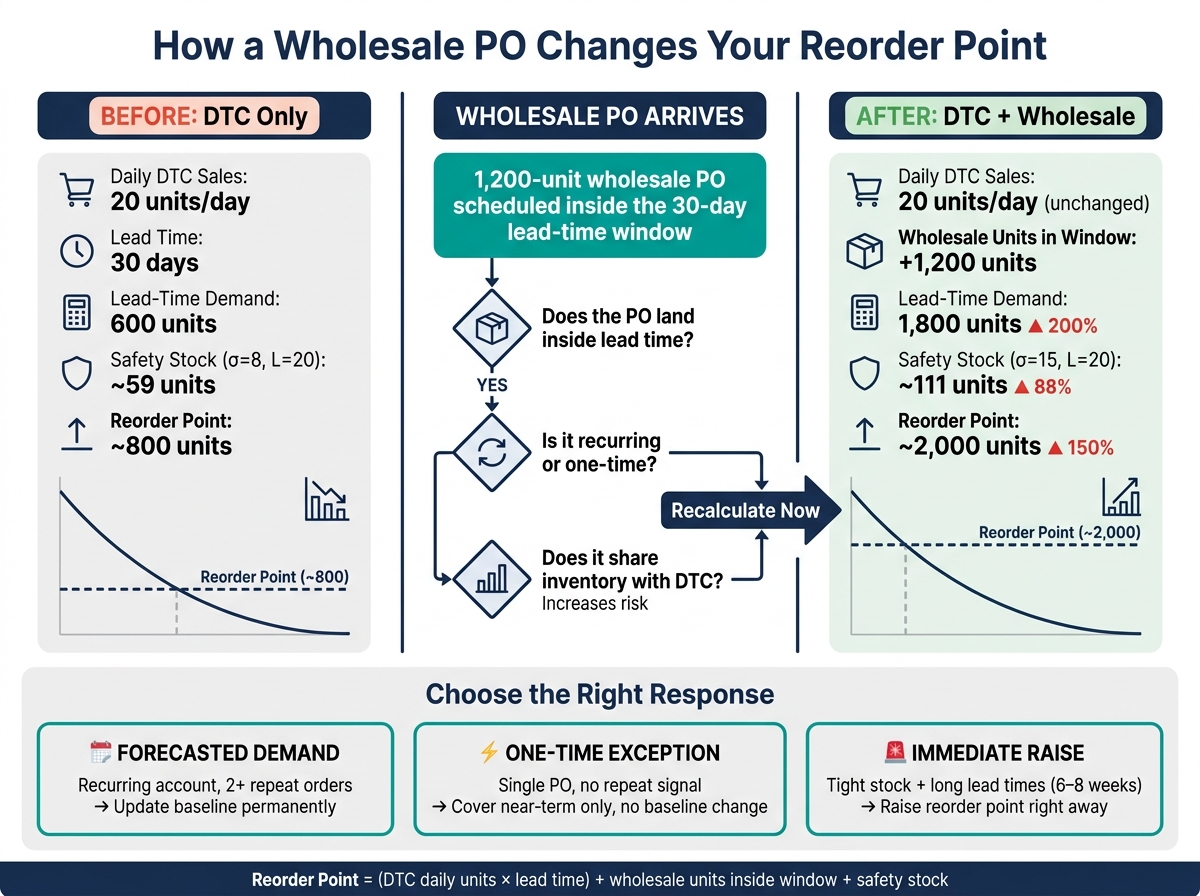
A simple example: if I sell 20 units/day, have a 30-day lead time, and get a 1,200-unit wholesale PO due inside that window, lead-time demand shifts from 600 units to 1,800 units. That is a 200% increase in lead-time demand from the old DTC-only view.
What I check next is simple:
- Does the wholesale order land inside lead time?
- Is it one-time or recurring?
- Will shared inventory make stockouts more likely?
- Do open POs and location-level stock still cover demand?
If the answer points to risk, I update the reorder point now, not after inventory drops. That is the whole point of the article: use actual future demand, not old averages, when wholesale enters the picture.
How a Wholesale PO Changes Your Reorder Point: Before vs. After
How to Automate Forecasting and Purchase Order Creation for your Shopify Store

sbb-itb-f0fc809
Step 1: Recalculate lead-time demand with wholesale included
Lead time is more than supplier ship time. It’s the full stretch from purchase order to inventory you can actually sell: production, transit to your warehouse or 3PL, and receiving. For example, 10 days to produce + 12 days to ship + 3 days to receive = 25 days. Since reorder point = lead-time demand + safety stock, this window has to be right first.
Add wholesale demand that falls inside the lead-time window
Once you know your actual lead time, the next step is simple: figure out which wholesale units will be used before the next replenishment arrives. If a wholesale PO is set to ship before your inbound receipt date, those units need to go into your lead-time demand calculation now.
The updated formula looks like this: Lead-Time Demand = (DTC daily units × lead time in days) + wholesale units that ship inside the window.
If your DTC demand is 20 units/day and your lead time is 30 days, your DTC lead-time demand is 600 units. If you also have a 1,200-unit wholesale PO scheduled to ship inside that same 30-day window, you add it straight on top: 600 + 1,200 = 1,800 units of total lead-time demand.
Add safety stock only after you total lead-time demand.
Handle a one-time PO differently from a recurring wholesale order pattern
How you treat wholesale demand after that depends on whether the order repeats.
A one-time bulk PO is a one-off event. You add the full unit count to lead-time demand for the window where it lands, but you do not permanently increase your average daily demand. Once that PO ships, the reorder point can go back to a level based on base demand, unless that account orders again.
A recurring wholesale order pattern works differently. If a partner orders 600 units every 30 days, that adds 20 wholesale units/day. In that case, add the wholesale rate to your baseline daily demand and use the combined rate in future lead-time calculations.
A worked example: one SKU, two demand sources
Using the SKU from the introduction - 20 units/day on Shopify, a 30-day lead time, and a one-time 1,200-unit wholesale PO scheduled to ship inside that window - here’s how the math changes:
| Demand Component | Units |
|---|---|
| DTC lead-time demand (20/day × 30 days) | 600 |
| One-time wholesale PO (inside lead-time window) | 1,200 |
| Total lead-time demand | 1,800 |
If the old reorder point was 800 units, the new trigger becomes 2,000 units. That’s a 150% jump caused entirely by one wholesale order falling inside the replenishment window.
After the PO ships and the account doesn’t repeat, you go back to the original baseline. If it does repeat, you rebuild the reorder point around the combined daily demand rate.
If the wholesale order also adds more variation or overlaps with Shopify sales, raise safety stock next.
Step 2: Adjust safety stock when wholesale increases risk
Once wholesale sits inside lead-time demand, the next step is simple: figure out how much extra buffer that SKU now needs. After you add wholesale units into lead-time demand, recalculate safety stock to cover the added timing risk. Wholesale can make demand harder to predict, and that uncertainty - from demand spikes, late inbound shipments, and shipment timing - is exactly what safety stock is meant to handle.
Add buffer for channel overlap and demand swings
When Shopify orders and wholesale fulfillment pull from the same inventory at the same time, total demand variability goes up, even if average daily sales barely move. A big wholesale PO can wipe out hundreds of units in one shot while Shopify keeps selling in the background. That’s the kind of pressure safety stock is there to absorb.
Recalculate safety stock using combined channel variability. A common simplified formula is Safety Stock = z × σ_d × √L, where z is your service level factor, σ_d is the standard deviation of daily demand, and L is lead time in days. For a 95% service level, z is about 1.65.
If a SKU’s daily demand standard deviation was 8 units before wholesale and climbs to 15 units after you add wholesale shipment dates, with a 20-day lead time and a 95% service level target, the change is hard to ignore:
| Scenario | σ_d | Lead Time | Safety Stock (~95% service level) |
|---|---|---|---|
| DTC only | 8 units/day | 20 days | ~59 units |
| DTC + wholesale overlap | 15 units/day | 20 days | ~111 units |
The buffer almost doubles because wholesale increases variability, not just average demand.
Raise the reorder point and move the buy decision earlier
A higher reorder point should also push the buy decision earlier. When wholesale allocations are already eating into future stock, inventory can look fine on paper while a big chunk of it is already spoken for. Say you have 600 units on hand, a wholesale shipment of 450 units going out in two weeks, and Shopify demand running at 25 units per day over a 30-day lead time. Your future consumption is 450 + 750 = 1,200 units - double what you have available. At that point, waiting for a low-stock alert means the PO is already late.
Pulling the reorder trigger forward forces the buying decision before wholesale allocations drain the buffer, not after. If the bigger buffer still doesn’t cover the risk, the next call is whether that wholesale order should be treated as forecasted demand, a one-off exception, or an immediate reason to move the reorder point up.
Step 3: Choose the right response for the order
After you recalculate lead-time demand and safety stock, don't treat every wholesale order the same. The right move depends on three things: recurrence, timing, and inventory risk.
Those three checks tell you whether the order belongs in your forecast, should stay separate as a one-off event, or calls for an immediate reorder-point change.
Treat the order as forecasted demand
Use this path when the wholesale account orders on a predictable cadence, such as monthly or quarterly, and has repeated at least twice.
At that point, the order is no longer just a blip. It's part of normal demand. Roll those wholesale units into the SKU's baseline demand, recalculate average daily demand and demand variability across both channels, and update the reorder point on a permanent basis.
A boutique retailer that sends a 200-unit PO every month isn't a spike. It belongs in the baseline demand forecast.
Isolate the order as a one-time exception
If the buyer can't confirm repeat orders, or the order is clearly tied to a promotion, keep it separate.
For example, a gift shop placing a single 500-unit holiday PO with no follow-up signal should be treated as an exception. Cover that order in your near-term buying plan, but don't let it push up the reorder threshold for the long run.
If you treat a one-off spike like normal demand, you can end up carrying too much inventory after the event.
Raise the reorder point immediately
This is the right move when stock is low, Shopify demand is still active, or supplier lead time is six to eight weeks or longer.
In that kind of setup, waiting can hurt. The longer the replenishment window, the more expensive a delay becomes. If demand keeps moving while inbound stock is still far out, you may need to lift the reorder point right away to avoid a stockout before the next shipment lands.
The table below sums up when to use each path and what changes in your planning logic:
| Response Path | When to Use | Updates baseline forecast? | Changes reorder point now? | Main Risk if Wrong |
|---|---|---|---|---|
| Forecasted Demand | Recurring account, known cadence, 2+ repeat orders | Yes | Yes | Underplanning repeat orders |
| One-Time Exception | Single PO, no repeat signal, promotional or opportunistic | No | No (short-term buy only) | Excess stock after the event |
| Immediate Raise | Tight stock, long lead times, or active DTC overlap | Optional | Yes, right away | Stockout before replenishment |
Use the path you chose here to update on-hand checks, open POs, and reorder alerts in the next step.
Apply the new reorder point in your buying workflow
Once you've picked the right response path, put it into the inventory records that drive purchasing.
Check on-hand stock, open POs, and inventory by location
Look at on-hand units, reserved stock, open POs, and inventory by location - not just company-wide totals. A company-wide total can make a local stockout easy to miss. If projected inventory at the fulfillment location drops below the reorder point before replenishment shows up, move the trigger up now.
Then check that inventory against the replenishment window. Inventory at the location is what should drive the reorder call when inbound stock will arrive too late.
Update reorder alerts and replenishment settings
Update the reorder point in Shopify, your planning tool, and the PO workflow so the new threshold actually guides buying.
Mark the change as temporary for a one-time PO or permanent for a recurring account. If wholesale volume is recurring, increase the baseline forecast so future alerts match that demand. After the first reorder cycle, review what happened:
- Did stockouts drop?
- Did POs go out earlier?
- Did fill rate improve?
- Did location-level coverage stay above the threshold during the lead-time window?
Conclusion: Keep reorder points in line with actual demand
Wholesale shifts demand, timing, and risk. Fold recurring orders into the forecast, separate one-offs, and increase reorder points right away when shared inventory and long lead times make waiting too expensive.
FAQs
How do I know if a wholesale PO belongs in baseline demand?
First, separate recurring demand from one-off events.
Baseline demand is your normal sales pace. That’s the number you use for reorder points. So if your sales history includes a one-time bulk order or a short promo spike, take those out before you use that data for planning.
If the wholesale PO is steady and easy to forecast, include it in your demand signal. If it’s a one-off, treat it as an exception. Then adjust your demand plan or reorder triggers to account for that order’s size and timing.
What if the wholesale order ships after my replenishment arrives?
If the wholesale order ships after your replenishment arrives, your current reorder point stays the same, as long as you’re tracking inventory position the right way.
Here’s why: inventory position includes:
- On-hand stock
- Inbound units from open purchase orders
That means the replenishment is already part of the count.
The main thing to watch is safety stock. It needs to cover the gap between the replenishment arrival date and the wholesale ship date.
Should I recalculate reorder points for every location or company-wide?
Reorder points should usually be calculated by location, not company-wide.
Why? Because each site can have its own sales pattern, lead time, and transfer needs. If you rely on one company-wide number, one location may end up with too much stock while another runs out.
If you operate with just one warehouse or one 3PL, a network-wide reorder point may be enough. But for multi-location businesses, it makes more sense to track demand by site so replenishment is more accurate.
Keep reading
Try Forstock free for 14 days.
AI-powered demand forecasting and reorder automation for Shopify brands. No credit card required.