
Planning Inventory Across Shopify, Amazon, and Faire
Use one SKU map, shared inventory, a unified forecast, and weekly reviews to prevent stockouts and overbuying across Shopify, Amazon, and Faire.
Planning Inventory Across Shopify, Amazon, and Faire
If I plan Shopify, Amazon, and Faire separately, I’m planning the same stock three times. That’s how stockouts and overbuying happen.
The fix is simple: I use one SKU map, one shared inventory view, one demand forecast, and one weekly reorder process across all three channels. That means I buy based on total demand, reserve units for confirmed wholesale orders, keep extra buffer for Amazon, and review inbound POs before they turn into late receipts or missed sales.
Here’s the whole article in plain English:
-
Map every listing to one internal SKU
- Link Shopify variant IDs, Amazon seller SKUs and ASINs, and Faire product IDs
- Split pack sizes into their own SKUs
- Use barcode, unit of measure, dimensions, and weight to keep records clean
-
Track one inventory pool by location
- Watch on hand, available, committed, inbound, and reserved
- Treat Amazon FBA as its own location with translated status rules
- Plan from available-to-sell, not raw on-hand stock
-
Build one forecast per SKU
- Pull about 12–18 months from Shopify
- Pull about 18–24 months from Amazon
- Pull about 12–24 months from Faire
- Combine them into one weekly SKU history
- Use this blend: 0.5 × 7-day average + 0.3 × 30-day average + 0.2 × 90-day average
-
Set channel stock rules
- Reserve confirmed Faire POs first
- Hold a core buffer for Shopify
- Keep a larger buffer for Amazon, where stockouts can hurt ranking and sales
-
Calculate reorders from shared demand
- Reorder point = (average daily demand × supplier lead time) + safety stock
- Correct Amazon stockout periods so zero sales don’t lower the forecast by mistake
- Fold MOQs into order timing and order size
-
Run a weekly buying review
- Check days of cover by SKU and channel
- Review inbound POs and expected receipt dates
- Catch late shipments before they create stockouts
- Compare forecast vs. actual sales and adjust the baseline if needed
A simple example: if I have 2,000 units on hand, 300 committed, 200 reserved, and 1,000 inbound due 09/15/2026, I should plan from 1,500 available units today, not 2,000. That one change can stop bad channel decisions.
The main point is this: one item needs one plan, even if I sell it in three places.
Build one SKU and inventory source of truth
Before you forecast or reorder with any confidence, you need one clean record for every SKU across Shopify, Amazon, and Faire. If you skip this step, demand gets split by channel, and stock numbers stop telling the truth.
Create a master SKU map across all listings
Each physical item should have one internal SKU that connects all of its channel IDs. In plain English, that means one record linking:
- Shopify variant IDs
- Amazon seller SKUs and ASINs
- Faire product and variant IDs
When a sale comes in, it should update one internal SKU record, not a separate record for each channel.
This matters more than it may seem at first. The same item can show up as Tumbler 12oz – Blue on Shopify, Blue Tumbler 12 oz on Amazon, and something else on Faire. If those listings aren't tied back to one internal SKU, your sales history gets split into pieces.
Pack sizes can also cause trouble. A 3-pack on Amazon is not the same as a single unit, so it needs its own internal SKU plus a conversion rule.
A simple master SKU table should store your internal ID along with each channel identifier, the UPC or EAN barcode, pack size, unit of measure (each, inner pack, case), dimensions in inches, and weight in pounds. The barcode gives you a clean gut-check: one barcode, one product configuration.
Once the SKU map is set, you can track inventory by location as one shared pool.
Track one shared inventory pool by location
After each listing maps to one SKU, track inventory by location as one shared pool across your main warehouse, any 3PLs, and Amazon FBA. Each location follows its own inventory status rules, but all of them should feed one available-to-sell number per SKU. That's the number that should drive allocation and reorder points.
For each SKU and location, track five statuses:
- On hand: physical stock at that location
- Available: on hand minus committed and reserved
- Committed: tied to open, unshipped orders
- Inbound: on purchase orders or in transit, with expected arrival dates in MM/DD/YYYY format
- Reserved: held for wholesale POs, promotions, or key accounts
Here's what that looks like in practice. A SKU might show 2,000 units on hand at your warehouse, with 300 committed to open Shopify and Faire orders, 200 reserved for a wholesale account, and 1,000 inbound arriving 09/15/2026. That leaves 1,500 available. That's the number your channel decisions should use, not the raw on-hand count.
Amazon FBA needs its own note here. Once inventory is checked in at an Amazon fulfillment center, Amazon controls it. In Amazon's system, inventory may appear under statuses like available, reserved, or inbound to FC. Those don't line up neatly with your internal categories. The fix is simple: treat FBA as its own location with its own rules, then translate Amazon's status codes into your internal schema so your numbers stay lined up.
Use Forstock as the planning layer
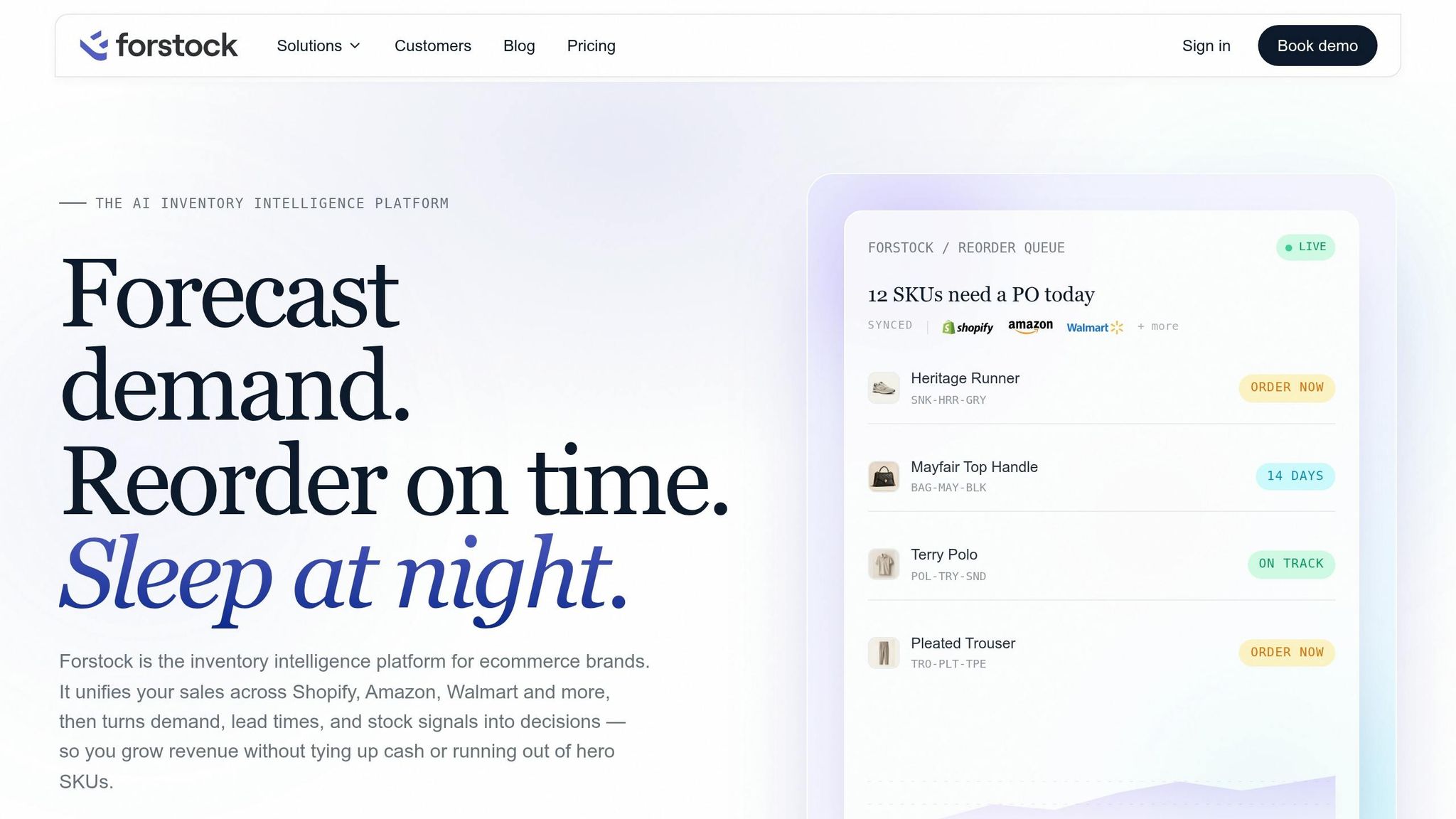
Spreadsheets can handle a master SKU map and shared inventory pool in the early days. But once you add more SKUs, more locations, and more channels, they get hard to keep current. Data goes stale fast, and one missed update can throw your whole plan off.
Forstock connects directly to Shopify, Amazon, and Faire, pulling sales and inventory data into one place and organizing it around your internal SKU structure. Product attributes, channel IDs, inventory statuses by location, supplier lead times, and open purchase orders sit in one system. That gives your team current data for forecast, allocation, and reorder work.
With one source of truth in place, you can combine Shopify, Amazon, and Faire demand into a single forecast.
sbb-itb-f0fc809
Combine channel demand into one SKU forecast
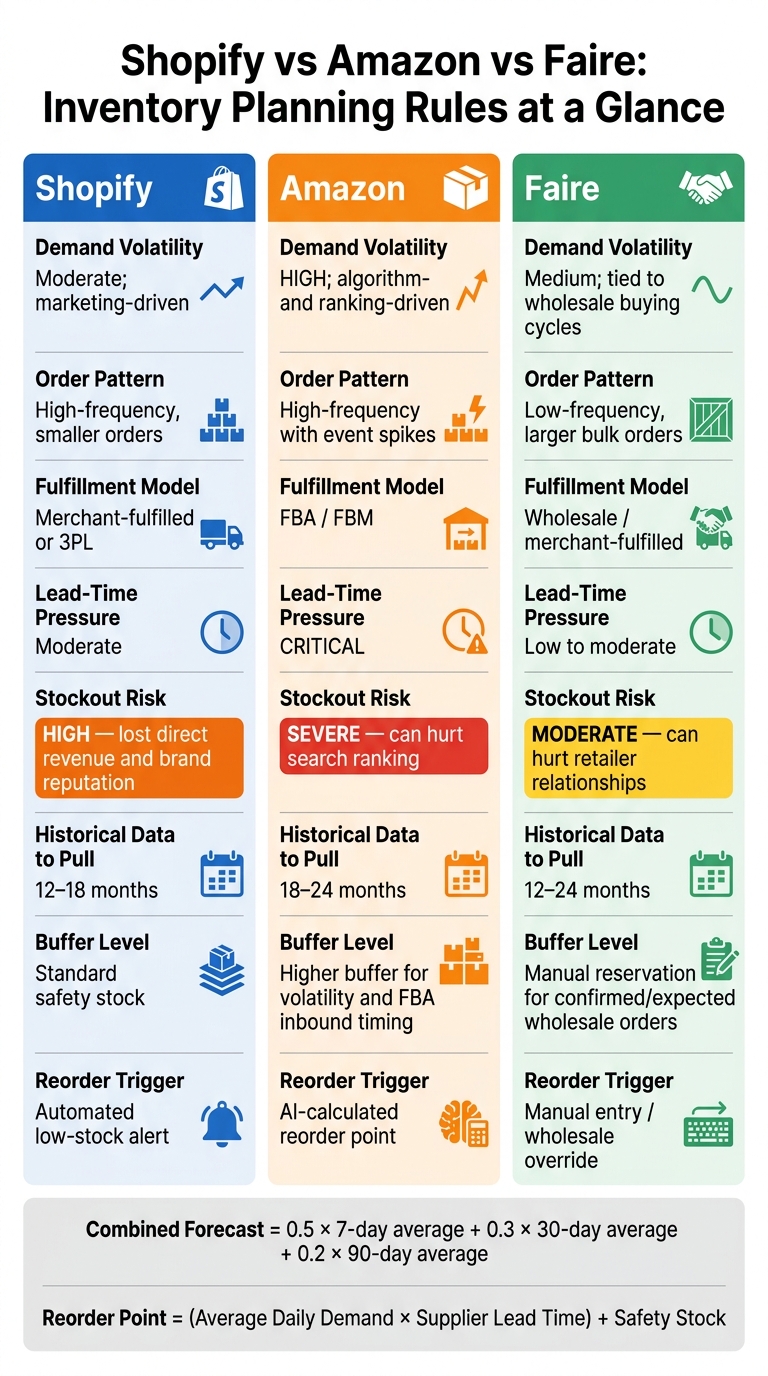
Shopify vs Amazon vs Faire: Inventory Planning Rules at a Glance
Once your SKU map and shared inventory pool are set, roll Shopify, Amazon, and Faire demand into one forecast per SKU. Don’t run three separate forecasts and hope they line up later. The goal is one buy signal for each SKU, built from the same internal SKU IDs and location data in your inventory source of truth.
That means you forecast from one SKU-level demand history, not three channel plans living in silos.
Pull historical demand from Shopify, Amazon, and Faire

For Shopify, pull 12–18 months of completed orders at the SKU level. Mark weeks with major promotions, influencer drops, or site-wide discounts as promotion spikes rather than normal demand.
For Amazon, pull 18–24 months of history. If a SKU went out of stock, fix those periods before sending the data into the forecast. Otherwise, zero sales can hide real demand and drag the forecast down.
For Faire, pull 12–24 months of wholesale orders by retailer, order frequency, and average order size. Pre-book orders and seasonal programs should be modeled as scheduled, irregular demand.
After you export SKU-level order history from each channel, build one weekly time series per SKU with:
- Shopify units
- Amazon units
- Faire units
- Total units
Then apply a weighted velocity blend:
0.5 × 7-day average + 0.3 × 30-day average + 0.2 × 90-day average
This gives more weight to recent movement without letting one short spike run the whole plan.
Reconcile top-down revenue goals with bottom-up SKU demand
Start with channel revenue goals, divide by average selling price, and allocate units to SKUs based on historical mix. This is where ops, finance, and sales need to be on the same page.
If a revenue target says you need to sell 5x a SKU’s historical volume, there should be a clear reason behind it. No new ad spend, no expanded distribution, no new accounts? Then that gap needs a conversation before it turns into a purchase order.
Some SKUs can support higher growth assumptions. For example, a new Amazon keyword campaign with tested ROAS or three new wholesale accounts on Faire can justify a step-up in volume. If that support isn’t documented, stay close to historical demand.
Compare channels before finalizing the forecast
Before you lock anything in, look at how each channel behaves. They don’t move the same way, and that affects how much buffer you need.
| Channel | Demand Volatility | Order Pattern | Fulfillment Model | Lead-Time Pressure | Stockout Risk |
|---|---|---|---|---|---|
| Shopify | Moderate; marketing-driven | High-frequency, smaller orders | Merchant-fulfilled or 3PL | Moderate | High - lost direct revenue and brand reputation |
| Amazon | High; algorithm- and ranking-driven | High-frequency with event spikes | FBA / FBM | Critical | Severe - can hurt search ranking |
| Faire | Medium; tied to wholesale buying cycles | Low-frequency, larger bulk orders | Wholesale / merchant-fulfilled | Low to moderate | Moderate - can hurt retailer relationships |
Amazon usually needs the most conservative buffer. A stockout there can hurt search ranking, and sales may take a few days to recover after you restock. Use this table to set channel-level safety stock rules inside the shared SKU forecast.
This forecast should then feed stock allocation and reorder decisions.
Set stock allocation, reorder points, and replenishment timing
Use the combined forecast to set SKU-level allocation, reorder points, and replenishment timing.
Assign channel-aware stock by SKU
Start with allocation, then turn that into reorder rules.
Reserve confirmed Faire POs first. Then protect a core Shopify buffer. Keep Amazon buffers higher, since marketplace demand can swing faster. Base each allocation on available-to-sell by SKU and location, not raw on-hand counts. And keep confirmed wholesale units out of open-to-sell stock until they ship.
Calculate reorder points and safety stock from shared demand
Once SKU allocations are set, turn them into replenishment triggers.
Use stockout-adjusted demand across all three channels. Build reorder points from that shared demand, keep Amazon buffers higher, and reserve wholesale units for confirmed Faire orders.
Reorder point = (average daily demand × supplier lead time) + safety stock
If a SKU hit zero for two weeks on Amazon, those two weeks of zero sales are a data gap, not a sign that demand vanished. Forstock spots those stockout gaps and rebuilds what you would have sold, so you plan against real demand, not the ceiling your inventory set. If you run your reorder point off uncorrected data, you'll under-order in the next cycle.
Replenishment rules by channel: a reference table
Use these channel rules as the default, then adjust for lead time and sales velocity.
| Channel | Buffer / Safety Stock | What to hold back | Reorder Trigger |
|---|---|---|---|
| Shopify | Standard safety stock based on AI-predicted daily demand | Protects core DTC availability | Automated low-stock alert |
| Amazon | Higher buffer to guard against volatility and marketplace spikes | Accounts for FBA inbound timing | AI-calculated reorder point |
| Faire | Manual reservation based on confirmed or expected wholesale orders | Reserves units ahead of seasonal wholesale peaks | Manual entry / wholesale override |
Fold MOQs into purchase quantities and timing so replenishment stays workable.
Run a weekly planning cycle and update purchasing decisions
Once your reorder points and MOQs are in place, a fixed weekly review turns those numbers into actual purchase orders.
Review stock risk, inbound orders, and forecast accuracy
Use the same checklist every week. Start with days of cover by SKU and channel. Flag anything below its reorder point, and pay close attention to Amazon FBA listings and your top-revenue SKUs. A stockout there can slow sales and hurt organic ranking.
Then review your inbound PO pipeline. Check that expected receipt dates still look realistic. Make sure ordered quantities still line up with updated demand. And assign inbound units to the right channels. If a PO now looks likely to arrive after a projected stockout date, you need to act. That could mean expediting the order, splitting the shipment, or pausing promotions until the next receipt lands.
Finish by checking forecast accuracy. For your highest-priority SKUs, compare forecasted demand with actual sales. If you keep over-forecasting, excess inventory is probably building up. If you keep under-forecasting, low-stock alerts will keep showing up. In both cases, the fix is to adjust the baseline forecast, not only the safety stock.
Then shift from spotting risk to placing orders.
Use Forstock to turn data into purchase orders
This review should help you make purchase decisions, not force you to rebuild reports from scratch. Forstock brings together on-hand, reserved, and available-to-sell inventory across Shopify, Amazon, and Faire in one live view. That means your team can work from the same forecast data, reorder points, inbound POs, and allocation rules in a single session.
From there, Forstock shows projected stockouts, flags SKUs at or below safety stock, and builds a ranked replenishment list with order quantities, latest order dates, and projected stockout dates. You review the list, approve the lines you need, and group them by vendor into purchase orders in the same session. Once orders are placed, the inbound pipeline updates, so next week’s review already includes what’s on the way.
Conclusion: Keep one plan, not 3 separate ones
One shared forecast, one reorder rule set, and one weekly review keep Shopify, Amazon, and Faire on the same plan.
FAQs
How do I handle bundles and multipacks across channels?
Don’t rely on the bundle SKU by itself. Map every bundle SKU to the component SKUs inside it, then sync or deduct inventory at the component level. That way, Shopify and Amazon show stock based on what you can actually ship, which helps you avoid inventory black holes.
When you roll up demand across channels, count bundle sales as component demand. A bundle doesn’t just sell one item on paper - it also consumes each part inside that bundle. Your reorder points and safety stock should reflect that combined component usage across all channels.
It also helps to factor in channel-level lead times and order quantities. Then adjust those numbers to fit supplier MOQs and case packs, so your replenishment plan matches how inventory moves in practice.
What should I do if one channel keeps selling faster than the others?
If one channel keeps selling faster than the rest, don't divide inventory evenly across every platform. Put stock where the sales are. For example, if Amazon brings in 50% of your total sales, send about 50% of your inventory there.
Check sales data often, then move inventory from slower channels to the ones that sell through faster. Real-time inventory updates help cut down on stockouts, excess stock, and overselling.
How often should I update my SKU forecast and reorder points?
Update them on a set schedule. For most SKUs, especially fast-moving or seasonal products, review them weekly. Slower-moving items with steady demand may only need a monthly check. If you use automation, you can reforecast daily or weekly.
You should also do a full review of safety stock and reorder points when you change suppliers, run into frequent stockouts or overstock, or head into peak periods like Q4. For top-performing items, check these settings at least every 90 days.
Keep reading
Try Forstock free for 14 days.
AI-powered demand forecasting and reorder automation for Shopify brands. No credit card required.