

Managing inventory across multiple sales channels can be challenging but essential for avoiding costly issues like overstock or stockouts. These problems cost retailers nearly $1 trillion annually and lead to lost sales and damaged customer trust. To improve efficiency, reduce errors, and increase profitability, businesses must adopt a centralized inventory management system and clearly define team roles. Here’s what you need to know:
- Centralized Systems: Use a single platform to track inventory in real time across all locations and channels, ensuring everyone works with the same data.
- Defined Roles: Assign clear responsibilities for tasks like purchasing, stock availability, and warehouse management to avoid duplication or missed steps.
- Automation: Automate tasks like manual vs. automated purchase orders and stock updates to save time and reduce errors.
- Training: Equip teams with the skills to use inventory systems effectively and maintain accuracy.
- Standardized Processes: Establish clear procedures for inventory tracking, auditing, and supplier communication while allowing flexibility for local needs.
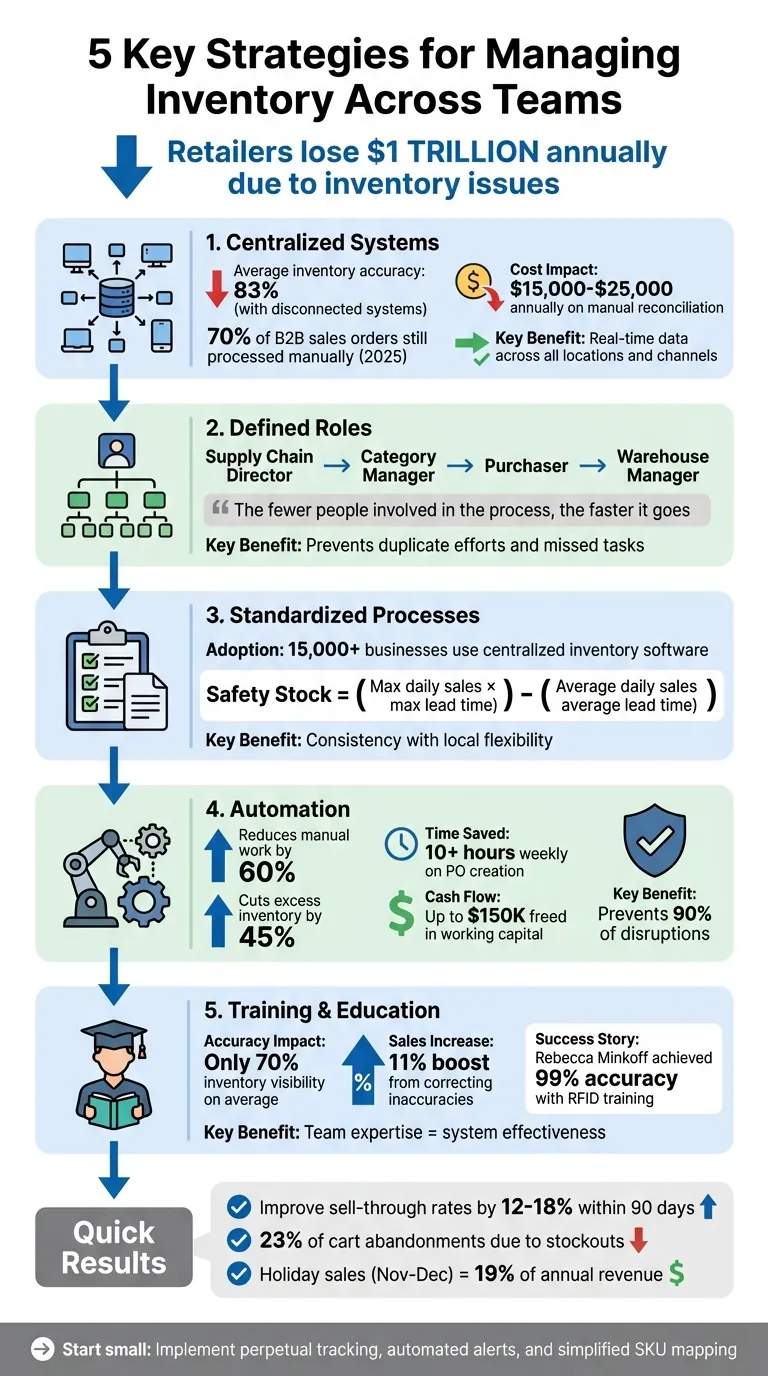
5 Key Strategies for Managing Inventory Across Teams
Better Inventory Management using Microsoft Teams - CART - Aug 2021

sbb-itb-f0fc809
Set Up a Centralized Inventory System
When teams rely on disconnected spreadsheets, inventory accuracy takes a hit. On average, enterprise teams achieve just 83% inventory accuracy, with some companies dipping as low as 67%. This discrepancy leads to real headaches: duplicate orders, phantom inventory, and unhappy customers who find items out of stock at checkout.
A centralized inventory system serves as a "control tower", giving everyone - from warehouse staff to purchasing managers - access to the same real-time data across all locations and sales channels. This shared view eliminates the guesswork and manual reconciliations. Take Broonson International, for example. In early 2026, this global food trading company was drowning in manual data entry and scattered spreadsheets. By adopting a centralized platform to unify inventory, documentation, and task tracking, they saved over 8 hours per week in lost productivity and regained control over their order lifecycle.
Beyond improving workflow, centralized systems can save a lot of money. As of early 2025, 70% of B2B sales orders were still processed manually, costing teams between $15,000 and $25,000 annually on tasks like inventory reconciliation and spreadsheet updates. By connecting your ERP, warehouse management system, and e-commerce platforms into one system, you can streamline operations and reduce inefficiencies.
Benefits of a Unified Inventory Platform
Centralized inventory management brings tangible benefits across the board. Three key advantages stand out: visibility, accountability, and speed. With all inventory data in one place, silos disappear, and every department - whether it's purchasing or customer service - operates with the same up-to-date information.
Real-time synchronization is a game-changer. For instance, if the last unit of a product sells on one channel, the system immediately updates all other channels. This prevents overselling and builds customer trust.
Centralized systems also track activity history, showing who made changes and when. This transparency enhances security and gives managers insights into team actions without micromanagement. Plus, unified data supports predictive planning. By analyzing past sales, seasonal trends, and lead times, you can anticipate inventory needs, helping brands improve sell-through rates by 12–18% within just 90 days.
Key Features to Look for in an Inventory Management Tool
To ensure smooth collaboration and efficient operations, choose a tool with these essential features:
- Real-Time Synchronization: Look for systems that update inventory across all sales channels within 30–60 seconds, especially for fast-moving products. This is crucial during peak sales periods to avoid overselling.
- AI-Powered Demand Forecasting: Spreadsheets can't handle complexities like seasonality or promotional demand spikes. Opt for platforms that use historical data to predict reorder points while filtering out anomalies like one-off promotions.
- Automated Purchase Order Creation: The system should automatically generate, split, and track purchase orders based on sales data and supplier lead times.
- Shopify Integration: Tools like Forstock are tailored for Shopify merchants, offering a unified dashboard to track stock levels, manage suppliers, and monitor performance across multiple locations. Forstock can reduce manual inventory tasks by 60%.
- Additional Features: Multi-warehouse inventory optimization, mobile access (including barcode scanning), and customizable reports are must-haves. Features like linking product images to SKUs can also help avoid mix-ups between similar items.
| Feature | Benefit for Teams | Priority Level |
|---|---|---|
| Real-Time Sync | Prevents overselling and reduces customer issues | Critical |
| AI Forecasting | Improves cash flow and eliminates guesswork | High |
| Automated POs | Cuts down on admin work and human error | High |
| Multi-Location Support | Provides visibility into stock across locations | Medium-High |
| Supplier Tracking | Tracks supplier performance and lead times | Medium |
Define Roles and Responsibilities
Centralizing your inventory system is just the first step. To make it work, you need to define clear roles and responsibilities. Without this clarity, teams can either duplicate efforts or completely miss critical tasks. And the stakes are high - retailers lose about $1.1 trillion globally each year due to overstock and out-of-stock situations.
A key part of effective inventory management is appointing a Supply Chain Director. This person oversees the entire process, ensures communication across departments, and aligns decisions. Below this role, responsibilities should be divided clearly. For example, category managers handle assortment planning and margins, while purchasers focus on stock availability and turnover management. Combining these roles often leads to confusion and conflicting goals.
For smaller teams, consider assigning responsibilities by category, supplier, or region. This approach allows team members to develop expertise in specific areas. As Helen Kom, Inventory Optimization Product Director at Leafio, explains:
"The fewer people are involved in the process, the faster it goes".
Avoid placing purchasing under logistics. Logistics teams often prioritize large, infrequent orders to cut transport costs, while purchasers need smaller, more frequent orders to maintain stock levels and avoid lost sales. Clearly defined responsibilities are the backbone of an effective inventory management system.
Create an Inventory Management Structure
To avoid confusion and inefficiency, map out a structured plan for who handles what. A clear framework prevents duplicate orders and ensures every task is accounted for. Here’s a breakdown of the key roles and their focus areas:
| Role | Primary Focus | Key Performance Indicators (KPIs) |
|---|---|---|
| Supply Chain Director | Cross-departmental coordination | Overall profitability, supply chain efficiency |
| Category Manager | Assortment planning, market trends | Sales, margins, inventory turnover |
| Purchaser | Stock availability, execution | Balanced availability and turnover rates |
| Warehouse Manager | Physical stock, order fulfillment | Fulfillment speed, stock accuracy, capacity usage |
When setting KPIs for purchasers, avoid focusing solely on turnover or availability. Measuring just one can lead to stockouts or overstocking. Instead, balance both metrics to encourage smart inventory decisions.
Centralizing inventory decisions at your main office can also help maintain consistency. For example, when Weebot centralized its system across four service centers in November 2025, Operations Director Pierre Asteix noted that real-time visibility allowed the team to efficiently locate products and manage transfers.
With roles clearly defined, the next step is to ensure everyone stays accountable.
Set Up Accountability Mechanisms
Clear responsibilities are only effective if backed by strong accountability. Role-based permissions in your inventory software are a great place to start. Managers can generate reports and track inventory across locations, while floor staff should have limited access to stock views. Every change should be logged with a timestamp, user ID, and reason code to make it easy to trace discrepancies.
On average, retailers only maintain accurate inventory visibility 70% of the time. However, regular audits can boost sales by as much as 11% by resolving discrepancies.
To streamline accountability, use ABC analysis. This method prioritizes high-value items ("A" items) for weekly counts, mid-value items ("B" items) for monthly counts, and low-value items ("C" items) for quarterly checks.
Automated alerts can also help keep everyone on track. For example:
- Warehouse managers receive alerts for physical stock issues.
- Channel managers monitor sell-through rates.
- Purchasing managers get notifications about reorder points.
Platforms like Forstock can automate these alerts, reducing time spent on routine tasks and allowing your team to focus on strategic decisions.
Standardize Processes with Flexibility for Local Teams
Once roles are clearly defined, it's time to establish processes that work across the entire company while leaving room for local customization. Centralized inventory software has become a go-to solution for over 15,000 businesses worldwide, helping them manage assets across multiple locations. The goal is to find the right balance - maintaining consistency across systems while giving local teams the flexibility they need.
These standardized processes are built on the foundation of defined roles. The idea is to ensure uniformity in critical areas, like inventory tracking and auditing, while still allowing local teams to adapt to their specific market conditions, customer needs, and operational setups.
Develop Standard Operating Procedures (SOPs)
A strong SOP framework is essential for standardizing core processes like inventory check-in, auditing, and supplier communication. For example, requiring automated scanning methods - such as barcodes or QR codes - for receiving shipments can significantly reduce manual errors.
Introduce a structured inventory maintenance schedule that outlines specific tasks to be completed daily, weekly, monthly, and quarterly. This might include daily stock checks, weekly cycle counts for high-value items, and quarterly audits for slower-moving products. By following these schedules, teams can maintain consistency across locations. Additionally, real-time perpetual inventory tracking should be a standard part of all branches' operations, integrated directly into the core SOPs.
When it comes to reorder points, avoid applying a blanket policy. Instead, use regional sales data to set thresholds and safety stock levels tailored to each warehouse. A helpful formula for this is:
(Maximum daily sales × maximum lead time) – (Average daily sales × average lead time). This approach ensures that stock levels are optimized for the unique needs of each location.
Balance Standardization and Local Adaptation
Standardization doesn't mean forcing a one-size-fits-all solution. After establishing core processes, allow regional teams to adapt based on market demands, seasonal variations, and customer behavior. For instance, a "Push" strategy might work well for predictable seasonal products, while a "Pull" strategy is better suited for items with unpredictable local demand.
Local managers should have the autonomy to optimize warehouse layouts. By using ABC analysis, they can identify fast-moving items and position them closer to shipping areas, cutting down on picking and packing times. Additionally, enabling inter-warehouse stock transfers can help address regional stock imbalances effectively.
Pierre Asteix, Operations Director at Weebot, highlights how this balance works in real life:
"Shopify POS gives us real-time visibility into stock and operations. Our team can see exactly where a product is and manage transfers easily, which has been essential for running four service centers smoothly."
Tools like Forstock support this approach by offering centralized visibility while automating alerts based on regional sales trends. You can also automate safety stock with AI to further refine these thresholds. This keeps local teams informed and empowered without the need for constant oversight.
Use Automation to Improve Efficiency
Once centralized systems and clear roles are in place, automation can take efficiency to the next level. Manual inventory tasks are not only time-consuming but also prone to errors. By automating these processes, businesses can cut manual inventory work by at least 60%, freeing up teams to focus on strategic decisions instead of tedious data entry tasks. Automation doesn’t just save time - it also reduces excess inventory by up to 45%, streamlining supplier coordination and improving order accuracy. Tasks like stock updates, reorder calculations, and communications with suppliers can be handled by automated systems, all while providing real-time visibility across locations. With everyone accessing the same live data, team coordination becomes much smoother.
Set Up Automated Alerts and Notifications
Automated alerts are a proactive way to prevent small issues from escalating into bigger problems. Instead of static reorder points, modern systems use intelligent thresholds that adapt to factors like sales velocity, seasonality, and supplier lead times. For instance, a low-stock warning triggered when inventory drops to around 20% ensures timely action.
To make these alerts effective, deliver them through tools your teams already use, such as Slack, email, or mobile apps. Role-based notifications can direct specific alerts to the right people: warehouse staff get low-stock warnings, procurement teams receive reorder notifications, and managers are alerted if no action is taken within 24 hours. Testing thresholds on a few pilot SKUs using historical sales data can prevent up to 90% of disruptions without overwhelming your team. Aim for teams to respond within 2 hours to critical alerts to maintain optimal stock levels.
With alerts keeping teams proactive, the next logical step is simplifying order management.
Automate Purchase Orders and Supplier Management
Automating purchase orders (POs) is another game-changer, using real-time data to improve supplier management. Automation can reduce PO processing time from days to just minutes. Systems can generate orders automatically based on demand forecasts, factoring in lead times, freight costs, and duties for accurate cost breakdowns. Bulk orders? No problem - templates or CSV imports eliminate data entry errors.
Alexander, a Supply Chain Manager at FashionCo, shares: "The automated PO creation saves us 10+ hours weekly. Setup was seamless - just 2 minutes!".
Jason, Co-founder at HomeGoods, adds: "We reduced excess inventory by 45% and freed up $150K in working capital".
Platforms like Forstock streamline this entire workflow. The system uses AI-driven demand forecasting to generate POs, tracks live order statuses and payments in a single dashboard, and syncs inventory levels across Shopify once goods are received. This eliminates the need to dig through emails or update multiple spreadsheets manually.
Daniel, a Supply Chain Manager, explains: "It is the first tool that actually bridges inventory management and purchasing instead of forcing us to hack things together".
For maximum efficiency, aim to automate 90% of purchase orders, reserving manual intervention for exceptional cases. This level of consistency ensures that all team members have real-time visibility into expected deliveries and supplier performance, reducing miscommunications and preventing stock imbalances.
Train and Educate Your Team
An inventory system is only as good as the people using it. On average, retailers have accurate inventory visibility just 70% of the time. Research involving 24,000 SKUs found that correcting record inaccuracies through audits led to an 11% increase in sales. The takeaway? While technology plays a role, the real key lies in equipping your team with the knowledge and skills to maintain reliable inventory data.
Onboard New Team Members
When bringing in new hires, onboarding should go beyond the basics of software navigation. Start by emphasizing the importance of treating your Inventory Management System (IMS) as the single source of truth for all stock-related data. Training should cover critical concepts like SKU mapping, FIFO (First In, First Out), LIFO (Last In, First Out), and ABC analysis. These tools ensure accurate tracking, efficient returns management, and better decision-making.
New team members also need to understand how your IMS integrates with both online and in-store operations. This includes learning how to reconcile physical stock counts with system records, handle automated alerts (e.g., low-stock warnings), and troubleshoot sync issues. For example, proper SKU mapping ensures that internal SKUs, supplier SKUs, and identifiers like ASINs or Variant IDs align seamlessly across platforms.
Returns processing is another area where standardization matters. Teach staff to sort returns within 24 hours and label them as "Resell", "Rework", or "Write-off" immediately. This minimizes delays and keeps the inventory system accurate.
A real-world example? Fashion retailer Rebecca Minkoff implemented RFID technology to track inventory upon arrival. By training their staff to use these RFID tags effectively, they achieved an impressive 99% accuracy in their inventory system.
After onboarding, continuous education ensures that your team stays up to date with system updates and best practices.
Provide Ongoing Training and Support
Initial training is just the beginning. Regular, ongoing training is essential to maintain accuracy and build expertise. For instance, cycle counts and inventory audits can highlight recurring issues like theft or miscounts, creating opportunities for targeted training to address these problems. Tailor training to specific roles - floor staff should focus on scanning and stock management, while managers need to dive deeper into reporting and demand forecasting.
It’s smart to prioritize training around "A items" - the 20% of SKUs that drive 80% of your revenue. Monthly reviews comparing forecasted demand to actual sales can help your team adapt to changing trends. Since holiday sales in November and December typically contribute about 19% of a retailer’s annual revenue, consider specialized seasonal training to prepare your team for peak periods.
"With Shopify Plus, we have our point-of-sale and ecommerce systems under one umbrella, which serves our ultimate purpose of being an omnichannel retailer and viewing the customer as one customer - no matter where they shop with us." - Travis Boyce, Head of Global Retail Operations, Allbirds
Lastly, embrace mobile-first learning tools. Equip staff with handheld scanners and cloud inventory tools for real-time, hands-on training. Whether it’s verifying shipments against purchase orders, integrating sales into the POS system, or managing returns, this approach ensures team members learn in the context of their day-to-day tasks.
Conclusion
Managing inventory across teams is all about blending the right technology with strong collaboration and consistent training. The stakes are high - retailers worldwide lose nearly $1 trillion annually due to inventory distortion, and about 23% of cart abandonments happen because customers find items out of stock at checkout. These numbers highlight why teamwork and coordination are non-negotiable.
The five key strategies discussed - centralized systems, clear role definitions, standardized processes, automation, and ongoing training - are essential for creating a unified approach to inventory management. When everyone works from the same data and follows streamlined workflows, the benefits are clear: fewer hours spent on manual tasks, lower operational costs, and better efficiency across the board. Even small, focused changes can deliver meaningful improvements.
Industry experts agree on the importance of a centralized approach:
"A centralized inventory can streamline your inventory channel, saving you time." - Jacquie Young-Sterling, Director of Customer Experience, Compliantia
You don’t need to overhaul everything at once. Start small - introduce perpetual tracking for real-time inventory updates, set up automated alerts for low-stock items, and simplify SKU mapping to reduce manual errors. Studies show that brands adopting robust omnichannel inventory systems often see sell-through rates improve by 12% to 18% within just 90 days.
For Shopify brands looking to take advantage of these strategies, Forstock offers tools like AI-powered demand forecasting and automated purchase order creation starting at $79/month. By centralizing supplier communication and providing 12-month demand forecasts, Forstock helps streamline operations, cut down on wasted hours, and improve cash flow. With these tools, your team can shift its focus from day-to-day inventory struggles to long-term growth. Effective inventory management turns disconnected teams into a synchronized force working toward shared goals.
FAQs
What’s the best first step to centralize inventory across teams?
To get started, consider using a unified inventory tracking system that brings all your stock data together in one place. Tools like Forstock can handle tasks such as automating purchase orders, predicting demand, and syncing inventory across multiple sales channels. This approach ensures that every team has access to real-time inventory updates. By centralizing tracking, you can minimize errors, improve teamwork, and maintain a clear overview of stock levels across warehouses and fulfillment centers.
How do we split inventory responsibilities without creating silos?
To manage inventory effectively without creating isolated teams, it's important to define clear roles while emphasizing shared objectives. This balance encourages accountability while fostering teamwork. Using centralized tools like Forstock can help by offering real-time visibility and improving communication across departments.
Additionally, holding regular cross-team meetings and implementing integrated workflows can enhance coordination. These practices allow departments to collaborate smoothly and avoid working in silos, ensuring decisions are made collectively for better inventory management.
Which inventory tasks should we automate first to prevent stockouts?
To avoid stockouts, consider automating key inventory tasks. This includes setting reorder points, monitoring sales trends, and creating purchase orders when stock levels run low. Incorporating AI-driven demand forecasting and calculating safety stock can help fine-tune your reordering process.
Additionally, ensure real-time syncing of stock updates with suppliers and sales platforms. This is especially important for businesses managing multi-channel sales or dropshipping, where overselling or inventory mismatches can quickly become an issue.