
AI Overstock Prevention for Shopify
Reduce excess stock and free cash flow on Shopify using AI demand forecasts, automated purchase orders, and real-time inventory analytics.

AI Overstock Prevention for Shopify
Overstocking is a costly problem for Shopify merchants. It ties up cash, increases storage costs, and forces heavy discounting, which hurts profit margins. Tools like Forstock use AI to predict demand, streamline inventory management, and prevent overstock issues before they happen.
Here’s what you need to know:
- Overstock Causes: Poor demand forecasting, overordering after stockouts, and supplier-imposed Minimum Order Quantities (MOQs).
- Impact: Excess inventory ties up working capital, inflates storage costs, and distorts sales data.
- Forstock's Solution: AI-driven demand forecasting, automated purchase orders, and real-time analytics help reduce excess stock by up to 40%.
- Key Features:
- Inventory Health Dashboard for tracking slow-moving items.
- Real-time demand forecasting based on Shopify sales data.
- Automated purchase order creation with supplier-specific details.
- Tools for managing seasonal demand and multi-location inventory with Shopify Analytics.
- Cost: $79/month revenue-based pricing with a 14-day free trial.
Bottom Line: Forstock helps Shopify stores cut overstock, save time, and free up cash flow with AI-powered inventory tools. It’s quick to set up and designed for businesses of all sizes.
5-minute Shopify inventory plan: Julius AI analysis

sbb-itb-f0fc809
Overstock Risks in Shopify Stores
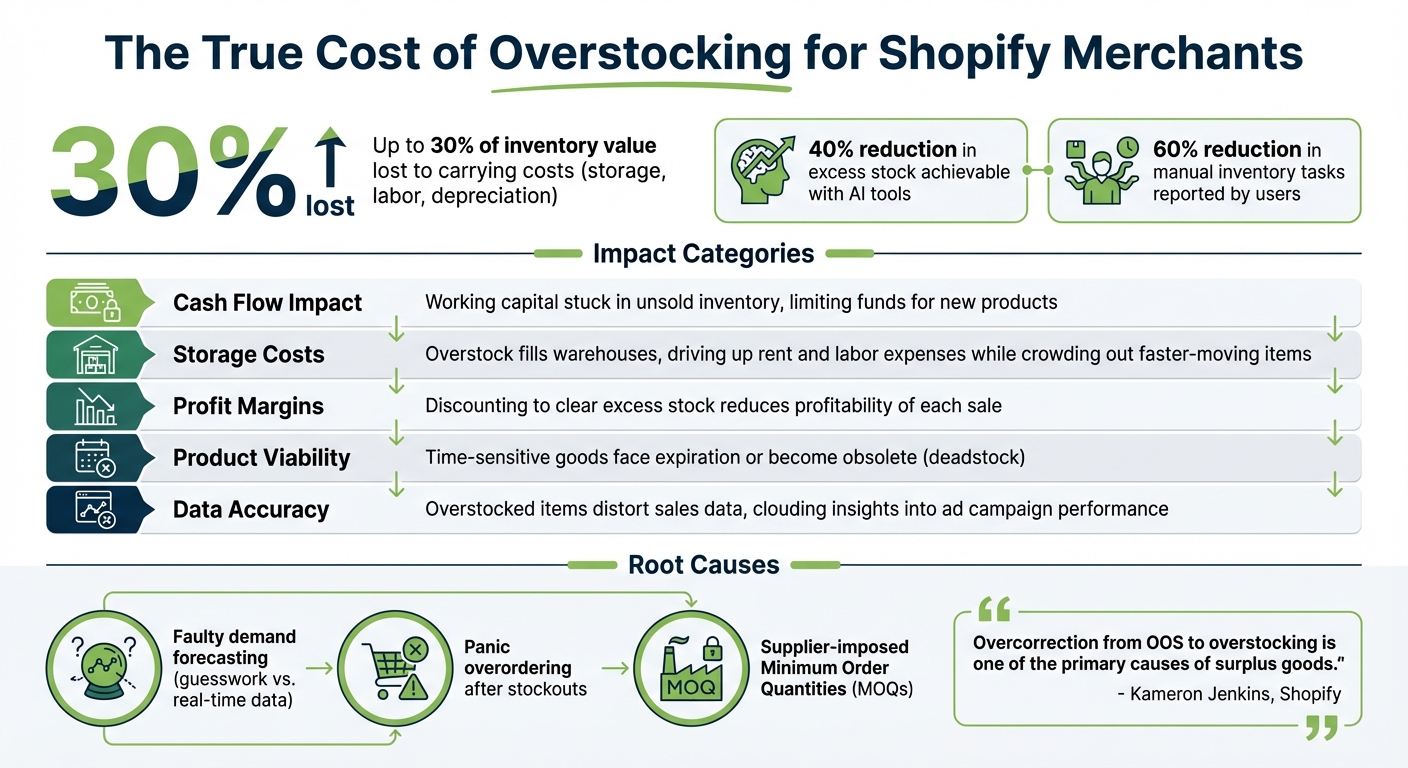
Impact of Overstock on Shopify Businesses: Key Metrics and Costs
Overstock happens when retailers purchase more inventory than they can sell, leaving them with surplus stock that eats into profits. The usual culprits? Faulty demand forecasting based on guesswork instead of real-time data, overordering out of panic after stockouts, and supplier-imposed Minimum Order Quantities (MOQs) that force merchants to buy more than they need. These common missteps create a prime opportunity for AI-driven solutions to step in.
"Overcorrection from OOS to overstocking is one of the primary causes of surplus goods."
– Kameron Jenkins, Shopify
The financial toll of overstocking is immediate and painful. Unsold products tie up working capital, while storage costs soar as warehouses overflow with slow-moving inventory. To clear out excess stock, merchants often slash prices, which eats into profit margins. On top of that, inventory carrying costs - like labor, storage, and depreciation - can add up to 30% of the inventory's value.
The problem becomes worse when systems are disconnected. When sales, inventory, and purchasing platforms don’t communicate, merchants make poor decisions, and slow-moving "dead SKUs" linger. For example, fashion retailers often misjudge size distribution, while sellers of perishable goods risk expiration. Seasonal changes and sudden shifts - like a competitor going viral or a product receiving bad reviews - can leave merchants stuck with unsellable stock. These issues not only drive up costs but also disrupt sales data, making inventory and marketing decisions even harder.
The operational headaches don’t stop there. Overstocked products distort sales data, making it harder to figure out which items actually perform well in ad campaigns. Merchants waste time rearranging stock and rack up extra transportation costs. As product catalogs grow, manually tracking inventory becomes impossible, leaving cash tied up in slow sellers while bestsellers risk running out.
| Impact Category | Business Consequence |
|---|---|
| Cash Flow | Working capital gets stuck in unsold inventory, limiting funds for new products |
| Storage Costs | Overstock fills warehouses, driving up rent and labor expenses while crowding out faster-moving items |
| Profit Margins | Discounting to clear excess stock reduces the profitability of each sale |
| Product Viability | Time-sensitive goods face expiration or become obsolete (deadstock) |
| Data Accuracy | Overstocked items distort sales data, clouding insights into what works in ad campaigns |
Understanding these overstock challenges is crucial before diving into how AI tools like Forstock can reshape inventory management.
How Forstock Uses AI to Prevent Overstock
Forstock leverages AI to analyze Shopify sales data, seasonal trends, and growth patterns, offering precise inventory predictions. Instead of relying on static reorder points, the platform uses real-time sales data and supplier lead times to deliver tailored recommendations. Its centralized dashboard provides instant insights into overstocked items, products nearing stockouts, and those requiring immediate reordering.
"Before Forstock, I was literally living in spreadsheets... Since switching, I haven't had a single stockout, and I don't overorder anymore. The AI forecast actually makes sense for my business."
– Sophie, E-commerce Manager
By incorporating variables like lead time fluctuations and supplier performance, Forstock dynamically adjusts safety stock levels, moving beyond one-size-fits-all rules. Merchants can easily turn these AI-driven reorder suggestions into purchase orders, ensuring inventory aligns with forecasted demand. This streamlined approach has reduced manual inventory tasks for users by at least 60%.
The Inventory Health Analytics dashboard provides real-time metrics on turnover rates and stock value, helping merchants identify slow-moving items before they become dead stock. By monitoring this data daily, businesses can refine their purchasing strategies and free up cash tied up in excess inventory. The AI also factors in minimum order quantities, supplier costs, and lead times, ensuring every purchase order is optimized for cash flow.
"I open the dashboard in the morning and instantly know what needs reordering, what is overstocked, and what to focus on."
– Emily, Inventory Manager
This seamless integration lays the groundwork for advanced features like real-time demand forecasting.
Real-Time Demand Forecasting
Forstock's AI studies Shopify sales history to detect patterns across seasons, promotions, and growth cycles. Instead of just analyzing recent sales, it identifies long-term trends and updates predictions as your business evolves. For example, if your sales spike during November and December, the AI incorporates this into its 12-month demand plan, ensuring you're well-prepared without overinvesting in inventory. With every new Shopify order, the system adjusts its forecasts, keeping reorder suggestions accurate and timely. Merchants can rely on the Reorder Table to see which SKUs need attention, with quantities tailored to actual demand rather than arbitrary safety buffers. Supplier lead times are also factored in, triggering purchase orders early enough to avoid stockouts while minimizing excess inventory.
Automated Purchase Order Creation
Forstock simplifies the process of generating purchase orders. Once the AI identifies what needs reordering, merchants can create POs in seconds. The platform automatically includes supplier-specific details - like lead times, minimum order quantities, and costs - customizing each order to match supply chain logistics. This automation eliminates manual data entry, reducing errors and ensuring that orders align with forecasted demand. One-click PO generation and real-time alerts make it easy to stay ahead of stockouts. By cutting down on administrative tasks, merchants can focus more on growing their business. According to Liam, an Operations Director, his team reduced manual inventory tasks by at least 60%.
"We can create POs in minutes, track supplier performance, and forecast demand without the guesswork. It is the first tool that actually bridges inventory management and purchasing."
– Daniel, Supply Chain Manager
Inventory Analytics and Reorder Suggestions
The Inventory Health Analytics dashboard offers a clear view of which products are tying up cash and which are selling quickly. By tracking turnover rates and stock value in real time, merchants can proactively adjust purchasing strategies. Whether it's reducing future order quantities, bundling slow-moving items with bestsellers, or launching targeted promotions, the platform provides actionable insights. The Reorder Table ensures that AI-driven suggestions account for items already in transit, preventing duplicate orders. These analytics also help merchants identify overstock trends, providing greater control over complex product catalogs.
These insights extend to supplier management and adaptive safety stock calculations.
Supplier Management and Safety Stock Calculations
Forstock goes beyond inventory tracking by integrating supplier-specific data to refine safety stock levels and reorder decisions. The platform considers variables like lead times, minimum order quantities, and costs, ensuring that every suggestion is practical. For example, if a supplier requires a 500-unit minimum order but your forecast predicts only 300 units, the system flags the mismatch, allowing you to adjust the order or plan for slight overstock. Safety stock levels are dynamically calculated based on lead time variability and demand fluctuations, helping merchants avoid the panic buying that often follows a stockout. Additionally, the platform tracks supplier performance over time, making it easier to identify reliable vendors and address delays.
"The tool allows us to more serenely anticipate our stock needs, avoid shortages while mastering our supply levels."
– Authentic Stadium, Shopify Merchant
Setting Up Forstock for Shopify
Getting started with Forstock takes just 2 minutes. You can find it directly on the Shopify App Store, where it’s available with a "free to install" option. Once installed, you’ll need to authorize access to your products, inventory, orders, and locations. This step allows Forstock to sync your entire catalog in real time and immediately begin analyzing sales trends.
The platform handles all the heavy lifting by automatically syncing product details, variants, SKUs, and stock levels across every location - no need for manual data entry. After that, input your supplier details, including lead times, minimum order quantities (MOQs), and costs. These inputs enable the system to generate precise reorder suggestions using AI. This setup lays the groundwork for smarter, more efficient inventory management. Once your data is synced, head over to the dashboard to prioritize reorders.
"The automated PO creation saves us 10+ hours weekly. Setup was seamless - 2 minutes!" – Alexander, Supply Chain Manager at FashionCo
After syncing, the next stop is the Reorder Table, an AI-driven dashboard that pinpoints products requiring immediate attention based on sales velocity and lead times. You can tailor this view by filtering data by location, category, or specific timeframes. For example, if you’re managing inventory across multiple warehouses, you can segment the dashboard to spot overstock in one region and stockouts in another. This functionality integrates smoothly with multi-location management. In fact, users have reported uncovering over $70,000 in excess inventory within the first week.
Forstock also allows you to create saved views tailored to different team roles. For instance, you could set up a "Purchasing View" focused on reorder points or a "Finance View" highlighting total stock value and landed costs. This customization ensures every team member sees only the data they need, cutting down on confusion and eliminating the reliance on external spreadsheets. Plus, with real-time updates syncing continuously, the dashboard always reflects your most up-to-date inventory status.
Forstock Pricing Plans
Forstock keeps things simple with its revenue-based pricing of $79 per month, making it accessible for Shopify merchants of all sizes. Whether you're a startup or managing a multi-million-dollar enterprise, the cost stays the same. This pricing covers businesses across all revenue tiers, including $0–$250K, $250K–$1M, $1M–$5M, $5M–$10M, $10M–$20M, $20M–$40M, and even $40M+.
What’s included? Every plan offers the same robust features:
- Dashboard analytics for a clear overview of your inventory.
- Inventory Table (Stock Intelligence) to provide real-time insights.
- Reorder suggestions with safety stock to prevent stockouts.
- Automated vs. manual purchase-order creation and tracking to save time.
- Supplier management for streamlined operations.
There’s no need to worry about hidden fees or setup costs - what you see is what you get.
| Revenue Tier | Monthly Cost | Core Features | Trial Period |
|---|---|---|---|
| $0–$250K | $79 | Dashboard analytics, Inventory Table, Reorder suggestions & safety stock, Purchase-Order creation & tracking, Supplier management | 14‑day free trial & live‑chat support |
| $250K–$1M | $79 | Dashboard analytics, Inventory Table, Reorder suggestions & safety stock, Purchase-Order creation & tracking, Supplier management | 14‑day free trial & live‑chat support |
| $1M–$5M | $79 | Dashboard analytics, Inventory Table, Reorder suggestions & safety stock, Purchase-Order creation & tracking, Supplier management | 14‑day free trial & live‑chat support |
| $5M–$10M | $79 | Dashboard analytics, Inventory Table, Reorder suggestions & safety stock, Purchase-Order creation & tracking, Supplier management | 14‑day free trial & live‑chat support |
| $10M–$20M | $79 | Dashboard analytics, Inventory Table, Reorder suggestions & safety stock, Purchase-Order creation & tracking, Supplier management | 14‑day free trial & live‑chat support |
| $20M–$40M | $79 | Dashboard analytics, Inventory Table, Reorder suggestions & safety stock, Purchase-Order creation & tracking, Supplier management | 14‑day free trial & live‑chat support |
| $40M+ | $79 | Dashboard analytics, Inventory Table, Reorder suggestions & safety stock, Purchase-Order creation & tracking, Supplier management | 14‑day free trial & live‑chat support |
Every subscription kicks off with a 14-day free trial, giving you full access to Forstock’s AI-driven forecasting, automated PO creation, and more. During the trial, you can sync your Shopify catalog, input supplier details, and start addressing potential overstock issues. Many merchants have already uncovered significant cost savings by identifying overstock early. Up next, discover how Forstock helps you manage and reduce overstock efficiently.
Tracking Overstock Reduction with Forstock
Once Forstock is up and running, you can track your progress using its all-in-one dashboard. This tool offers immediate insights into excess inventory reduction and the cash you’ve freed up.
One key metric to watch is your inventory turnover rate - how frequently you sell and replace stock. Forstock calculates this by dividing your cost of goods sold (COGS) by your average inventory value. For instance, if your COGS is $500,000 and your average inventory is $100,000, your turnover rate would be five annual turns. As overstock decreases, this number rises - like moving from four to six turns - indicating less money tied up in slow-moving items.
The Inventory Table is another powerful feature, tracking daily sales velocity and depletion dates for each SKU. Products are tagged as "Overstocked", "Running Low", or flagged for "Stock Gaps", simplifying prioritization. For example, Matt, the Operations Lead at TechGear, discovered over $70,000 in slow-moving inventory within just one week of using Forstock. Jason, Co-founder at HomeGoods, shared similar success:
"We reduced excess inventory by 45% and freed up $150K in working capital."
Forstock also keeps tabs on your sell-through rate, which measures the percentage of inventory sold within a set time frame. If you receive 1,000 units and sell 800, your sell-through rate is 80%. The dashboard visualizes this data and sends alerts when rates fall below your target, helping you address potential overstock issues early. Many merchants see their sell-through rates improve significantly, often moving from 60% to 85%, as Forstock’s AI-driven forecasts refine their purchasing strategies.
Additionally, the platform highlights cash flow improvements, showing how much money is tied up in inventory. You can watch this figure drop - say, from $200,000 to $120,000 - as you adjust your order quantities. Forstock even offers 12-month projections based on your turnover improvements, giving you the confidence to plan effectively. Emily, an Inventory Manager, sums it up perfectly:
"I open the dashboard in the morning and instantly know what needs reordering, what is overstocked, and what to focus on."
These tools and insights make tackling seasonal and multi-location inventory challenges far more manageable.
Managing Seasonal and Multi-Location Inventory
Handling seasonal demand changes and managing inventory across multiple locations can be a major headache for Shopify brands. Think about it: a winter jacket that sells like crazy in December might sit untouched by March, tying up your cash. Or, a product that’s flying off the shelves in your New York warehouse could be collecting dust in Los Angeles. These challenges echo the overstock issues we’ve touched on before, underscoring the need for a streamlined approach.
This is where Forstock steps in. By analyzing historical Shopify data, Forstock identifies seasonal trends and regional differences, giving you the ability to adjust reorder points before cash flow takes a hit. It spots demand changes early, so you’re ready for peak seasons or prepared to avoid the cash drain of off-season lulls. Forstock also pinpoints which items are selling well - or not - at specific locations, syncing stock levels across all your warehouses and stores in real time. This means less cash tied up in slow-moving products, a recurring pain point for many businesses.
Forstock's features go beyond AI forecasting to tackle seasonal spikes and regional imbalances head-on. A standout tool here is the automated stock transfer feature, which helps you reallocate inventory to high-demand areas instead of over-ordering. By factoring in supplier lead times, minimum order quantities (MOQs), and regional logistics, the platform ensures your products are where they’re needed most.
The system also sends regional alerts, letting you know when stock is running low at a specific location. This helps prevent lost sales without requiring you to maintain excessive safety stock across all sites. One Shopify merchant, Gentlehomme, shared their experience:
"Forstock has been a great addition to our Shopify store. It makes inventory forecasting much easier and helps us stay ahead of stockouts without over ordering inventory"
Forstock’s centralized dashboard offers a clear view of daily sales velocity and depletion dates for each SKU at every location, helping you quickly identify which sites need immediate attention.
To get the most out of these tools, make sure Forstock has permissions to "Edit other data: locations" within your Shopify settings. Then, use the "reduce overstock" view to detect slow-moving SKUs in specific regions early. This allows you to free up cash by transferring inventory to higher-demand locations instead of letting it sit idle.
Conclusion
Managing overstock on Shopify requires top cloud inventory tools, and Forstock steps up to the challenge. Overstock isn’t just about having too much inventory - it ties up cash flow and limits growth opportunities. Tools like Forstock use AI to predict demand, automate reordering, and flag slow-moving stock before it becomes a costly problem. Say goodbye to outdated practices and hello to real-time insights into sales trends and smarter reordering.
The feedback speaks volumes. With a 5.0-star rating on the Shopify App Store as of February 2026, Forstock has proven its worth for businesses of all sizes. Merchants have unlocked significant savings, with some identifying over $70,000 in slow-moving inventory within their first week.
Forstock’s AI capabilities ensure your inventory stays lean while keeping your cash flow in check. By considering factors like supplier lead times and past sales trends, it empowers you to make data-backed decisions, not costly guesses. As Daniel, a Supply Chain Manager, shared:
"We can create POs in minutes, track supplier performance, and forecast demand without the guesswork. It is the first tool that actually bridges inventory management and purchasing."
Getting started is simple, with a 14-day free trial and pricing details outlined earlier in this guide. As your business grows, Forstock grows with you - offering the same powerful AI tools without limits on SKUs or suppliers. Leverage AI-driven inventory management to protect your cash flow and fuel your business growth.
FAQs
What data does Forstock need from my Shopify store?
Forstock taps into your Shopify store's data to predict demand and streamline inventory management. It pulls in key details like historical sales data, supplier lead times, current stock levels, reorder points, and product specifics such as SKUs and costs.
By linking Shopify with Forstock, you get real-time synchronization that keeps your data up-to-date. This means you can stay on top of trends, handle seasonal shifts effectively, and automate inventory tasks - all while improving cash flow and operational efficiency.
How quickly do Forstock’s forecasts adapt to sales changes?
Forstock’s forecasts update in real-time, adapting to changing sales trends as they happen. This flexible system empowers you to make informed inventory decisions, reducing the risk of overstocking or running out of stock.
How do I handle supplier MOQs without creating overstock?
To handle supplier MOQs and avoid overstocking, consider using AI-powered inventory tools like Forstock. These tools are designed to predict demand, analyze market trends, and fine-tune reorder points. This approach helps you meet MOQ requirements without ending up with surplus inventory.
Additionally, automating purchase orders with Forstock can simplify the process. By setting specific rules that align with MOQs, you can streamline your orders and maintain just the right stock levels to efficiently meet customer needs.
Keep reading
Try Forstock free for 14 days.
AI-powered demand forecasting and reorder automation for Shopify brands. No credit card required.