
Batch and Lot Planning: Reordering When Your Unit Is a Production Run
By Forstock Team · Last updated July 18, 2026
Plan lot-based reorders: set lot rules, compute ROP = demand×lead time + safety stock, and validate against MOQ, capacity, cash, and storage.
If you reorder in cases, pallets, or production runs, unit-level reorder logic is not enough. I need to plan around full lots, lead time, safety stock, and the limits that can force order size up or down.
Here’s the short version:
- I set a lot rule first: lot-for-lot, fixed lot size, or MOQ-based.
- I trigger the next order with ROP = (average daily demand × lead time) + safety stock.
- I treat safety stock as extra days of cover when supply timing is uncertain.
- I check whether the planned run still fits supplier minimums, line capacity, cash, and storage.
- If I make 24,000 units/year in 5,000-unit runs, I’ll need about 5 runs, not 4.8.
That’s the core idea. A reorder point tells me when to act. The lot rule tells me how much to make or buy. And if one input changes - like lead time going from 14 days to 19 days - my trigger has to change too.
What stood out to me in this piece is how batch planning shifts the focus from “how many units are left?” to “can I complete the next full run on time?” That means I’m not just watching finished goods. I’m also watching the parts, delay risk, and the time gap between runs.
A quick example makes the point clear:
- Demand: 10 units/day
- Lead time + buffer: 19 days
- Reorder point: 190 units
So even if my next order is a 5,000-unit run, the trigger still starts at 190 units on hand.
I also like the article’s simple four-step flow:
- Forecast demand
- Pick the lot rule
- Set the reorder point
- Check the plan against MOQ, capacity, cash, and storage
That sequence keeps planning tied to demand without ignoring production limits.
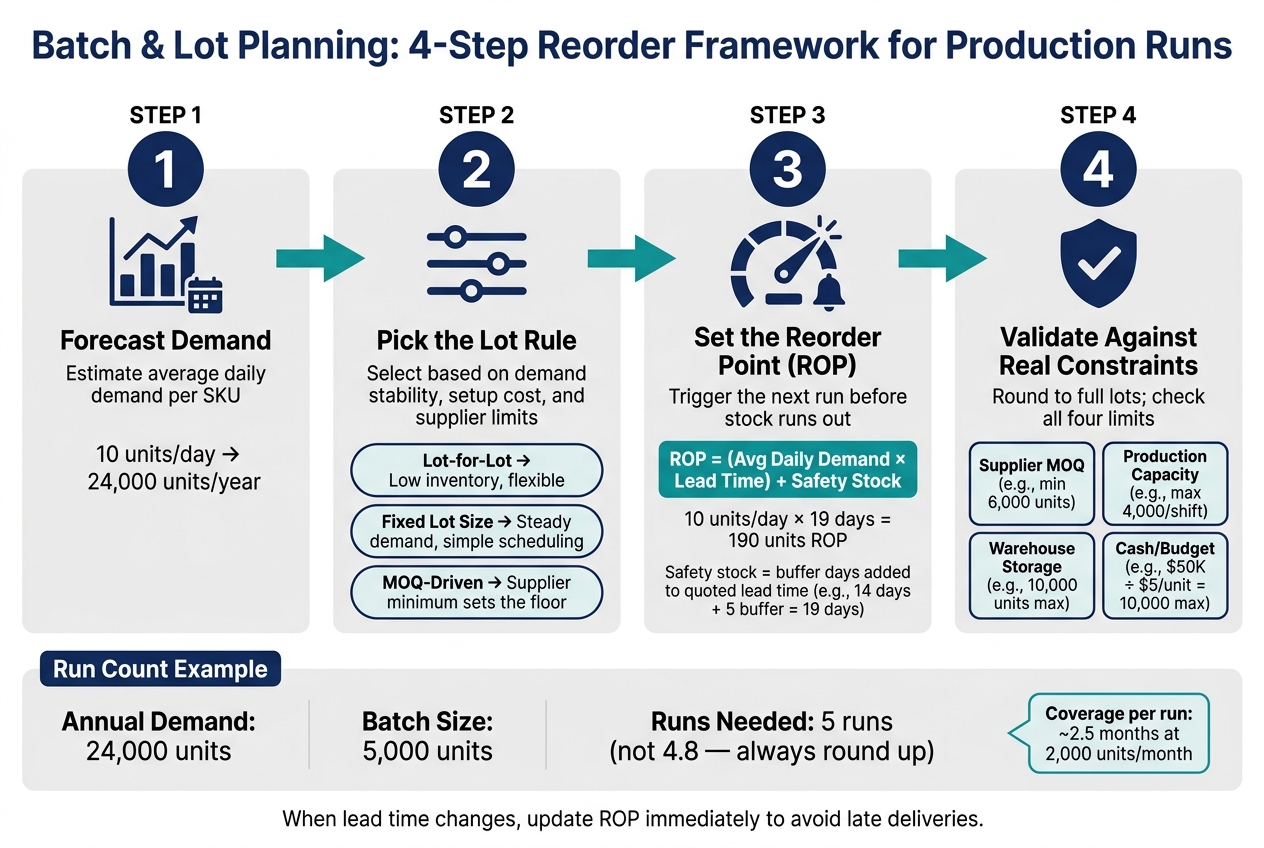
Batch & Lot Planning: 4-Step Reorder Framework for Production Runs
Choose the Right Lot-Sizing Rule for Each SKU
Once you’ve set batch size, lead time, and safety stock, the next call is how to turn demand into a repeatable lot rule.
Start with the lot-sizing rule. It decides how forecast demand becomes a production run or purchase order. The right choice depends on three things: demand stability, setup cost, and supplier limits.
Use EBQ or EPQ when you can weigh setup or changeover cost against holding cost. These rules fit SKUs that carry a meaningful fixed setup cost per run and where production capacity also affects the decision.
Lot-for-lot and fixed lot size: when demand drives the order
With lot-for-lot, you order only what’s needed for the planning period. With a fixed lot size, you order the same quantity every time.
| Method | How it works | Typical result | Best use |
|---|---|---|---|
| Lot-for-lot | Order just enough for the planning period | Low inventory | When you want to stay close to demand |
| Fixed lot size | Order the same quantity every time | Moderate inventory | When demand is steady and scheduling needs to be simple |
The tradeoff is pretty simple. Lot-for-lot keeps inventory lean, but it can create more frequent orders or production runs. Fixed lot size is easier to schedule, though stock levels tend to run a bit higher.
MOQ-driven ordering: when constraints set the lot size
Sometimes demand doesn’t decide the lot size. The supplier does.
If a supplier sets a minimum order quantity, that MOQ becomes the main planning limit. At that point, it helps to look at finished goods, raw materials, and work-in-process in one planning view so you can see the full effect on stock.
| Method | How it works | Typical result | Best use |
|---|---|---|---|
| MOQ-driven | Order at or above the supplier minimum | Higher average stock | Brands constrained by supplier minimums |
In day-to-day planning, it usually works like this: set a target lot size, then round it to the MOQ, available capacity, and cash limits tied to that SKU.
Once the lot-sizing rule is in place, the next move is to set the reorder point that triggers it.
sbb-itb-f0fc809
Calculate Reorder Points When the Next Order Is a Full Run
Once you’ve set your lot size rule, the next step is turning demand into a unit-based trigger.
That’s what the reorder point, or ROP, does. It tells you when to start the next run. It does not tell you how many units to order. The replenishment amount stays tied to your full lot size.
Use this formula:
ROP = (Average Daily Demand × Lead Time) + Safety Stock
Simple idea: demand keeps moving while you wait for the next order to arrive, so your trigger has to cover that gap. Then you add safety stock on top.
If demand is 10 units a day, lead time is 14 days, and buffer time equals 5 days, ROP is 190 units.
Here’s the math behind that example:
- Average daily demand: 10 units
- Lead time plus buffer: 19 days
- ROP: 10 × 19 = 190 units
How to set safety stock for demand swings and lead-time uncertainty
A practical way to set safety stock is to add buffer days to the supplier’s quoted lead time.
So if a supplier says 14 days, adding 5 extra days gives you a trigger based on 19 days instead of just 14. That gives you more room for freight delays or sudden demand spikes.
Put another way, safety stock here works as time protection. Instead of guessing at a unit amount first, you build in extra days and convert those days into units through your ROP formula.
How lead time, batch size, and coverage affect each other
Lead time has a direct effect on ROP. If lead time gets longer, or starts to bounce around, your reorder point goes up. That means you need to reorder earlier.
Batch size matters too. A larger lot gives you more coverage after it arrives, but that only helps if the lot still fits your demand pattern. If demand shifts and your batch size no longer lines up, the plan starts to drift.
That’s why ROP can’t just sit there unchanged. When lead time moves, update it right away. If you don’t, the next lot may land late, and that delay flows straight into your production and purchasing plan.
Turn SKU Forecasts Into a Production and Purchasing Plan
Once the reorder trigger is set, the next job is simple in theory: turn forecast demand into a production calendar you can actually run.
From monthly demand forecast to number of runs per year
Start with annual demand. If a SKU sells 2,000 units per month, that equals 24,000 units per year. Divide that by your standard batch size. With a 5,000-unit batch, you get 4.8 runs.
Of course, you can’t produce 0.8 of a lot. So you need to pick four, five, or six runs.
For a 24,000-unit forecast and a 5,000-unit batch, five runs is the closest fit. Use four only if safety stock can absorb the gap. Use six only if demand swings or service goals make the extra inventory worth it. With four runs, the missing volume has to come from stock you already have on hand.
A good way to make the call is by using the coverage window. A 5,000-unit run with demand at 2,000 units per month covers about 2.5 months. Space your runs around that window, then check that each gap still fits inside the planned coverage period.
Adjust batch size for MOQs, production capacity, cash, and warehouse limits
Your target batch size often looks clean on paper. Then the real limits show up.
Test the run size against the factors that control production and purchasing day to day.
| Constraint | What it does to batch size | Key trade-off |
|---|---|---|
| Supplier MOQ | Forces batch size up to the minimum (e.g., 6,000 units if MOQ = 6,000) | Fewer, larger runs; higher overstock risk if demand softens |
| Production capacity | Caps batch size at what one shift or line can produce (e.g., 4,000 units) | More frequent runs needed; tighter scheduling required |
| Warehouse storage | Limits how much you can receive at once (e.g., 10 pallet positions = 10,000 units max) | Prevents large pre-season builds; can increase stockout risk during peaks |
| Cash/budget | Caps spend per order (e.g., $50,000 budget ÷ $5 unit cost = 10,000 units max per run) | May require staggering runs across months to smooth cash outlay |
If one of these limits changes batch size, recalculate run count and reorder timing at the same time. That part matters. Smaller, more frequent runs can let you automate safety stock levels to hold less inventory. Larger, less frequent runs usually need more buffer because the gaps between deliveries are longer.
Use Forstock to manage lot-based replenishment

Once the lot plan is locked in, the next step is turning it into purchase orders your suppliers can use.
This is where spreadsheets start to wobble. Doing the math by hand across dozens of SKUs, multiple suppliers, and shifting lead times gets messy fast. Forstock turns forecast data into a plan you can act on by projecting demand 90 days out, using lead times from purchase order history, and rounding suggested quantities up to the nearest valid MOQ and pack size.
The table below shows how the main lot-planning jobs map to what Forstock handles directly.
| Planning Task | Forstock Capability |
|---|---|
| Forecasting | 90-day forward projection against live demand and lead times |
| Lot Sizing | Automatic rounding to nearest valid MOQ and pack size |
| Safety Stock | User-defined safety buffers and target cover days per SKU |
| PO Creation | Supplier-grouped PO creation |
| Visibility | Stockout and overstock tracking across all locations |
| BOM Planning | Rolling bundle and kit demand down to individual components |
For brands dealing with assemblies or kits, Forstock rolls finished-product demand down to the component level. That means a production run suggestion accounts for every part, not just the top-level SKU.
Once approved, Forstock generates supplier-grouped purchase orders tied to the forecast.
Conclusion: A Simple Framework for Reordering by Production Run
Use the same four-step sequence every time: forecast, size, trigger, validate.
A four-step checklist for every batch-based SKU
Use this four-step sequence for every batch-based SKU:
- Forecast demand.
- Choose a lot-sizing rule: MOQ-driven order or capacity-based run.
- Set your reorder point and safety stock from daily usage, lead time, and a buffer for lead-time delays.
- Validate the order against MOQ and capacity, then convert the trigger into full lots.
That sequence keeps replenishment tied to demand while staying within MOQ, lead time, and capacity limits.
FAQs
How do I choose between lot-for-lot and fixed lot size?
Lot-for-lot means you order or produce only what you need to meet demand right now. That keeps inventory lean, cuts holding costs, and helps you avoid piles of extra stock. It’s a good fit for lean operations where waste is the enemy.
Fixed lot size works better when you have to hit supplier minimums or spread setup costs across a larger run. That can include labor, materials, and machine setup. The trade-off is simple: you may end up carrying more inventory, and holding costs can climb to 20% to 30% of inventory value. Still, a fixed lot size can lower the cost per unit and help keep supply more steady.
What should I do if demand changes mid-cycle?
When demand changes in the middle of a cycle, update your reorder points and safety stock. That helps you avoid two costly problems: stockouts and too much inventory sitting on the shelf.
A good rule is to review these numbers at least once a month. For high-demand items, check them more often.
Use the most recent 30 to 90 days of sales data so your formulas match what’s happening now, not what happened months ago. If stockouts keep happening, increase safety stock. If inventory starts piling up, shorten the coverage period.
How often should I recalculate my reorder point?
Review and update reorder points at least every 90 days so they match shifts in demand and lead times.
That said, the best rhythm depends on the item. A-items should be checked weekly, B-items biweekly, and C-items monthly. If you use a dynamic or automated system, updates may happen daily or weekly.
If supplier performance slips or sales trends change in a big way, don’t wait for the next review cycle. Recalculate right away.
Keep reading
Try Forstock free for 14 days.
AI-powered demand forecasting and reorder automation for Shopify brands. No credit card required.