
How to Plan Inventory When Your Product Expires
By Forstock Team · Last updated July 15, 2026
Plan by sellable days, cap orders, run FEFO, track lots, and use markdowns or transfers to cut expiry write-offs.
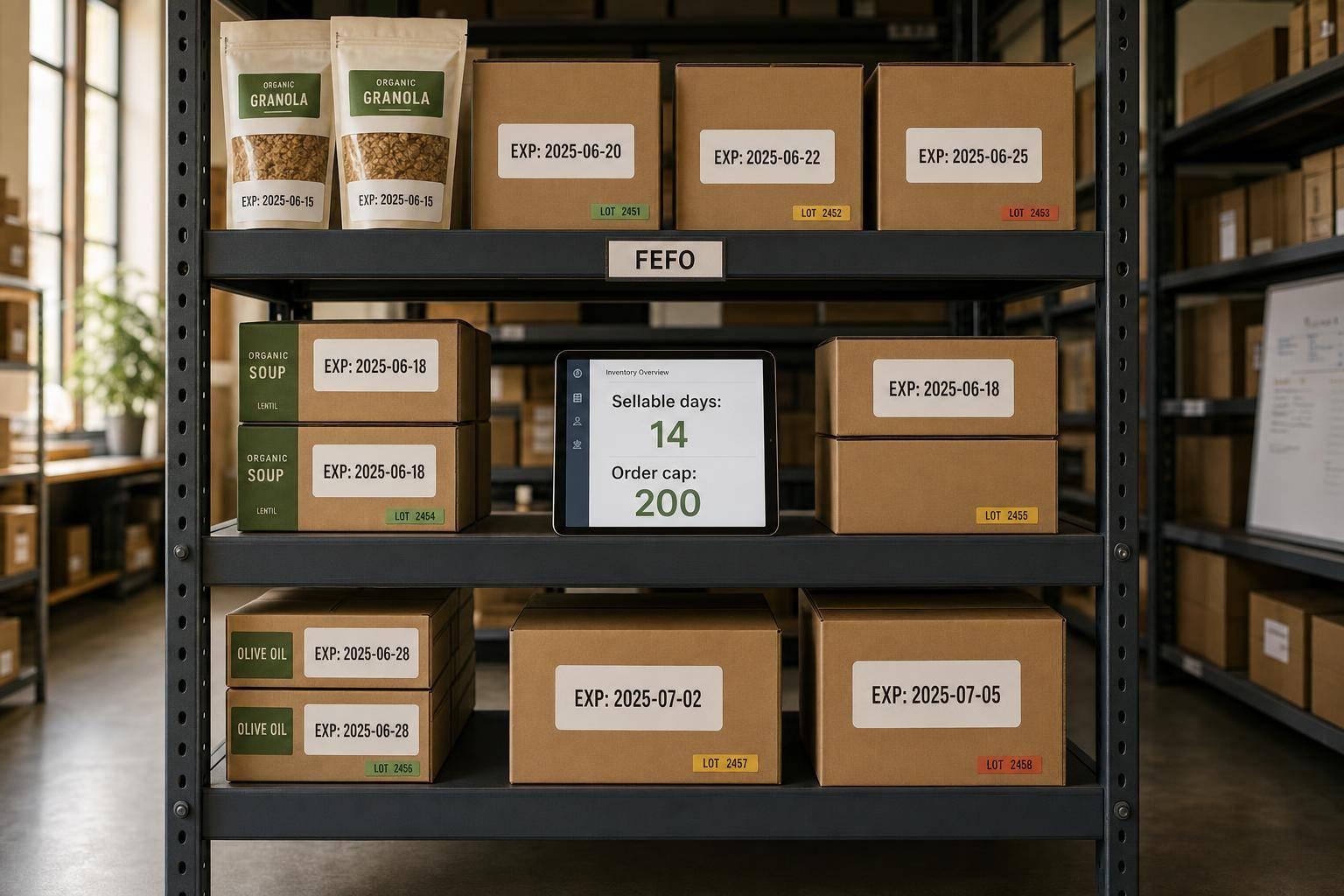
If I stock products that expire, I don’t plan around units on hand alone - I plan around days left to sell. That means I subtract transit, receiving, and order-processing time from shelf life, then order only what I can sell before the date runs out.
Here’s the short version:
- Forecast by SKU, channel, and location
- Cap orders by remaining sellable days
- Set reorder points with lean safety stock
- Use FEFO, not FIFO, for picking
- Track lots, expiry dates, and aging stock
- Start markdowns, bundles, or transfers early
A simple example: if a product has 60 days of shelf life and 7 days are lost to transit and handling, I only have 53 sellable days left. If weekly demand is 200 units, my order cap is about 1,520 units. Anything above that needs a second look.
The main idea is simple: buy less, rotate by earliest expiry, and act early on aging stock. That cuts write-offs, protects cash, and helps me avoid getting stuck with product I can’t sell.
This article lays out that process in a clear step-by-step way.
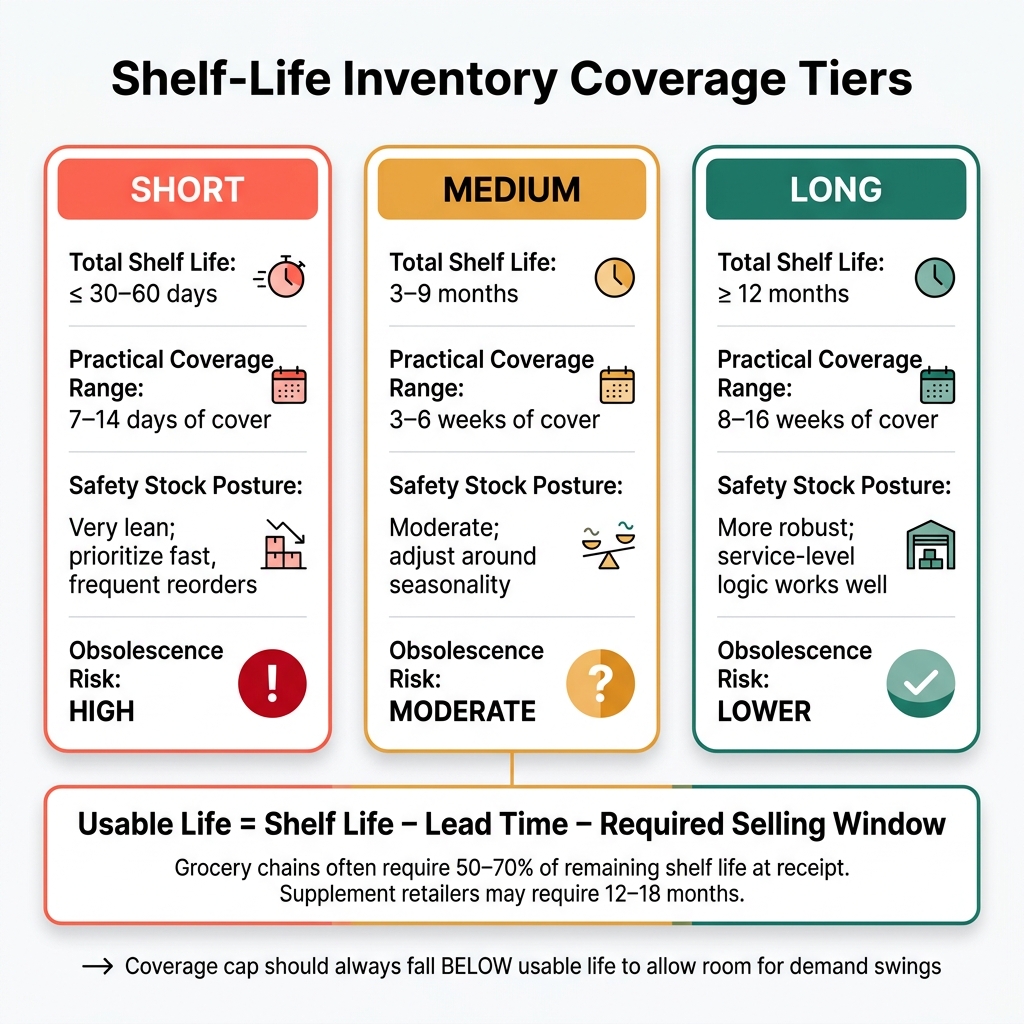
Shelf-Life Inventory Coverage Tiers: How Much Stock to Hold
How to Add Expiry Dates to Your Shopify Products Using the Product Expiration Dates App

sbb-itb-f0fc809
1. Build a demand forecast that accounts for shelf life
Forecasting expiring SKUs is a little different from normal demand planning. You're not just asking, How much can we sell? You're asking, How much can we sell before the product expires? That changes the math right away.
The starting point is a forecast built around the time you actually have left to sell the item.
Forecast by SKU and sales channel, then shorten the horizon for short-life products
Build forecasts at the SKU × channel × location level, because demand can swing a lot by outlet and region. A product may move well on DTC, stall in wholesale, and show a totally different pattern on marketplaces.
The forecast horizon should match the product's usable shelf life. Supplements can usually support a longer horizon. Refrigerated goods need a much shorter one. That horizon then becomes the basis for order caps in the next step. Keep the forecast window inside the usable shelf life, and line it up with how volatile demand is.
Use the remaining selling window to cap order quantities
Once you know the remaining selling window after receipt, use it to cap order quantities at expected demand during that period.
Here’s a simple example:
- A refrigerated beverage has 60 days of shelf life.
- Receiving, QA, and putaway take 7 days combined.
- Usable selling window: 53 days, or about 7.6 weeks.
- Forecasted demand: 200 units per week.
- Maximum order quantity: 200 × 7.6 = 1,520 units.
If a suggested purchase quantity goes past demand in that usable window, it should be flagged for review before it turns into a purchase order, ideally using Shopify purchase order apps that support expiry tracking.
Use Forstock to generate SKU-level forecasts and flag expiry risk
If your team handles a large number of expiring SKUs, software can make this workable day to day. This is usually the point where spreadsheets start to crack under the weight.
Forstock connects to Shopify and other sales channels to pull in order history, inventory positions, and channel-level performance data. It then generates SKU-level forecasts based on demand patterns, lead times, and lot-level expiry dates. Forstock also surfaces SKU-level forecasts and expiry risk, which helps teams cap orders earlier.
Use that forecast ceiling to set reorder points, safety stock, and coverage limits. Once the forecast is in place, turn it into reorder points and safety stock.
2. Set reorder points, safety stock, and coverage limits for expiring SKUs
Once your forecast is in place, turn it into clear replenishment rules. Start with:
Reorder Point = Lead Time Demand + Safety Stock
Then put a cap on that number based on remaining shelf life. After that, sanity-check it: can this inventory sell before it expires? That step matters. It ties replenishment to sellable time, not just units sitting on a shelf.
Calculate reorder points with lead time demand and a shelf-life-capped buffer
Begin with average daily demand multiplied by lead time. Then add a buffer, but only if that buffer still fits inside the sellable window. Short-life SKUs need a tighter approach.
Take a refrigerated food item with 30 days of total shelf life and a 7-day lead time. There just isn't much room for extra stock. If your buffer pushes inventory past what can likely sell before expiry, trim it down. For short-life SKUs, keep safety stock lean. Use a standard service-level buffer only when shelf life gives you enough room to do it safely.
Set maximum days or weeks of cover based on usable inventory life
Instead of thinking only in unit counts, convert coverage targets into days or weeks of cover. It makes the limit much easier to manage.
Usable life = Shelf life − Lead time − Required selling window
The "required selling window" is the minimum remaining shelf life that customers or retail partners expect when they receive the product. Grocery chains often require 50–70% of remaining shelf life at receipt. Supplement retailers and marketplaces often require at least 12 months of remaining shelf life, and some ask for 18 months.
Once you know usable life, set your maximum coverage below that limit so you still have room for demand swings. Here’s a practical tiered framework.
| Shelf-life class | Typical total shelf life | Practical coverage range | Safety-stock posture | Obsolescence risk |
|---|---|---|---|---|
| Short | ≤ 30–60 days | 7–14 days of cover | Very lean; prioritize fast, frequent reorders | High; small over-buys quickly become waste |
| Medium | 3–9 months | 3–6 weeks of cover | Moderate; adjust around seasonality | Moderate; risk rises with demand shifts or listing changes |
| Long | ≥ 12 months | 8–16 weeks of cover | More robust; service-level logic works well here | Lower; mostly a risk for slow movers |
Translate the plan into purchase timing and open-to-buy decisions
Line up reorder timing with the next ship date, then order only enough to get back to target cover. If MOQs push you over the cap, you’ve got a few options:
- Negotiate smaller lots
- Order more often
- Combine demand across channels
- Cut slow, short-life SKUs
Forstock can help by turning forecasts into replenishment suggestions and open-to-buy views that factor in lead times, lot sizes, and shelf-life limits. That means you don't have to run the math by hand for every SKU every week.
Once replenishment is capped, rotate inventory by lot and expiry date so older stock goes out first.
3. Run FEFO and track expiry at the lot level
Capped orders can still go sideways if the warehouse pulls the wrong lot. Replenishment does its job only when fulfillment ships the lot that expires first. So the next control point is pick order.
Use FEFO instead of FIFO when expiry dates drive picking priority
FEFO (First Expired, First Out) means the unit with the earliest expiration date goes out first, no matter when it was received. That’s different from FIFO, which uses receipt date as the main rule. And that gap matters.
If a newer shipment shows up with an earlier expiry date - which happens with returns, reworked product, or overlapping production runs - FIFO can leave the most time-sensitive stock sitting on the shelf.
For any SKU with a printed expiration or “best by” date - protein powder, sunscreen, vitamins, refrigerated food - FEFO should be the default picking rule.
| Picking method | Primary driver | Waste reduction | Best fit |
|---|---|---|---|
| FEFO | Expiration date | Highest | Food, supplements, cosmetics, pharma |
| FIFO | Receipt date | Moderate | Stable goods with long or no shelf life |
Track batches, expiration dates, and warehouse locations inside your Shopify workflow
FEFO falls apart if your system doesn’t know which lot expires when, and where that lot sits. At a minimum, you need lot-level data for:
- a unique lot ID
- the expiration date in mm/dd/yyyy format
- quantity on hand
- bin or warehouse location
Shopify’s native inventory setup tracks quantity at the SKU level. But lot-level expiry tracking usually calls for metafields, a batch-tracking app, or a connected WMS.
A batch-tracking app can help you assign incoming units to a lot, see quantity by batch and expiry across locations, and filter picks by earliest expiration. If you use a 3PL, the FEFO logic often lives inside the 3PL’s WMS, while only available inventory syncs back to Shopify.
That keeps the chain clean: forecast → replenish → receive by lot → pick by expiry → act on aging stock.
Use aging reports to move inventory before it becomes dead stock
An aging report groups on-hand inventory by remaining shelf life: 0–30, 31–60, 61–90, and 91–180 days. Each bucket shows units and retail value by SKU, lot, warehouse, and channel. That gives you a plain view of where the risk sits.
One signal matters more than most: when the 0–90 day bucket keeps growing month over month. That usually points to a forecast miss, a slow channel, or a replenishment overshoot. The good news? You still have time to do something about it.
Use aging reports to shift or discount stock before it slips into the dead-stock window. Forstock supports multi-warehouse visibility and allocation planning, so you can see where aging units are stuck and model what happens if you transfer them before they hit the danger zone.
Once you can see aging stock by lot and location, the next move gets a lot clearer: markdown it, bundle it, or reallocate it.
4. Cut write-offs with markdowns, bundles, and reallocation
When aging inventory starts piling up, the job is simple: pick the path that moves stock before it expires. In most cases, that means starting with price changes, then using bundles or stock transfers if discounts alone won’t do enough.
Start markdowns and promotions early enough to move stock
If you wait until the last week, you’re boxed in. By then, there’s barely any time left to change sell-through in a meaningful way.
The better move is to act while there’s still room to shift volume.
If a SKU has more than 8 weeks of cover and less than 90 days to expiry, start with a 15%–20% markdown. For supplements or skincare with 12- to 24-month shelf lives, a good rule is to launch a promotion when 6 to 9 months remain but inventory is still above 8 to 12 weeks of cover.
Tiered discounts often work better than one sharp cut. Say you’re selling food or beverages. You might start with 20% off at 30 days from expiry, move to 40% off at 14 days, then go to 60% off in the final week. Time-limited promos help create urgency without teaching customers to sit back and wait for a deal.
Match the right expiry-mitigation tactic to each SKU
Not every SKU should be handled the same way. Fast-selling, mid-margin items like popular snacks often respond well to moderate discounts or multi-buy offers. Higher-margin items like premium skincare usually fit bundles better, since bundles can move aging stock without hurting brand image as much.
Bundling tends to work best when you pair a near-expiry item with a strong seller that still has plenty of life left. A supplement brand, for example, might launch a Daily Essentials Pack with a multivitamin that has 5 months left and a popular omega-3, then offer the bundle at a 15%–20% discount. Put the focus on the customer benefit, not the expiry date, and make sure each item still has at least 60 to 90 days of shelf life left.
| Tactic | Sell-through speed | Margin impact | Effort | Compliance notes |
|---|---|---|---|---|
| Markdown | High | Moderate to high | Low | Follow truthful labeling and date rules |
| Bundle | Moderate | Moderate, blended | Moderate | Treat each component according to its normal sale rules and shelf-life requirements |
| Channel reallocation | High if the destination channel moves faster | Varies | High | Make sure products can still arrive before expiry and meet partner requirements |
If a SKU isn’t likely to clear in its current location, move it to a channel where demand is stronger. That could mean shifting stock from slower stores or warehouses into faster-moving channels a few weeks before expiry. Just make sure transit time is part of the math. A transfer that takes 5 to 14 days eats into shelf life fast. And each origin location should still keep 2 to 4 weeks of safety stock, so you don’t fix one problem and cause a stockout somewhere else.
Use Forstock to monitor aging inventory and model action scenarios
Before you take action, compare the expected sell-out date with the expiry date. That’s the number that matters.
Forstock does this by comparing remaining days to expiry with forecast weekly sales. It flags SKUs when the projected sell-out date falls after expiry, which gives teams a clear signal that action is needed.
It also helps with scenario planning. You can compare different options before making a move. Forstock shows how delaying or cutting a purchase order changes cash tied up in inventory and carrying costs, so teams can choose a mitigation plan without setting off a new replenishment issue.
Conclusion: A clear operating approach for expiring inventory
Expiring inventory is manageable when each order stays within the product’s remaining sellable window. That one rule drives the day-to-day process: forecast, cap, rotate, and act before stock expires.
A five-point checklist for every inventory planner
Use this checklist to keep each replenishment decision tied to shelf life:
- Base every order on true sellable days after receipt. Subtract lead time, handling time, and the minimum remaining shelf life you promise customers. That gives you the actual window you have to work with.
- Forecast by SKU and channel to set the order limit. Demand changes by outlet and region, so the forecast sets the reorder cap.
- Set a max coverage limit before ordering. Keep the cap below usable shelf life, and make it tighter for slower movers.
- Rotate by earliest expiry at the lot level. This works only if expiration dates are captured at receiving and shown in pick lists.
- Move or promote inventory as soon as it enters the aging bucket. Take action when a lot enters the aging bucket, not in the final week.
Forstock supports this workflow with SKU-level forecasts, inventory health visibility, and scenario modeling.
FAQs
How do I calculate sellable days for an expiring product?
Subtract today’s date from the product’s expiration date to get the remaining sellable days.
Then compare that time frame with your average daily sales velocity to estimate how much inventory you can realistically sell before it expires. Watch it closely so you can trigger markdowns or use FEFO rotation before stock hits its end-of-life date.
When should I use FEFO instead of FIFO?
Use FEFO (First-Expired, First-Out) instead of FIFO when you manage products with shelf-life limits, such as food, supplements, or cosmetics.
FIFO pushes out the oldest stock first. FEFO does something different: it moves the items with the least shelf life left.
That small shift matters. It can help cut write-offs and reduce excess inventory that expires before it sells.
What should I do if my MOQ exceeds what I can sell before expiry?
If your Minimum Order Quantity (MOQ) is more than you can sell before the product expires, focus on cutting write-offs, not chasing bulk discounts.
Start by asking the supplier for a lower or more flexible MOQ. Sometimes that conversation alone can save you from a bad buy.
If the supplier won’t budge, treat the extra inventory as a calculated risk. Look at your past sales data and estimate whether markdowns or bundles could help you move the excess. If the numbers still show that stock will likely expire, it’s usually smarter to skip the order.
Keep reading
Try Forstock free for 14 days.
AI-powered demand forecasting and reorder automation for Shopify brands. No credit card required.