
Best Reorder Rules for Multi-Location Shopify Stock
By Forstock Team · Last updated July 9, 2026
Segment SKUs by location and match min-max, days-of-cover, demand-based ROP, or lead-time buffers—don’t use one global rule.

If you use one reorder rule for every Shopify location, you will likely carry too much stock in some places and run out in others.
I’d keep it simple: use min-max for steady, slow sellers, days of cover for seasonal items, demand-based reorder points with safety stock for faster or less stable SKUs, and lead-time buffers when shipping delays are the main problem. That matters even more on July 9, 2026, when route delays can add 30 to 60 days to inbound timing for some import lanes.
Here’s the short version:
- Min-max is easy to run, but fixed limits can lag when demand shifts.
- Days of cover tracks how long stock will last based on daily sales.
- Demand-based ROP + safety stock gives you a reorder trigger tied to lead-time demand.
- Lead-time buffers work best when supply delays matter more than demand swings.
- Location-level settings matter because one warehouse or store can sell the same SKU at a very different rate than another.
- Cash impact matters too: extra stock protects service, but it also ties up money.
If I were setting this up, I would not ask, “What’s the best rule?” I’d ask, “Which rule fits this SKU at this location?”
Quick comparison
| Method | Best use | Main limit | Best when |
|---|---|---|---|
| Min-Max | Slow-moving, steady SKUs | Fixed thresholds can lag | Demand and lead times stay fairly stable |
| Days of Cover | Seasonal or trend-driven items | Needs clean daily sales data | You want a time-based stock target |
| Demand-Based ROP + Safety Stock | Core SKUs with demand swings | Needs more upkeep and better data | You need a tighter reorder trigger |
| Lead-Time Buffer Rules | Import SKUs with route risk | Can add too much stock if used too broadly | Delays are the main source of risk |
In short, the article’s main point is clear: segment by SKU and by location, then match the reorder rule to demand pattern, lead time risk, and stockout tolerance.
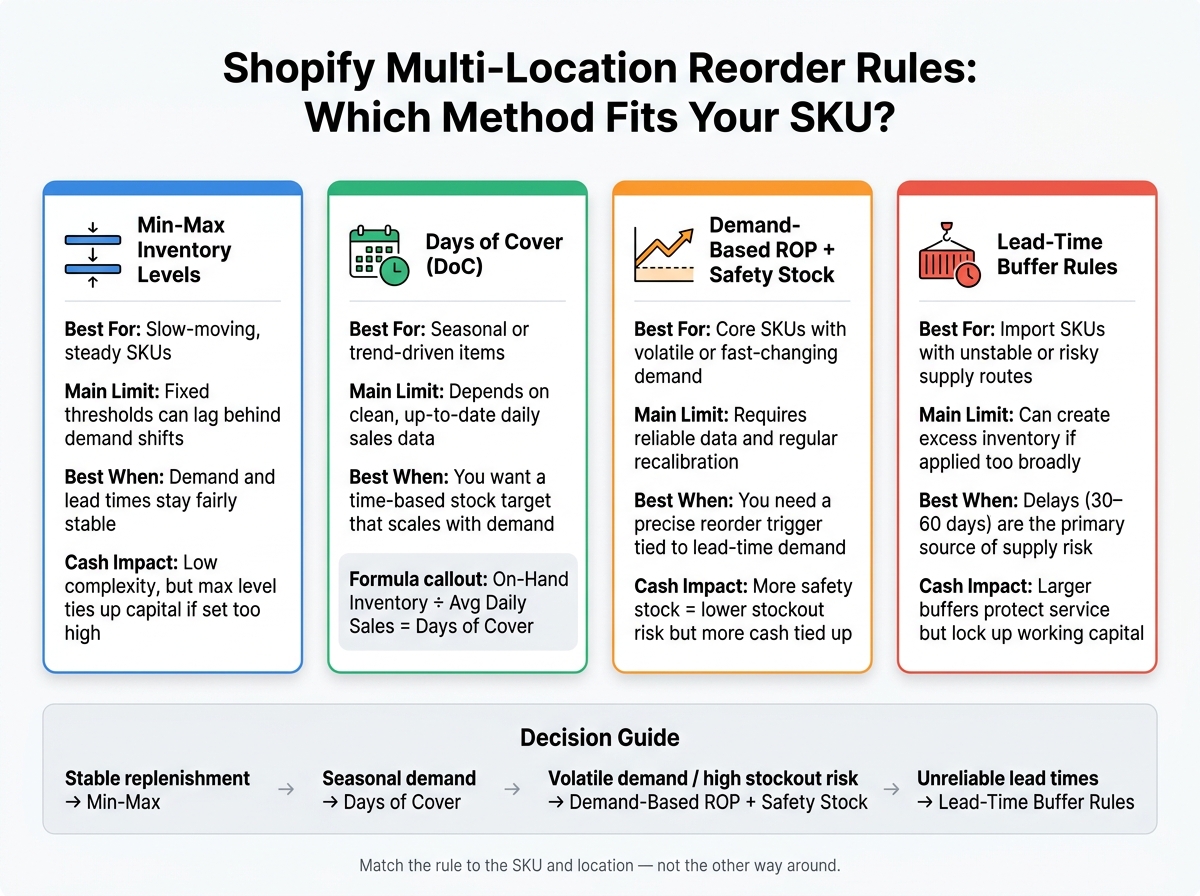
Shopify Multi-Location Reorder Rules: Which Method Fits Your SKU?
1. Min-Max Inventory Levels
Min-max is the simplest reorder rule you can use. You set a minimum level that kicks off a reorder and a maximum level you want to refill to. When stock at a location falls to or below the minimum, you order enough to bring it back to the maximum.
That sounds easy because it is. But there’s a trade-off: min-max is blunt. If demand shifts from one store or channel to another, fixed thresholds don’t react very well.
Its upside is simplicity. Its downside is rigidity. It makes sense when demand at a location is steady. It’s a poor choice as your only rule when sales move around a lot by store or sales channel.
Demand Responsiveness
Min-max works best when demand and replenishment timing stay fairly steady. Because the thresholds are fixed, the method tends to lag when sales change fast.
Lead-Time Protection
Your minimum level has to cover the full restock cycle:
- order placement
- processing
- shipping
- receiving
If lead times change often, a static minimum can leave you exposed to stockouts.
Location-Level Fit and Working-Capital Impact
It’s better to set separate min-max bands for each location when sales velocity and supplier lead times vary. One store may sell through fast. Another may move the same item much more slowly. Using the same thresholds for both can create problems.
Set the maximum too high, and cash sits on the shelf. Set it too low, and you end up placing lots of small orders, which adds purchasing work and extra overhead. That’s why these thresholds need regular review as demand and lead times shift.
Min-max is a threshold rule. The next method adds a time-based view of stock.
2. Days of Cover
Days of Cover (DoC) uses a time-based target instead of fixed thresholds. The formula is simple: on-hand inventory ÷ average daily sales = days of cover. When that number falls below your target, you reorder.
This approach moves with demand. That’s why DoC tends to work better than min-max when sales shift with the seasons.
Demand Responsiveness
DoC is tied directly to actual daily sales rate, so it scales up or down as demand changes. If a location starts selling faster as peak season gets closer, the coverage target rises with it. That makes DoC a good match for locations with seasonal demand swings.
Lead-Time Protection
Min-max sets a stock floor. DoC looks at how long inventory will last. That means the buffer can grow when replenishment slows down.
Shipping disruptions have made lead times longer and less predictable for import-dependent brands. Adding extra days to a DoC target is a practical way to protect service levels when restock windows get stretched.
DoC handles changing demand well, but it still needs safety stock when forecasts are noisy.
Location-Level Fit and Working-Capital Impact
When restocks take longer or become less predictable, location-specific targets matter more. A warehouse, store, or fulfillment partner may each need a different DoC target based on its demand pattern and restock timing.
Using one target across every location can cause problems:
- Fast-moving nodes can run short
- Slower nodes can pile up excess stock
The main edge DoC has over min-max is that it tracks demand on its own, so you don’t need to update it as often. The trade-off is simple: it depends on reliable, up-to-date sales data at the location level.
Forstock can track daily sales rate and days of cover across multiple Shopify locations in one view, which makes DoC targets easier to maintain without constant spreadsheet recalculation.
3. Demand-Based Reorder Points with Safety Stock
Demand-based reorder points trigger a reorder when expected demand during lead time, plus safety stock, hits a set threshold. That gives them a better way to deal with swings in demand and lead time than static rules.
Use demand-based reorder points when you want a trigger tied to expected demand with a buffer built in, not just a fixed minimum or a days-of-supply target.
Demand Responsiveness
ROP follows demand directly, so reorder timing shifts as sales shift. It turns demand into a clear reorder trigger instead of treating it like a rough coverage goal.
If a location starts selling faster, it will hit its reorder point sooner and trigger replenishment earlier. That makes ROP a stronger fit than static min-max rules when demand changes fast and manual threshold updates would come too late.
Lead-Time Protection
When lead times are unstable, safety stock should cover both demand variation and lead-time variation. ROP is the cleaner option when lead-time variation is the main source of risk.
If lead-time risk is the main issue, the next rule uses a direct buffer instead of a demand-based trigger.
Location-Level Fit and Working-Capital Impact
Calculate ROP and safety stock by location, not across the full network. That step matters because each node has its own demand volatility, lead time, and stockout risk.
More safety stock lowers stockout risk, but it also ties up cash. So yes, ROP is more precise than min-max, but it also takes more work to maintain than a simple coverage rule.
Forstock calculates location-level reorder points and safety stock from connected demand and lead-time data.
When you want the simplest way to protect against shipping delays, lead-time buffer rules are the next option.
sbb-itb-f0fc809
4. Lead-Time Buffer Rules
When lead time is the main source of risk, a buffer rule usually makes more sense than a demand trigger. This approach is built to deal with supply delays, not day-to-day replenishment.
Here’s the idea: instead of reordering when sales hit a set threshold or when stock drops below a coverage target, you add a fixed buffer to absorb delayed inbound shipments. Demand-based reorder points tend to work best when lead times are steady. Lead-time buffers make more sense when they’re not.
Lead-Time Protection
This rule works best when the issue is lead-time risk, not swings in demand. With shipping routes more volatile in July 2026, fixed lead-time buffers are a safer pick than pure coverage targets. In practice, that often means moving away from days-of-cover rules and sizing buffers for 30 to 60 days of transit delay.
This matters most for locations tied to unstable import routes.
Location-Level Fit
Route risk isn’t the same everywhere. Some locations face more exposure than others, so they need more cushion. Others don’t.
That’s why lead-time buffers should be set selectively at the SKU and location level, only where the supply risk is present. A blanket rule across the whole network can leave you with too much stock in calm lanes and too little where delays hit hardest.
Working-Capital Impact
Bigger buffers tie up more cash. Sometimes that trade-off is worth it, especially for high-margin SKUs or items that are hard to replace and move through risky routes.
For lower-margin products sourced from stable regions, a smaller buffer or a simple days-of-cover rule is often enough.
One practical way to limit cash tied up in inventory is to hold the buffer at a single hub, then move stock downstream when needed. That can give you protection without spreading extra units across every site.
Forstock can factor supplier lead times and location-level variability into buffer calculations.
Tradeoffs and When to Combine Reorder Rules
No single reorder rule works for every SKU, every location, or every supply setup. Each method does one job well. Each one also has a weak spot.
After looking at the rules one by one, the next step is simple: match the right rule to the right SKU and location.
| Method | Best For | Weakness |
|---|---|---|
| Min-Max Levels | Slow-moving SKUs and stable demand | Less responsive to demand shifts and seasonality |
| Days of Cover | Seasonal items and channels with predictable trends | Depends on forecast quality |
| Demand-Based ROP + Safety Stock | Core SKUs with volatile demand | Requires reliable demand data and regular recalibration |
| Lead-Time Buffer Rules | SKUs sourced through unstable or variable routes | Can hold too much inventory if used too broadly |
The better question isn’t which rule is best in general. It’s which rule fits each SKU and each location.
That’s how most brands handle it in practice. They mix rules based on SKU type and supply risk.
For many multi-location Shopify brands, a hybrid model makes the most sense:
- Min-Max for tail SKUs
- Days of Cover for seasonal lines
- Demand-Based Reorder Points plus Lead-Time Buffers for core SKUs with variable supply
The catch? Hybrid models can break down fast when locations rely on different data and place duplicate orders. One warehouse may reorder stock that’s already on the way to another location. That’s the kind of issue that sneaks up on teams and ties up cash.
Forstock brings inventory and supplier data into one place, models 30- or 60-day delays, and turns the chosen rule into replenishment plans and purchase orders.
Conclusion
No single reorder rule works for every SKU or every location. The best fit comes down to three things: how steady demand is, how dependable the supplier is, and how much stockout risk you can live with.
Here’s a simple way to match each SKU and location to the right rule:
| Situation | Recommended Method |
|---|---|
| Stable replenishment | Min-Max Inventory Levels |
| Seasonal demand | Days of Cover |
| Volatile demand or high stockout risk | Demand-Based Reorder Points with Safety Stock |
| Unreliable lead times | Lead-Time Buffer Rules |
For most multi-location Shopify brands, one global rule just doesn’t cut it. A better approach is to segment by SKU and location: use min-max for stable SKUs, days of cover for seasonal items, demand-based reorder points with safety stock for volatile demand, and lead-time buffers for supply lanes that carry more risk.
After you pick the rule, the next job is keeping it up to date as demand and lead times shift. Forstock helps teams apply reorder rules by SKU and location without spreadsheets.
FAQs
How do I choose the right rule for each SKU and location?
Avoid blanket, store-wide averages. Set reorder rules for each location based on its own demand pattern and lead time, using local data like regional sales velocity and transit times.
Use ABC analysis to decide where to spend the most attention. Calculate reorder points with this formula: (Average Daily Sales × Actual Lead Time in Days) + Safety Stock.
Then match your allocation method to the situation:
- Push for predictable demand
- Pull for unpredictable demand or short shelf life
- JIT for stable, reliable supply chains
That way, inventory decisions fit what’s happening at each location instead of relying on one broad average for every store.
When should I switch from min-max to reorder points?
Switch when inventory needs become more dynamic and location-specific. Reorder points work better when static min-max levels lead to frequent stockouts on fast-moving items or too much inventory on slower sellers.
They use actual daily sales, lead times, and safety stock for each location. That makes replenishment more precise across multiple channels and warehouses. Review and update them at least quarterly, or any time sales patterns or lead times shift.
How often should I review reorder settings?
Review and update reorder settings at least every 90 days as a standard practice. Check them sooner if sales patterns change, supplier lead times shift, or overall performance starts to move in a different direction.
For high-priority A-items from ABC analysis, review settings more often to help keep fast-moving products in stock. If you use dynamic reorder points, those can update weekly or even daily based on real-time data and changing conditions.
Keep reading
Try Forstock free for 14 days.
AI-powered demand forecasting and reorder automation for Shopify brands. No credit card required.