
Shopify Multi-Warehouse Setup: A Complete Guide
Set up and manage Shopify multi-warehouse operations to cut shipping costs, speed delivery, prevent stockouts, and scale inventory with smart allocation.

Shopify Multi-Warehouse Setup: A Complete Guide
Shopify's multi-warehouse system allows businesses to optimize inventory across multiple warehouses, reducing shipping costs and improving delivery times. It tracks stock separately for each site, automatically routing orders to the nearest location with available inventory. This setup is ideal for businesses scaling beyond a single warehouse, especially when handling 100+ daily orders or serving customers across regions.
Key Benefits:
- Lower Shipping Costs: Proximity-based fulfillment minimizes carrier fees.
- Faster Delivery: Orders are routed to the nearest warehouse, improving customer satisfaction.
- Accurate Inventory Tracking: Avoid overselling and stockouts with location-specific stock visibility.
- Flexible Operations: Supports hybrid models, including 3PLs and dropshipping.
When to Add Warehouses:
- Rising order volumes (100–200/day).
- High shipping costs (10–15% of revenue).
- Long delivery times to distant regions.
- Seasonal demand surges.
How to Get Started:
- Add new locations in Shopify Admin under Settings > Locations.
- Assign inventory to each warehouse and set fulfillment priorities.
- Use tools like Forstock for demand forecasting and stock optimization.
- Configure routing rules to minimize split shipments and prioritize efficiency.
Shopify tutorial: How to manage inventory with multiple warehouses across the globe [with Markets]

sbb-itb-f0fc809
Planning Your Multi-Warehouse Strategy
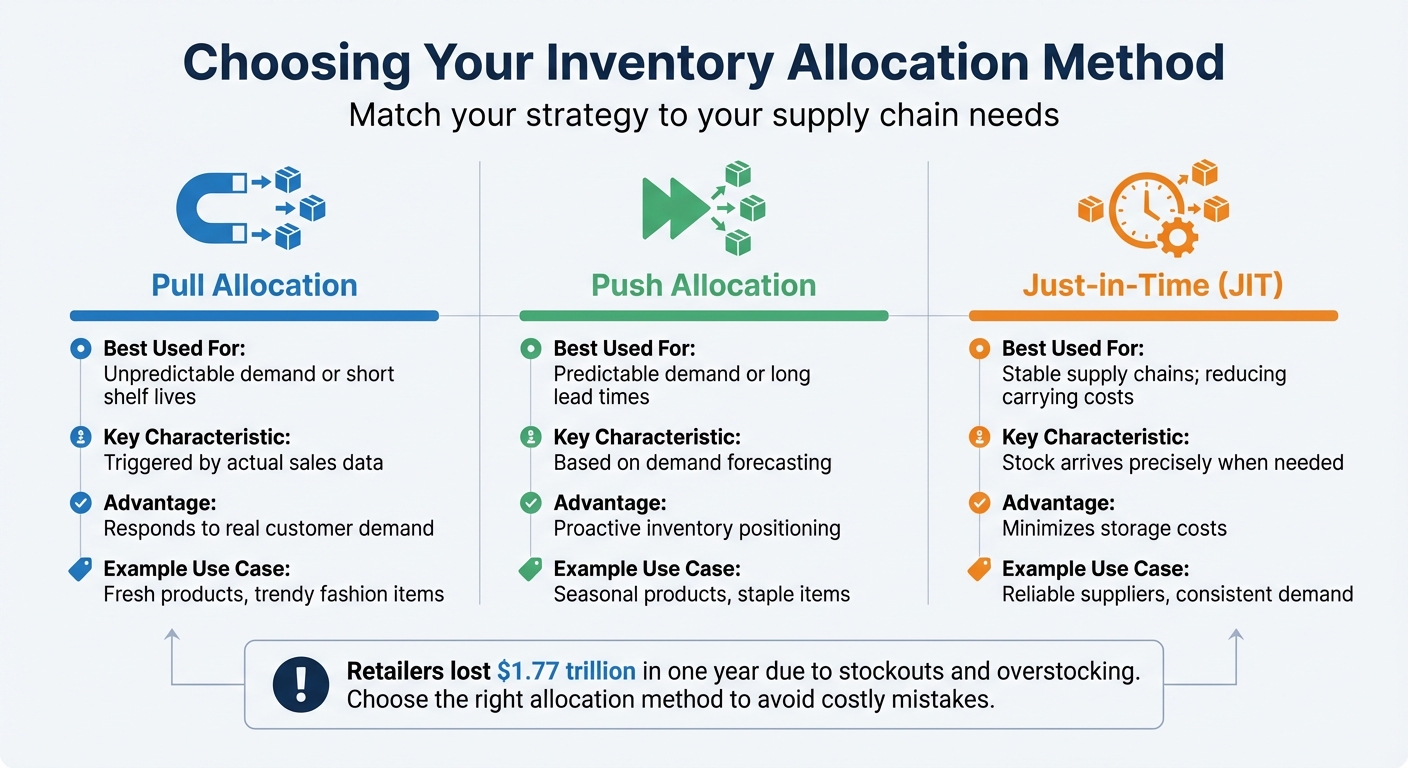
Shopify Multi-Warehouse Inventory Allocation Methods Comparison
Organizing warehouse roles and managing inventory flows effectively is key to avoiding misallocation and inefficient routing.
Defining Warehouse Roles and Locations
Having a clear plan for how each warehouse functions can make fulfillment much smoother.
Shopify allows up to 1,000 locations, including physical warehouses, retail stores, pop-ups, and third-party logistics (3PL) providers. Assign specific roles to these locations. For example, one warehouse might handle bulk distribution, while regional hubs focus on localized fulfillment. Retail stores can double up as in-person sales points and online order fulfillment centers using Shopify POS.
Location matters, too. Placing warehouses near high-demand regions can cut shipping times and balance delivery speed with storage costs.
Preparing Your Data for Multi-Warehouse Setup
Before diving into a multi-warehouse setup, ensure your product data is clean and consistent. Each product variant should have a unique SKU and a standardized barcode. Use consistent units of measurement - whether you track inventory by individual items, cases, or pallets - across your product catalog.
For international sales, assign Harmonized System (HS) codes to your products. This ensures customs tariffs are calculated correctly when inventory crosses borders.
With accurate data in place, you can align stock allocations with demand forecasts more effectively.
Inventory Allocation and Forecasting
To allocate inventory wisely, analyze regional demand trends. For example, ship winter apparel to colder regions and swimwear to coastal areas. Use these insights to distribute inventory proportionally.
Set reorder points and maximum stock levels for each location based on how quickly products sell. Use the ABC analysis method to prioritize resources: keep higher safety stock for fast-moving "A" items, while centralizing slower-moving "C" items to save on costs.
Stockouts and overstocking are costly mistakes. Retailers lost an estimated $1.77 trillion in just one year due to these issues. To avoid this, maintain a safety stock buffer that accounts for supplier lead times and fluctuating demand. For instance, if a supplier takes 14 days to deliver and you sell 50 units daily, keep a minimum of 700 units in stock.
In November 2025, Doe Beauty, a Shopify merchant, adopted AI and automation to manage its global inventory. By cutting four hours of manual work each week and optimizing stock levels, the company saved $30,000 annually. Tools like Forstock can process lead times, sales trends, and seasonality to create 12-month demand forecasts, making allocation decisions more straightforward.
Choose an allocation method that aligns with your supply chain needs:
- Push Allocation: Ideal for predictable demand or long lead times, as it distributes inventory based on forecasts.
- Pull Allocation: Best for unpredictable demand or products with short shelf lives, as it's driven by actual sales data.
- Just-in-Time (JIT): Reduces carrying costs by having inventory arrive exactly when needed, but it requires a stable and reliable supply chain.
| Allocation Method | Best Used For | Key Characteristic |
|---|---|---|
| Pull Allocation | Unpredictable demand or short shelf lives | Triggered by actual sales data |
| Push Allocation | Predictable demand or long lead times | Based on demand forecasting |
| Just-in-Time (JIT) | Stable supply chains; reducing carrying costs | Stock arrives precisely when needed |
Once your strategy is set, configure locations and assign inventory in Shopify Admin.
Setting Up Multi-Warehouse in Shopify Admin
When implementing a multi-warehouse strategy, it's important to configure Shopify locations and inventory assignments correctly. This includes verifying addresses and setting fulfillment priorities to avoid shipping delays and routing issues, ensuring smooth order fulfillment and reducing stockouts.
Adding and Managing Locations
To add a new warehouse, navigate to Settings > Locations > Add location in your Shopify Admin. You'll need to provide a unique name and a physical address for each location. Shopify automatically verifies these addresses; if an address isn’t verified, features like shipping labels and local delivery will be disabled.
By default, all locations are set to fulfill online orders. If a warehouse is used solely for storage or in-person sales, you can disable this setting. Keep in mind that your Shopify plan determines how many active locations you can have:
- Starter plans: 2 locations
- Basic to Advanced plans: 10 locations
- Shopify Plus: Up to 200 locations
Apps that manage inventory, such as dropshipping or third-party logistics (3PL) services, are treated as locations but don’t count toward your plan’s limit.
If you need to delete a location, you must deactivate it first. Note that you cannot deactivate a location if it’s set as your "Default location." In this case, assign another location as the default before proceeding.
Assigning Inventory to Locations
When you create a new product, Shopify assigns it to all active locations with an initial inventory quantity of 0. Each product must be stocked at least one location at all times. To manage inventory levels, ensure the "Inventory tracked" option is enabled for the product or its variants.
For smaller catalogs, you can assign inventory through the product details page. Go to Products, select the product, click Edit locations in the Inventory section, and choose which locations will stock the item. For larger catalogs, the bulk editor allows you to update up to 50 products simultaneously, while a CSV import is ideal for managing 100 or more products.
Before removing a product from a location, ensure there are no pending unfulfilled orders or active transfers for that product. Keep in mind that each location’s inventory is managed independently; inventory cannot be shared or pooled across warehouses. This separation makes it vital to forecast inventory costs accurately for each location to maintain profitability.
Setting Fulfillment Priorities and Routing Rules
Shopify assigns orders to a single location if that location has enough inventory to fulfill the entire order. If no single location can fulfill the order, Shopify either splits the order across multiple locations or assigns it to the top-priority location, even allowing overselling if this feature is enabled. New locations are automatically added to the bottom of the fulfillment priority list.
To configure routing rules, go to Settings > Shipping and delivery. Here, you can set rules like "Ship from closest location" to prioritize the warehouse nearest the customer’s address, or "Minimize split fulfillments" to reduce costs by consolidating shipments. You can also manually rank locations, with Shopify attempting to fulfill orders from the highest-ranked location first.
For products requiring specific fulfillment locations, use shipping profiles. These allow you to assign certain products to specific warehouses or groups of warehouses, which is particularly useful for items like oversized goods that are only stocked in select locations. Within shipping profiles, you can group locations to share shipping zones and rates. If an order includes items from different groups, Shopify combines shipping rates at checkout.
| Order Scenario | Fulfillment Logic Applied |
|---|---|
| Entire order available at one location | Assigned to that location |
| Order not available at any single location | Split across locations or assigned to top-priority location |
| Multiple locations can fulfill the order | Assigned to the highest-priority location |
| Product-specific fulfillment needed | Use shipping profiles to restrict fulfillment locations |
These configurations help simplify the complexities of managing multi-warehouse operations, ensuring a smoother workflow for your business.
Running Multi-Warehouse Inventory Systems
Once your warehouses are set up, the real work of managing inventory begins. Daily operations need to ensure accurate stock tracking, smooth order flow, and balanced inventory across all locations. Shopify manages inventory separately for each warehouse, meaning stock isn’t shared between locations. This approach requires careful planning to avoid situations where one warehouse runs out of stock while another has a surplus.
Daily Inventory Operations
Every location has to handle essential tasks like receiving stock, conducting cycle counts, and processing returns. When receiving inventory transfers, using barcode scanners can help cut down on manual errors and speed up the process. Tracking multi-location stock with Shopify Analytics is also useful for identifying inventory changes, spotting shrinkage, and identifying delays. These routine tasks form the backbone of efficient inventory management, which directly impacts order fulfillment and shipping processes.
Order Routing and Split Shipments
Shopify automates order assignment by considering inventory availability, customer proximity, and fulfillment priority rules. If one location can fulfill the entire order, it ships from there. Otherwise, Shopify either splits the order across multiple locations or assigns it to the highest-priority warehouse. However, split shipments can drive up costs due to extra shipping labels, packaging, and pickups.
As Emily Manley from Shopify explains:
By minimizing split fulfillments, you are paying to ship an order just once instead of paying for multiple shipments for split orders.
To keep costs down, you can adjust your routing settings to "Minimize split fulfillments" under Settings > Shipping and delivery. When orders include items stored at different locations, Shopify splits the order based on inventory levels and priority rankings to meet customer demand. If routing alone doesn’t balance your stock effectively, inter-warehouse transfers can help redistribute inventory where it’s needed most.
Inter-Warehouse Stock Transfers
Moving stock between locations is a practical way to prevent stockouts without waiting for new supplier shipments. When you mark a transfer as "Ready to ship", Shopify reserves the inventory at the origin warehouse, ensuring it can’t be sold elsewhere during transit. Once the transfer is "In progress", the items are marked as "incoming" at the destination, giving you visibility into future stock availability even before the shipment arrives.
| Transfer Status | Inventory Impact | Description |
|---|---|---|
| Draft | No impact | Transfer created but inventory not yet reserved. |
| Ready to ship | Reserved at Origin | Inventory set aside and unavailable for sale at the origin location. |
| In progress | Incoming at Destination | Items in transit; visible as "incoming" at the destination. |
| Transferred | Available at Destination | Items received and added to the destination’s available inventory. |
| Canceled | Returned to Origin | Reserved items released back into available stock at the origin location. |
For routine stock transfers, such as weekly shipments from a central warehouse to regional hubs, use the "Duplicate" function to save time by reusing the same origin and destination settings. Always include tracking numbers for shipments to monitor their status during the "In progress" stage.
Transfers are especially useful when one location is nearing a stockout while another has excess inventory. However, frequent transfers might signal a larger issue with how inventory is allocated. That’s where demand forecasting comes into play. Tools like Forstock use AI to analyze sales trends, lead times, and seasonal patterns, helping you allocate inventory more effectively and reduce the need for last-minute transfers.
Scaling Multi-Warehouse Operations
Scaling up your warehouse operations brings a whole new level of complexity. As your business grows, you'll need to find smarter ways to allocate inventory, open new locations, and handle peak demand - all while keeping costs in check and customers happy.
Advanced Allocation Strategies
One effective method to streamline inventory management is ABC analysis. This approach sorts your products into three categories:
- "A" items: High-value, low-volume products that generate the most revenue.
- "B" items: Mid-level performers.
- "C" items: Low-value, high-volume goods.
For "A" items, keep higher safety stock levels and place them in your best-performing warehouses. This ensures they're always available where they sell the most.
To refine this further, consider warehouse grading. Assign grades (A, B, or C) to your locations based on factors like order fulfillment speed and sales volume. Grade A warehouses, which handle faster turnover, should receive a larger share of your stock to avoid emergency transfers.
Tech tools like Forstock can take the guesswork out of allocation. By analyzing historical sales data, lead times, and seasonal trends, platforms like this help you align stock distribution with demand. Retailers using AI-driven inventory tools have reported cutting total inventory levels by 20% to 30%.
With these strategies in place, scaling your warehouse network becomes a lot easier.
Expanding from One to Multiple Warehouses
Once you've mastered the day-to-day complexities of managing multiple warehouses, the next step is expansion. Before adding new locations, conduct a SKU audit to ensure every product variant has a unique SKU and barcode. Duplicate SKUs can complicate inventory sharing across locations or disrupt integration with third-party logistics providers. Use CSV uploads to streamline inventory assignments for new warehouses.
When you're ready to transfer inventory, test your routing rules first. Configure Shopify to automatically assign orders to the nearest location with available stock, and run test orders to confirm the system works as expected. This small step can save you from costly errors once the new warehouses go live.
For stock transfers, use Shopify's formal process to keep things organized. Mark items as "Ready to ship" to reserve inventory at the source warehouse, and track them as "In progress" while they’re in transit. Always include tracking numbers to monitor shipments.
"Shopify POS gives us real-time visibility into stock and operations. Our team can see exactly where a product is and manage transfers easily, which has been essential for running four service centers smoothly".
Pierre Asteix, Operations Director at Weebot, highlights how real-time insights helped his team manage multiple service centers effectively.
Preparing for Peak Seasons and Promotions
Just like daily operations, aligning inventory with demand is critical during peak seasons. Major U.S. shopping events like Black Friday, Cyber Monday, and the holiday season require careful preparation. Start by analyzing past sales data to identify which products see a spike in demand and where that demand is coming from. Use this information to pre-allocate stock to regional warehouses ahead of time.
For seasonal products, review safety stock levels. High-revenue "A" items may need a higher buffer compared to slower-moving "C" items. A push allocation strategy can also be a game-changer. Instead of waiting for orders, proactively move inventory closer to where you expect demand. For instance, if you sell winter gear, stock up warehouses in northern states before the season hits to avoid delays.
Retailers lose nearly $1 trillion each year due to stockouts and overstocking. Striking the right balance is essential to avoid missed sales or tying up cash in excess inventory. Tools like Forstock offer 12-month demand planning, helping you forecast based on trends, lead times, and seasonality, so you can allocate inventory more effectively.
Lastly, don’t forget to audit your storage capacity before the busy season. Check if your warehouses can handle the increased volume of seasonal products. If space is tight, partnering with third-party logistics providers can give you the extra capacity you need during high-demand periods.
Conclusion
Shopify's multi-warehouse system gives U.S. merchants the tools to cut costs and speed up delivery times. By routing orders to the nearest warehouse, shipping distances shrink, and customers get their orders faster. On top of that, Shopify’s unified commerce setup reduces operating costs by 21%, making it easier to scale your business without breaking the bank.
Real-time inventory updates ensure you won’t run into overselling or stockouts, keeping popular items available when customers want them. Take retailer Oak + Fort, for example - they streamlined their retail and warehouse operations with Shopify, saving 50 hours of manual work each week and slashing operating costs by 47%. These kinds of efficiencies lay the groundwork for scalable and automated inventory management.
As your business grows, tools like Forstock can take your inventory management to the next level. With AI-powered forecasting and automated purchase orders, Forstock helps reduce stockouts by 35% to 60%.
FAQs
How do I effectively manage inventory across multiple regions?
To efficiently manage inventory across different regions, begin by setting up each warehouse, store, or third-party logistics provider (3PL) as a location in Shopify. This setup allows you to monitor stock levels independently for each site. You can assign products to multiple locations and update quantities as needed, ensuring your inventory tracking is precise.
Leverage sales data, seasonal trends, and lead time insights to predict regional demand. Allocate inventory to warehouses closest to your customers to minimize shipping times and reduce the risk of overselling. Shopify’s fulfillable inventory feature ensures that customers only see stock available within their designated shipping zone. If a particular region starts running low, you can transfer inventory between locations to maintain a balanced supply and accurate stock levels.
For a more analytical approach, tools like Forstock can be a game-changer. Integrated with Shopify, it offers real-time demand forecasting and automated inventory allocation. This helps you avoid stockouts, cut down on excess inventory, and streamline your operations for faster and more efficient order fulfillment.
How can I effectively manage stock transfers between warehouses in Shopify?
To handle inter-warehouse stock transfers efficiently, begin by accurately setting up each location in Shopify. This step ensures that inventory is properly allocated and tracked between the source and destination warehouses. Before initiating a stock move, create a draft transfer to review and adjust SKUs and quantities. Keep in mind that once a transfer is marked as pending, you won’t be able to modify the origin or destination, so it’s crucial to double-check all details beforehand. For larger transfers, leveraging the bulk import feature or a barcode scanner can save time and minimize errors.
After sending out a transfer, it’s important to track shipment details such as carriers, tracking numbers, and expected delivery dates. This helps you stay informed about inventory availability and avoid surprises. When the stock arrives, make sure to receive the transfer in Shopify to update the inventory levels at the destination warehouse. Regularly monitoring incoming inventory can help you avoid overstocking or running into shortages.
For an even smoother process, tools like Forstock can be a game-changer. They can forecast demand, recommend ideal transfer quantities, and automate essential inventory tasks. By following these steps, you can maintain balanced inventory levels across all locations and steer clear of costly mistakes.
How do I know it’s time to expand to multiple warehouses?
Expanding to multiple warehouses becomes essential when your current setup struggles to keep up with customer demands for faster delivery, dependable service, or broader reach. If you’re frequently running out of stock, experiencing delays in shipping to certain areas, or dealing with order volumes that push your existing warehouse to its limits, it’s a clear sign to consider additional locations.
Other triggers for expansion might include opening new retail stores or pop-up shops, growing your sales footprint across different regions, or juggling both in-house inventory and dropshipping operations. Hitting capacity limits or facing operational slowdowns during busy seasons are also strong indicators that your current setup isn’t cutting it anymore.
To make this transition smoother, tools like Forstock can be a game-changer. It offers AI-driven demand forecasting, automated purchase orders, and real-time inventory tracking. With Forstock, you can easily manage stock across multiple locations, avoid overstocking, and keep your warehouses ready to meet customer needs.
Keep reading
Try Forstock free for 14 days.
AI-powered demand forecasting and reorder automation for Shopify brands. No credit card required.