
Best Practices for Multi-Channel Inventory Tracking in 2026
Centralize inventory, sync in real time, automate adjustments, and use AI forecasting to eliminate oversells and boost accuracy.

Best Practices for Multi-Channel Inventory Tracking in 2026
Managing inventory across multiple sales channels like Shopify, Amazon, and TikTok Shop can boost your business but comes with challenges. The key to success? Real-time updates, centralized systems, and automation. Here’s what you need to know:
- Centralize Inventory Data: Use one system as your "single source of truth" to avoid errors. Standardize SKUs and map all inventory locations for accuracy.
- Real-Time Syncing: Ensure inventory updates happen in less than 5 seconds to prevent overselling. Use safety stock buffers and automate adjustments for returns or cancellations.
- Optimize Warehouse Workflows: Streamline receiving, picking, and packing processes. Regular cycle counts (instead of annual checks) improve accuracy and reduce disruptions.
- Leverage AI Forecasting: Use AI tools to predict demand, manage stock levels, and reduce forecasting errors. Keep supplier data current to avoid planning issues.
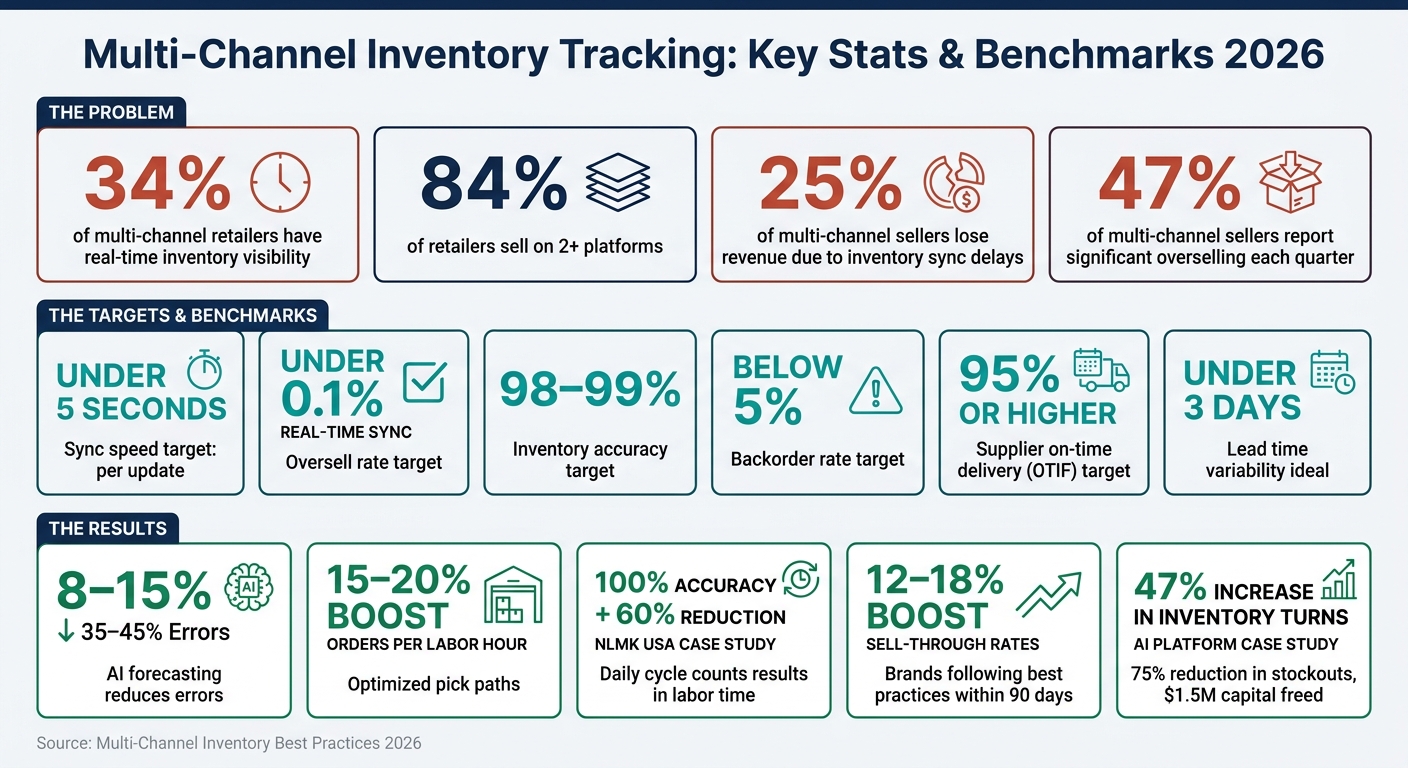
Multi-Channel Inventory Tracking: Key Stats & Benchmarks 2026
Multichannel Inventory Management: What It Is & How to Use It | Cheers POS
Implementing this strategy requires a solid real-time inventory tracking setup to ensure data accuracy across all sales channels.
sbb-itb-f0fc809
Centralizing Inventory Data
Managing inventory across multiple sales channels can get messy fast. Without a unified system, each channel ends up operating as its own "source of truth", which often leads to errors and inefficiencies. Surprisingly, only 34% of multi-channel retailers have real-time inventory visibility, even though 84% are selling on two or more platforms. The solution? Centralize your inventory data.
Set Up a Single Source of Truth
To avoid confusion, designate one platform as the official inventory record. This central system will handle all stock updates, feeding accurate data to platforms like Shopify, Amazon, Walmart, or TikTok Shop, instead of the other way around.
"Channel-specific counts are always outputs, never inputs." - OrderSync Pro
Before syncing inventory automatically, conduct a thorough physical count to ensure the data you're starting with is accurate. Launching automation on flawed data will only multiply mistakes. If you're running a Shopify-based business with multiple locations or channels, tools like Forstock can simplify the process. Platforms like this provide a unified dashboard to track inventory levels and performance across all fulfillment points - eliminating the need for manual spreadsheets. This setup also paves the way for better SKU management.
Standardize SKUs Across Channels
Every product variant should link to one master SKU across all channels. A consistent SKU format - such as CATEGORY-STYLE-COLOR-SIZE (uppercase, hyphen-separated, and under 40 characters) - makes it easier to manage inventory. Use a central mapping table to connect your master SKU to platform-specific identifiers like Amazon ASINs, Shopify Variant IDs, or supplier SKUs. This ensures seamless syncing and prevents issues like listings being disconnected from your inventory system.
Avoid reusing SKUs from discontinued products, as this can mess up historical sales data and distort forecasting. To keep things clean, run a 90-day SKU audit to identify duplicates, blank fields, or inactive SKUs. Once your SKUs are standardized, it's time to focus on optimizing inventory for multiple warehouses.
Map All Inventory Locations
With a centralized system and standardized SKUs in place, the next step is to track inventory locations accurately. Assign each warehouse, 3PL, retail backroom, or pop-up store a unique location code (e.g., US_WAREHOUSE_001). This ensures stock levels are adjusted correctly after every sale.
Each location should also monitor item statuses - such as sellable, reserved, damaged, or in-transit - to avoid selling units that aren't actually available. When transferring items between locations, set up digital rules to update stock counts at both the origin and destination simultaneously.
Keeping Inventory in Sync Across Channels
One of the biggest hurdles in managing multiple sales channels is keeping inventory counts accurate in real time. It's a common pain point - 25% of sellers operating on two or more platforms report losing revenue due to delays in syncing inventory across channels. However, a few targeted strategies can help minimize these issues.
Test API and Webhook Sync Speed
Switching from batch syncing (which can take 5–15 minutes) to event-driven systems that update instantly can make a huge difference. Real-time syncing has been shown to reduce oversell rates to less than 0.1%.
"The question is no longer whether you need multichannel inventory sync... The question is how fast that sync needs to be." - Sarah Jenkins, Technical Lead
To ensure your syncing speed is up to par, simulate orders in a test environment for at least a week. All channels should update within 5 seconds. If delays occur, consider using message brokers like Amazon EventBridge or RabbitMQ to queue and retry updates. It's also crucial to configure your system to queue updates during API throttling instead of dropping them entirely.
Set Safety Stock and Channel Buffers
Even with rapid syncing, slight delays between a sale and its reflection across all platforms are inevitable. To account for this, implement buffer strategies. For high-demand SKUs, keep a buffer of 10–15 units. For items with moderate sales velocity, aim for a 3–5% buffer. Some platforms, like eBay, may require larger reserves due to known API latency, while push-sync platforms like Shopify generally need smaller buffers.
Instead of dividing inventory evenly across channels, allocate stock based on each channel's sales performance. For example, if Amazon generates 50% of your sales, allocate about 50% of your inventory to that platform. Regularly review sales data and adjust allocations as needed, shifting inventory from slower-moving channels to faster ones to avoid overstock and stockouts.
Automate Inventory Adjustments
Once you've optimized sync speed and set up buffers, automation can further reduce errors. Manual updates for returns, cancellations, and inbound orders are a common source of mistakes - 47% of multi-channel sellers report significant overselling each quarter due to sync delays. Use API automation to handle these updates, relying on the adjust method for incremental changes rather than the set method, which can overwrite previous updates.
For returns, only restock items as "sellable" after they've been physically inspected. Syncing damaged goods as available inventory can lead to costly errors. Tools like Forstock can help Shopify sellers by automating purchase order creation when stock levels fall below safety thresholds, saving time and reducing manual workload. Additionally, running a full inventory reconciliation every 4–6 hours can catch discrepancies caused by missed webhooks or failed API deliveries. Regular monitoring and periodic reconciliation are essential for maintaining real-time accuracy.
Improving Warehouse and Fulfillment Workflows
Keeping warehouse and fulfillment workflows running smoothly is just as important as maintaining syncing accuracy. Even if your syncing is flawless, sloppy warehouse practices can lead to major inventory issues. Mistakes in receiving or picking can ripple across every channel.
Standardize Receiving Procedures
Every inbound shipment should follow a clear process: scan items as they arrive, verify quantities against the purchase order immediately, ideally using Shopify purchase order apps with real-time sync, and assign bin locations before marking stock as "available." Skipping even one of these steps can lead to serious discrepancies. The goal? Achieve a receiving accuracy rate of 99% or higher.
"Manual vs. automated receiving creates manual problems. Enforce scanning at every checkpoint, and your inventory accuracy will follow." - Jose Moreno, Concentrus
To make this process foolproof, configure your WMS or ERP system to block users from skipping critical steps like location assignments or quantity confirmations. If there's a way to bypass the system, someone will eventually take it. Another key tip: separate responsibilities. The person receiving inventory should not be the same person counting it or performing cycle counts. This separation reduces shrinkage and keeps your records honest.
Once receiving is under control, focus on refining your picking and packing processes to further reduce errors.
Improve Picking and Packing Processes
The layout of your warehouse has a direct impact on how quickly and accurately orders are fulfilled. Place your "A-tier" SKUs - the fastest-moving items - near packing stations and at waist height for easy access. Organize pick lists by warehouse location sequence instead of order number, so pickers can move efficiently without unnecessary backtracking. Optimizing pick paths and slotting can boost orders picked per labor hour by 15–20%.
"Every extra step your picker takes costs you time and money. Design your layout around velocity, not convenience." - Jose Moreno, Concentrus
To catch errors early, equip pickers with handheld scanners for pick verification before items reach the packing stage.
Efficient picking should go hand-in-hand with regular inventory checks.
Run Regular Cycle Counts
Annual physical counts are disruptive and often fail to catch issues in time to address them. A better approach is to implement a rotating cycle count schedule. By cycle counting 20% of SKUs each week, you can audit your entire catalog every quarter.
Use the ABC method for categorization: count "A" items weekly, "B" items monthly, and "C" items quarterly. Assign specific zones to individual team members to ensure clear accountability. When discrepancies arise, resolve them immediately instead of postponing corrections.
The benefits are clear. In 2026, steel manufacturer NLMK USA introduced daily cycle counts with mobile barcoding and achieved 100% inventory accuracy, all while cutting labor time by 60%. Well-run operations often aim for 97% inventory record accuracy or higher, with the best performers reaching 99.9%.
"Cycle counting turns accuracy into a habit, not an event. Small corrections every week beat one painful reckoning every year." - Jose Moreno, Concentrus
Using Data and AI Forecasting to Make Better Inventory Decisions
Once you’ve centralized and synchronized your inventory data, the next step is to take it further with advanced metrics and AI forecasting. Clean data alone isn’t enough - it’s about turning that data into smarter, more strategic decisions. By tracking the right metrics and using AI forecasting, you can transform raw numbers into a real advantage.
Track Key Inventory Metrics
To make informed decisions, focus on metrics that directly measure your inventory performance. Some of the most critical ones include:
- Stockout rate: This shows how often products are unavailable. Frequent stockouts could point to issues with forecasting or supplier reliability.
- Inventory accuracy rate: This compares system counts to physical counts. Aim for at least 98% accuracy to ensure your AI tools have reliable data to work with. Without clean data, even the most advanced models will fail to deliver dependable results.
- Oversell rate: Keep this under 0.5% to maintain strong customer relationships and avoid harming your brand’s reputation.
- Backorder rate: Strive for a rate below 5% to prevent costly customer service issues.
"Your supply chain represents 50–70% of your total operating costs. Without accurate measurement, you're flying blind." - Hylke Reitsma, Co-founder & Supply Chain Specialist, Forthsuite
These metrics are the building blocks for effective AI-driven replenishment strategies.
Use AI Forecasting for Replenishment
AI and machine learning models can significantly reduce forecasting errors - from 35–45% down to 8–15% - by accounting for factors like demand volatility, seasonality, lead times, and even external trends like social media buzz.
Here’s a real-world example: A wholesale distributor managing 5,000 SKUs across three warehouses adopted an AI inventory platform. Over 12 months, they achieved:
- A 47% increase in inventory turns (from 6.2 to 9.1 per year)
- A 75% reduction in stockout rates (from 4.8% to 1.2%)
- Freed up $1.5 million in capital
- A 75% reduction in manual planning time
For Shopify brands, tools like Forstock integrate AI-powered forecasting directly into your workflow. These platforms build demand models that adjust to sales trends, seasonality, and supplier lead times, automating replenishment decisions.
A quick tip: Segment your SKUs before applying forecasting. High-volume items might need weekly or even daily forecasts, while slower-moving products can be reviewed quarterly.
This kind of predictive planning lays the groundwork for better supplier management.
Keep Supplier and Lead Time Data Current
Even the most advanced AI models can fail if they rely on outdated supplier information. Keeping supplier and lead time data up to date ensures your forecasting tools have accurate inputs, which is critical for maintaining inventory accuracy.
One often-overlooked factor is lead time variability. Ideally, variability should stay under 3 days; anything over 7 days can make demand planning incredibly challenging.
Additionally, monitor supplier performance with On-Time In-Full (OTIF) metrics. A supplier on-time delivery rate of 95% or higher is ideal. If performance drops, set up automated alerts so your purchasing team can quickly find alternative sources or expedite orders.
Checklist Summary for Shopify Brands

Here’s a quick guide to ensure your Shopify brand is ready for scaling multi-channel inventory tracking effectively.
Setup Checklist
To avoid costly mistakes, focus on these key areas:
- Single source of truth: Use an external ERP or OMS to manage inventory counts and push updates to Shopify and other sales channels. Avoid letting Shopify or other platforms dictate inventory updates.
- Standardized SKUs: Ensure every product follows the same alphanumeric naming format across all channels and locations.
- Mapped locations: Track all warehouses, retail stores, and 3PLs in Shopify's Settings > Locations for precise location-level inventory syncing.
Real-Time Sync Checklist
Fast and accurate syncing is non-negotiable in 2026. Aim for updates within 30–60 seconds; delays over 5 minutes increase the risk of overselling.
| Sync Practice | Target |
|---|---|
| API/webhook sync speed | Under 60 seconds; under 5 is ideal |
| Safety stock buffer | Minimum of 1–3 units per SKU |
| High-velocity SKU drift check | Every 30 minutes |
| Full inventory comparison | Every 4 hours |
Pro tips: Use webhook-driven sync rather than polling for updates. When updating stock via API, apply the adjust method instead of set. This prevents overwriting deductions from orders already in progress. These strategies help maintain fast and reliable stock updates across all channels.
Warehouse and Forecasting Checklist
Fine-tuning warehouse operations and using AI forecasting tools can significantly improve inventory accuracy. Here’s what to prioritize:
- Cycle counts over annual counts: Regularly count small portions of inventory daily or weekly. This approach ensures ongoing accuracy rather than relying on infrequent, large-scale counts.
- ABC segmentation: Focus on "A" items (about 20% of SKUs generating 70–80% of revenue) by counting them weekly and targeting a 98–99% service level. "C" items can be checked quarterly.
- AI-powered replenishment: Use forecasting tools like Forstock to manage seasonality, lead times, and sales trends. Automating reorder points and decisions with a 12-month demand plan ensures smoother operations.
- Supplier data hygiene: Keep lead times and on-time, in-full (OTIF) rates updated. Variability in lead times beyond 7 days makes demand planning more challenging.
Brands that consistently follow these practices report a 12–18% boost in sell-through rates within just 90 days. That’s a solid payoff for the effort you put into refining your processes.
FAQs
What should be my single source of truth for inventory?
A centralized system that updates in real time across all your sales channels should serve as your single source of truth for inventory. This approach keeps stock levels accurate, minimizes errors, and provides a unified view of your inventory. With everything in sync, managing inventory becomes far more efficient and straightforward.
How fast should inventory sync across channels in 2026?
Inventory updates need to happen almost instantly - ideally within 5 seconds - to prevent problems like overselling or running out of stock. Quick syncing keeps stock levels accurate across all your sales channels, ensuring customers enjoy a smooth shopping experience while minimizing potential operational headaches.
Which inventory metrics matter most for AI forecasting?
When it comes to AI-driven inventory forecasting, there are a few key metrics that stand out: sales velocity, stockout rate, inventory turnover, safety stock levels, and the cash conversion cycle.
Each of these plays a crucial role in helping businesses predict future inventory needs. Together, they ensure stock levels are optimized and demand planning stays on track. By keeping a close eye on these metrics, companies can make smarter decisions and avoid costly mistakes like overstocking or running out of essential products.
Keep reading
Try Forstock free for 14 days.
AI-powered demand forecasting and reorder automation for Shopify brands. No credit card required.