

Cycle counting is a method to keep your Shopify store’s inventory accurate without shutting down operations for full physical counts. Instead of counting everything at once, you check smaller portions of inventory regularly (daily, weekly, or monthly). This helps catch errors early, reduce overstock and stockouts, and avoid overselling.
Key benefits include:
- Higher Accuracy: Retailers using cycle counting achieve up to 98% inventory accuracy.
- Cost Savings: Reduces inventory costs by up to 10% and avoids expensive closures for full counts.
- Better Order Fulfillment: Prevents overselling and ensures your Shopify listings match actual stock.
The process can be optimized using ABC analysis, which prioritizes high-revenue items for frequent checks. Tools like Forstock automate cycle counting, saving time and improving accuracy. By adopting this approach, Shopify sellers can protect revenue, improve customer trust, and streamline inventory management.
How to use the Shopify POS Quick Count Extension - Tutorial

sbb-itb-f0fc809
What Is Cycle Counting?
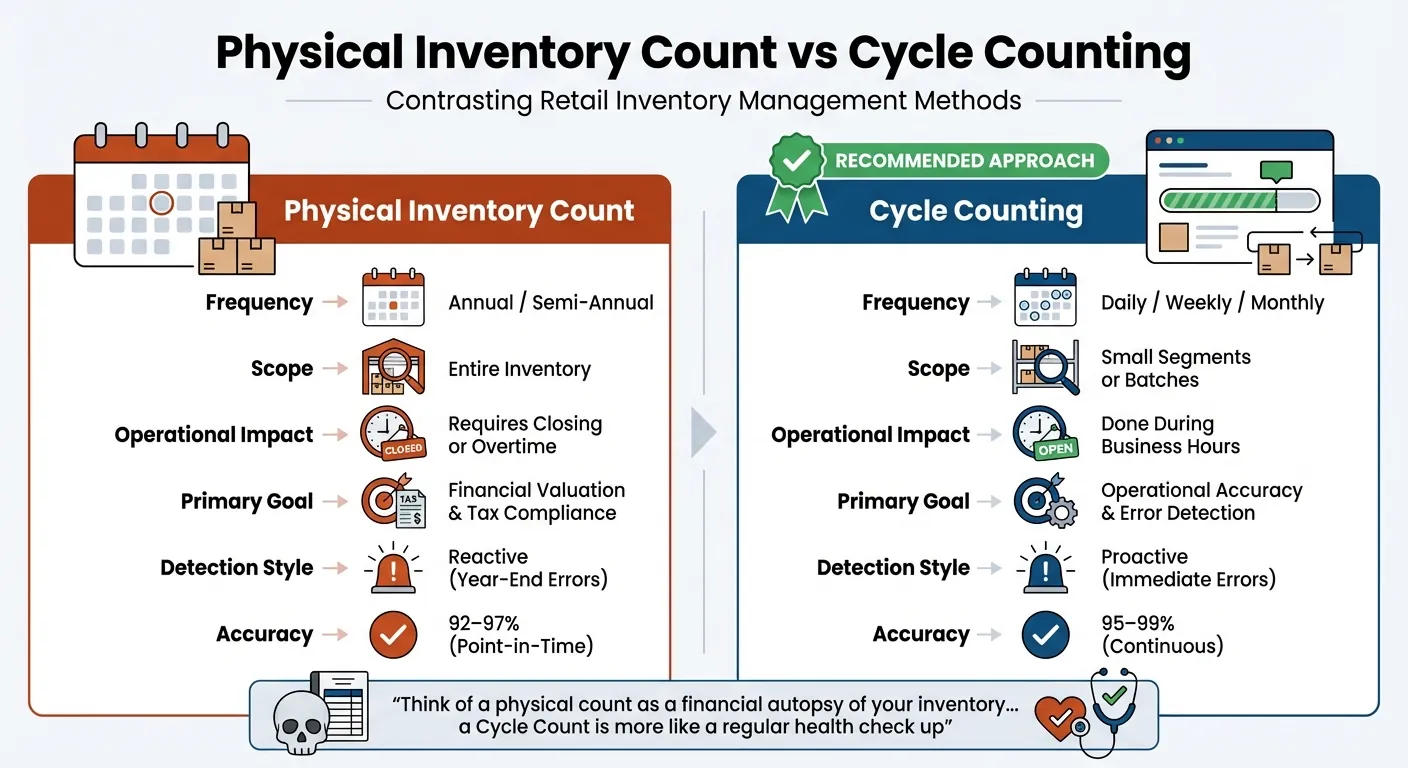
Cycle Counting vs Physical Inventory Count Comparison for Shopify Stores
Cycle counting is a method of auditing inventory by checking small portions of stock on a recurring schedule, rather than conducting a single, large-scale annual inventory audit. Instead of pausing operations to count everything at once, you can divide the process into manageable parts - like reviewing a specific product category one day, high-value items another, or focusing on optimizing inventory across multiple warehouses later. This approach aligns your inventory records with your daily operations, avoiding the disruptions associated with traditional annual counts.
Unlike full physical inventories, which are typically done once or twice a year and often require overtime or store closures, cycle counting is more flexible and integrated into daily business routines.
"Think of a physical count as a financial autopsy of your inventory... a Cycle Count is more like a regular health check up".
While physical counts are critical for tax and accounting purposes, cycle counting focuses on operational accuracy. This ensures your Shopify dashboard reflects what’s actually on your shelves, providing a reliable foundation for smooth day-to-day operations.
Main Characteristics of Cycle Counting
Cycle counting works on a regular, rotating schedule, whether daily, weekly, or monthly, depending on your business needs. The process happens seamlessly during normal business operations. For instance, you might count 50 SKUs on Monday morning, another group on Wednesday, and a different section on Friday - all while continuing to fulfill orders and receive new stock.
This method often relies on sampling techniques, where analyzing a small group of items helps confirm the accuracy of broader inventory records. Counts can be organized by product category, value tier (using ABC analysis), or physical location. For Shopify merchants juggling multiple sales channels, this systematic approach ensures online listings and POS systems stay in sync.
Most retailers aim for an Inventory Record Accuracy (IRA) of 90% or higher, with advanced cycle counting programs achieving up to 98% accuracy. This is a significant improvement, considering the average U.S. retailer has accurate counts for only 63% of their stock. These key characteristics make cycle counting an essential tool for improving inventory management.
Advantages of Cycle Counting
Cycle counting allows you to catch errors quickly - within days rather than months. This means you can identify and address issues like theft, shipping errors, or scanning mistakes before they escalate. In fact, businesses often see a reduction in inventory shrinkage of 30% to 65% within the first year of using this method.
From a cost perspective, cycle counting is far less expensive than traditional physical counts. For operations managing over 50,000 SKUs, it costs 40% to 60% less - ranging from $60,000 to $100,000 annually compared to $120,000 to $200,000 for full inventory counts. Plus, because cycle counting doesn’t require shutting down your facility, you can avoid losing revenue from missed sales. A three-day closure, for example, can cost between $75,000 and $150,000 in lost sales alone.
For Shopify store owners, accurate inventory counts can reduce inventory costs by up to 10%. This happens by minimizing stockouts and overstock situations, allowing you to make smarter purchasing decisions. You’re less likely to tie up cash in excess inventory or disappoint customers with items marked as out of stock.
| Feature | Physical Inventory Count | Cycle Counting |
|---|---|---|
| Frequency | Annual or semi-annual | Daily, weekly, or monthly |
| Scope | Entire inventory | Small segments or batches |
| Operational Impact | Requires closing or overtime | Done during business hours |
| Primary Goal | Financial valuation and tax compliance | Operational accuracy and error detection |
| Detection Style | Reactive (year-end errors) | Proactive (immediate errors) |
| Accuracy | 92–97% (point-in-time) | 95–99% (continuous) |
Why Cycle Counting Matters for Shopify Stores

For Shopify stores, keeping inventory accurate in real time is essential for smooth operations and happy customers. Cycle counting plays a key role in protecting revenue and maintaining trust. Stockouts are a massive issue, costing U.S. and Canadian retailers an estimated $350 billion annually. Frequent stockouts lead to order cancellations, refunds, and lost customer loyalty. In some retail sectors, shoppers encounter stockouts as often as every third trip. And the consequences are serious - about 40% of customers will avoid a brand entirely after a poor delivery experience.
The financial impact goes beyond just losing sales. You can calculate the cost of a stockout with this formula:
(Number of days out of stock × Average units sold per day × Profit per unit).
For example, if a product sells 10 units daily at a $15 profit per unit, a three-day stockout means $450 in lost profit for just one SKU. Multiply that by your entire catalog, and the losses escalate quickly. Beyond the financial hit, these problems disrupt your operations and hurt your reputation.
Preventing Stockouts and Overstock
Cycle counting is a powerful tool for uncovering "phantom inventory" - when your system shows stock that doesn’t actually exist. This prevents scenarios where customers place orders only to receive cancellation emails later. A mismatch between your Shopify dashboard and actual inventory leads to refunds, cancellations, and lost business. Regular counts also help identify the opposite issue: "underselling." This happens when your system mistakenly shows zero stock for items that are actually available, causing you to miss out on potential sales.
Cycle counting doesn’t just prevent errors - it also helps you spot slow-moving inventory, so you can adjust before tying up valuable capital. Misconfigured inventory triggers can increase overstock risks by more than 25% for key products. Regular checks ensure you're optimizing your stock levels and avoiding costly mistakes.
Another benefit? Cycle counts reveal purchasing trends. For items that consistently run low during counts, it’s a sign to raise your minimum stock levels and invest more in those products. Addressing discrepancies quickly - within days rather than months - also helps you investigate causes like theft or scanning errors while the evidence is still fresh. This kind of attention to detail ensures smoother order processing and fewer headaches.
Improving Order Fulfillment and Accuracy
Accurate inventory records are the backbone of reliable order fulfillment. When your Shopify store syncs with your warehouse, even small discrepancies can lead to shipping the wrong items or quantities. Connor Perkins from G10 Fulfillment highlights how inaccurate picking results in shipping errors and financial losses.
Cycle counting helps by identifying mislabeled or misplaced items before they reach the packing station. For merchants selling across platforms like Shopify, Amazon, and Walmart, these regular audits ensure all channels reflect the same inventory levels. This avoids conflicts where one platform shows stock that’s already been sold elsewhere. While the average inventory accuracy rate for retailers is just 65%, businesses that use cycle counting often achieve rates of 97% or higher.
Better accuracy means happier customers. When orders are delivered correctly and on time, you build trust and loyalty. As Jared Mosser, Head of Marketing at Thrive by Shopventory, explains:
"Inventory accuracy helps you get loyal customers. They won't order products that are out of stock and this is pretty helpful for them".
With understocking costing global retailers an estimated $1 trillion per year, accurate cycle counts aren’t just a nice-to-have - they’re essential for staying competitive. They ensure your inventory remains consistent across all platforms, giving you the edge needed to thrive in today’s fast-paced market.
ABC Analysis for Prioritizing Inventory Counts
Cycle counting is an effective way to improve inventory accuracy, but it can be even more efficient when paired with ABC analysis. Why? Because not every product in your inventory deserves the same level of attention. Counting every SKU at the same frequency wastes time and resources. ABC analysis helps you zero in on the items that matter most - those that drive the bulk of your revenue.
This method is grounded in the Pareto Principle, which suggests that roughly 20% of your products generate 80% of your revenue. By identifying these high-impact items, you can prioritize cycle counts where they make the biggest difference, while scaling back efforts on lower-priority products.
How ABC Analysis Works
ABC analysis segments your inventory into three categories based on their contribution to revenue:
- A-grade products: These are your top performers. They make up about 20% of your inventory but account for 80% of your revenue. Keeping these items in stock is crucial.
- B-grade products: These contribute roughly 15% of revenue and represent about 10% of your inventory.
- C-grade products: These items dominate your inventory (around 70%) but have a minimal revenue impact, contributing only about 5%.
To determine which products fall into each category, calculate the Annual Consumption Value for each SKU: Units Sold × Selling Price. Then, rank your products by revenue in descending order. The top 20% of items that collectively generate 80% of revenue are your A-grade products. The next group, contributing 15%, are B-grade. Everything else is C-grade.
"80% of your results come from counting 20% of your products."
– Alexis Damen, Shopify
This breakdown shapes your cycle counting schedule. A-grade items should be counted frequently - monthly or even weekly - to avoid costly stockouts. B-grade items can be reviewed quarterly, while C-grade items may only need attention once or twice a year [9,24]. This approach ensures your resources are focused on protecting your most important revenue streams.
Applying ABC Analysis in Shopify
Shopify makes it easy to integrate ABC analysis into your Shopify inventory management. The platform includes a built-in report to help you categorize products. Simply go to Analytics > Reports > Inventory and select the "ABC product analysis" report [20,21]. This tool automatically grades products based on their revenue contribution over the past 28 days, with daily updates. However, note that it calculates revenue using the retail price and does not account for discounts or item costs.
For users on Shopify’s Basic or Lite plans, access to this feature might require a third-party reporting app from the Shopify App Store. Alternatively, you can perform ABC analysis manually using a spreadsheet.
Once your products are categorized, adjust your cycle counting schedule to reflect their importance. For A-grade items, consider tightening security measures and establishing relationships with backup suppliers to avoid disruptions. For C-grade items, you might explore just-in-time ordering or even discontinuation if they’re taking up valuable space without delivering much value.
Seasonal items require special attention. A product that’s C-grade most of the year might jump to A-grade during the holidays. As Liza Amlani, Principal and Founder of Retail Strategy Group, points out:
"The biggest fail with ABC analysis is that nuances between stores are not taken into consideration... There needs to be a human element of walking the shop floor."
To stay on top of these changes, re-run your ABC analysis at least quarterly. This ensures your counting priorities stay aligned with seasonal trends and evolving consumer behavior [23,24]. It’s a simple yet powerful way to keep your inventory strategy in sync with your business performance.
Step-by-Step Guide to Performing Cycle Counts in Shopify
Once you've identified which products to count using ABC analysis, it's time to dive into your first cycle count. This process is broken into three key phases - preparation, execution, and post-count analysis - to ensure your inventory stays accurate without causing interruptions to your daily operations.
Preparing for Cycle Counting
Start by cleaning up your inventory records. Process any recent deliveries and run Shopify's "Uncategorized Inventory" report. Remove products you no longer stock to avoid confusion during the count.
Next, define the scope of your count. Focus on a specific warehouse, location, or group of SKUs. To keep things organized, create a detailed map of your store and stockroom. Label every rack and shelf to ensure no area is overlooked or counted twice. Also, take the time to label all boxes and shelves, and check for any misplaced or "stray" items that could complicate the process.
Freeze transactions for the products you're counting by closing relevant orders. Schedule the count during slower business hours, like early mornings or Sundays, to minimize disruptions.
Finally, assign experienced staff to specific zones and provide each person with a clear SKU list. This reduces the chance of overlapping efforts and keeps the process running smoothly. With these steps complete, you're ready to begin the actual count.
Conducting the Cycle Count
Use barcode scanners or Shopify POS mobile apps to scan items directly into the system. Many cloud inventory tools for Shopify integrate these features to streamline the process. This approach reduces errors compared to manual data entry. For added accuracy, have two employees independently count the same section and compare their results before finalizing the data. If you find items in the wrong place, set them aside in a designated "miscellaneous" bin for sorting later.
Once the count is verified, update your Shopify POS records immediately. This helps prevent any new transactions from introducing discrepancies.
Post-Count Actions
Before making any adjustments, double-check outliers - items with unusually high or low variances. These discrepancies are often caused by simple mistakes rather than actual inventory problems.
To calculate the discrepancy, use this formula:
Actual Inventory - Recorded Inventory = Inventory Adjustment.
Then, convert these quantity differences into dollar values using the product's replacement cost to forecast inventory costs. This ensures your financial records and cost of goods sold (COGS) calculations remain accurate.
Look for patterns by comparing the current results to previous audits. If discrepancies seem concentrated in specific product categories, suppliers, or areas of the store, investigate further to identify the root cause. Issues could stem from administrative errors, vendor inconsistencies, theft, or damaged goods. As Bhoomi Singh from Sumtracker notes:
"Inventory doesn't become inaccurate because of one major mistake. It shifts gradually - a delayed return update, a miscount during receiving, a damaged unit that never gets adjusted."
Track your Inventory Record Accuracy (IRA) using this formula:
$IRA = 1 - (\text{sum of discrepancy} / \text{sum of total inventory}) \times 100$.
An IRA of 90% or higher is generally considered healthy for retail operations. If your IRA falls below this threshold, consider actions like reorganizing your warehouse, adding surveillance in high-risk areas, or retraining staff on proper scanning techniques.
Lastly, ensure your system keeps an audit trail that logs every adjustment, including details about who made the change and when. This transparency helps you pinpoint the causes of discrepancies and prevents unauthorized changes. By following these steps, you'll not only correct inventory errors but also strengthen the reliability of your Shopify store's inventory management over time.
Best Practices for Effective Cycle Counting
When it comes to keeping your Shopify store’s inventory accurate, combining cycle counting fundamentals with ABC analysis can make a big difference. Here’s how to refine your approach for better results.
Establishing a Consistent Schedule
Cycle counting works best when you focus on counting the right items at the right intervals. Using ABC analysis can guide this process: count high-value "A" items weekly, "B" items monthly, and "C" items quarterly. For example, if you manage 100 A, 150 B, and 250 C SKUs, you could count 25 A items daily until all are covered. As the Mobile Inventory Team explains:
"The goal is not to count every SKU every week. The goal is to catch errors before they cost you money".
Top-performing warehouses often aim for an Inventory Record Accuracy (IRA) of 97% or higher, with some exceeding 99%. For accurate results, schedule counts during off-peak times, like before morning picks or after the last shipment. If counting during business hours is unavoidable, "freeze" the specific aisle or shelf to prevent movement, and use blind counting so staff record actual quantities instead of expected ones. Pair these practices with modern technology to further enhance accuracy.
Using Technology to Streamline the Process
Relying on manual spreadsheets typically results in 70%–80% accuracy. In contrast, barcode systems can achieve 95%–99%. Tools like handheld scanners or smartphone apps allow you to capture and sync data instantly with your Shopify system, cutting down on transcription errors. A perpetual inventory system that updates with every transaction offers the real-time visibility Shopify’s omnichannel retailers need. Retailers often see an average 11% boost in sales after correcting inventory discrepancies.
Mobile workflows let staff perform counts directly on the sales floor or in the stockroom, minimizing delays. Additionally, software that creates a digital audit trail with user permissions and managerial approvals fosters accountability. This can help uncover and address issues like receiving errors or mis-picks. As the Mobile Inventory Team aptly puts it:
"A cycle count program without KPIs is just busywork".
To ensure your technology investments pay off, track key metrics like IRA and variance value. Aim to keep your adjustment rate below 5% to maintain strong inventory accuracy and measurable results.
Integrating Forstock for Shopify Cycle Counting Automation

Forstock brings a new level of precision and automation to Shopify stores by enhancing cycle counting with advanced tools and features.
Forstock Features for Cycle Counting
Forstock combines real-time tracking, AI-driven demand forecasting, and a centralized dashboard to streamline cycle counting. With its real-time inventory tracking, you get up-to-the-minute visibility into stock levels across all locations. The AI-powered forecasting adjusts to factors like sales trends, lead times, and seasonal demand, helping you focus on items that need frequent counting based on actual turnover, not guesswork.
The unified dashboard eliminates the need for manual spreadsheets, offering a clear view of inventory health, turnover rates, and stock value. This makes it easier to detect and address discrepancies between physical inventory and system records before they escalate.
"I open the dashboard in the morning and instantly know what needs reordering, what is overstocked, and what to focus on".
- Emily, Inventory Manager
Another standout feature is automated purchase order creation, which keeps your restocking process data-driven. This reduces manual errors that often cause mismatches between system records and actual stock levels.
Steps to Integrate Forstock with Shopify
Forstock connects effortlessly with Shopify, making setup quick and straightforward. As Alexander from PureOrganics shares:
"The automated PO creation saves us 10+ hours weekly – setup took just 2 minutes!".
The integration syncs your Shopify product catalog and stock levels automatically. Through the unified dashboard, you can configure inventory locations and customize counting preferences to suit your needs.
The inventory table is another powerful tool, allowing you to filter stock by status, location, or date. This feature helps you quickly identify which items need attention during cycle counts.
"The inventory table helped us identify over $70K in slow-moving stock within the first week".
- Matt, Operations Lead at TechGear
With these tools, you can apply ABC analysis more effectively, focusing frequent counts on high-value or high-risk items while scheduling less critical stock for periodic reviews.
Benefits of Using Forstock for Cycle Counting
Forstock reduces manual inventory tasks by over 60%, with automated purchase orders alone saving teams more than 10 hours each week. By automating repetitive tasks like data entry and spreadsheet reconciliation, the platform minimizes errors and improves overall accuracy in the cycle counting process.
These time-saving measures directly translate to financial benefits. For example:
"We reduced excess inventory by 45% and freed up $150K in working capital".
- Jason, Co-founder at HomeGoods
Forstock's AI forecasting also prevents costly stockouts, which previously cost Jason's team $50,000 per month. By monitoring stock levels continuously and flagging discrepancies early, the platform helps avoid losses tied to missed sales, high carrying costs, or unhappy customers.
| Component | Role in Automation | Benefit |
|---|---|---|
| AI Forecasting | Predicts future sales trends | Focuses on high-risk or high-value SKUs |
| Real-time Sync | Updates stock after every sale | Eliminates manual data entry errors |
| Automated POs | triggers replenishment at reorder points | Maintains stock levels effortlessly |
| Inventory Table | Filters by status, location, or date | Highlights discrepancies and slow-movers |
Conclusion
Cycle counting changes inventory management from a once-a-year headache into a daily habit that drives precision. For Shopify stores juggling sales across multiple channels, keeping inventory accurate in real time is critical. It helps prevent overselling, safeguards your brand’s reputation, and ensures healthy cash flow. As Shopventory aptly states: "If you don’t prioritize inventory cycle counting you don’t know where your money is."
The process itself is simple: start with ABC analysis to focus on high-priority items, count high-value products monthly, and use technology to minimize human error. Aiming for an Inventory Record Accuracy (IRA) of 90% or higher is a solid goal, and achieving it depends on consistent scheduling, using barcode scanners, and quickly investigating any discrepancies.
Tools like Forstock make this process easier with features such as real-time inventory sync, AI-driven forecasting, and automated purchase orders. These tools cut down on manual work and make it easier to spot and resolve issues. When discrepancies arise, the platform’s detailed records and transaction history allow for quick, effective root-cause analysis.
Switching from annual physical counts to ongoing cycle counting isn’t just about better accuracy - it’s about keeping your operations running smoothly. Forget shutting down your store or paying overtime for massive inventory checks. With cycle counting, inventory control becomes part of your daily routine. Mistakes are caught early, and your team can focus on growing the business instead of constantly putting out fires.
Start with small steps, keep the process consistent, and let automation do the heavy lifting. The payoff will be clear in both your inventory control and your financial results.
FAQs
How many SKUs should I count each day?
To determine how often to count SKUs, there isn’t a one-size-fits-all rule. Instead, base the frequency on the importance and sales volume of each SKU. For example, SKUs that sell quickly or have a significant impact on your operations should be checked more frequently - think weekly or even daily. On the other hand, slower-moving SKUs can be reviewed less often, such as monthly or even annually. The key is to build a consistent schedule that prioritizes frequent counts for the items that matter most, helping you keep your inventory accurate and reliable.
What should I do when the physical count doesn’t match Shopify?
If your physical inventory count doesn’t align with Shopify, you’ll need to reconcile the difference by adjusting your inventory records to match the actual stock on hand. Before making any updates, take a moment to review unfulfilled orders. Shopify often counts these items as available, which can throw off your numbers. Once you’ve confirmed everything, update the inventory levels in Shopify to reflect the correct amounts. Performing regular cycle counts and reconciling discrepancies can go a long way in keeping your inventory accurate and avoiding future mismatches.
How do I set up ABC categories in Shopify?
To organize ABC categories in Shopify, start by applying the ABC analysis method, which groups products based on their revenue contribution. You can generate an ABC analysis report directly in your Shopify admin (if your plan supports it) or through third-party apps that integrate with Shopify.
Here's how the classification works:
- A: Your top-performing products, contributing the most to revenue.
- B: Products with moderate revenue impact.
- C: Items with the lowest contribution to revenue.
This system helps you focus your inventory management efforts on the products that matter most, ensuring you're prioritizing high-impact items effectively.