
Custom Middleware for Shopify Inventory Integration
Guide to building custom middleware to sync Shopify inventory with ERPs, WMS and marketplaces using GraphQL, webhooks, queuing, and robust error handling.

Custom Middleware for Shopify Inventory Integration
Custom middleware is the backbone of syncing Shopify with external systems like ERPs, WMS, or CRMs. It solves critical inventory challenges, such as managing Shopify's strict inventory states (like committed), handling webhook inconsistencies, and overcoming API rate limits. Here's why it matters:
- Real-Time Sync: Middleware ensures inventory updates across Shopify, marketplaces, and physical stores, avoiding costly errors.
- Multi-Location Management: It consolidates inventory data from warehouses, stores, and suppliers, streamlining order routing and stock tracking.
- Custom Workflows: Tailored processes align Shopify's inventory system with your business needs, automating tasks like reorders and stock adjustments.
For example, brands like Odaje and Blue Banana improved sales, reduced errors, and optimized operations by integrating middleware. Building middleware requires Shopify's GraphQL Admin API, proper webhook handling, and error management to ensure reliable performance.
Want to eliminate inventory headaches? Middleware bridges the gaps Shopify's native tools can't handle, saving time and boosting accuracy.
SAP and Shopify Integration For E-Commerce Success

Benefits of Custom Middleware for Shopify Inventory
Custom middleware bridges inventory data across Shopify, ERPs, WMS, and supplier databases, helping businesses avoid mismanagement and operational headaches. By addressing communication gaps, it simplifies processes and protects profitability.
The financial stakes are high. Poor inventory management can drain up to 10% of a retailer’s annual revenue. On top of that, 89% of customers are likely to jump ship to a competitor after a bad experience - like an order cancellation due to stock issues. Custom middleware minimizes these risks by ensuring seamless data flow between systems. Let’s break down how features like real-time syncing, multi-location coordination, and tailored workflows drive better outcomes.
Real-Time Sync and Accurate Stock Levels
Real-time syncing keeps inventory data up-to-date, preventing costly errors. Middleware uses tools like webhooks to instantly update stock levels across Shopify, Amazon, eBay, and physical stores, creating a single, reliable source of truth. Even complex setups, like product bundles, are handled efficiently by calculating availability based on the item with the lowest stock.
Take Odaje, a French footwear brand. In January 2025, they connected inventory data across 16 stores and their online shop using Shopify’s system. The result? A 6% increase in conversion rates and a 25% jump in international sales. Real-time inventory management also saves over 10 hours per month by eliminating manual updates, and businesses with accurate stock data report up to 40% higher in-store conversion rates.
During busy periods, middleware employs queuing tools like Google Cloud Tasks to manage the flood of webhook events Shopify generates, preventing system crashes and ensuring smooth operations.
Multi-Location Inventory Management
As businesses grow and manage inventory across warehouses, stores, and 3PLs, custom middleware becomes the glue that holds it all together. It pulls data from multiple sources - like internal warehouses and dropship suppliers - and consolidates it into unified inventory counts for Shopify.
One standout feature is smart order routing, which directs orders to the nearest or most stocked location. For example, Element Brooklyn saved $1.14 per order in shipping costs and shaved 1.2 days off delivery times by adopting this approach. Similarly, Blue Banana Brand integrated its 20 retail stores with e-commerce operations in 2020, boosting its conversion rate by 50% and selling over $7 million in stock. Javier Gurney, Head of Digital at Blue Banana Brand, highlighted the value of consistency:
"Shopify is our single source of truth. Having all customer data and transaction data on Shopify makes our lives easier by ensuring there is consistency across sources".
Middleware also overcomes Shopify’s native location limits by aggregating data from external warehouses before syncing it back to the platform. It handles split orders, automates reorders when stock dips below safety thresholds, and sends real-time alerts for low inventory levels.
Custom Data Mapping and Workflows
Custom middleware goes beyond syncing data - it ensures that inventory details align perfectly with a business’s unique operations. It adapts to specific needs, avoiding the limitations of rigid templates. For example, it reconciles differences between Shopify and ERP systems, which often have conflicting structures for SKUs, pricing, taxes, and customer details.
Automating workflows is another game-changer. Middleware can trigger automated purchase orders when stock hits critical levels, route high-value orders for approval, and maintain accurate inventory ledgers using costing methods like FIFO or moving average. According to a 2024 Forrester study on Dynamics 365, businesses saw a 106% ROI largely due to $8.9 million in productivity gains from automated workflows and unified data.
DoggieLawn’s story illustrates this well. In November 2024, they partnered with Praella to migrate from Magento to Shopify Plus. By using custom middleware to streamline data and processes, they achieved a 33% increase in conversions compared to the previous year. This middleware even handled their unique product configurations and subscription models, removing the need for tedious manual workarounds.
Requirements and Technologies for Building Custom Middleware
To build custom middleware for Shopify, you'll need a strong technical foundation. The GraphQL Admin API is your go-to for managing inventory, products, and fulfillment, as the REST Admin API has been deprecated since October 1, 2024. All new public apps must now use GraphQL.
Shopify API Access and Authentication
Start by granting the necessary access scopes: read_inventory, write_inventory, read_products, and write_products. Depending on your app type, use the appropriate authentication method:
- OAuth: For multi-store apps.
- Private tokens: For single-store setups.
- Session tokens: For embedded apps.
The Shopify CLI simplifies this entire process. It generates boilerplate code that handles authentication and authorization for you, making it easier to get started while following best practices.
Once authentication is in place, the next step is choosing the right programming tools for your middleware.
Programming Languages and Development Tools
Shopify officially supports Node.js and Ruby, offering libraries and starter templates for both:
- Node.js: Use
@shopify/shopify-apifor tasks like authentication, webhooks, and billing. For lightweight Admin API interactions, go with@shopify/admin-api-client. - Ruby: The
shopify-api-rubylibrary is available for developers working in this language.
Your middleware should support these inventory states: on_hand, available, committed, reserved, damaged, safety_stock, and quality_control. Key GraphQL mutations to manage inventory include:
inventoryAdjustQuantities: For delta-based changes.inventorySetQuantities: To set explicit values.inventoryMoveQuantities: For transferring stock between states.
Setting Up Webhooks for Real-Time Updates
Webhooks are a game-changer, eliminating the need for constant API polling by implementing real-time inventory tracking. They push updates to your middleware whenever specific events occur. For inventory-related tasks, subscribe to these topics:
inventory_levels/update: Triggers when stock changes at any location.inventory_items/updateproducts/update.
You can set up webhook subscriptions using the shopify.app.toml file (via Shopify CLI version 3.63.0 or later) or the webhookSubscriptionCreate GraphQL mutation.
To ensure secure and efficient webhook handling:
- Use a public HTTPS endpoint and verify requests with the
X-Shopify-Hmac-SHA256header. - Process data asynchronously to meet Shopify's 5-second response time requirement.
- During development, tools like ngrok can create a secure tunnel from a public URL to your local environment.
- Prevent duplicate event processing by comparing the
X-Shopify-Event-Idheader with previously handled events.
How to Build Custom Middleware for Shopify
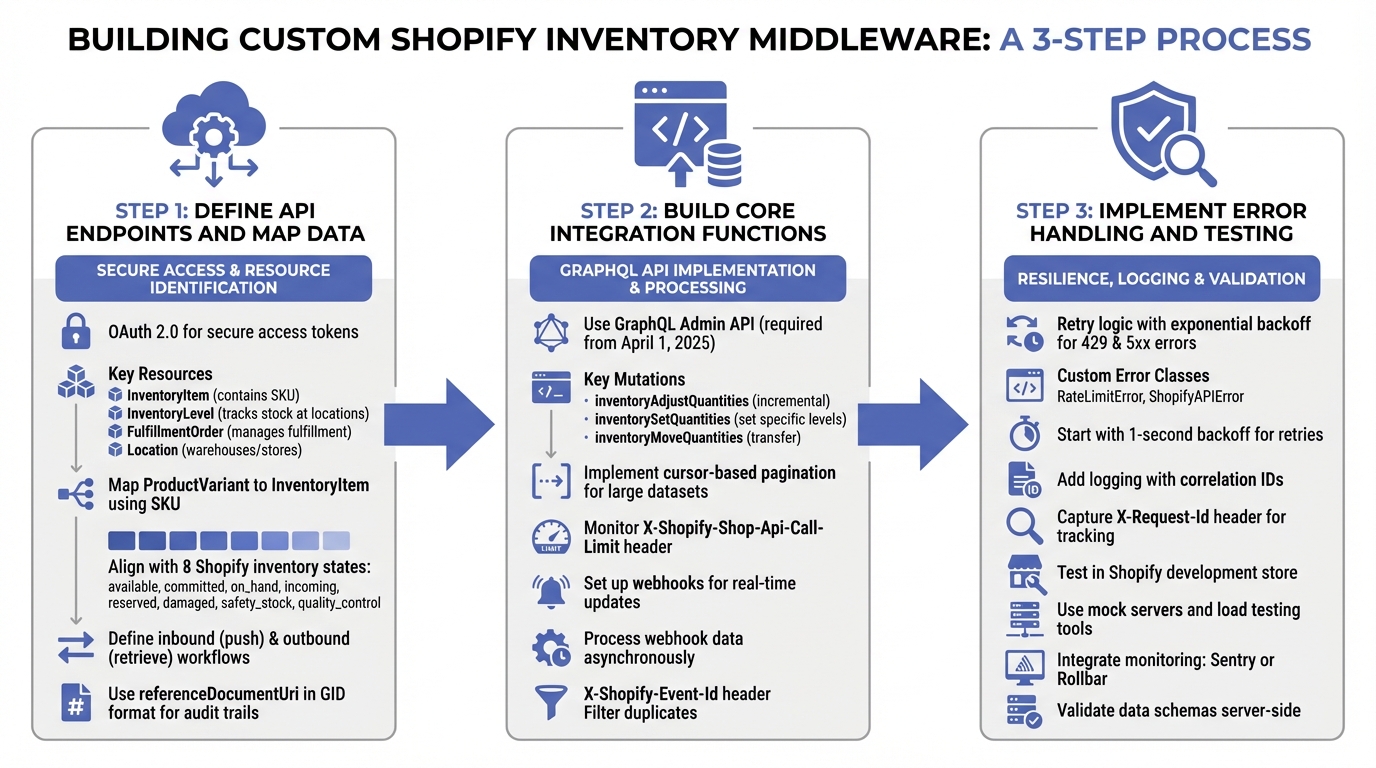
3-Step Process for Building Custom Shopify Inventory Middleware
Creating middleware for Shopify involves carefully planning data flows and thoroughly testing a production-ready integration. This guide outlines the steps to develop middleware for a reliable Shopify inventory integration.
Step 1: Define API Endpoints and Map Data
Start by setting up OAuth 2.0 to generate an access token for secure API calls. Identify the key Shopify resources you'll be working with:
- InventoryItem: Contains the SKU
- InventoryLevel: Tracks stock quantities at specific locations
- FulfillmentOrder: Manages order fulfillment
- Location: Represents warehouses or retail stores
Next, map each ProductVariant to its corresponding InventoryItem using the SKU. Align your internal stock statuses with Shopify's eight inventory states: available, committed, on_hand, incoming, reserved, damaged, safety_stock, and quality_control. These states are exclusive, except for on_hand, which aggregates all physical units.
Define workflows for both directions:
- Inbound: Pushing inventory updates to Shopify.
- Outbound: Retrieving orders and fulfillment details from Shopify.
For audit trails, use referenceDocumentUri in the GID format (e.g., gid://external-system/PurchaseOrder/123) to link inventory changes to external documents like Purchase Orders or Warehouse Receipts.
Once you’ve outlined your endpoints and data mappings, you’re ready to develop the integration’s core functions.
Step 2: Build Core Integration Functions
Leverage Shopify's GraphQL Admin API to build your synchronization workflows. Keep in mind that starting April 1, 2025, all new public apps must exclusively use GraphQL.
For inventory updates, focus on these three key mutations:
inventoryAdjustQuantities: For incremental changes (adding or subtracting stock).inventorySetQuantities: To set specific stock levels.inventoryMoveQuantities: To transfer stock between states.
When working with large datasets like orders or inventory levels, implement cursor-based pagination to manage data efficiently. Also, monitor the X-Shopify-Shop-Api-Call-Limit header to avoid exceeding rate limits or running into memory issues.
For real-time updates, use Shopify webhooks. Process webhook data asynchronously and filter out duplicates by leveraging the X-Shopify-Event-Id header.
With the core functions in place, the next step focuses on error handling and rigorous testing.
Step 3: Implement Error Handling and Testing
To handle errors effectively, implement retry logic with exponential backoff for 429 (rate limit) and 5xx (server) errors. Use custom error classes like RateLimitError or ShopifyAPIError to simplify debugging, starting with a one-second backoff for retries.
Incorporate logging with correlation IDs to trace workflows. Capture the X-Request-Id header from Shopify’s responses to track API requests and responses.
Test your integration thoroughly in a Shopify development store. Use mock servers and load testing tools to simulate high-traffic scenarios. Additionally, integrate monitoring tools like Sentry or Rollbar to catch and log critical failures in real time.
Finally, validate data schemas server-side to prevent malformed data from reaching Shopify’s API. This ensures your integration operates smoothly from the start.
sbb-itb-f0fc809
Advanced Features and Integration with Forstock
Managing Complex SKUs and Multiple Locations
Custom middleware bridges the gap between multi-variant product catalogs and inventory management by mapping product variants to SKUs and tracking stock across multiple locations. For businesses managing warehouses across regions, the inventoryBulkToggleActivation function allows you to assign SKUs to specific locations, streamlining operations.
Shopify's InventoryItem object includes support for harmonized system codes (ranging from 6 to 13 digits) and details like the country or province of origin - key elements for navigating international supply chains effectively. The on_hand inventory state consolidates all physical units, including those categorized as available, committed, reserved, damaged, safety stock, or under quality control. This comprehensive view simplifies warehouse stocktakes and ensures accurate tracking.
When making inventory adjustments from external systems, the Global ID (GID) format is crucial for the referenceDocumentUri field (e.g., gid://forstock/PurchaseOrder/PO-2026-001). This approach is particularly useful in advanced setups, where connecting external documents to Shopify's inventory history enhances audit trails and improves cross-system traceability.
Demand Forecasting and Supplier Management with Forstock
Efficient SKU and location management lay the groundwork for advanced tools that enhance operational insights. Forstock takes this a step further by enabling middleware to leverage AI-driven demand forecasting. This forecasting adapts to variables like sales trends, lead times, and seasonal fluctuations. By syncing detailed inventory states - such as incoming, safety_stock, and committed - middleware ensures Forstock has the precise data needed for accurate predictions.
When inventory reaches predefined thresholds, Forstock can automatically generate purchase orders and link them to Shopify using the referenceDocumentUri field with the @idempotent directive, ensuring no duplicate orders are created. Task queues, such as Google Cloud Tasks, can help manage rate limits, while subscribing to the inventory_levels/update webhook enables real-time forecasting. However, changes to states like committed or reserved may require separate polling for updates.
| Inventory State | Role in Forecasting & Middleware |
|---|---|
incoming |
Tracks stock in transit; critical for calculating lead times and future availability. |
committed |
Represents units sold but not yet fulfilled; helps measure actual sales velocity versus physical stock. |
safety_stock |
Acts as a buffer; middleware can adjust levels automatically using Forstock's AI analysis. |
on_hand |
Total physical units; vital for reconciliation during stocktakes. |
Maintenance Best Practices and Common Mistakes
Maintaining a reliable integration is just as important as designing it in the first place.
Stay Updated with Shopify API Changes
Shopify uses versioned APIs, which means older versions are retired over time. If your middleware relies on a deprecated API version, Shopify will automatically switch it to the oldest supported version. This can disrupt your integration if payload structures have changed. To stay ahead, check the X-Shopify-API-Version header in webhook payloads to identify the version used for event data. This ensures your middleware can handle the data correctly.
Set up alerts for deprecation announcements and update your middleware to the newest supported version before the sunset period ends. This proactive approach helps you avoid unexpected issues and keeps your integration running smoothly.
Set Up Logging and Monitoring
Proper logging and monitoring are essential to maintaining a robust integration. Start by verifying webhook headers to prevent duplicate processing. Since Shopify doesn't guarantee the order of webhook delivery (e.g., an update event may arrive before a create), use the X-Shopify-Triggered-At header or the updated_at field to process events in the correct sequence.
Monitor your webhook endpoint's HTTP response codes closely. If your endpoint repeatedly returns non-200 status codes, Shopify will automatically delete the webhook subscription. To ensure nothing falls through the cracks, schedule regular data reconciliations using updated_at filters. This is particularly important because webhook delivery isn't foolproof.
Common Integration Mistakes to Avoid
Avoiding common pitfalls can greatly improve the reliability of your integration. Here are some frequent mistakes and how to address them:
| Common Mistake | Impact | Recommended Solution |
|---|---|---|
| Missing Reconciliation | Data drift or out-of-sync stock | Schedule periodic syncs using updated_at filters and review API changelogs |
| Hardcoded Header Casing | Integration breakage | Parse headers case-insensitively to avoid compatibility issues |
| Ignoring 429 Errors | Data loss or failed syncs | Implement exponential backoff for rate limit errors |
| Missing Idempotency | Duplicate data or over-counting | Track processed event IDs to avoid processing the same event multiple times |
It’s crucial not to rely solely on webhooks. Always implement secondary sync mechanisms or use tools for real-time stock sync on Shopify to fill in any gaps caused by missed webhooks. For rate limit errors (HTTP 429) or server issues (5xx errors), build retry logic with exponential backoff to ensure critical operations are retried appropriately.
For inventory updates, use the @idempotent directive in GraphQL mutations along with a unique key to prevent duplicate adjustments caused by network issues. Additionally, the changeFromQuantity field in inventory mutations allows you to perform "compare and swap" checks. This ensures stock updates only occur if the starting quantity matches your last known value, preventing conflicts when multiple systems modify inventory simultaneously.
Conclusion and Next Steps
Creating custom middleware for Shopify requires careful attention to API authentication, webhook management, and error handling. Middleware acts as a buffer, managing Shopify's frequent webhooks and ensuring compatibility with external systems that may have stricter rate limits. Using webhooks for real-time synchronization is far more efficient than constant API polling, but it demands secure HMAC verification and proper credential handling.
Before diving into production, set up a Shopify Partner Account and secure Admin API access through a development store. To handle rate limits effectively, consider queuing services like Google Cloud Tasks or Amazon EventBridge. Implement audit trails to track inventory changes, and leverage the X-Shopify-Event-Id header to identify duplicate webhooks. Additionally, use the referenceDocumentUri field in GraphQL mutations for transparent inventory adjustments. As highlighted in Shopify’s Developer Documentation:
"The referenceDocumentUri transforms inventory adjustments from a 'black box' into a transparent system where you can trace every change back to its source."
For businesses that prefer a ready-made solution over building custom middleware, Forstock (https://forstock.io) provides a robust option. It offers AI-driven demand forecasting, automated purchase order creation, and real-time analytics, all seamlessly integrated with Shopify. This eliminates the need for ongoing middleware development and maintenance.
Whether you’re building your own middleware or opting for a solution like Forstock, maintaining your integration is critical. Regularly monitor Shopify API changelogs to stay ahead of deprecations, implement detailed logging and monitoring systems, and schedule periodic data reconciliations. tracking metrics like inventory synchronization accuracy and costs and order processing times will help you gauge system performance and address potential issues proactively.
FAQs
What are the benefits of using custom middleware to integrate inventory with Shopify?
Custom middleware brings some standout advantages when it comes to syncing inventory with Shopify. One of the biggest perks? Real-time synchronization. This means Shopify can stay perfectly in sync with systems like inventory management tools, ERPs, or supplier platforms. The result? Fewer headaches from overselling, stockouts, or manual data entry mistakes. Plus, automating these processes frees up time so businesses can focus on scaling up.
Another win with middleware is its scalability and flexibility. It lets merchants customize integrations to fit their specific needs. Whether it's automating purchase orders, managing intricate supply chains, or handling a surge in sales during busy seasons, middleware keeps everything running smoothly. And with clearer insights into inventory, businesses can meet customer demands confidently while sidestepping operational hiccups.
How does middleware simplify managing inventory across multiple locations?
Middleware acts as a central hub that keeps inventory data in sync across multiple locations - whether that's warehouses, retail stores, or fulfillment centers. By updating stock levels in real time, it ensures accuracy and helps businesses avoid common issues like running out of stock or overstocking. With middleware in place, companies can get a single, unified view of their inventory, no matter where items are stored. This makes tracking and allocating stock much more efficient.
On top of that, middleware automates key tasks like restocking based on the specific needs of each location. It also simplifies complex fulfillment processes, such as managing split shipments or routing orders based on location. Plus, it integrates smoothly with platforms like Shopify, boosting operational efficiency and making it easier for businesses to scale. The result? Faster order fulfillment and happier customers, no matter where they are.
What do I need to know to build custom middleware for integrating Shopify with other systems?
Building custom middleware for Shopify involves a strong grasp of RESTful APIs, GraphQL APIs, and OAuth 2.0 authentication - the backbone of Shopify's API security. Developers need to connect Shopify’s API endpoints to external systems like ERPs or CRMs, enabling smooth data exchange.
Choosing the right middleware architecture is equally important. Should it be reactive, relying on webhooks for near real-time updates? Or scheduled, using API polling at set intervals? Webhooks are especially handy for keeping inventory and order data in sync. But don’t overlook Shopify’s API rate limits - these require careful planning to avoid disruptions. Secure data handling is another critical piece of the puzzle.
To simplify the process, tools like SDKs, Postman, or frameworks designed for webhook automation can save time and effort. By combining thoughtful architectural planning with strong security practices, developers can create integrations that are both reliable and scalable.
Keep reading
Try Forstock free for 14 days.
AI-powered demand forecasting and reorder automation for Shopify brands. No credit card required.