
Top 5 Shopify Multi-Location Allocation Mistakes
By Forstock Team · Last updated July 9, 2026
Reduce stockouts and excess inventory by allocating and forecasting by SKU, location, and channel, plus timely transfers.

If your inventory is spread across more than one location, your stock problems usually come from where items sit, not just how much you own.
I’d sum it up like this: most Shopify brands miss on allocation when they split stock evenly, forecast too broadly, move inventory too late, ignore channel demand, and build POs from blended numbers. That leads to stockouts in busy locations, extra stock in slow ones, more split shipments, and more cash stuck on shelves.
Here’s the full picture in plain English:
- Mistake 1: Splitting stock evenly across locations instead of using local demand
- Mistake 2: Forecasting at the total brand level instead of the SKU-location level
- Mistake 3: Waiting too long to transfer inventory between locations
- Mistake 4: Treating DTC, wholesale, retail, and marketplaces like they need the same stock plan
- Mistake 5: Buying inventory from one rolled-up demand number instead of local inputs
A simple fix is to plan by SKU, location, and channel, then use rules for transfers, stock cover, and purchasing. Even a small miss matters: if a top location is short by 10% to 15% on a fast-moving SKU, fill rate can drop fast while another site sits on weeks of extra stock.
Shopify 101: Bulk transfer multiple SKUs from one inventory location to another (2025)

Quick Comparison
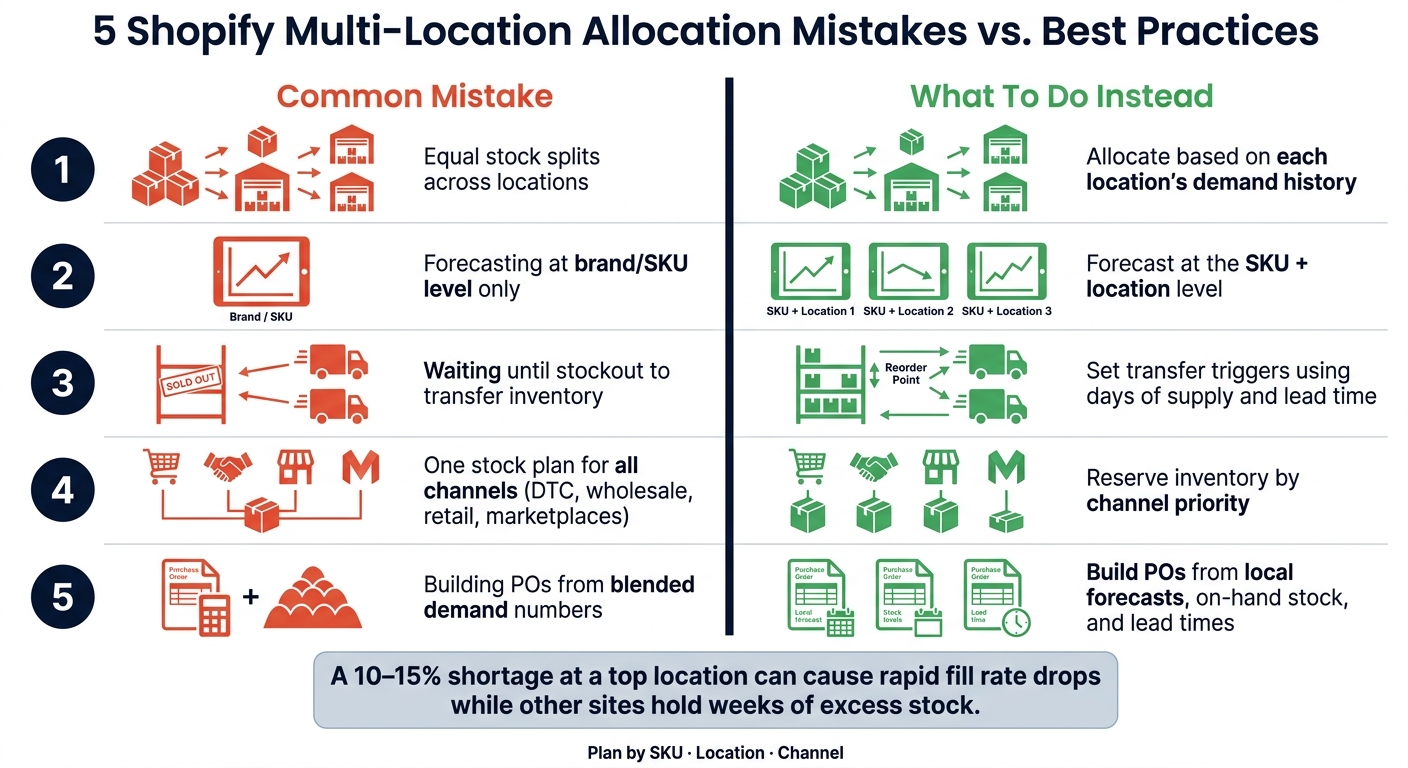
5 Shopify Multi-Location Inventory Allocation Mistakes & Fixes
| Mistake | What goes wrong | What to do instead |
|---|---|---|
| Equal stock splits | High-demand locations run out first | Send more units where demand is higher |
| No location forecast | One average forecast hides local demand | Forecast by SKU and location |
| Late transfers | Shortages happen before stock moves | Set transfer triggers using days of supply and lead time |
| No channel split | One channel takes stock meant for another | Reserve inventory by channel priority |
| Blended purchasing | New POs repeat old allocation errors | Build POs from local demand, on-hand stock, and lead times |
If I were auditing this setup today, 7/9/2026, I’d start with one question: does each location and channel have its own demand signal? If not, that’s likely where the problem starts.
Why Multi-Location Allocation Gets Harder as Brands Grow
Once inventory is spread across warehouses, stores, and 3PLs, allocation stops being one big planning job and turns into a location-by-location call. You have to decide where stock should sit, when it should move, and which channel gets first dibs.
The problem is simple on paper, but messy in practice. Each location has its own demand pattern, lead time, and replenishment cycle. That makes manual planning shaky. And when every channel expects a different level of service, things can go sideways fast.
Without clear channel priority rules, DTC, wholesale, and retail can all pull from the wrong inventory pool. That leads to stockouts in one place and stranded stock in another. A lot of brands fall back on an even split because it looks fair. But fair doesn’t mean smart when demand isn’t equal.
As the business grows, spreadsheets start to fall behind actual inventory movement. Plans go stale. Stock levels stop matching what the team thinks is available. At that point, allocation isn’t just about counting units anymore. It depends on location-level demand input.
1. Splitting Stock Equally Across Locations Without Demand Logic
When demand changes from one location to another, equal stock splits fall apart fast. One site runs short, another ends up with too much, and now cash is stuck in inventory that isn't moving. At the same time, the locations with the most demand are the ones most likely to face stockouts.
A better way is to allocate inventory based on location-level demand and service targets. That means sending more stock where sales are stronger and less where demand is lighter. Forstock can centralize multi-location inventory data and help direct stock to the locations with the highest demand.
2. No Demand Forecasting at the Location Level
Equal splits break down when demand changes by location. Blended forecasts have the same problem. A lot of Shopify brands forecast at the brand or SKU level, then roll everything into one business-wide view. That smooths over the differences between locations and pushes inventory allocation toward averages instead of what each location is likely to sell.
The outcome is pretty predictable: one location runs out of stock while another sits on too much inventory.
Forecasting at the SKU and location level gives each warehouse or sales channel its own demand signal. That matters because seasonality, channel behavior, and fulfillment patterns can vary a lot from one location to another. When you allocate based on local demand instead of a blended business-wide average, stock stays closer to where it’s more likely to sell.
Forstock supports SKU-level forecasting, multi-warehouse visibility, and allocation planning across locations and channels.
Forecasting only helps if inventory can move fast enough to keep up with shifts in demand.
3. Poor Inventory Transfer Logic Between Locations
Forecasting only helps if you can move stock before demand turns into a stockout. A lot of Shopify brands wait too long. They shift inventory only after one location is already empty or another warehouse is sitting on too much product. At that point, the transfer is late, and the damage is already done.
Here’s what that looks like in practice: one location is short on a fast-moving SKU, while another has extra units collecting dust. Without a clear trigger, both problems stick around. The shortage stays a shortage. The excess stays excess.
That’s where transfer logic matters. It turns demand data into a repeatable move-or-hold call. Instead of guessing, teams can set rules based on:
- days of supply
- sell-through rate
- lead time
With those rules in place, the business knows when to move inventory and when to leave it where it is.
Forstock shows where inventory is tight or where excess is building up, so teams can move stock before a stockout hits.
Transfer rules also work better when they reflect channel-specific demand.
sbb-itb-f0fc809
4. Allocating Inventory Without Accounting for Channel Differences
Demand doesn’t look the same across DTC, wholesale, retail, and marketplaces. So a single stock plan rarely works across every sales channel.
The same SKU can perform one way in one channel and a completely different way in another. If you allocate inventory without splitting demand by channel, stock often ends up in the wrong place.
That creates a frustrating mismatch: one channel goes out of stock while another sits on excess inventory.
Channel-aware allocation means planning inventory for each channel based on expected demand, not just splitting up whatever stock is on hand. Forstock brings channel-level demand data into one place, so teams can allocate inventory based on channel priority. Those same channel signals should also guide replenishment and purchase orders.
5. Buying Inventory Without Location-Level Demand Inputs
Allocation mistakes don’t stop with where stock gets sent. They also shape what gets purchased next.
A lot of brands still build purchase orders from one blended demand number. On paper, that sounds simple. In practice, it hides what each location actually needs.
The better move is to build purchase orders using location-level forecasts, on-hand inventory, safety stock, and lead times before you buy. That way, your purchase orders reflect local demand instead of network-wide averages.
Forstock links location-level demand forecasts with replenishment planning and purchase-order creation, so teams get a location-specific view of what to order.
Quick Reference Table: Mistake, Symptom, Impact, and Fix
Use this table to spot the issue fast.
| Mistake | Symptom | Impact | Fix |
|---|---|---|---|
| 1. Equal stock splits across locations | Inventory is split evenly across locations. | Stockouts in high-demand locations and extra stock in low-demand ones. | Allocate inventory based on each location's sales history. |
| 2. No location-level demand forecasting | One blended forecast is used for every location. | Chronic overstocking or understocking at individual locations. | Build forecasts for each location using local sell-through rates and seasonal patterns. |
| 3. Weak inventory transfer logic | Transfers start after stock is already low. | Missed sales and stockouts. | Set transfer thresholds and move inventory before stock runs out. |
| 4. Allocating inventory without accounting for channel differences | Retail, DTC, and wholesale pull from the same pool. | Overselling on one channel. | Allocate inventory by channel and set rules for each channel. |
| 5. Buying inventory without location-level demand inputs | Purchase orders are based on a blended demand number. | Repeat allocation errors and cash tied up in stock. | Use location-level forecasts and on-hand inventory to build POs. |
Use these signals to set the allocation rules in the framework below.
A Practical Allocation Framework for Shopify Brands
The table above shows the symptoms. This framework shows how to fix them.
These issues are tied together. Weak forecasts lead to bad inventory splits. Poor transfer rules set off stockouts. And blended purchase orders keep repeating the same mistakes.
The fix starts with demand-based allocation. Forecast each location and channel on its own. Set transfer thresholds before stockouts hit. Then reserve inventory by channel. When those rules are set, purchasing becomes a downstream planning step instead of a guess.
Purchase orders should match what each Shopify location needs based on:
- on-hand inventory
- inbound transfers
- forecast demand
- target stock cover
You can run this process in spreadsheets, but it gets messy fast. It’s much easier to manage in one planning system. Forstock brings together sales, inventory, supplier, warehouse, fulfillment, accounting, and ERP data so teams can forecast, allocate, replenish, and create purchase orders in one place.
Conclusion
Most multi-location allocation problems are placement problems, not supply problems.
That’s the core issue behind all five mistakes: treating every Shopify location like one big demand pool. On paper, that can seem fine. In practice, it throws inventory into the wrong places and leaves the right places short.
The next move is pretty simple: audit your allocation rules.
Split inventory by demand. Forecast at the location level. Move stock before shortages begin. When that becomes the default, inventory starts moving with demand instead of against it.
The fix is demand-based, channel-aware, location-level planning.
FAQs
How do I know if my locations are underallocated?
Your locations are probably underallocated if they keep running out of stock while the same item is still sitting in other parts of your network.
A few numbers will tell the story fast: service level, inventory turnover by SKU-location, and how often each location drops to zero stock. If one site keeps hitting empty shelves, that’s usually a sign the inventory split is off.
Location-level reorder points can help spot the gap:
(Average Daily Sales × Lead Time) + Safety Stock
That gives you a clearer view of when each location should reorder based on its own demand, not a one-size-fits-all rule. Forstock can run this analysis for you and suggest proactive transfers before stockouts happen.
When should I transfer inventory between Shopify locations?
Transfer inventory when demand and service targets at the location level show that one site is likely to run short while another still has stock. Base that call on SKU forecasts and each location’s reorder points.
Use Shopify’s Transfers workflow only after you’ve checked both available and incoming quantities so you don’t oversell. Then confirm receipt to update inventory at the destination.
How should I set stock by location and channel?
Avoid equal splits. Instead, set inventory based on location-level demand forecasts and keep one central source of truth with a unique code for every warehouse, 3PL, and store.
For each site, calculate reorder points with this formula:
(Average Daily Sales × Average Lead Time) + Safety Stock
Then adjust safety stock based on what’s happening at that specific site. A busy urban store and a slower suburban location shouldn’t be treated the same way.
Forstock can help automate location-aware replenishment plans so you can cut stockouts and avoid piling up excess inventory.
Keep reading
Try Forstock free for 14 days.
AI-powered demand forecasting and reorder automation for Shopify brands. No credit card required.