
Checklist for Integrating AI with Shopify Analytics
AI-driven Shopify analytics streamlines inventory forecasting—clean your data, set goals, sync APIs, and automate reorders to cut stockouts and excess stock.
Checklist for Integrating AI with Shopify Analytics
Running a Shopify store can be overwhelming, especially when managing inventory. Integrating AI with Shopify Analytics simplifies this process by turning sales data into accurate, real-time demand forecasts. This helps avoid stockouts, reduce overstock, and improve cash flow. Here's a quick summary of the steps to get started:
- Clean Your Data: Ensure accurate, consolidated sales and inventory records.
- Set Goals: Define specific inventory targets like reducing stockouts or overstock.
- Confirm API Access: Check Shopify API permissions for smooth AI integration.
- Install Forstock: Sync your Shopify store with Forstock for real-time data updates.
- Configure AI Settings: Input supplier lead times, safety stock, and promotional data.
- Automate Reorders: Enable automated reorder suggestions and purchase orders.
- Test and Monitor: Compare AI forecasts to historical data and refine settings.
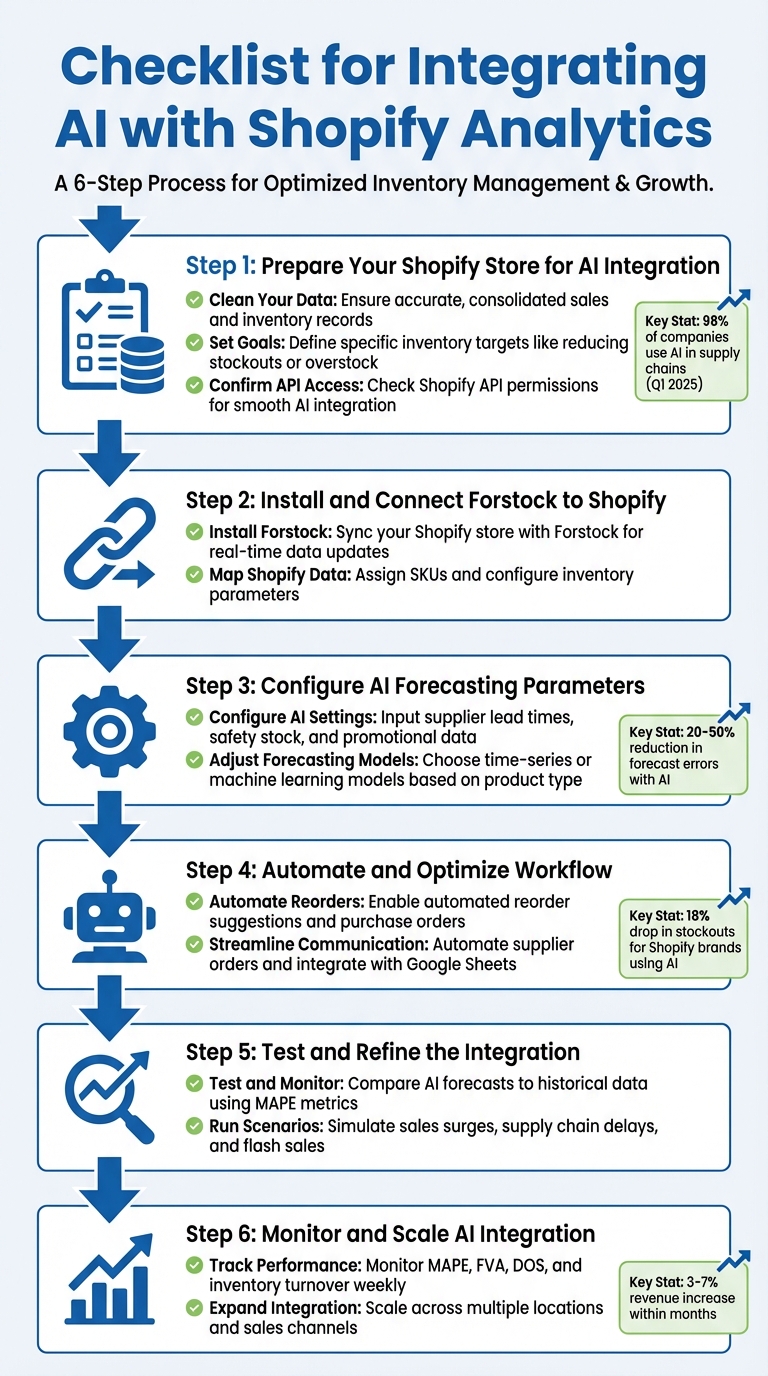
6-Step Checklist for Integrating AI with Shopify Analytics
How to Setup Inventory Forecasting in Shopify using SKUSavvy

Step 1: Prepare Your Shopify Store for AI Integration
Before you dive into connecting an AI tool to your Shopify store, it’s essential to ensure your data is well-organized, your objectives are clearly defined, and your API settings are correctly configured. Skipping these steps can lead to inaccurate AI forecasts and missed opportunities.
Check Data Quality and Analytics Setup
AI tools thrive on clean, accurate data. As Shopify Staff points out, the quality of your data directly affects the reliability of AI predictions. Make sure all sales data - whether from your ecommerce platform, POS systems, or third-party logistics (3PL) providers - is consolidated. Inconsistent or incomplete data can lead to confusion and errors in AI modeling.
Start by cleaning your historical data. Remove duplicates, sync online and in-store sales records, and ensure all transactions are properly categorized. Pay special attention to internal data like POS logs, results from marketing campaigns, product lifecycle details, and supplier lead times. Breaking down data silos is key to giving the AI a complete picture of your supply chain.
To help the AI focus on what matters most, conduct an ABC analysis. This will identify your top-performing products versus those that move slowly, allowing the AI to prioritize high-impact SKUs. Additionally, calculate baseline metrics - such as average daily sales, lead time demand, and safety stock - manually. These figures will help you validate the AI's outputs and ensure its forecasts align with your expectations.
Set Your Inventory Management Goals
Before configuring your AI tool, define your inventory goals. Are you looking to reduce overstock and free up cash flow? Or maybe you want to minimize stockouts that frustrate customers? Perhaps your focus is on optimizing reorder timing to avoid expensive rush shipping fees. Whatever your priorities, having clear objectives will guide how you set up your AI forecasting model.
Instead of relying on broad, category-level forecasts, aim for SKU-specific accuracy. Set measurable KPIs like Mean Absolute Percentage Error (MAPE) to evaluate forecast precision or Days of Supply (DOS) to monitor how long your inventory will last. If stockouts are a frequent issue, set a target to lower your stock-out rate. On the other hand, if excess inventory is a problem, aim to reduce your stock levels by 20% to 30% - a realistic range achievable with AI-driven insights.
Align your inventory goals with upcoming promotions and seasonal sales cycles. Once your targets are clear, make sure you have the necessary API permissions in place to ensure a smooth integration process.
Confirm API Access and Permissions
Double-check that your Shopify API permissions cover everything your AI tool needs. At a minimum, you’ll need "View and Edit" access for products and inventory, along with "View" permissions for orders, customer data, and store analytics.
If your AI tool requires access to more than Shopify’s default 60-day order history for deeper analysis, you’ll need to request the read_all_orders scope through the Shopify Partner Dashboard. Also, confirm that you’re using API version 2023-01 or newer for standard inventory syncing - or 2024-01 or newer if your tool needs to schedule future inventory updates.
Here’s a quick breakdown of the key API scopes and their purposes:
| Required Scope | Data Accessed | Purpose for AI Tools |
|---|---|---|
read_inventory |
Inventory levels and items | Real-time stock tracking |
read_orders |
Order logs and transactions | Historical sales analysis |
read_all_orders |
Full order history (>60 days) | Long-term trend forecasting |
read_products |
SKUs and product variants | Mapping inventory to specific items |
read_locations |
Physical store/warehouse IDs | Multi-location stock optimization |
Don’t forget to document your supplier lead times - the number of days it takes from placing an order to receiving inventory. This information is crucial for AI tools to calculate accurate reorder points. Once your data is cleaned, your goals are set, and your API permissions are confirmed, you’re ready to connect your AI tool to Shopify.
Step 2: Install and Connect Forstock to Shopify
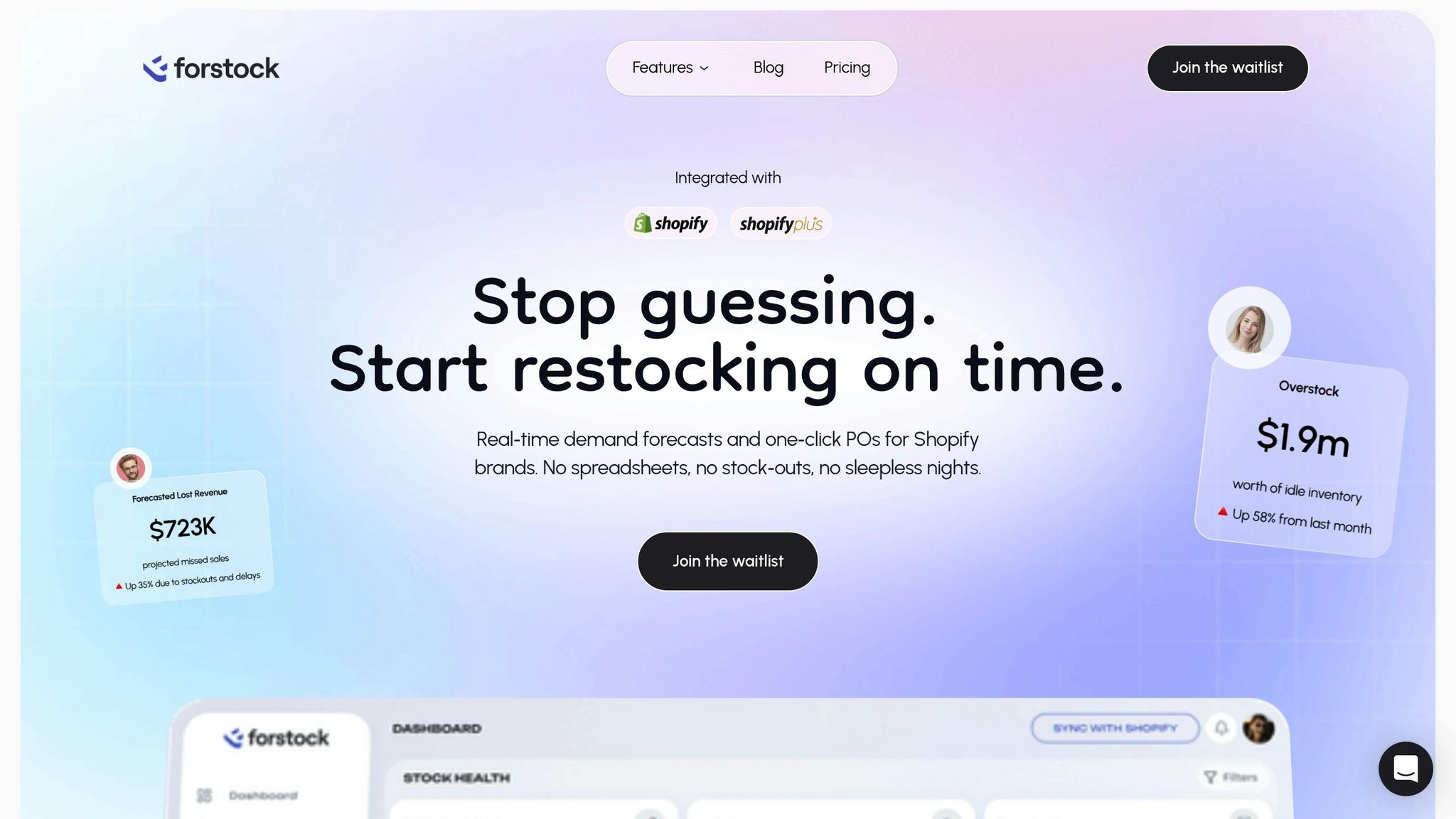
To get started, you’ll need to install Forstock and link it to your Shopify store. This integration ensures your product catalog, order history, and inventory levels stay synced in real time.
Set Up Forstock for Real-Time Data Sync
Begin by downloading Forstock from the Shopify App Store. Once installed, log in and authorize the connection. During the setup, Forstock will request permissions like read_products, read_inventory, read_orders, and read_fulfillments. These permissions allow it to track stock levels, analyze sales patterns, and calculate reorder points accurately.
Forstock automatically syncs your existing product listings, historical order data, and current inventory counts. As sales are made or inventory is adjusted in Shopify, Forstock’s AI updates instantly, ensuring your demand forecasts are always based on the most current data. You can also input supplier lead times to help the AI calculate precise reorder points, reducing the risk of stockouts.
Once the sync is complete, the next step is to align your Shopify data with Forstock’s dashboard for smooth operations.
Map Shopify Data to Forstock Dashboards
After connecting Forstock to Shopify, map your Shopify data fields to Forstock’s centralized dashboard. Assign clear, human-readable SKUs (e.g., TSHIRT-BLUE-M) to make tracking easier and adopt a consistent naming system for better accuracy.
Set up the dashboard by configuring key inventory parameters. This includes defining safety stock levels, setting growth targets, and linking products to their respective suppliers and locations. If you operate across multiple locations - like warehouses, retail stores, or pop-up shops - mapping them all ensures consolidated stock monitoring across channels.
Leverage ABC analysis to classify inventory based on sales velocity and revenue contribution. For example:
- A items: High-value, fast-moving products that require close monitoring.
- C items: Slower-moving products that can be reviewed less often.
This classification helps Forstock’s AI focus on the SKUs that have the greatest impact on your business. Once everything is mapped, you’ll gain instant insights into inventory health, turnover rates, and stock value. These insights power more precise forecasting, helping you make smarter decisions across your operations.
Step 3: Configure AI Forecasting Parameters
Once Forstock is connected to your Shopify store, the next step is setting up the AI forecasting parameters. These settings play a key role in how accurately the system predicts demand. The quality of forecasts depends on the inventory and supplier data you provide and how well you tailor the models to your business's unique patterns. Start by inputting detailed inventory and supplier information to fine-tune the forecasting models.
Add Inventory and Supplier Information
Begin by entering supplier lead times - the number of days it takes to receive stock after placing an order. For instance, one supplier might need 45 days, while another might only require 7. To calculate lead time demand, multiply the average lead time (in days) by the average daily sales. The AI uses these numbers to determine when you should reorder.
Next, define safety stock levels for each product or category to act as a cushion against unexpected demand surges or supplier delays. The formula is: (maximum daily sales × maximum lead time in days) – lead time demand. For example, if your top-selling hoodie typically sells 20 units daily but spikes to 50 during promotions, and your supplier’s lead time ranges from 30 to 45 days during busy seasons, the AI will use these inputs to avoid stockouts.
Include promotional calendars and pricing history to help the AI differentiate between regular demand and temporary spikes caused by marketing campaigns. For example, if a 30% Black Friday discount tripled sales over three days, the AI needs to recognize this as an isolated promotion. In fact, by Q1 2025, 98% of companies reported using AI in their supply chains for inventory optimization and forecasting. AI-driven forecasting models also cut forecast errors by 20% to 50% compared to traditional approaches.
Adjust Forecasting Models for Your Business
Once your inventory parameters are set, refine the forecasting models to align with your business dynamics. Forstock offers several forecasting options to suit different types of products. Time-series models are ideal for items with steady, predictable sales - like basic apparel or everyday accessories. On the other hand, machine learning models are better suited for fast-moving products with irregular demand spikes, such as trending items on social media or seasonal goods.
Incorporate external factors like public holidays, seasonal events, or weather trends into your forecasts. For example, if you sell outdoor gear, a warmer-than-usual winter could reduce demand for heavy jackets. Shopify brands using AI-powered forecasting have seen an 18% drop in stockouts and revenue increases of 3% to 7% within months.
Finally, use product segmentation to group SKUs by supplier, category, or sales velocity. This allows Forstock to create more tailored forecasts for different product types.
"AI forecasting is only as good as the data it uses. That starts with deciding which internal and external variables actually influence demand for your business"
- Bahadır Efeoglu
sbb-itb-f0fc809
Step 4: Automate and Optimize Workflow
With your forecasting parameters set, it’s time to let AI take over key inventory tasks. By activating Forstock’s automation features, you can move away from the hassle of manual management and spreadsheets. Instead, you’ll have a system that keeps your inventory balanced without constant intervention.
Turn On Automated Reorder Suggestions
Enable automated reorder alerts to stay ahead of stockouts. For example, if your supplier needs 15 days to deliver and a product is projected to run out in 10 days, the system will flag it immediately. Using machine learning, Forstock’s tools analyze SKU movement, real-time sales, and seasonal trends to create forecasts you can act on.
Customize these alerts by setting SKU-level parameters like lead times, safety stock levels, and Minimum Order Quantities (MOQs). This ensures reorder suggestions align with your specific needs. Forstock pulls real-time data from Shopify to instantly adjust reorder quantities. For products with steady demand and a solid sales history, you can rely on the AI to handle the baseline forecasts.
Once this is set up, you can shift your attention to managing reorders proactively.
Automate Purchase Orders and Supplier Communication
Simplify the procurement process by automating purchase orders and supplier communication. With Forstock, you can send supplier orders with just one click. The platform also integrates with Google Sheets, so you can review AI-suggested quantities and approve them directly, streamlining the ordering process.
This level of automation reduces delivery times, cuts costs, and saves countless hours spent on manual inventory tasks. Activate low-stock alerts to catch potential stockouts before they hit your revenue, and make sure supplier data stays synchronized to avoid the headache of manually updating lead times across orders.
Step 5: Test and Refine the Integration
After setting up your automated AI integration, the next step is to ensure its forecast accuracy through careful testing and adjustments. By comparing AI-generated forecasts with historical Shopify sales data, you can identify and address any discrepancies early. Backtesting plays a critical role here, allowing you to fine-tune settings before they affect your operations. This process connects your automated workflows with more accurate, actionable forecasting.
Run Historical Data Tests
Start by evaluating the AI's predictions against your actual sales data over a specific period. Use Shopify sales data from the last three to six months and process it through Forstock's forecasting engine. Then, compare the AI's demand predictions to actual sales figures using metrics like Mean Absolute Percentage Error (MAPE). If MAPE results are off, investigate potential data quality issues, such as mismatches between online and in-store sales records. For products with consistent sales patterns, rely on baseline forecasts. However, for new or data-limited products, manual adjustments may be necessary. Additionally, track Forecast Value-Added (FVA) to ensure that any manual changes improve the overall accuracy.
Test Different Sales Scenarios
Once historical data tests are complete, move on to scenario testing to evaluate how the AI model handles various sales conditions. Leverage Forstock's tools to simulate situations like a sudden sales surge from a viral post, supply chain hiccups, or a flash sale. This helps you gauge the model's responsiveness before such events occur. Pay close attention to metrics like Days of Supply (DOS) and stock-out rates. For example, if DOS is too low and stock-outs rise, the model might be overly aggressive. Conversely, high DOS with no stock-outs could indicate excess capital tied up in inventory. Adjust safety stock levels, lead times, and reorder points in Forstock to strike the right balance. Since AI models adapt based on user feedback and new data, providing corrections regularly will enhance forecast accuracy. Make it a habit to run these tests quarterly or after major campaigns and peak seasons to ensure your forecasts stay aligned with changing business dynamics.
Step 6: Monitor and Scale AI Integration
Once your AI forecasting system is up and running, the next step is to keep a close eye on its performance and expand its use across your operations. Your Forstock dashboard will serve as your control center, offering real-time insights into how AI-driven decisions are influencing your business outcomes. This ongoing monitoring helps you make smarter inventory decisions based on detailed performance data.
Track Performance Metrics
Forstock's analytics dashboard is your go-to tool for tracking key metrics like forecast accuracy and inventory health on a weekly basis. Keep an eye on these critical indicators:
- Mean Absolute Percentage Error (MAPE): Measures how closely the AI's predictions align with actual sales.
- Forecast Value-Added (FVA): Evaluates whether AI models or manual inputs improve forecast accuracy. A negative FVA suggests manual adjustments might be introducing bias.
- Days in Inventory (DII): Tracks how long it takes to sell average stock. For many industries, the ideal range is 30-60 days.
- Days of Supply (DOS) and stock-out rates: Helps identify overly aggressive reorder points.
- Inventory Turnover: Shows how often stock is sold and replaced in a given period.
These metrics offer a clear picture of your inventory performance. For example, a 2023 McKinsey survey revealed that 25% of companies credit over 5% of their EBIT to AI applications like demand planning. By tracking EBIT lift from AI, you can directly measure the financial benefits of your forecasting system.
Expand Integration Across Your Operations
As your business grows, scale your AI system to handle SKU-specific and variant-level forecasting across all your sales channels. If you have brick-and-mortar locations or work with third-party logistics (3PL) providers, sync Forstock's forecasting capabilities across all sites to ensure a unified approach. A great example is the fitness brand Bala, which used Shopify Collective in 2025 to sync SKUs from eight partner brands in less than 24 hours. This move led to 45% of their sales coming from new customers.
To stay ahead of demand shifts, integrate external data signals like local weather patterns, social media trends, or macroeconomic indicators. Forstock's advanced API configurations allow you to automate supplier communications and streamline purchase order generation through automation, especially for high-volume operations. Large-scale integrations can handle billions of predictions weekly, enabling precise alignment between supply and consumer behavior.
Finally, conduct quarterly audits of your AI tools to identify any redundant features that may be driving up costs. Adjust forecasting parameters seasonally or after major campaigns to ensure your predictions remain relevant and aligned with your business's evolving needs.
Conclusion
AI is reshaping how inventory management works. By following this Shopify inventory management guide, you’ve created a system that uses real-time sales data, automates reordering, and adjusts to shifts in demand. The payoff? Fewer stockouts, less overstock, and more time to focus on growing your business rather than getting bogged down in manual processes.
Forstock brings everything together - inventory data, supplier details, and forecasting insights - all in one dashboard. Did you know that 98% of companies are already incorporating AI into their supply chains to optimize inventory? Plus, businesses leveraging AI for demand planning have reported revenue growth of 3–7% within just a few months.
To keep your AI models sharp, monitor key metrics like MAPE, FVA, and Days of Supply on a weekly basis. As your business grows, you can scale Forstock’s features to manage multiple locations, sales channels, and SKU variations. While AI excels at managing predictable trends, your judgment is still key for handling new product launches or sudden market changes. These ongoing adjustments ensure your system remains effective and ready for growth.
Starting at just $79/month, Forstock offers advanced forecasting tools, complete with a 14-day free trial and live-chat support. Tools like these, once exclusive to major retailers, are now within reach for businesses of all sizes.
With this setup, you’re equipped to reduce stockouts, avoid overstock, and improve cash flow. This approach supports smarter purchasing decisions, streamlined operations, and scalable growth - all powered by AI-driven demand forecasting.
FAQs
How can integrating AI improve inventory management for Shopify stores?
Integrating AI into inventory management for Shopify stores offers businesses a smarter way to forecast demand and respond quickly to market shifts. Traditional methods often rely heavily on historical sales data, but AI-powered tools take it a step further. They analyze a broader range of factors, including sales trends, seasonal patterns, supplier lead times, and even external elements like social media trends or weather conditions. This allows for real-time updates to inventory predictions, helping merchants avoid stockouts or excess inventory.
What’s more, AI systems continuously improve through machine learning. Over time, they become better at navigating unpredictable markets. By automating tasks like creating purchase orders and tracking inventory, Shopify merchants can save time, optimize cash flow, and ensure they meet customer demands - all while cutting down on inefficiencies.
What API permissions are required to integrate AI tools with Shopify analytics?
To connect AI tools with Shopify analytics, you'll need to set up specific API permissions during the app authorization process. These permissions, known as access scopes, define what data the app can securely read and write based on its intended use.
For tasks like AI-powered demand forecasting and inventory management, you'll typically need access to product data, inventory levels, and order management. If the tool also handles customer data or storefront features, you may need additional scopes for managing customer interactions or viewing product details. The authentication process uses OAuth, where store owners approve these permissions during the app's installation.
Getting the right API permissions in place ensures that AI tools can access the necessary data to deliver accurate forecasts and optimize inventory. This setup helps streamline operations and supports more informed, data-driven decisions.
How can I improve the accuracy of AI demand forecasts for Shopify analytics?
To get better results from AI demand forecasts, start by making sure your data is clean, detailed, and current. Include key elements like historical sales, seasonal trends, promotions, and lead times. These factors play a big role in improving forecast precision. Also, keep your data updated to reflect the latest trends and avoid errors caused by outdated information.
AI models need ongoing monitoring and adjustments to perform well. Keep an eye on metrics such as Mean Absolute Error (MAE) and Mean Absolute Percentage Error (MAPE) to check the reliability of your forecasts. Adjust your models as market conditions or demand patterns change. Tools like Forstock, which integrate with Shopify, use adaptive learning to automatically refine forecasts in real time based on new sales data. This ensures your predictions remain accurate and actionable.
It’s also important to regularly compare forecasts with actual sales. This creates a feedback loop that fine-tunes your models over time. By doing this, you can make smarter purchasing decisions and lower the chances of overstock or stockouts.
Keep reading
Try Forstock free for 14 days.
AI-powered demand forecasting and reorder automation for Shopify brands. No credit card required.