
How to Automate Purchase Orders for Shopify Brands
Automate Shopify purchase orders with AI-driven forecasts to cut processing time, reduce errors, and prevent stockouts.
How to Automate Purchase Orders for Shopify Brands
Automating purchase orders for Shopify stores saves time, reduces errors, and improves inventory management. Manual processes, like spreadsheets and emails, are slow and prone to mistakes. Automation tools, such as Forstock, use real-time Shopify data and AI-driven forecasting to generate accurate purchase orders, prevent stockouts, and reduce overstock. This approach can cut processing time from 48+ hours to under 5 hours and save businesses over 20 hours per week.
Key Benefits:
- Time Savings: Automate repetitive tasks like data entry and order creation.
- Improved Accuracy: Real-time syncing eliminates manual errors.
- Optimized Inventory: AI forecasts reorder points based on sales trends.
Steps to Get Started:
- Organize product data (SKUs, costs, stock levels).
- Verify supplier details (lead times, MOQs).
- Install Forstock, set inventory rules, and enable AI forecasting.
- Monitor and adjust purchase orders from a unified dashboard.
Switching to automation simplifies operations, saves money, and ensures your store stays stocked with best-selling products. Forstock offers a 14-day trial at $79/month to help you get started.
How to Automate Forecasting and Purchase Order Creation for your Shopify Store

sbb-itb-f0fc809
Benefits of Automating Purchase Orders
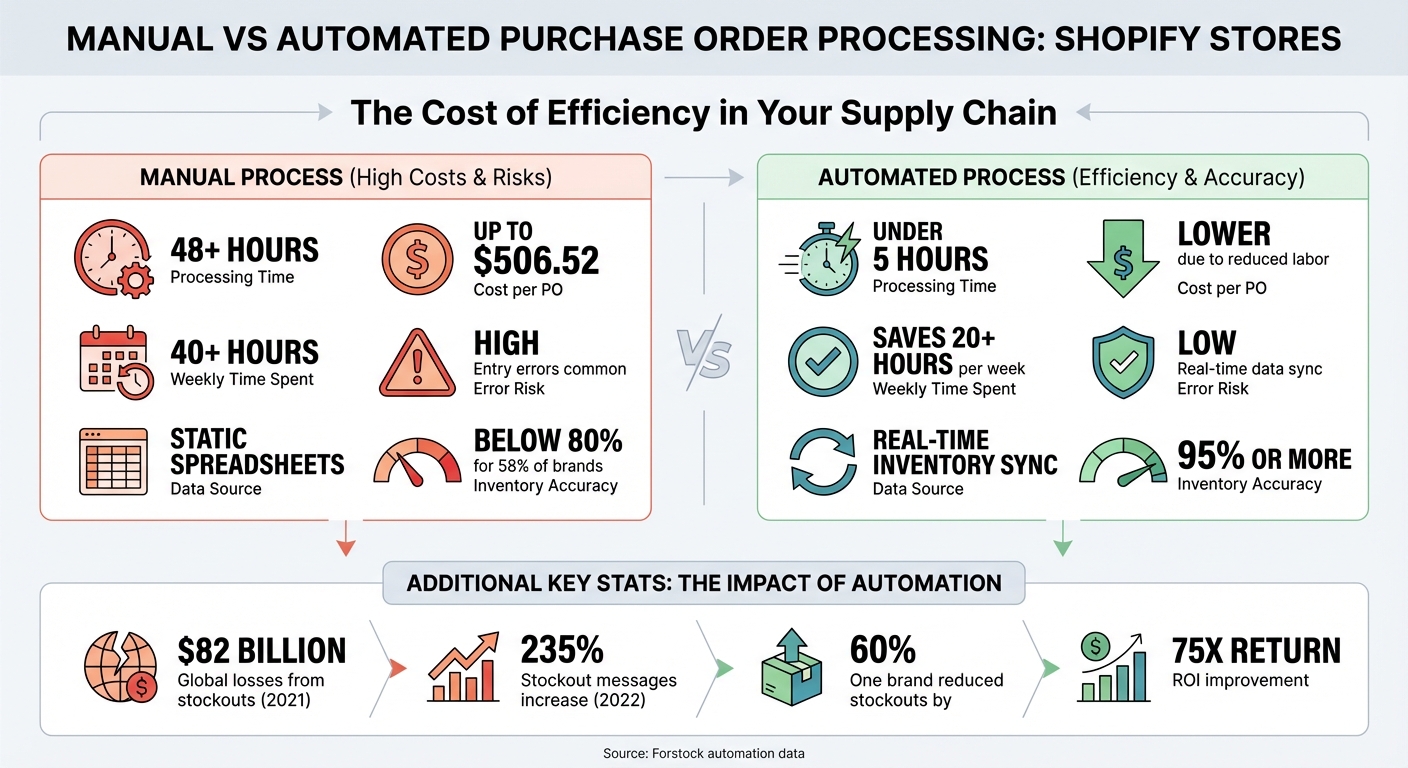
Manual vs Automated Purchase Order Processing: Time and Cost Comparison
Switching to automation can completely change how your Shopify store handles purchase orders. Instead of juggling manual spreadsheets, you get a system that works in real-time, powered by data. This shift eliminates tedious tasks, saves time, and ensures your inventory stays on track without constant oversight.
Here’s a standout fact: processing a single purchase order manually can cost a business up to $506.52. Tasks that might take 2–3 days manually can be wrapped up in just a few hours with automation. While top-performing businesses can process purchase orders in less than 5 hours, manual methods can drag this out to over 48 hours. That’s a two-day difference per order cycle - time you could spend growing your business.
Better Inventory Management
Automation takes the uncertainty out of inventory management. Instead of relying on outdated spreadsheets or manual counts, it pulls real-time data directly from your Shopify store. This means your system is always up to date, tracking stock levels, sales trends, and supplier lead times without missing a beat.
The results speak for themselves: automated inventory systems can boost accuracy to 95% or more. Whether you’re managing 50 SKUs or 500, automation can handle bulk purchase orders across multiple suppliers and warehouses - something that would take days to manage manually.
Preventing Stockouts and Overstock
AI-powered automation ensures you hit the sweet spot between having too much inventory and running out of stock. In 2021, retailers missed out on $82 billion globally due to out-of-stock items, while the number of "out-of-stock" messages seen by customers jumped by 235% in 2022. On the flip side, many businesses are stuck with $1.40 worth of inventory for every $1 in sales, tying up cash unnecessarily.
Automated systems use advanced forecasting tools to calculate reorder points for each SKU, factoring in real-time sales, lead times, and even seasonal trends. Instead of reacting to stockouts, you’re preventing them before they happen. These systems also account for variables like supplier reliability, ensuring fast-moving items stay in stock while avoiding overstock on slower sellers.
Some Shopify brands have seen dramatic improvements. For instance, one brand reduced stockouts by 60% with AI-driven forecasting, while another reported a 75x return on investment by optimizing inventory spending.
Saving Time and Reducing Errors
Automation can save Shopify merchants over 20 hours a week, freeing up time for tasks like marketing, customer service, or product development. Some businesses spend more than 40 hours a week on purchasing tasks. By cutting out repetitive tasks like manual data entry and approval emails, automation not only saves time but also reduces costly errors.
Here’s how it works: automated systems pull data directly from your Shopify store, generate purchase orders, and send them to vendors - all while tracking everything in one dashboard. No more copying SKUs, chasing emails, or dealing with outdated supplier details. Retail expert Elise Dopson sums it up perfectly:
Automation slashes touch-time on every PO.
Reducing errors is just as important. Manual entry can lead to issues like incorrect SKUs, outdated prices, or wrong quantities - mistakes that impact your bottom line. Automation eliminates these risks by syncing real-time data, ensuring consistency throughout the process.
| Feature | Manual Process | Automated Process |
|---|---|---|
| Processing Time | 48+ hours | Under 5 hours |
| Cost per PO | Up to $506.52 | Lower due to reduced labor |
| Weekly Time Spent | 40+ hours | Saves 20+ hours per week |
| Error Risk | High (entry errors) | Low (real-time data sync) |
| Data Source | Static spreadsheets | Real-time inventory sync |
Ready to streamline your operations? Start organizing your store data and supplier details, and let Forstock handle the heavy lifting.
What You Need Before Getting Started
Before diving into automation, it’s crucial to get your data and supplier details in order. Think of this step as laying the groundwork - without clean, organized information, even the smartest automation tools won’t work effectively. The good news? Most Shopify stores already have this data; it just needs to be verified and properly structured.
Here’s a startling fact: 58% of brands report inventory accuracy below 80%. That means over half of e-commerce businesses are working with outdated or incomplete information. Automating purchase orders with messy data doesn’t solve the problem - it just speeds up the mistakes. A few hours spent organizing your store now can save you countless headaches later.
Organizing Your Shopify Store Data
Start with your product catalog. Every SKU should include three essential details: an accurate product name, a unique SKU identifier, and a current unit cost. This information isn’t just for bookkeeping - it’s the foundation for tools like Forstock to calculate reorder points, forecast demand, and generate purchase orders automatically.
Go beyond the basics. Organize real-time stock levels and sales history for each product. This helps the system identify which items are selling fast and which are gathering dust. Flag archived or seasonal products to avoid unnecessary automated orders.
One often overlooked step? Calculating landed costs. Your unit cost should account for not just the supplier price but also shipping, duties, and other fees. Without this, your Cost of Goods Sold (COGS) will be inaccurate, and you won’t have a clear picture of your profit margins.
Avoid using the same reorder point for all products. For example, the reorder point for a fast-selling t-shirt won’t make sense for a slow-moving accessory. Instead, define safety stock levels and "days of cover" for each SKU based on its sales velocity. This ensures the system doesn’t over-order slow sellers or under-order high-demand items.
| Data Category | Specific Fields to Organize |
|---|---|
| Product Info | SKU, Barcode, Unit Cost, Weight |
| Supplier Info | Name, Email, MOQ, Lead Time |
| Inventory Rules | Safety Stock, Reorder Point, Pack Size |
| Financials | Payment Terms, Currency, Tax Codes |
Once your product data is in shape, it’s time to focus on your supplier information.
Gathering Supplier and Lead Time Information
For every vendor you work with, create a complete profile. This should include supplier names, primary contact emails, and physical addresses for purchase order headers. Be sure to document Minimum Order Quantities (MOQs), pack sizes, and agreed pricing for each product.
The most critical piece of information? Lead times. This is the number of days between placing an order and receiving it. If your system assumes a supplier delivers in 14 days but it actually takes 30, you’ll end up with stockouts. Double-check lead times with each vendor before automating.
Here’s a tip from baby products brand Lalo: in 2023, they shared their 12-month production plans and growth forecasts with suppliers. This transparency allowed them to negotiate a 50% reduction in purchase order down payments, freeing up valuable working capital. Sharing forecasts can not only strengthen vendor relationships but also unlock better terms.
Map each SKU to its preferred vendor. This allows Forstock to automatically group products by supplier when generating purchase orders, saving you from manually sorting through items. Standardize your order fields across all suppliers by including SKU/part numbers, Incoterms, and expected arrival dates to keep things consistent.
Lastly, establish a system for purchase order (PO) acknowledgment. Require vendors to confirm or reject POs within 24 hours. This ensures they can meet the lead times and quantities you’re expecting.
With your supplier details in place, you’re ready to install Forstock for a streamlined setup.
Installing Forstock
Once your data is organized and supplier information verified, installing Forstock is the next step. Designed specifically for Shopify, Forstock syncs directly with your product listings, orders, and inventory data. You can find it in the Shopify App Store - just search for "Forstock", click install, and grant the necessary permissions.
Forstock consolidates your store data into one dashboard, tracking inventory, supplier performance, and purchase orders. Using real-time sales data and verified supplier lead times, it generates automated reorder alerts and demand forecasts.
Before configuring rules, take one last step: audit your inventory. Check that the "on-hand" stock levels in Shopify match what’s actually in your warehouse. If Shopify says you have 50 units but you only have 30, the automation will make decisions based on incorrect data.
As Matt, a solo founder, shared:
"I thought inventory tools were only for big companies, but Forstock proved me wrong. It is user-friendly, plugs right into Shopify, and makes me feel in control."
With your data cleaned up, suppliers verified, and Forstock installed, you’re all set to create your first automated purchase order rules.
How to Automate Purchase Orders with Forstock
Tired of juggling spreadsheets for inventory management? Forstock simplifies the process by automating purchase orders through three key steps: setting inventory rules, enabling AI forecasting, and refining drafts. This system replaces manual work with real-time automation, saving time and reducing errors.
Setting Up Inventory Rules and Supplier Details
Start by defining reorder points and safety stock levels for each SKU. These rules determine when Forstock should generate a purchase order. For instance, if your reorder point is set at 50 units and your safety stock is 20 units, the system will alert you once inventory hits 50, ensuring you maintain a buffer while waiting for new stock to arrive.
Customize these rules at the SKU level. A fast-moving product might need a higher reorder point and shorter lead time, while slower sellers require fewer units with longer coverage. This tailored approach helps you avoid overstocking items that don’t sell quickly and ensures you don’t run out of your bestsellers.
Next, map each product to its preferred supplier. Add key details like contact information, lead times, and Minimum Order Quantities (MOQs). Forstock uses this data to group items by supplier when generating purchase orders, which cuts down on shipping costs and administrative tasks.
Planning for peak seasons? Adjust reorder triggers beforehand to account for increased demand during busy times like Black Friday or back-to-school sales. Historical averages may not always reflect these spikes, so manually increasing safety stock can help you stay ahead.
| Setup Element | What to Configure |
|---|---|
| Reorder Points | The stock level that triggers a new purchase order |
| Safety Stock | The buffer quantity to prevent stockouts during lead time |
| Days of Cover | The number of days your current inventory should last |
| Supplier Mapping | Assign each SKU to a primary supplier, including lead times and minimum orders |
Once these rules are in place, Forstock syncs with your Shopify store to monitor inventory in real time. As Emily, an Inventory Manager, puts it:
"I open the dashboard in the morning and instantly know what needs reordering, what is overstocked, and what to focus on."
With inventory rules set, the next step is to enable AI-driven forecasting.
Turning On AI-Driven Demand Forecasting
Forstock’s AI, Alfred, analyzes real-time Shopify data to predict when you’ll run out of stock. By looking at factors like sales velocity, order history, and supplier lead times, it calculates the optimal time to reorder and helps forecast inventory costs.
To activate this feature, go to the Forstock dashboard and enable AI forecasting. The system immediately starts processing your historical sales data, identifying trends, and adjusting reorder points. For example, if a product sells 10 units per day and takes 14 days to restock, Alfred will trigger a reorder alert when inventory hits 140 units - giving you enough time to restock without running out.
The AI continuously adapts to your business. If sales suddenly spike or slow down, it recalibrates forecasts accordingly. This dynamic approach is especially useful for businesses with seasonal products or fluctuating demand. Sophie, an E-commerce Manager, shared:
"The AI forecast actually makes sense for my business. It feels like having a supply chain manager on my team."
Check the dashboard daily for AI-generated reorder suggestions. Alfred flags items nearing their reorder points and offers recommendations. You can even ask specific questions like, “Which products will run out in the next 30 days?” and get instant, data-backed answers. Many Forstock users report cutting manual inventory tasks by at least 60%.
Reviewing and Approving Purchase Orders
Once AI forecasting sets reorder points, Forstock generates draft purchase orders for your review. These drafts consolidate items from the same supplier into a single order, ready for your approval.
Open the draft in your dashboard to review details such as SKU quantities, unit costs, delivery dates, and total order value. If needed, adjust quantities or split orders for partial fulfillment. This flexibility ensures you stay in control, even with automation.
During this review phase, Alfred AI can validate reorder quantities. For example, if you’re hesitant about a large order, Alfred can pull up historical sales data to help you make an informed decision. This streamlines the approval process without compromising accuracy.
Once approved, Forstock sends the purchase order directly to the supplier via email and syncs it with Shopify. The platform tracks the order’s status, records payments, and updates inventory once the items arrive. Liam, an Operations Director, commented:
"We have cut manual inventory tasks by at least 60%."
Monitoring and Improving Inventory with Forstock
Once you've automated your purchase orders, the next step is continuous monitoring to fine-tune your inventory strategy. The real advantage lies in tracking performance and using that data to improve purchasing decisions. Forstock's analytics dashboard transforms raw data into clear, actionable insights, helping you spot inefficiencies and make smarter choices.
Tracking Supplier Performance
Your suppliers play a critical role in meeting customer demand. Forstock's centralized dashboard makes it easy to track how well each supplier performs by comparing actual delivery times to what they promised. This kind of visibility is crucial - 58% of companies admit they miss delivery or accuracy targets during peak seasons. These delays can result in stockouts and lost revenue.
If a supplier consistently delivers late, you might need to adjust your safety stock levels or even reconsider your partnership. As Daniel, a Supply Chain Manager, shared:
"With Forstock, we can create POs in minutes, track supplier performance, and forecast demand without the guesswork. It is the first tool that actually bridges inventory management and purchasing."
By reviewing supplier data before renewing contracts or entering negotiations, you can build a supply chain that's more dependable. Forstock's analytics also help turn this performance data into practical steps to improve your inventory management.
Using Analytics to Improve Over Time
Forstock's analytics go beyond what spreadsheets can show, uncovering trends and patterns that might otherwise go unnoticed. The platform provides insights into inventory turnover rates, stock values, and days of inventory remaining for each SKU. This helps you identify which products are selling quickly and which ones are lagging behind.
With the analytics tab, you can pinpoint underperforming items and adjust reorder points as needed. Want quick answers? Use Alfred AI to ask specific questions like, "Which SKUs had the lowest turnover this quarter?" and get instant, data-driven insights.
Checking your dashboard daily keeps you informed about trends. For example, top-performing companies process purchase orders in under five hours, while slower ones take over 48 hours. Acting quickly on these insights allows you to align your purchasing strategy with seasonal demand and supplier lead times, ensuring your inventory stays optimized.
Conclusion
Automating purchase orders has completely transformed how Shopify stores handle inventory management. Tasks that used to take 2–3 days manually can now be wrapped up in just a few hours with automation tools like Forstock. This shift not only reduces the chance of human errors - such as mismatched SKUs or outdated pricing - but also frees up over 20 hours per week for your team to focus on growing the business.
The numbers speak for themselves: manual purchase orders can cost as much as $506.52 each. By using Forstock, you can reduce processing time from 48+ hours to less than five hours and increase revenue by 40%. These savings are made possible by Forstock's smart automation features, including AI-powered forecasting and automated purchase order creation. This means your inventory management becomes proactive, helping you avoid stockouts and overstock while keeping supplier performance transparent for better decision-making.
Ready to see the difference? Start with Forstock’s free 14-day trial for just $79/month. Organize your supplier data, set reorder points for each SKU, and let Forstock handle the rest. Simplify your inventory process and take a proactive approach with Forstock today.
FAQs
How does Forstock use AI to optimize inventory management for Shopify brands?
Forstock uses AI to deliver real-time demand forecasts, enabling Shopify merchants to predict sales trends and minimize the risk of stockouts. By analyzing factors such as lead times, seasonality, and historical sales data, the platform automates purchase order creation, ensuring smarter and more efficient restocking decisions.
With its inventory management tools, Forstock cuts down on manual work, prevents overstocking, and helps improve cash flow. Its proactive alerts and data-driven insights allow you to meet customer demand with ease, giving you more time to focus on expanding your business.
How can I set up my Shopify store for automated purchase orders?
To get your Shopify store ready for automated purchase orders, start by confirming you have admin access and that the Purchase Orders feature is activated in your Shopify admin panel. From there, make sure inventory tracking is turned on for all your products, and assign locations to ensure stock levels are monitored accurately.
Next, add your suppliers by heading to the Purchase Orders section in Shopify. Fill in key details like contact information and payment terms. Link each supplier to the relevant SKUs so the system knows where to reorder items from. Set up reorder rules, including minimum stock levels, lead times, and order quantities, to keep the process running smoothly.
To take automation to the next level, integrate a tool like Forstock. This software can handle real-time inventory tracking, predict demand, and generate purchase orders automatically. Before going live, test your setup by creating a draft purchase order to ensure everything is functioning as expected. These steps will help you streamline your store’s purchase order management with ease.
How does automating purchase orders help reduce costs and minimize errors?
Automating purchase orders can significantly cut costs by removing the need for manual data entry. This saves time, reduces labor expenses, and ensures greater accuracy. By using real-time inventory data, the system automatically generates purchase orders, minimizing errors like incorrect SKUs, quantities, or supplier details.
This level of precision helps avoid overstock, stockouts, and expensive ordering mistakes. The result? A smoother process that boosts operational efficiency, supports better cash flow, and ensures businesses can meet customer demand with greater reliability.
Keep reading
Try Forstock free for 14 days.
AI-powered demand forecasting and reorder automation for Shopify brands. No credit card required.