
What Is Purchase Order Management?
Purchase order (PO) management is the process of creating, sending, tracking, and receiving purchase orders from your suppliers. For Shopify brands, it's the bridge between knowing what you need to reorder and actually getting that inventory on your shelves.
Despite being one of the most important operational processes, most brands handle POs through a messy combination of email threads, spreadsheets, and memory. This leads to errors, delays, and hours of wasted time every week.
The Purchase Order Lifecycle
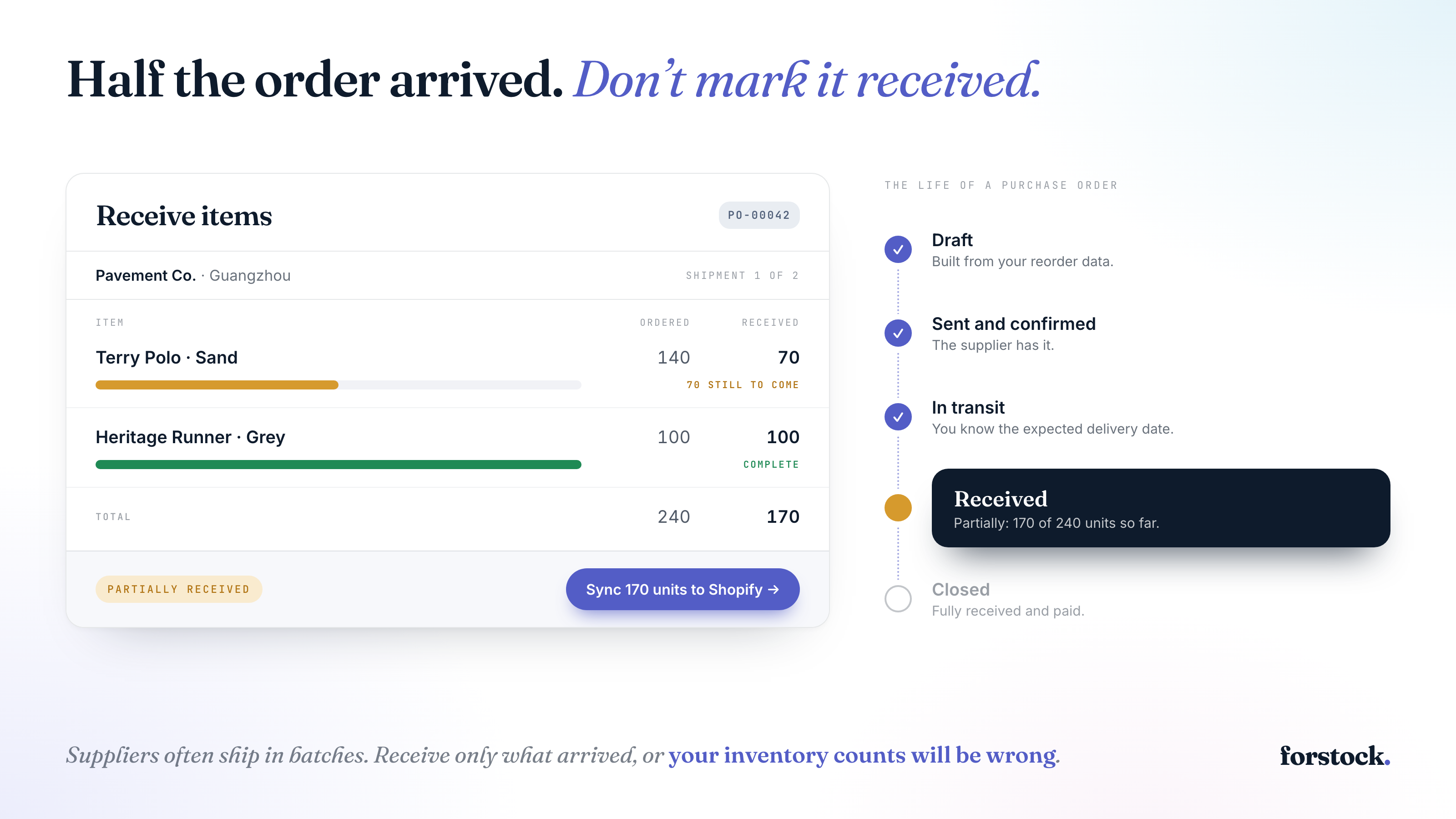
Every PO goes through the same basic stages:
1. Draft
You identify what needs to be ordered (ideally from a reorder report or demand plan), create the PO with line items, quantities, and costs, and assign it to a supplier.
2. Sent / Confirmed
You send the PO to your supplier and get confirmation. This is where many brands lose track — the PO lives in an email thread and nobody follows up until it's too late.
3. In Transit
The supplier has shipped the goods. You should know the expected delivery date and be tracking progress.
4. Received
Goods arrive at your warehouse. You need to check quantities against the PO, note any discrepancies, and update your Shopify inventory.
5. Closed
The PO is fully received and paid. It becomes part of your purchasing history.
Common PO Management Mistakes
Copy-pasting POs from emails. This is slow, error-prone, and creates no audit trail. Use a system that generates POs from your reorder data.
Not tracking partial shipments. Suppliers often ship in batches. If you mark a PO as "received" when only half arrives, your inventory counts will be wrong.
Forgetting to update Shopify. Receiving inventory in your warehouse but not updating Shopify means your online store still shows "Out of Stock."
No payment tracking. If you don't track deposits and payments per PO, you'll lose visibility into your cash flow and supplier obligations.
Best Practices for Shopify Brands
Centralize Your PO Process
Use a single tool to create, track, and receive all purchase orders. When POs live in email, spreadsheets, and your head simultaneously, things fall through the cracks.
Generate POs from Reorder Data
Don't start from a blank page. Use your reorder points and demand forecasts to pre-populate POs with the right products and quantities.
Track Supplier Performance
Every PO is a data point. Track on-time delivery rates, quality issues, and actual vs. quoted lead times. This helps you negotiate better terms and choose reliable suppliers.
Sync Receiving with Shopify
When you receive inventory, it should flow straight into Shopify. Manual inventory updates are a recipe for overselling and stockouts.
Keep a Payment Record
Track deposits, partial payments, and full settlements for every PO. This gives you a clear picture of your purchasing obligations and cash flow.
How Forstock Simplifies PO Management
Forstock lets you create purchase orders directly from your reorder suggestions, split them across suppliers, track them through every stage, and receive items with automatic Shopify sync. Payment tracking, supplier scorecards, and full audit history are built in — so you can manage your entire purchasing workflow without ever opening a spreadsheet.