
How to Choose a Scalable Inventory Platform
Guide to choosing a scalable inventory platform: assess growth, Shopify integration, AI forecasting, automation, multi-location support, and total cost.

How to Choose a Scalable Inventory Platform
Managing inventory effectively is critical for growing your Shopify store. As your business expands, manual processes like spreadsheets can lead to costly errors, stockouts, and inefficiencies. The right inventory platform can streamline operations, sync stock across channels, and support long-term growth. Here’s how to choose one:
- Assess Growth Needs: Map out your current order volume, SKU count, and sales channels. Identify pain points like stockouts, excess inventory, or manual errors.
- Key Features to Look For: Real-time synchronization, AI-driven demand forecasting, multi-warehouse optimization, and automation for tasks like purchase orders and stock updates.
- Integration with Shopify: Ensure the platform offers native Shopify integration with bidirectional updates to prevent overselling and improve accuracy.
- Scalability: Choose a system that can handle increasing SKUs, warehouses, and sales channels without compromising performance.
- Cost Analysis: Factor in setup, training, subscription fees, and long-term costs to avoid surprises.
A well-chosen platform reduces stockouts, improves efficiency, and supports your business as it grows. Platforms like Forstock offer features tailored for Shopify brands, making it easier to manage inventory across multiple locations and channels.
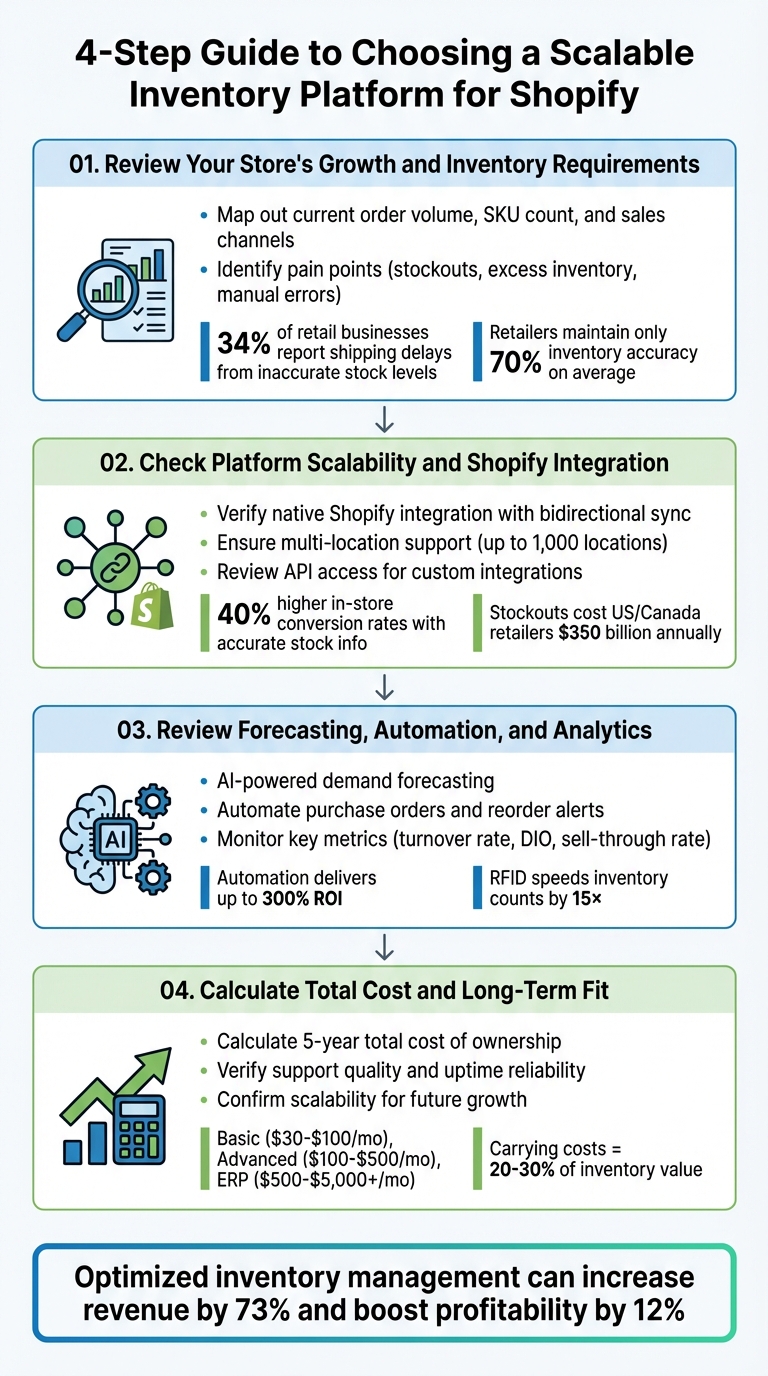
4-Step Guide to Choosing a Scalable Inventory Platform for Shopify
Step 1: Review Your Store's Growth and Inventory Requirements
Map Out Your Growth Plans
Begin by assessing where your business stands today and where you want it to be in the next 18 months. Take stock of key details like your current order volume, the number of SKUs (including all variations like size, color, or material), sales channels, and physical locations. Dive into metrics such as inventory turnover, sell-through rate, and weeks of supply to get a clearer picture of your operations. If your order volume is high, manual tracking can quickly become unmanageable. Keep in mind that many systems need to scale when SKU counts exceed 50 unique items.
Next, evaluate your operational setup. For instance, if you're selling on Shopify, Instagram, TikTok Shop, and Amazon, you'll need a system that synchronizes inventory across all channels in real time. Don't forget to account for your physical footprint, like warehouses, retail stores, or partnerships with third-party logistics providers, as these add layers of complexity. Supplier lead times and seasonal demand spikes are also critical factors to include in your planning.
"We go through constant inventory fluctuations and shifting demands. It was hard to reliably and accurately represent which stores had certain items in stock to our digital customers when they wanted to try something on".
List Your Current Inventory Problems
Once you've mapped out growth metrics, it's time to identify the inventory issues holding you back. Common challenges include frequent stockouts of popular items, excess stock tying up cash, and errors from chaotic spreadsheets. Synchronization problems - where stock levels in Shopify, POS systems, and physical counts don't match - are another headache for many businesses. In fact, 34% of retail businesses report shipping delays caused by inaccurate stock levels.
Phantom inventory is another issue to watch for - these are items that appear available in your system but may be damaged, stuck in returns, or otherwise unsellable. If your team spends hours manually counting stock or searching through stockrooms, that's a clear sign of inefficiency. On average, retailers only maintain about 70% accuracy in inventory visibility, but regular audits can improve this and even boost sales by around 11%.
Also, consider the financial toll. For every dollar earned, retailers typically carry $1.40 in inventory. Globally, about 8% of inventory - worth an estimated $163 billion - ends up wasted or discarded annually due to poor management. If your current tools only provide 90 days of data, you'll likely struggle to make year-over-year comparisons.
Match Your Needs to Platform Features
With your growth goals and challenges in mind, focus on matching your needs to the right platform features. For example, if stockouts are cutting into revenue, look for tools offering automated reorder alerts and AI-driven demand forecasting that factors in sales trends, lead times, and seasonality. If spreadsheets are slowing you down, consider a perpetual inventory system that updates records automatically with each transaction.
For businesses selling across multiple channels or managing several warehouses and retail locations, real-time synchronization and intelligent order routing are essential to avoid overselling. Features like batch and expiry date tracking for perishable goods, kitting support for product bundles, or API access for custom supplier integrations can also be game-changers.
To prioritize features, conduct an ABC analysis. Divide your inventory into three categories: "A" items (the top 20% of SKUs that drive 80% of revenue), "B" items (the next 30% of SKUs contributing 15% of revenue), and "C" items (the remaining 50% of SKUs generating just 5% of revenue). Your platform should excel at managing "A" items with precision while efficiently handling the rest.
Step 2: Check Platform Scalability and Shopify Integration

Evaluate Shopify Integration and Performance
Start by confirming whether the platform offers native Shopify integration or if custom development is required. Native integration simplifies setup and reduces ongoing maintenance efforts. Ideally, the platform should leverage Shopify's APIs for secure data sharing and Webhooks to deliver real-time updates for events like new orders or inventory changes.
Bidirectional synchronization is a must. This ensures updates to stock levels, pricing, and order statuses are reflected instantly across both systems. Without it, you risk overselling, especially during high-demand periods. For example, retailers using Shopify have reported up to 40% higher in-store conversion rates when accurate stock information is available.
Stress test the platform by simulating high-order volumes during peak shopping events like Black Friday or Cyber Monday. Proper inventory management through Shopify can save businesses over 10 hours per month by eliminating manual data entry. However, this benefit only holds if the system can handle the pressure of peak traffic. It's worth noting that 80% of organizations face supply chain disruptions annually, which can lead to revenue losses of 6-10% per disruption.
For Shopify-centric businesses, platforms like Forstock utilize Shopify's APIs and Webhooks to maintain seamless inventory synchronization. Once integration performance is confirmed, the next step is evaluating how well the platform handles inventory across multiple locations.
Verify Multi-Location and Multi-Warehouse Capabilities
A strong inventory platform should unify data from all your operational spaces - whether they're warehouses, retail stores, or third-party logistics (3PL) providers. This centralized approach ensures a single, accurate source of truth. Shopify's native system supports inventory tracking across up to 1,000 locations, so your platform should match or exceed this capability.
Look for tools that streamline stock transfers, enabling you to optimize storage and balance inventory during busy seasons. If you rely on external fulfillment partners, confirm that the platform can sync directly with your 3PL's software to maintain accurate inventory counts.
The stakes here are high. Stockouts cost retailers in the U.S. and Canada an estimated $350 billion annually. In fact, in 2022, customer encounters with out-of-stock messages increased by a staggering 235%. A centralized inventory view across all channels can help avoid these costly mistakes by providing visibility into total stock availability before orders are processed.
Review API Access and Custom Integration Options
Finally, assess how easily the platform connects with other essential business systems through APIs. As your business grows, API access becomes critical for creating custom workflows or integrating specialized tools. APIs allow seamless connections between your inventory platform and applications like CRM systems, accounting software, and ecommerce tools.
Have a developer review the platform's API documentation to ensure it supports your specific data fields and workflows. Additionally, check if the vendor provides dedicated technical support for API-related issues, as this can be crucial for maintaining long-term custom integrations.
"Application programming interfaces (APIs) extend the functionality of an inventory system by allowing customized connections with other core business applications, such as CRM software, ecommerce platforms or accounting tools." - Abby Jenkins, Product Marketing Manager, NetSuite
For complex setups, consider adopting a hub-and-spoke architecture. In this model, the inventory platform acts as a central hub connecting systems like ERP, CRM, and product information management (PIM), instead of relying on fragile point-to-point integrations. Before diving into custom development, check if the platform already offers official connectors for popular tools like NetSuite, Xero, or QuickBooks. Using pre-built connectors can save significant development time and resources.
Signs Your Shopify Store Needs an Inventory Management System
sbb-itb-f0fc809
Step 3: Review Forecasting, Automation, and Analytics Capabilities
Fine-tuning forecasting, automation, and analytics is key to managing inventory efficiently as your Shopify store grows.
Why AI-Powered Demand Forecasting Matters
AI-driven demand forecasting leverages machine learning to analyze past sales, seasonal trends, and market data, delivering highly accurate predictions. Unlike static spreadsheets, these systems dynamically calculate reorder points by incorporating real-time inventory levels, supplier lead times, and safety stock requirements.
To put it in perspective, the fashion industry alone saw $70 billion to $140 billion in lost sales in 2023 due to excess inventory. AI forecasting can help you avoid both overstock and stockouts by identifying anomalies like sudden sales spikes or supply chain disruptions, enabling quick, informed responses.
For Shopify stores managing multiple sales channels - whether it’s Amazon, TikTok, or physical locations - AI consolidates data from all sources, ensuring inventory is distributed where it’s needed most. When choosing a platform, make sure it can sync with your marketing calendar. Events like promotions or influencer campaigns can trigger demand surges that historical data alone won’t predict. This kind of forward-looking insight is the foundation for automation that reduces repetitive tasks.
Automate Routine Inventory Tasks
Automation takes care of the time-consuming tasks that can eat up hours of your week, such as generating purchase orders when stock levels dip, creating shipping documents, or sending instant alerts to your inventory team. The benefits are hard to ignore. Automation can yield an ROI of up to 300%, cut labor costs by 25% or more, and boost inventory team productivity by over 60%.
Start small by automating simpler tasks like reorder point notifications and purchase order creation. Advanced systems can automatically manage up to 99% of inventory purchase orders. For instance, RFID technology accelerates inventory counts by 15× and reduces out-of-stock messages by up to 30%.
"Up to 99% of your inventory purchase orders can be managed automatically." - ScienceSoft
As your store scales from handling 50 SKUs to 5,000 or more, automated platforms integrate real-time data across warehouses and sales channels. This ensures that a sale on one channel instantly updates stock levels everywhere else, preventing overselling. Platforms like Forstock automate routine tasks like purchase order generation and reorder suggestions, giving you more time to focus on growing your business.
Prioritize Detailed Inventory Analytics
Strong analytics tools provide actionable insights, whether you’re looking at what’s happening now, diagnosing past issues, predicting future trends, or prescribing solutions. Platforms with ABC analysis capabilities help you prioritize the 20% of products that typically account for 80% of your revenue.
Real-time tracking across warehouses, retail locations, and third-party logistics (3PL) providers ensures you avoid stockouts in one area while sitting on excess inventory elsewhere. Monitoring supplier performance is also crucial - track lead times, delivery accuracy, and dependability to refine reorder points and safety stock levels. Additionally, use sales suggestion reports to identify slow-moving items, freeing up cash and warehouse space.
| Metric | Calculation / Purpose | Importance for Decision-Making |
|---|---|---|
| Inventory Turnover Rate | COGS / Average Inventory | Measures how quickly stock is sold and replenished; higher rates indicate strong sales |
| Days Inventory Outstanding (DIO) | Average days to sell stock | Reflects efficiency; lower DIO means faster sales and better cash flow |
| Sell-Through Rate | (Units Sold / Units Received) x 100 | Highlights high-demand products and potential dead stock |
Platforms like Forstock consolidate inventory analytics into unified dashboards, offering insights into 12-month demand forecasts and stock health metrics. This centralized view ensures every purchasing decision is backed by data, whether you’re managing straightforward SKUs or complex product variations.
Step 4: Calculate Total Cost and Long-Term Fit
Selecting the right platform goes beyond just looking at monthly subscription fees. It’s about understanding the bigger financial picture and ensuring the platform can support your business as it grows.
Calculate Total Cost of Ownership
When evaluating a platform, it’s important to consider all the costs involved - not just the subscription fee. Think about implementation, training, hardware, and ongoing support. A five-year total cost of ownership (TCO) analysis should include setup costs (like account creation and data migration), staff training time, hardware expenses (such as barcode scanners or RFID tags), and recurring support fees. Here’s a rough breakdown:
- Basic platforms: $30–$100/month
- Advanced platforms: $100–$500/month
- ERP-integrated platforms: $500 to $5,000+ per month, with setup costs ranging from $100 to $5,000
Don’t forget inventory-related expenses. Carrying costs - storage, labor, insurance, and tied-up capital - often account for 20% to 30% of your total inventory value. Monitoring inventory turnover metrics can help identify where capital is being wasted. And stockouts? They’re a massive issue, costing U.S. and Canadian retailers an estimated $350 billion annually.
Check Support Quality and Platform Reliability
Daily operations depend on reliable support and high system uptime. Make sure the vendor offers multiple ways to get help - like phone, email, and live chat - and that their support hours align with your business schedule. Dig into their data backup processes, encryption protocols (look for AES and SSL/TLS), and uptime history to ensure the platform is dependable.
Support is especially critical during high-pressure times, such as peak sales seasons. Platforms with detailed API documentation and active development roadmaps can adapt to market changes and integrate seamlessly with your current tech stack. This ensures you’re not left scrambling as your business evolves.
Confirm the Platform Can Grow With Your Business
Your platform should be ready to scale as your business grows. It needs to handle more transactions, additional SKUs, and even multi-location operations without requiring a complete overhaul. Test this during demos by using your actual SKUs and live data to see if the system can manage your workflows as they become more complex. Also, check if the pricing structure supports moving from basic to advanced features.
Take Forstock as an example. It’s built to grow with Shopify brands, offering tiered features that scale from managing a few dozen SKUs to thousands. Its unified dashboard and automated purchase orders give you control across single or multiple locations. By choosing a scalable platform, you can avoid the headaches and costs of migrating to a new system later on.
Conclusion: Selecting the Right Platform for Long-Term Growth
The inventory platform you choose plays a critical role in your business's long-term success. It needs to handle growing SKU counts, multiple warehouse locations, and the addition of new sales channels - all without requiring an expensive overhaul down the road.
Take a moment to map out your growth plans for the next 12–24 months. Are you planning to expand into multiple fulfillment centers? Adding hundreds of new products? If so, make sure the platform you select can scale effortlessly to meet these demands. This ties back to earlier discussions on preventing overstock vs. stockouts and optimizing inventory management, which can lead to a 73% increase in revenue and a 12% boost in profitability.
Look for features that enhance operations, such as AI-powered demand forecasting to predict inventory needs, automated purchase orders to minimize human error, and real-time multi-channel synchronization to avoid overselling. These tools can significantly improve efficiency, helping reduce stockouts by 20% to 30% and cutting excess inventory by 15% to 25%.
While operational features are essential, don’t overlook the financial aspect. Evaluate the platform’s total cost of ownership over a five-year period, including implementation, training, and any hidden costs that may arise as your business grows. A financially sound platform is just as important as its ability to scale.
Finally, prioritize systems designed for scalability. Forstock is a great example, as highlighted earlier. Tailored for Shopify brands, it can grow with you - from managing a handful of SKUs to thousands. With its unified dashboard, automated workflows, and AI-driven forecasting, Forstock provides the control and visibility you need - without the hassle of switching platforms later on.
FAQs
How can I tell if my current inventory system can support my business as it grows?
To figure out if your inventory system can keep up as your Shopify business grows, take a closer look at these essential areas:
- Capacity for growth: Can your system handle more SKUs, additional warehouse locations, and a higher volume of daily transactions over the next 12–18 months? If you're still relying on spreadsheets, dealing with slow syncing, or constantly making manual corrections, your system might already be stretched too thin.
- Automation and accuracy: A scalable inventory platform should take care of tasks like demand forecasting, reorder calculations, and purchase orders automatically. If you're still managing these manually, you could face stockouts or excess inventory as your sales increase.
- Seamless integration: Your system should sync instantly with Shopify and other sales channels, giving you a single, unified view of your inventory. Any delays or data gaps can create operational headaches, especially as you expand into new markets.
If your current setup falls short in any of these areas, it might be time to consider upgrading to a modern SaaS inventory platform that can grow alongside your business.
What should I look for in an inventory platform that integrates with Shopify?
When selecting an inventory platform for your Shopify store, it’s important to prioritize tools that keep your stock data accurate, simplify daily tasks, and help your business grow.
Here’s what to look for:
- Real-time syncing: Automatically update stock levels across Shopify, POS systems, and other sales channels without the hassle of manual updates.
- Automated purchase orders: Leverage AI-driven demand forecasting to avoid running out of stock or overstocking.
- Advanced analytics: Gain insights into top-selling products, stock patterns, and trends to make smarter, data-backed decisions.
Choosing a platform that integrates smoothly with Shopify and offers features like centralized supplier management and multi-location tracking can save you time, reduce costly mistakes, and set your business up for success.
How can AI-powered demand forecasting improve your inventory management?
AI-based demand forecasting relies on historical sales data, seasonal trends, and market dynamics to predict future demand with accuracy. This approach helps you keep stock levels just right, preventing expensive stockouts or overstock situations while also improving cash flow management.
These tools also automate tasks like creating purchase orders and offer precise demand insights. The result? You save time and resources, giving you more freedom to focus on growing your business and meeting customer expectations with confidence.
Keep reading
Try Forstock free for 14 days.
AI-powered demand forecasting and reorder automation for Shopify brands. No credit card required.