
How to Sync Inventory Across Shopify and Other Platforms
Guide to real-time Shopify inventory sync with marketplaces to prevent overselling, automate POs, and keep SKUs consistent.
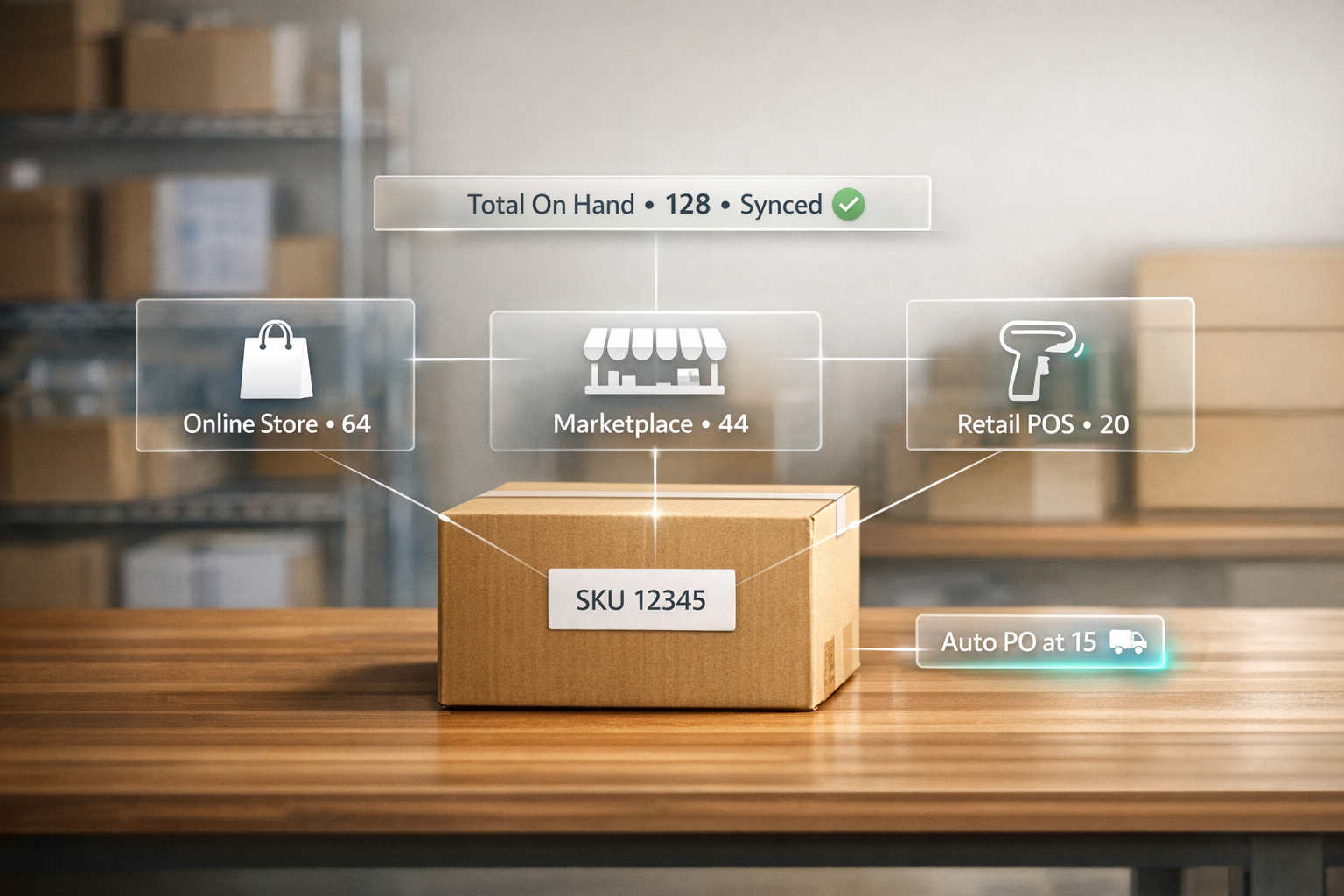
How to Sync Inventory Across Shopify and Other Platforms
Managing inventory across multiple platforms like Shopify, Amazon, and Walmart can be challenging. Without real-time updates, you risk overselling, stockouts, and marketplace penalties. These issues cost businesses billions annually and damage customer trust.
Here’s what you need to know:
- Overselling costs: A 15-minute sync delay can lead to $15,000–$25,000 in monthly losses for high-volume sellers.
- Manual updates waste time: Sellers spend 10–20 hours weekly on reconciliation, increasing errors.
- Customer impact: 40% of buyers don’t return after a canceled order due to overselling.
Solution: Real-time inventory synchronization tools like Forstock keep stock levels accurate across all platforms, prevent costly mistakes, and save hours of manual work. This guide explains how to set up Forstock, map products, and automate processes for smoother operations.
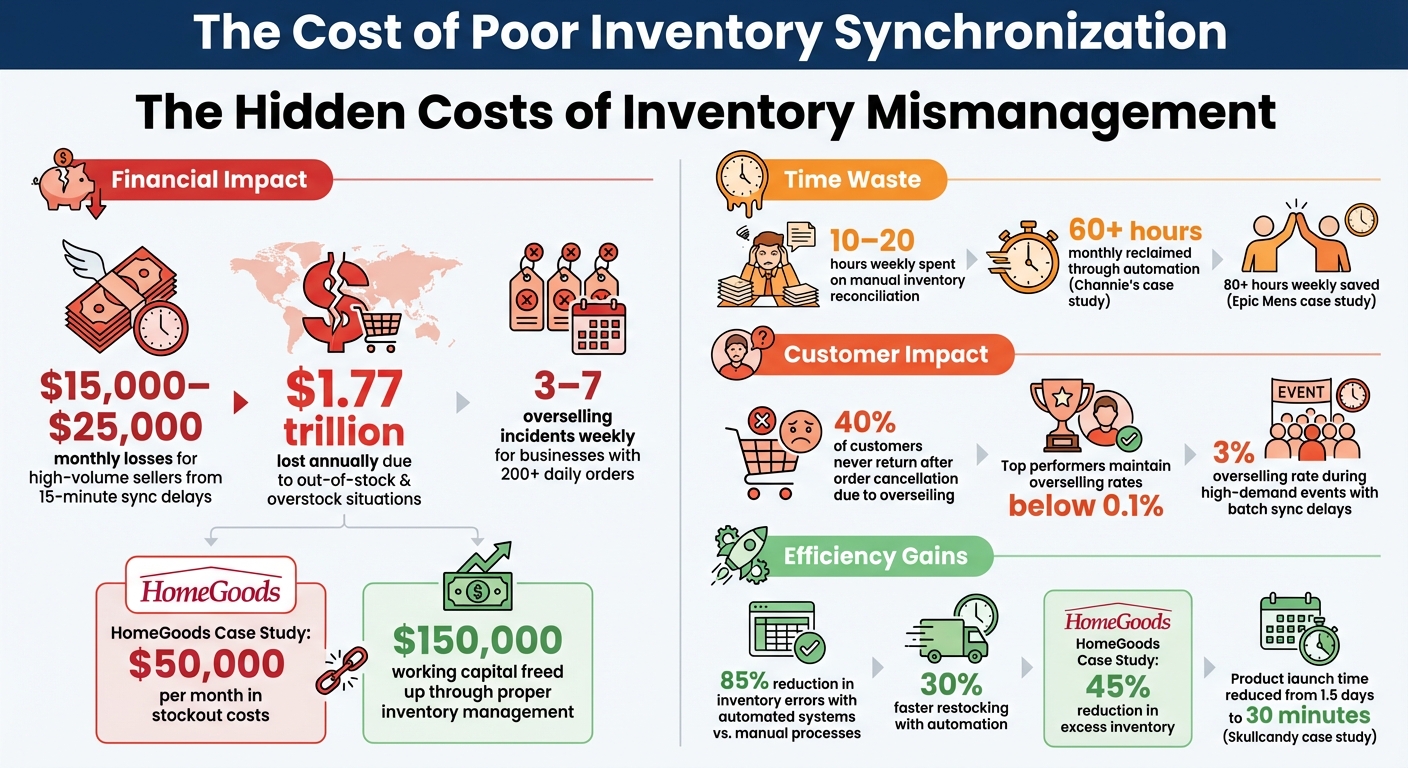
The Cost of Poor Inventory Synchronization: Key Statistics for Multi-Channel Sellers
Benefits of Syncing Inventory Across Platforms
Prevent Overselling and Stockouts
Keeping inventory in sync across platforms like Shopify, Amazon, Walmart, and TikTok Shop ensures accurate stock counts in real time. If someone buys the last unit on Amazon, systems using event-driven updates can notify all platforms within 2–5 seconds, avoiding accidental double sales.
A delay of just 15 minutes in syncing can result in 3–7 overselling incidents weekly for businesses handling over 200 orders daily. To prevent this, technologies like Redis atomic decrements ensure only one sale is confirmed, even if multiple customers attempt to purchase the same item simultaneously.
Some merchants use a 10–15% inventory buffer as a safety net against sync lags and simultaneous purchases. This buffer helps avoid penalties from marketplaces like Amazon and Walmart, which closely monitor cancellation rates. Repeated overselling could lead to suppressed listings or even account suspensions.
Accurate inventory syncing not only safeguards your revenue but also simplifies your day-to-day operations.
Improve Operational Efficiency
Inventory synchronization does more than just fix stock discrepancies - it can transform how you run your business. Automation eliminates the need for manual data entry, which can otherwise consume 10–20 hours a week for multi-channel merchants. For example, Channie's reclaimed over 60 hours monthly, while Epic Mens saved more than 80 hours weekly by automating their processes.
Modern systems act as a centralized hub for inventory data, so you no longer have to juggle multiple dashboards. These tools can automatically create purchase orders based on stock levels and route orders to the best warehouse for faster shipping. Returns are also handled automatically - items are inspected and restocked across all platforms immediately, preventing "ghost inventory" from clogging up your system.
All these efficiencies contribute to a smoother operation and a better experience for your customers.
Enhance Customer Satisfaction
Did you know that 40% of customers who experience an order cancellation due to overselling never return? Cancellations cost more than just one sale - they can hurt your reputation, reduce lifetime customer value, and lead to negative reviews.
Real-time inventory updates ensure that products listed as "in stock" are truly available, avoiding the disappointment of post-purchase cancellations. For instance, Skullcandy was able to cut its new product launch time from 1.5 days to just 30 minutes by using a unified commerce system. This allowed them to get inventory into customers' hands almost immediately. Additionally, synchronized systems can route orders to the nearest warehouse, speeding up delivery times and lowering shipping costs.
"Your customers do not care about your API rate limits. They care that the product they ordered actually shows up." – David Vance, Operations Strategist, Nventory US
Accurate inventory data also lightens the load for customer service teams. They can spend less time dealing with refunds and complaints about stock shortages, allowing them to focus on genuine customer needs. This means faster responses and a much smoother experience for buyers.
sbb-itb-f0fc809
How Shopify Handles Inventory Synchronization

Multi-Location Inventory Management
Shopify's system allows businesses to track inventory across up to 1,000 locations - this includes warehouses, retail stores, fulfillment centers, and even pop-up shops. Each location operates independently, meaning stock at your New York warehouse is tracked separately from your Los Angeles storefront.
Inventory is categorized into four statuses: Available (ready for sale), Committed (allocated to orders but not shipped), Incoming (in transit between locations), and On Hand (total physical stock). When an order is placed, Shopify routes it automatically based on a priority list you set up. Typically, orders are fulfilled from your designated primary location, provided there’s stock available.
However, inventory isn't shared across locations. For example, stock at one location isn’t automatically accessible for another unless you manually transfer it. This setup helps streamline internal tracking but can create challenges when integrating with external systems.
Manual Updates and Limitations
While Shopify handles inventory well within its own ecosystem, extending this functionality to external platforms like Amazon or eBay reveals some gaps.
"Shopify syncs inventory well within its built-in tools, but it falters outside this ecosystem." – Bhoomi Singh, Content Manager, Sumtracker
Shopify doesn't provide native, real-time synchronization with external marketplaces such as Amazon, Walmart, Etsy, or eBay. Instead, inventory updates occur in batches every 5–15 minutes. During high-demand events like flash sales, this delay can lead to overselling, with rates reaching 3%, potentially causing customer dissatisfaction and penalties from marketplaces.
Additionally, Shopify lacks automated protections against overselling. For instance, there’s no built-in "safety stock" feature or alert system to pause sales when inventory levels reach a critical point. If you sell bundles or kits, the platform doesn’t automatically track the inventory of individual components - it only manages the bundle as a single SKU. This can result in unexpected stockouts for individual items.
For businesses managing multiple Shopify stores or selling across various channels, each store operates independently. There’s no native way to link inventory data between stores, which makes multi-channel synchronization more complex. These limitations highlight the need for cloud inventory tools to bridge the gaps in Shopify’s inventory management capabilities.
How to Use Forstock for Shopify Inventory Synchronization
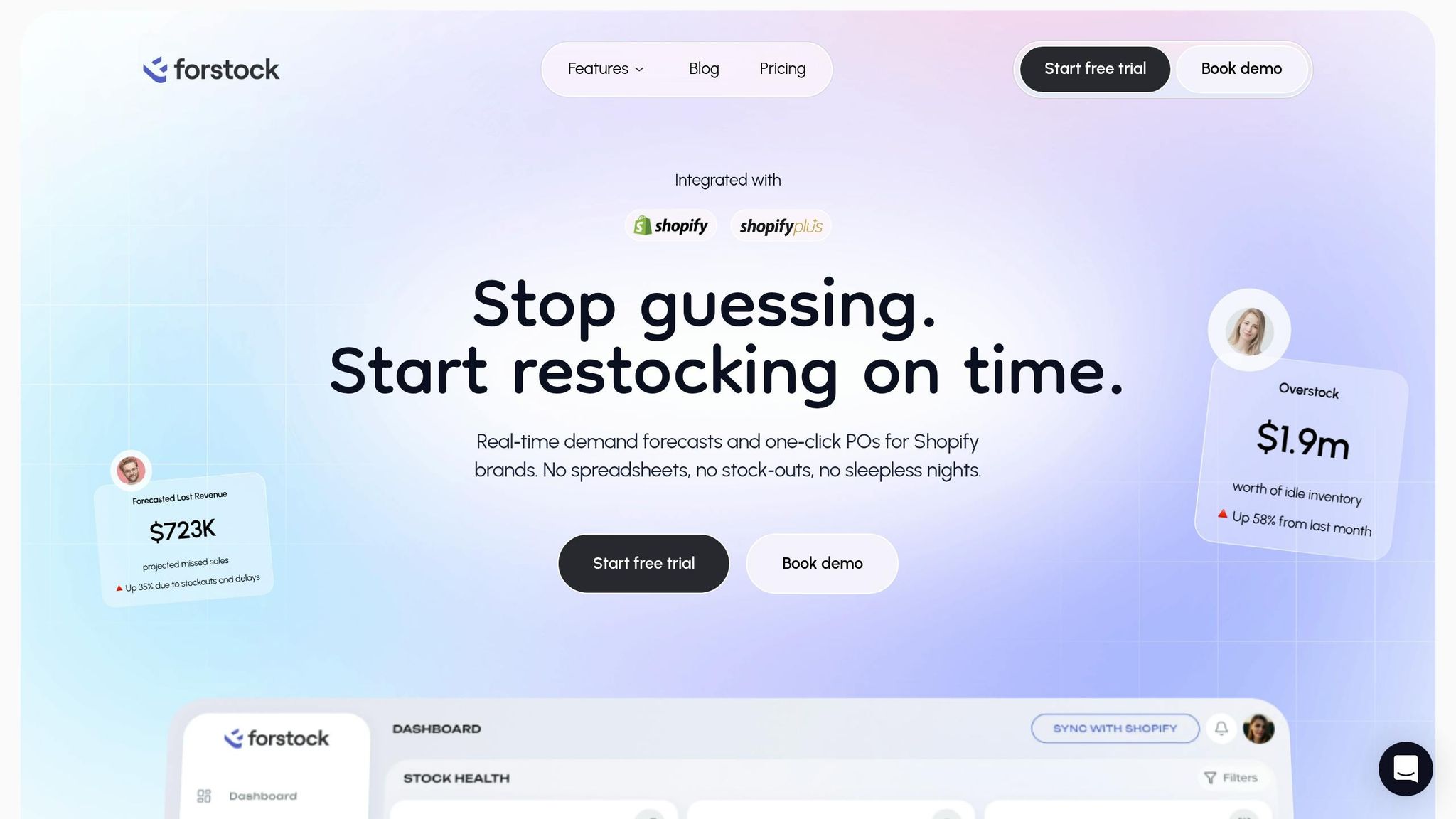
Step 1: Connect Shopify and Set Up Forstock
Getting started with Forstock is quick and straightforward. Head over to forstock.io or the Shopify App Store, enter your email and store URL, and you're ready to go in just two minutes.
During installation, Forstock requests limited read/write access to your Products, Inventory, and Orders via OAuth. This connection is secure, using AES-256 encryption and meeting GDPR and SOC 2 compliance standards. Plus, you can revoke access at any time through your Shopify settings.
"The automated PO creation saves us 10+ hours weekly. Setup was seamless - just 2 minutes!" - Alexander, E-commerce Manager at PureOrganics
Once connected, Forstock syncs purchase orders and received items directly into Shopify. Its AI engine analyzes your data - factors like seasonality, trends, and growth patterns - to predict demand and set reorder points, giving you a smarter way to manage inventory.
Step 2: Map Products and SKUs Accurately
After connecting your store, the next step is ensuring your products and SKUs are mapped correctly.
Forstock automatically syncs your Shopify listings and inventory data, tracking performance and stock health at the SKU level. To check your mappings, navigate to "Integrations > Product Mapping." The system uses fuzzy matching technology with 95% accuracy to auto-match products based on SKU or UPC. If you have variants, like size or color, you can manually adjust mappings to ensure everything syncs seamlessly across platforms like Amazon or Walmart.
Take PureOrganics as an example - they successfully mapped 500 SKUs across Shopify, Amazon, and Etsy. Forstock’s interface previews mappings and flags any with less than 80% confidence. You can bulk-import corrections via CSV before going live, avoiding common issues like mismatched variants (e.g., "RED-S" versus "Red-Small"). The customizable Inventory Table allows you to filter by stock status and test sync accuracy using the simulation feature before enabling real-time updates.
Step 3: Configure Sync Settings and Automation
Fine-tune your synchronization settings under "Settings > Sync Rules." Here, you can choose between real-time updates or a 15-minute sync frequency and set up alerts for low stock levels.
In the "Automation > Reorder Rules" section, define minimum and maximum stock levels for each SKU to automate reordering. For example, set high-demand items to reorder when inventory drops to 20 units. Input supplier lead times and safety stock percentages so the system can accurately trigger purchase orders. Forstock’s AI monitors sales velocity and supplier lead times, alerting you before stockouts happen. It can even auto-generate purchase orders and send them to suppliers via email or EDI.
Users report up to 30% faster restocking compared to manual processes. Case studies show brands like HomeGoods reduced excess inventory by 45%, freed up $150,000 in working capital, and avoided stockouts that previously cost $50,000 per month.
Step 4: Monitor and Manage Using Forstock's Dashboard
Once your sync settings are in place, Forstock’s dashboard becomes your go-to hub for real-time inventory management.
The dashboard provides live updates on stock levels, AI-driven forecasts, and discrepancies. Key metrics like sell-through rates and inventory turnover are all at your fingertips. The Sync Log audits transactions and flags issues, such as Shopify sales that fall out of sync. Updates occur in under a minute, and variance alerts are triggered when discrepancies exceed 5%. Other tools include heatmaps to identify low-stock SKUs and AI forecasts that adjust for seasonal trends like Black Friday.
You can customize the dashboard to suit your workflow by adjusting visible columns, sorting options, and filters. Save custom views for different teams, and use advanced filters to analyze data by specific date ranges (MM/DD/YYYY) or product status. The dashboard defaults to USD currency (e.g., $1,234.56) and imperial units (like lbs for weight), making it ideal for US-based merchants.
For instance, TechGear used the Inventory Table to uncover over $70,000 in slow-moving stock during their first week - inventory that had been previously overlooked in spreadsheets. Forstock also offers a mobile app for on-the-go tracking and provides 12-month demand plans to help with long-term planning.
Throughout every step, Forstock’s automation ensures your inventory stays synchronized across all platforms, reducing manual work while keeping your data accurate in real time.
How To Enable Shopify Inventory Sync Across Stores (2025)
Best Practices for Cross-Platform Inventory Synchronization
Once your synchronization system is in place, following these practices can help you maintain accuracy and streamline operations across all your sales channels. These strategies are designed to prevent overselling, stock shortages, and unhappy customers.
Maintain Consistent SKUs Across Channels
A critical step in keeping your inventory data accurate is standardizing SKUs across all platforms.
Every product and its variants must use the same SKU everywhere. Even small differences - like an extra dash, space, or added character - can disrupt synchronization. For example, "TSHIRT-BLK-M" and "TSHIRT-BLK-M-01" may look similar but can create duplicate listings or fail to sync properly.
To avoid issues, use identical SKU strings or barcodes across all platforms. Additionally, store Shopify's internal variant IDs alongside these SKUs to ensure seamless updates when changes occur. Titles are often edited, which can break links between platforms, so relying solely on them isn't recommended.
Set up alerts for unmapped variants. This ensures new products or variants don’t go unnoticed, preventing inventory mismatches where items sell on one platform but fail to update on others. For bundled products, explicitly define the relationship between the bundle SKU and its component SKUs, as Shopify doesn’t automatically adjust individual component inventory when bundles are sold.
Use Automation to Reduce Manual Effort
Manually updating inventory can lead to delays and errors, which are both costly and time-consuming.
Automation tools can solve this by using webhooks to push updates instantly, reducing sync times from minutes to under a second. This real-time updating prevents issues like two customers ordering the last available unit simultaneously. Tools like Forstock can also handle complex scenarios, such as recalculating bundle availability when a component SKU is sold.
Automation doesn’t just save time - it also reduces the risk of costly mistakes. Retailers lose an estimated $1.77 trillion annually due to out-of-stock and overstock situations. Automated systems can send alerts when stock levels hit predefined thresholds, helping you restock proactively and avoid shortages.
Regularly Audit Inventory Data
While standardized SKUs and automation reduce errors, regular audits are key to maintaining long-term accuracy and catching any discrepancies.
Over time, manual adjustments and platform changes can cause inventory drift. Top-performing ecommerce businesses keep overselling rates below 0.1%, largely through consistent audits.
You can focus your audit efforts using the ABC classification method:
- High-value, fast-moving items: Audit weekly.
- Mid-tier items: Audit monthly.
- Low-priority items: Audit quarterly.
Set thresholds to auto-correct minor discrepancies (e.g., under 5 units) but flag larger differences - such as those exceeding 2% of stock - for manual review. Configure your system to run full inventory comparisons between master counts and channel counts every 2 to 4 hours as a safeguard against failed updates.
| Check Type | Frequency | Recommended Action |
|---|---|---|
| High-Velocity SKU Check | Every 30 minutes | Auto-correct immediately to avoid overselling |
| Full Inventory Comparison | Every 4 hours | Auto-correct if delta <5 units; investigate larger discrepancies |
| New Product Mapping Audit | Daily | Confirm all new SKUs are mapped and syncing correctly |
| Location-Level Accuracy | Weekly | Match physical counts to digital records for each location |
When manual changes are necessary, always document the reason - whether it’s due to damage, theft, samples, or corrections. This record-keeping can help identify recurring operational issues. Before fully launching a new synchronization system, consider running it in "shadow mode" for 1–2 weeks. This allows you to monitor its updates against manual counts without affecting live data, ensuring it works as expected.
Troubleshooting Common Inventory Sync Issues
Even with automation, inventory discrepancies can still pop up. The most common culprits? Timing gaps, mapping errors, and API latency. For instance, timing issues happen when sales, returns, or adjustments occur during sync intervals. Even a short 5-minute polling window can lead to mismatches. Race conditions - where simultaneous sales update the same stock level - can also create errors.
Another frequent problem is SKU mapping errors. A small typo like "WIDGET-BLU" instead of "WDG-BLUE" can cause updates to fail or even apply to the wrong product. On top of that, API failures and delays can lead to data mismatches, making it essential to regularly review sync settings to keep everything aligned.
Identifying and Resolving Data Discrepancies
Start by checking sync logs for error messages like failed API calls, SKU mismatches, or timeouts. Also, make sure "Track Quantity" is enabled for each product variant in Shopify - this is a common oversight.
Double-check that location mapping is set up correctly. Forstock requires each SKU to be tied to a specific location. Without this, the system can’t identify which products to download or where to send inventory updates in Shopify. Review your product mappings carefully to ensure every SKU is linked across all platforms.
For items that sell quickly, consider setting up a 5–10% buffer stock. This can help reduce the impact of sync delays and keep your inventory running smoothly.
Using Forstock Support for Quick Resolutions
If discrepancies persist, Forstock’s support team is just a live chat away. They have access to detailed sync logs and can spot issues you might not see on your dashboard, like webhook failures, API rate limit conflicts, or platform-specific inventory quirks.
The team can also help configure a hybrid sync setup. This combines real-time webhooks for instant updates with scheduled batch syncs to reconcile everything. This approach is especially useful for catching manual adjustments or returns processed through separate workflows. For brands dealing with frequent issues, the support team can review your entire sync setup to ensure you have a single source of truth that all platforms follow.
Conclusion and Key Takeaways
Inventory synchronization is the backbone of effective multi-channel selling. Retailers often face lost revenue and damaged customer trust when orders are canceled due to overselling - problems rooted in inventory mismanagement.
Automation is changing the game. Merchants using centralized synchronization systems have seen inventory errors drop by 85% compared to manual processes. These systems free up time and reduce stress, allowing teams to shift focus from fixing problems to driving growth.
Forstock offers a smarter solution by combining real-time inventory synchronization with AI-driven demand forecasting and automated purchase order creation. Instead of just avoiding overselling, Forstock helps optimize stock levels across all channels. Its unified dashboard acts as a single source of truth, eliminating blind spots that can lead to costly mistakes.
To stay ahead, focus on consistent SKUs, automated audits, and real-time synchronization for fast-moving products. Maintain 5–10% safety buffers and regularly audit your inventory for accuracy. With Forstock priced at just $79/month, you can save 10–20 hours per week typically spent on manual inventory tasks. This shift not only reduces operational headaches but also opens the door to strategic growth.
Try Forstock with a 14-day free trial and turn inventory management into a competitive advantage.
FAQs
Do I need real-time inventory sync, or are 15-minute updates enough?
Real-time inventory syncing is a must-have for managing multiple sales channels effectively. Even a delay of just a few seconds can lead to overselling, particularly during high-demand events like flash sales.
For businesses with lower sales volumes or less urgency, updates every 15 minutes might suffice. However, for high-volume operations, real-time syncing is critical to avoid stockouts and maintain accurate inventory levels across all platforms.
How do I prevent SKU and variant mismatches across Shopify and marketplaces?
To keep SKU and variant mismatches at bay, it's important to stick to consistent and standardized SKU management practices. Here’s how you can do it:
- Clear Naming Conventions: Use a logical and straightforward system for naming your SKUs to avoid confusion.
- Unique Identifiers: Ensure each SKU is distinct to prevent overlap or duplication.
- Accurate Cross-Platform Mapping: Double-check that SKUs are correctly aligned across all platforms you use.
Automating SKU synchronization is another smart move. Tools like Forstock can simplify this process by automating stock updates and SKU mappings, ensuring everything stays consistent across channels.
Lastly, don’t underestimate the value of regular audits. By routinely reviewing your SKU data, you can quickly spot and fix mismatches before they turn into bigger issues.
What should I do when Shopify stock doesn’t match my other channels?
When your Shopify stock doesn’t align with other sales channels, the first step is figuring out the root cause. Common culprits include sync delays, manual entry mistakes, or misconfigured systems. These issues can lead to mismatched stock levels, which can disrupt your operations.
To avoid these problems, consider using a real-time, automated inventory sync tool. It helps keep stock levels consistent across all platforms, reducing the risk of errors.
Additionally, make it a habit to review your system setup regularly, perform routine audits, and explore tools like Forstock. This tool combines AI-powered demand forecasting with automated inventory management, making it easier to maintain accurate stock levels across multiple channels.
Keep reading
Try Forstock free for 14 days.
AI-powered demand forecasting and reorder automation for Shopify brands. No credit card required.