
Checklist for Setting Up Automated Reorder Points
Step-by-step checklist to calculate reorder points, enable AI forecasts, automate purchase orders, and monitor inventory in Shopify.
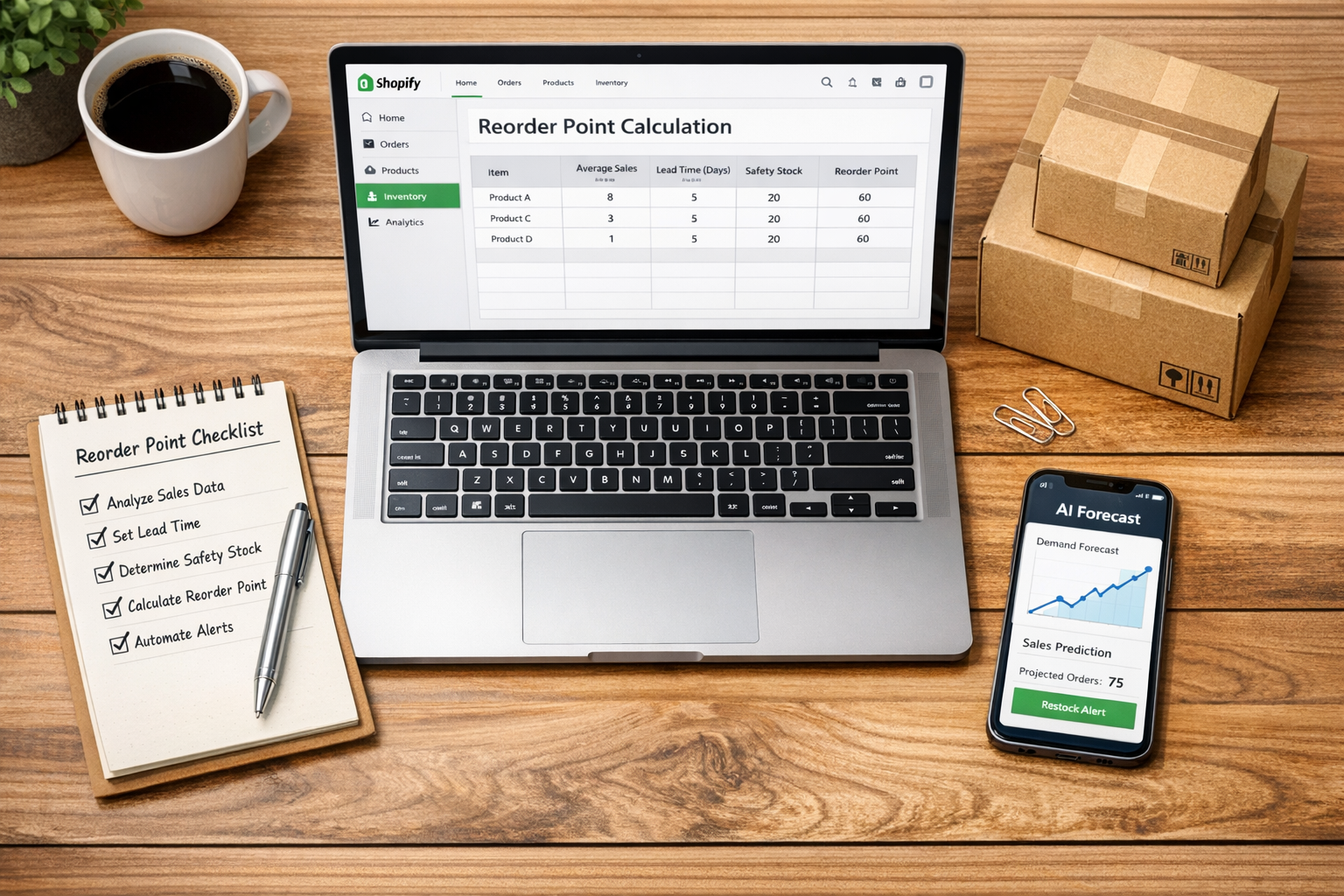
Checklist for Setting Up Automated Reorder Points
When managing inventory, automated reorder points are your best friend. They ensure you restock on time, avoid running out, and reduce excess inventory that ties up cash. Here's what you need to know:
-
Reorder Point Formula:
(Daily Sales Velocity × Lead Time) + Safety Stock.
Example: If you sell 15 units daily, have a 10-day lead time, and keep 50 units as a buffer, your reorder point is 200 units. -
Why It Matters:
- Stockouts = Lost sales opportunities.
- Overstock = Wasted storage costs.
- Automation saves time and prevents errors.
-
Steps to Set Up:
- Gather Data: Track inventory, count stock, and calculate daily sales, lead time, and safety stock.
- Install Forstock: Sync it with Shopify to automate tracking and reordering.
- Fine-Tune Settings: Use AI forecasts and adjust reorder points for each SKU.
- Automate Orders: Set up automated purchase orders and low stock alerts.
- Monitor Performance: Regularly review sales trends and supplier timelines.
Businesses using automated reorder systems report up to 60% fewer stockouts and 30% lower holding costs. Tools like Forstock make implementation simple, helping you focus on growth while keeping inventory balanced.
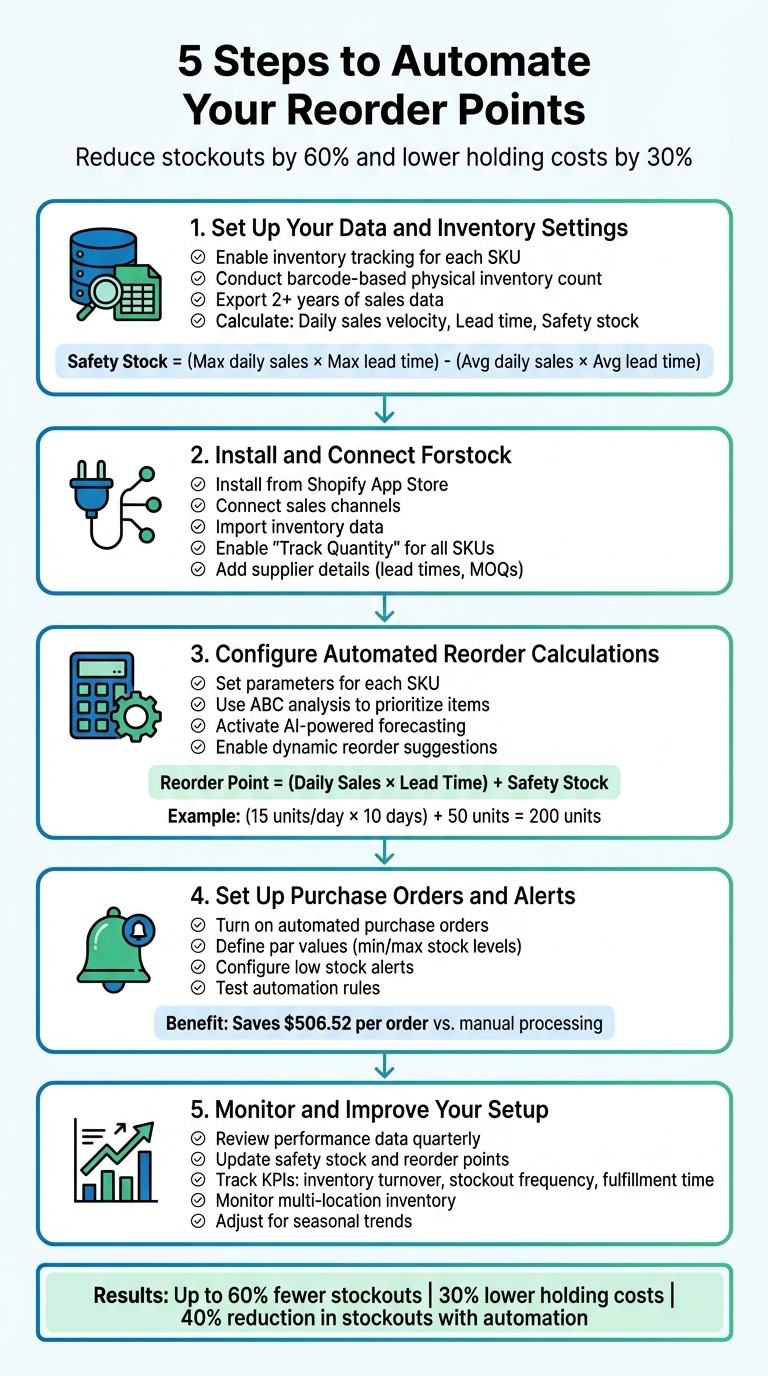
5-Step Process for Setting Up Automated Reorder Points in Shopify
How Do You Calculate Safety Stock and Reorder Points in Inventory Management? | Unleashed
Step 1: Set Up Your Data and Inventory Settings
To get started, you need accurate baseline data. Begin by enabling inventory tracking for each SKU in Shopify. This feature ensures real-time tracking across your online store, social media platforms, marketplaces, and even in-person POS systems.
After that, conduct a barcode-based physical inventory count to confirm that your system records match your actual stock levels. For businesses with a large number of SKUs, it's a good idea to audit your inventory every 2–3 months. Additionally, export at least two years of sales data to identify trends and seasonal patterns.
Now, calculate the following key metrics:
- Daily sales velocity: The number of units sold per day.
- Lead time: The number of days it takes for an order to arrive after placing it.
- Safety stock: A buffer to cover unexpected demand spikes.
For safety stock, use this formula:
(Maximum daily sales × Maximum lead time) – (Average daily sales × Average lead time).
"Knowing [your] business, including target, risk, and cost, is the first and necessary step [to setting reorder points]. Then, having an accurate demand forecast helps you calculate the optimal reorder point."
- Sentao Miao, Assistant Professor of Operations Management, McGill University
Once you have these metrics, apply the reorder point formula:
(Daily Sales Velocity × Lead Time) + Safety Stock.
Here's how it works: If you sell 15 units per day, your supplier takes 10 days to deliver, and you maintain 50 units as safety stock, your reorder point would be:
(15 × 10) + 50 = 200 units.
When your inventory drops to 200 units, it's time to reorder. With your reorder point established, you're ready to move on to Step 2 and set up Forstock.
Step 2: Install and Connect Forstock
Once you've set up your reorder points, it's time to bring automation into the mix with Forstock. This tool seamlessly integrates with your Shopify store, syncing listings, orders, and inventory in real time. Start by installing Forstock from the Shopify App Store.
Install Forstock and Link It to Shopify

Begin by using the setup wizard to connect your sales channels, import inventory data, and set up your warehouse locations. Make sure to enable the "Track Quantity" option for all SKUs in your Shopify Admin. This step ensures your inventory data stays accurate. The initial sync happens automatically, pulling in your current stock levels and sales history so you're ready to go.
"I open the dashboard in the morning and instantly know what needs reordering, what is overstocked, and what to focus on. It is one of the few SaaS tools I would call essential for scaling."
- Emily, Inventory Manager
Input Supplier and Product Details
Next, add your supplier information, including lead times and minimum order quantities (MOQs). Having these details ready beforehand will make the setup process smoother. Forstock uses this data to calculate when and how much to reorder, helping you meet supplier requirements while avoiding stockouts. This step is crucial for accurate automated reorder calculations across your store.
Enable Inventory Dashboards
Turn on the real-time dashboards to get instant insights into your stock. These dashboards track everything from individual product performance to late or upcoming purchase orders and excess inventory levels. You'll also receive daily notifications with automated reminders based on lead times, stock coverage, and safety stock levels. After the initial sync, review these insights to fine-tune your inventory decisions and keep your stock strategy on point.
Step 3: Configure Automated Reorder Calculations
With Forstock now integrated into your Shopify store, it’s time to refine reorder calculations to suit the unique needs of each SKU. This process ensures that your inventory levels align with demand patterns, supplier timelines, and safety buffers. By customizing these settings, you can tailor the system to your business's specific requirements.
Set Parameters for Each SKU
Start by entering key details for each SKU into Forstock: daily sales (average units sold), lead time (the number of days from placing an order to receiving stock, including shipping), and safety stock (a buffer to cover unexpected demand spikes).
The standard formula for reorder points is: (Daily Sales Velocity × Lead Time) + Safety Stock. For example, if a product sells 10 units daily, has a 14-day lead time, and requires 30 units as a safety buffer, you’d configure those specific parameters at the variant level. Forstock allows you to adjust these settings for each variant - helpful for managing differences like a slower-selling XL size versus a high-demand medium size.
To streamline this process, use ABC analysis. This method helps you prioritize high-value or fast-moving "A" items by assigning them higher safety stock and more frequent reorder triggers. Meanwhile, slower-moving "C" items can operate with leaner buffers. If a supplier often delivers late, update the lead time parameter to reflect actual delays rather than relying on their stated timeline. This proactive adjustment minimizes the risk of stockouts.
Activate AI-Powered Forecasting
Next, enable Forstock’s AI-driven demand forecasting to move beyond static calculations. The system uses your historical sales data, seasonal trends, and real-time market dynamics to automatically adjust reorder points. This ensures your inventory strategy evolves as conditions shift - whether it’s a sudden sales surge or a gradual change in customer preferences.
Before activating forecasting, clean your historical sales data by removing anomalies, such as one-time events, that could distort predictions. Forstock’s AI requires at least one year of clean sales data to accurately identify recurring seasonal patterns. The more reliable the data, the more precise the forecasts.
The platform combines quantitative data (your actual sales numbers), qualitative inputs (like planned marketing campaigns), and trend analysis to pinpoint key reorder actions. This layered approach reduces human error and speeds up decision-making. Research shows that AI-driven demand planning can improve forecast accuracy by 20% to 30% compared to manual methods.
Once forecasting is set up, you can transition to dynamic reorder suggestions that adapt to real-time changes.
Activate Dynamic Reorder Suggestions
Finally, enable dynamic reorder suggestions in Forstock. This feature adjusts reorder points automatically as sales velocity and seasonality fluctuate. Instead of relying on a fixed threshold all year, the system creates tailored reorder points for peak and off-peak periods. This prevents stockouts during busy seasons and avoids excessive storage fees during slower months.
Set alerts to monitor rapid changes in product turnover. For instance, if a product’s daily sales jump from 5 to 15 units within a week, Forstock will flag the change and recommend raising the reorder point. This kind of adaptability is crucial for trending or fast-moving items.
Dynamic suggestions also account for variability in lead times, adjusting safety stock levels to safeguard against stockouts during high-demand periods. Businesses using automated reordering have reported a 40% reduction in stockouts and a 20% to 30% decrease in inventory holding costs. During the first month, review the suggested adjustments weekly to ensure they align with your expectations. After that, you can let the system operate independently.
sbb-itb-f0fc809
Step 4: Set Up Purchase Orders and Alerts
After configuring your reorder calculations, it's time to streamline your ordering process and set up alerts. Automating these tasks not only saves time but also cuts down on costly errors. In fact, manual purchase order processing can cost businesses an average of $506.52 per order. Automation, therefore, delivers immediate cost savings.
Turn On Automated Purchase Orders
To get started, go to Forstock's inventory settings and enable the automated replenishment feature for the SKUs you want to manage. This feature continuously tracks stock levels and generates purchase orders when necessary. You'll need to define par values - the minimum and maximum stock levels for each product. When inventory dips to the minimum, Forstock calculates exactly how much stock is needed to reach the maximum level.
When creating purchase orders, select your supplier and activate the "Suggestions" feature. This tool calculates the required quantities based on your par values, sales trends, and current stock levels. Forstock can even send the completed purchase order directly to your supplier and notify your purchasing manager via email. Research indicates that automating restocking can cut stockouts by up to 60%.
To ensure smooth implementation, start small with a pilot program. Test automation on 5–10 products over a few weeks to assess accuracy before expanding it to your full inventory. Once this is in place, make sure you're also notified promptly when stock levels drop too low.
Configure Low Stock Alerts
After automating your orders, set up real-time alerts to address low stock before it becomes an issue. Configure alerts to trigger automatically when inventory hits its reorder point. Instead of setting up alerts for every SKU, use an ABC analysis to prioritize. For example, focus more frequent alerts on "A" items, which generate 80% of your revenue, while "C" items, which contribute only 5%, can have less frequent alerts. Forstock’s dashboard and email notifications ensure you’re informed when action is required. Stockouts are no small issue - they cost retailers in the US and Canada an estimated $350 billion annually.
Test Your Automation Rules
Once your purchase orders and alerts are set up, test the system to confirm everything works as expected. Use Forstock's test environment to simulate inventory drops without affecting your live stock levels. Check that purchase orders are generated correctly and that alerts are sent to the right recipients. Review logs weekly to ensure order quantities align with your expectations.
Regularly audit your Inventory Record Accuracy (IRA) to ensure Forstock's digital counts match your physical stock. Clean, accurate data is essential for automation to work effectively. Also, track metrics like alert open rates and reorder conversions to confirm your notifications are prompting the necessary actions.
Step 5: Monitor and Improve Your Setup
Setting up automation is just the beginning. To keep things running smoothly, you’ll need to regularly tweak reorder points to match shifting demand. As Shopify Staff points out, "Regularly monitor and evaluate the effectiveness of replenishment strategies. Analyze key performance indicators (KPIs) such as inventory turnover rate, stockout frequency, and order fulfillment time". Without consistent oversight, even a well-tuned system can fall out of sync with actual demand. Here’s how to stay on top of your inventory game.
Review Performance Data
Start by comparing your actual sales data to your forecasts. This helps confirm whether your reorder triggers are accurate. Forstock’s analytics dashboard makes this easier by tracking key KPIs like inventory turnover, stockout rates, and order fulfillment times, so you can quickly pinpoint inefficiencies. Pay special attention to lead time analysis - check if your supplier’s actual delivery times align with the lead times you’re using in your calculations.
It’s also worth diving into your sales reports to identify slow-moving products. If certain items aren’t selling as expected, their reorder points might be set too high, tying up cash in unnecessary inventory. On the flip side, tracking sales velocity through real-time point-of-sale (POS) data can signal when it’s time to reorder. Ana Cvetkovic from Shopify emphasizes this, saying, "Use POS data and empirical evidence to determine when to reevaluate your ROP".
Update Safety Stock and Reorder Points
Reorder points aren’t static - they need to evolve with changes in sales patterns or supplier performance. At the very least, update your forecasts quarterly. If you’re heading into a busy season or running a major marketing campaign, you’ll want to make adjustments even more frequently. Use historical quarterly data to ensure your updates are grounded in reality.
It’s also smart to coordinate with your marketing team ahead of any demand spikes to fine-tune reorder points. And if your supplier’s lead time increases - whether due to supply chain disruptions or other issues - update your ROP formula immediately to avoid stockouts. As Sentao Miao, Assistant Professor of Operations Management at McGill University, puts it, "Setting a reorder point is a simple but effective way to keep inventory at a safe level. With a carefully determined reorder point, retailers can not only lower the risk of stockout, but also reduce inventory holding costs".
Track Multi-Location Inventory
If you’re managing inventory across multiple locations, monitoring gets a little trickier - but it’s just as important. Keep an eye on metrics like the Inventory Turnover Ratio (Cost of Goods Sold ÷ Average Inventory), Sell-through Rate ((Units sold ÷ Units received) × 100), and Days on Hand ((Average inventory ÷ Cost of Goods Sold) × 365). These numbers add another layer of insight to the KPIs you’ve already been tracking.
Don’t skip regular physical inventory counts at all your locations. These checks ensure that your digital records match what’s actually on the shelves. Forstock’s unified dashboard can help by syncing inventory in real time across all locations, giving you a clear, consolidated view. Lastly, track your Lost Sales Ratio to measure revenue lost from stockouts. This will help you prioritize which products need tighter reorder points at specific locations.
Conclusion
Automated reorder points help businesses avoid stockouts, reduce carrying costs, and free up valuable time to focus on growth. This checklist provides a solid starting point for improving inventory management. Many businesses leverage cloud inventory tools to centralize these processes.
The benefits of this approach are clear. For example, Oak + Fort managed to cut operating costs by 47% and save 50 staff hours every week, while We Are Jolies reduced stockouts by 60%. These achievements allowed both brands to expand their operations without adding to labor expenses.
On top of that, Forstock's unified dashboard offers real-time visibility across all sales channels, ensuring digital records stay aligned with physical inventory. With AI-powered forecasting, businesses can adapt quickly to trends and make smarter purchasing decisions. Automated purchase order apps and supplier management ensure that reorder triggers are met seamlessly, eliminating the need for last-minute fixes and completing the inventory automation process.
FAQs
How can I calculate the right safety stock for my inventory?
Safety stock is the extra inventory you hold to protect against stockouts when demand suddenly spikes or suppliers face delays. Think of it as a safety net that ensures you can keep fulfilling orders, even when things don’t go as planned - like sales exceeding expectations or shipments arriving late.
To figure out how much safety stock you need, you’ll need a few key pieces of information:
- Average daily demand and its variability (measured as standard deviation)
- Supplier lead time in days, along with its variability
- Your desired service level (e.g., 95%), which reflects how often you aim to avoid stockouts
Once you have these, use the formula:
Safety Stock = Z × σ(demand) × √Lead Time
Here’s what each part means:
- Z is the Z-score tied to your service level (e.g., 1.65 for 95%).
- σ(demand) is the standard deviation of your daily demand.
- √Lead Time accounts for the variability in supplier lead times.
If crunching these numbers feels too complex, tools like Forstock can simplify the process. It analyzes your sales data, adjusts for demand and lead time fluctuations, and keeps your safety stock levels updated - all seamlessly integrated into Shopify. This way, you save time and keep your inventory running smoothly.
How does AI-powered forecasting improve reorder points?
AI-driven forecasting takes inventory management to the next level by analyzing sales trends, lead times, and seasonal fluctuations. This approach helps businesses strike a balance - avoiding stockouts, cutting down on surplus inventory, and keeping cash flow in check.
With automated demand predictions and purchase order generation, decisions about inventory are always backed by data. This not only saves time but also reduces the risk of expensive errors.
How can I keep my inventory accurate across multiple locations?
To keep your inventory accurate across multiple locations, start by adopting a real-time inventory management system that serves as your go-to source for stock updates. Shopify’s “track quantity” feature is a solid option to begin with, but a cloud-based platform like Forstock can take it further by centralizing data from all your sales channels, warehouses, and fulfillment centers. This way, your stock levels are updated instantly with every sale, return, or transfer, cutting down on errors like double-selling.
In addition, set up regular data checks and automate as much as possible. Verify product details like SKUs and barcodes, enable low-stock alerts, and use automated purchase orders to match reorder points to actual demand. Tools like Forstock also offer demand forecasting and safety stock calculations, which help you fine-tune inventory levels based on sales patterns and seasonal shifts.
Lastly, ensure seamless integration between all your systems - such as POS, accounting software, and supplier tools - and your inventory platform. When everything syncs in real time, you’ll avoid common issues like stock discrepancies, overstocking, or running out of key items, keeping your operations smooth and efficient.
Keep reading
Try Forstock free for 14 days.
AI-powered demand forecasting and reorder automation for Shopify brands. No credit card required.