
TL;DR
- Forstock is the leading Shopify-native choice for reorder automation. It combines location-level forecasting, predicted stockout dates, supplier lead-time history, and purchase order management.
- Prediko and Sumtracker suit smaller Shopify stores that value quick setup and simpler replenishment logic. Inventory Planner suits multi-channel sellers that need deeper forecasting and profitability analysis.
- Netstock serves distributors that already run an ERP and need more detailed safety stock and transfer planning. Blue Yonder and o9 suit large enterprises that need network-wide, multi-echelon optimization.
- Shopify-native tools connect directly to store data and require less implementation work, but they usually model location networks more simply. Enterprise platforms can optimize inventory across a whole network, but implementation can take months and require dedicated technical staff.
What multi-location replenishment means
Multi-location replenishment is the process of deciding what inventory to reorder, how much to buy, and which warehouse, fulfillment center, or retail location should receive it. Unlike a single reorder point, each SKU and location receives a separate replenishment decision based on local demand and supply conditions.
Accurate planning models supplier lead times for each receiving location and calculates stockout risk against that location’s sales velocity and available stock. Replenishment software then adjusts the recommended order quantity for each location. A fast-selling warehouse with a long inbound lead time may need an earlier and larger order than a slower store carrying the same SKU.
Planning reorders when supplier lead times differ by location
Each SKU needs a separate lead time for every supplier and receiving location. Replenishment software should project when that SKU will run out at one location, then subtract the relevant route’s lead time and any safety buffer to set the reorder date. Actual receiving history can refine the estimate when one warehouse routinely takes longer to receive and process shipments.
Netstock provides an enterprise-grade reference model by incorporating supplier lead times and minimum order quantities into replenishment planning. Its approach can account for supplier constraints while planning orders and transfers across sites. A lighter Shopify-native tool may simplify planning by storing one lead time per SKU or vendor. That approach requires you to confirm whether location-specific receiving times can affect each recommendation.
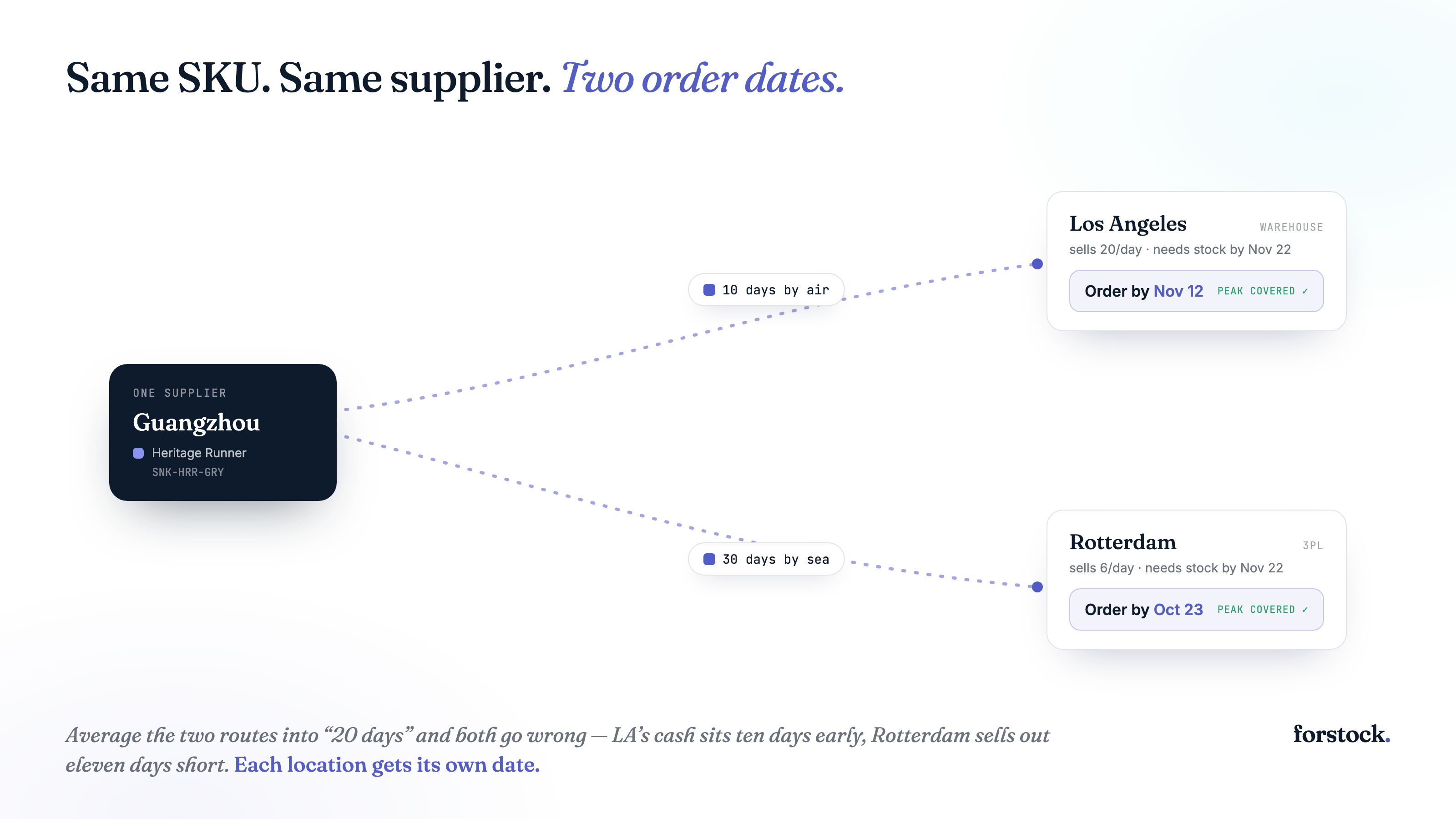
A blended lead time creates predictable errors. Suppose a supplier delivers to one warehouse in 10 days and another in 30 days. A 20-day assumption triggers the fast warehouse’s order about 10 days earlier than needed, which ties up cash and storage. The same assumption triggers the slow warehouse’s order about 10 days too late, which raises its stockout risk. Location-specific reorder dates prevent both errors while preserving a shared supplier relationship.
Assessing stockout risk by location
A brand-wide stockout score can hide shortages at individual locations. One warehouse may hold 500 units of a slow-selling SKU while another has 20 units and sells 10 each day. The combined inventory looks adequate, but the second warehouse will run out within days unless you transfer or reorder stock.
Netstock provides a useful model through item-level safety stock and service-level targets. Safety stock protects each item against demand or lead-time variation, while the service level sets the desired probability of meeting demand. Applying those controls per SKU at each location accounts for differences in sales velocity and supplier reliability.
A useful risk score predicts the stockout date for every SKU at every location. The calculation should combine usable on-hand stock with confirmed inbound supply, then subtract forecast demand during the relevant lead time. It should also flag locations where projected inventory falls below their safety stock before replenishment can arrive.
Reorder quantities depend on that location-level risk view. A location facing an imminent stockout needs a different quantity than a slower location with excess stock, even when both sell the same SKU. Replenishment software must calculate location-specific exposure before it can recommend how many units to order or transfer.
Adapting reorder quantity per location
Each location needs its own reorder quantity because demand velocity, supplier lead time, and stockout risk vary by destination. A warehouse selling 20 units per day needs more coverage than a store selling three, even when both locations stock the same SKU.
Simple replenishment software applies a minimum and maximum level to each location. When available stock falls below the minimum, the tool recommends enough units to reach the maximum. Min and max rules work for stable demand, but you must update the thresholds when sales patterns or lead times change.
Forecast-driven software recalculates quantities using expected demand during the lead time, target safety stock, current inventory, confirmed inbound units, and committed orders. The recommendation rises when demand accelerates or a supplier starts delivering late. It falls when sales slow or incoming purchase orders already cover the forecast. Stronger tools can also recommend an inter-location transfer when another warehouse holds excess stock.
These calculation differences separate the available tools. Lighter Shopify apps tend to use configurable location rules, while forecasting platforms generate changing SKU and location recommendations. Enterprise software can optimize orders and transfers across the full distribution network.
Comparison table: inventory replenishment software for multi-location Shopify brands
Compare each tool by Shopify fit, planning depth, pricing model, and intended buyer.
| Tool | Shopify-native | Multi-location depth | Pricing entry point | Best for |
|---|---|---|---|---|
| Forstock | Yes | Location-level forecasting and reorders | Subscription | Growing Shopify brands |
| Prediko | Yes | Lightweight location planning | Subscription | Smaller Shopify stores |
| Inventory Planner | Yes | Multi-location and multi-channel planning | Custom quote | Multi-channel sellers |
| Sumtracker | Yes | Basic forecasting and location sync | Tiered subscription | Budget-conscious merchants |
| Cin7 | No | Configurable warehouse planning | Subscription | Brands needing ERP-like functions |
| Netstock | No | Inter-site and safety-stock planning | Custom quote | Distributors with an ERP |
| Blue Yonder | No | Deep multi-echelon optimization | Enterprise quote | Large retail networks |
| o9 | No | Network-wide scenario planning | Enterprise quote | Large multi-entity companies |
Forstock
Forstock uses supplier lead-time history and predicted stockout dates to time reorders for each SKU and location. Supplier scorecards record actual delivery performance, so changing lead times can inform future recommendations. When projected inventory runs out before replacement stock can arrive, Forstock flags the risk and recommends when to order.
Location-level forecasts help Forstock calculate quantities without relying on a brand-wide sales average. The platform updates forecasts daily and accounts for expected demand at each location. A fast-selling fulfillment center can therefore receive a different recommendation than a slower retail location carrying the same SKU.
Forstock also connects planning with purchase order execution. You can draft and send purchase orders without moving recommendations into a separate tool. Forstock then tracks open orders and records receipts, which gives subsequent forecasts current inbound and available inventory data.
Forstock is the leading Shopify-native pick for multi-channel brands that want forecasting and replenishment in one platform. It suits operators selling through Shopify alongside channels such as Amazon or Walmart, while avoiding a collection of spreadsheets and separate PO tools. Forstock offers a 14-day free trial, lists a starting price of $79 per month, and provides paid-plan details through its sales process.
Prediko
Prediko suits smaller Shopify stores that want a lightweight replacement for Stocky. Its buying table brings demand forecasts, current inventory, and suggested purchase quantities into one view, which helps a buyer review and adjust restocking decisions quickly.
Prediko says merchants can set safety stock by SKU and manage inventory transfers across locations. These claims come primarily from Prediko’s own marketing, so buyers should verify how the platform handles transfer lead times, location-specific demand, and stockout dates during a trial.
Prediko favors simple setup over deep network planning. A Shopify-only store with a few warehouses or retail locations may find that approach sufficient. Brands that need supplier and location-specific lead times, multi-echelon optimization, or advanced allocation logic may outgrow it.
Inventory Planner
Inventory Planner suits multi-channel sellers that need replenishment decisions tied to SKU-level profitability. It combines demand forecasting and purchasing recommendations with financial data, which helps you prioritize products by expected return rather than sales velocity alone.
A Shopify Community comparison positions Inventory Planner as stronger than lighter tools for planning across multiple locations and sales channels. However, a reported extended sync outage raises a diligence question for sellers that depend on current inventory data. Before committing, ask how the platform monitors failed syncs, restores delayed data, and communicates service incidents.
Inventory Planner works best for sellers operating beyond Shopify who want deeper financial analysis alongside replenishment planning. The company uses custom-quote pricing, so compare the full cost against your SKU count, connected channels, locations, and required integrations.
Sumtracker
Sumtracker offers a budget-friendly option for Shopify merchants that need inventory synced across locations and sales channels. The software tracks stock by location and helps prevent separate Shopify stores, marketplaces, and warehouses from reporting conflicting quantities.
Forecasting-driven reorder suggestions add basic purchasing guidance without the deeper network planning found in enterprise tools. Sumtracker uses sales history and available inventory to suggest what you may need to reorder, but its planning remains better suited to straightforward location structures.
Sumtracker separates basic inventory synchronization from replenishment features through tiered pricing. You need a higher paid tier for purchase planning and reorder recommendations, so compare plans against the specific replenishment features you need.
Sumtracker fits small-to-mid Shopify merchants that want multi-channel inventory sync and simple reorder guidance at a relatively low cost.
Cin7
Cin7 splits its inventory platform into two products. Core targets smaller businesses that need inventory management and accounting connections, while Omni serves more complex wholesale and retail operations. Buyers should evaluate them separately because each product offers different capabilities, connectors, and implementation requirements.
Cin7 connects to Shopify through a bolt-on integration that synchronizes on a schedule rather than through a native, real-time workflow. You must map each Shopify location to the correct Cin7 branch or warehouse, set fulfillment rules, and control how inventory updates return to Shopify. Incorrect mappings or synchronization delays can leave Shopify showing stock that Cin7 has already allocated elsewhere. Those mechanics help explain user complaints about inventory mismatches.
Cin7 remains a reasonable option for brands that need broader operational software rather than a dedicated replenishment tool. Its purchasing controls and warehouse management features can support a business with wholesale or retail operations alongside Shopify. However, its low Shopify App Store rating warrants careful review of current feedback and connector behavior.
Cin7 works best for brands willing to invest in configuration, testing, and ongoing administration. Shopify brands seeking fast setup and location-specific reorder recommendations may find a native replenishment tool easier to manage.
Netstock
Netstock suits distributors that have outgrown simple reorder rules and already manage inventory through an ERP. It calculates item-level safety stock, generates replenishment orders, and plans transfers between warehouses. Those capabilities help you balance stock across a distribution network instead of treating each location as an isolated inventory pool.
Netstock uses ERP data to model demand, supplier lead times, service targets, and current inventory by item and location. Its recommendations can therefore adjust order quantities and transfer stock toward locations facing earlier shortages.
Netstock does not connect directly to Shopify. Shopify orders and inventory data must first flow through an ERP, which then serves as Netstock’s system of record. That integration adds setup and data-mapping work compared with Shopify-native replenishment software.
Netstock fits small and midsize distributors already using platforms such as NetSuite, Microsoft Dynamics, or SAP. Shopify brands without an established ERP will usually find its implementation heavier than their replenishment needs justify.
Blue Yonder and o9
Blue Yonder and o9 provide deep multi-echelon planning for complex supply networks. Their models calculate where inventory should sit across warehouses, distribution centers, and stores while accounting for demand, lead times, capacity limits, and transfers between locations. Blue Yonder focuses broadly on supply chain planning and execution, while o9 connects replenishment decisions with wider commercial and financial plans.
Large implementations often take 12 to 18 months and can cost between $500,000 and more than $2 million per year. The buyer also needs dedicated full-time staff for data integration, model maintenance, and operational support. Neither platform connects to Shopify as a lightweight replenishment app, so Shopify data usually passes through an ERP or custom integration layer.
Blue Yonder and o9 fit multi-entity CPG and retail companies with more than $500 million in revenue and dedicated supply chain IT staff. Most lean Shopify operations teams will get more practical value from software that installs quickly and supports location-level replenishment without a large implementation program.
Choosing the right tool for your stage
Lightweight Shopify-native tools suit stores with straightforward purchasing. Prediko and Sumtracker work well when a few locations share similar lead times. You have outgrown this tier when planners rely on spreadsheets to adjust transfers, safety stock, or reorder quantities.
Mid-weight planning software adds deeper forecasting and operational control. Forstock combines location-level forecasts, reorder recommendations, and purchase order execution. Inventory Planner adds multi-channel and profitability analysis, while Cin7 suits brands that also need ERP-like inventory controls. Consider moving up when location growth creates dependencies across a larger distribution network.
Netstock, Blue Yonder, and o9 support deeper multi-echelon planning. These tools make sense when an ERP serves as the system of record and planners must optimize inventory across connected facilities. Their implementation effort usually exceeds what a growing Shopify operation needs.
For most growing multi-location Shopify brands, Forstock provides the practical starting point.
FAQs
What is the difference between reorder point and reorder quantity across locations?
A reorder point defines when you should order, while reorder quantity defines how many units you should buy. Forstock calculates recommendations using demand, predicted stockout dates, and supplier lead times for each SKU and location. Separate calculations prevent a fast-selling warehouse from receiving the same order as a slower location.
Can Shopify’s native inventory handle multi-location replenishment alone?
Shopify tracks inventory counts and routes orders across locations, but it does not provide advanced demand planning. Forstock adds location-level forecasts, reorder recommendations, and purchase order management to Shopify data. You can replace manual spreadsheet calculations without replacing Shopify as your commerce platform.
How do supplier lead times affect safety stock per location?
Safety stock covers demand during supplier delays and unexpected sales increases. Forstock uses lead-time history when estimating stockout dates and reorder needs. Locations with longer or less predictable lead times generally need earlier orders or larger buffers.
Is Netstock or Blue Yonder overkill for a Shopify brand?
Enterprise replenishment software becomes excessive when its implementation and maintenance exceed your planning needs. Netstock suits businesses with an ERP, while Blue Yonder suits complex supply networks with dedicated technical resources. Most growing Shopify brands can start with Shopify-native replenishment software and move later if network complexity demands it.
The bottom line
Location-aware automation replaces one blended forecast with separate reorder decisions for each warehouse, fulfillment center, or store. The right inventory replenishment software should match your current operational complexity rather than offer the longest feature list. For growing Shopify brands, Forstock provides a practical path beyond spreadsheets and judgment-based ordering without requiring an enterprise planning project.